Dokploy on a VPS: Git Deployment Without the Platform Tax
You ship one project to Heroku’s managed cloud platform.
Then a second.
Then a third.
It’s all in a month’s work.
But then the bill creeps up from $7, to $35, to $75 a month — plus other variable fees based on add-ons and build minutes.
All of these little apps don’t seem like a big deal at the time, but the cost can add up fast.
If you’re looking for an alternative, it’s time to consider Dokploy.
Dokploy plus a flat-rate VPS mimics the same deploy flow, but without the seemingly ever-growing costs.
The catch?
You’re in charge of the server now.
Which actually isn’t nearly as worrisome as it sounds, as long as you understand what you’re getting into.
Curious?
Then come along as we walk through what running Dokploy on a VPS hosting plan actually looks like, how it compares to managed platforms, which is right for you, and how to get set up.
What Is Dokploy and What Does It Replace?
Dokploy is an open-source platform-as-a-service (PaaS) that runs on a Linux VPS with Docker, giving you a Heroku-style deployment experience but on infrastructure you control.
Push to a Git branch and Dokploy builds the app, routes traffic through a bundled reverse proxy, and serves the result over HTTPS. The control plane is a web dashboard. The workloads are containers.
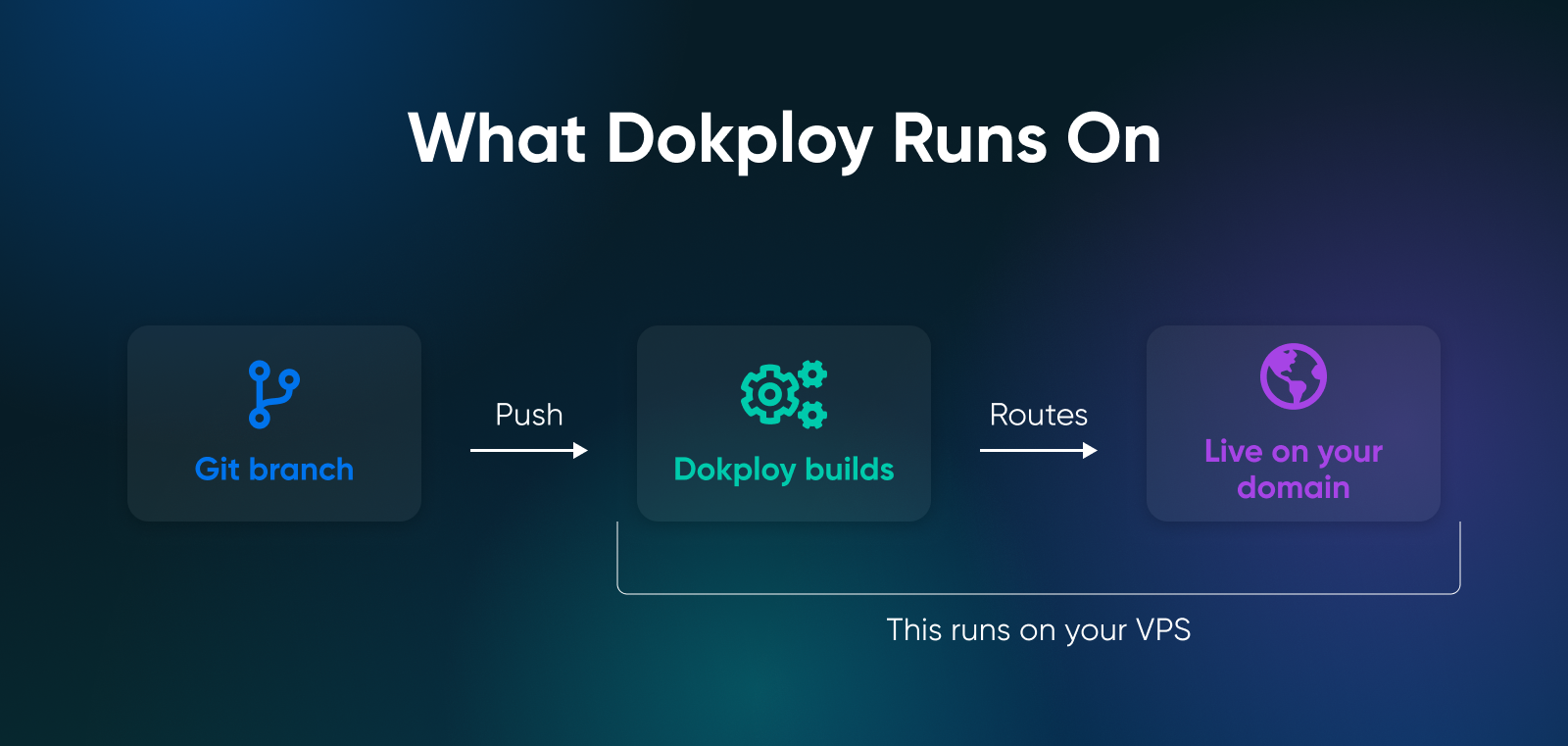
Dokploy connects to GitHub, GitLab, Bitbucket, or Gitea, and detects what you’re deploying through one of three paths.
The project has accumulated more than 34,000 stars on GitHub and a roster of 388+ one-click templates for Plausible, Pocketbase, Cal.com, Supabase, Ghost, and the rest.
Dokploy offers control and monetary savings compared to managed PaaS like Heroku and Vercel, which have per-dyno/per-seat pricing plus usage. Coolify is a peer to Dokploy, but has a heavier idle footprint — and CapRover is similarly lightweight but more limited on Docker Compose.
What Can You Deploy With Dokploy?
With Dokploy, you can deploy anything that runs in a container. The patterns most teams actually use look like:
- Git-connected web apps: Push to a branch, Nixpacks figures out the language, container deploys.
- Managed databases: PostgreSQL, MySQL, MongoDB, MariaDB, Redis, libSQL, and S3-compatible backups.
- 388+ one-click templates: Plausible, Pocketbase, Cal.com, Supabase, Ghost, and the rest of the self-hosting greatest hits.
- Cron jobs and background workers: Scheduled tasks and queue processors run alongside the web services.
- Multi-container apps via Docker Compose: Paste the YAML, Dokploy runs the whole stack.
How Much Does Running Dokploy on a VPS Cost?
Dokploy itself is free. No seats, no build minutes.
You pay for the VPS underneath, and the VPS usually pays for itself once you have more than one or two small apps.
The platform is Apache 2.0 licensed as of January 21, 2026, with future paid features moving to the Dokploy Source Available License.
Dokploy idles at roughly 350 MB of RAM and 0.8% CPU per MassiveGRID’s benchmark, leaving most of a 4 GB box free for app containers.
You’re looking for a VPS plan where Dokploy runs on 4 GB at the baseline, with NVMe storage, full root access, and unmetered bandwidth.
Dokploy vs. Heroku, Vercel, and Render Pricing
These three platforms charge slightly differently, but the fees add up just the same once you have a handful of apps:
- Heroku Basic: $7 per dyno per month. Five small apps cost $35 before databases. Essential Postgres starts at $5/month (Essential-0); the 10 GB Essential-1 plan is $9.
- Heroku Standard-1X: $25 per dyno. The always-on step up from Basic — Standard-1X dynos don’t sleep, and it’s the entry point for horizontal scaling.
- Vercel Pro: $20 per developer per month with $20 of included credit. Bandwidth and function invocations bill on top.
- Render Starter: $7 per web service for 512 MB RAM and 0.5 vCPU. As of April 2026, Render bills workspaces at a flat rate rather than per seat. The Pro workspace is $25 per month with unlimited team members.
The additional costs are the same across all three: bandwidth overages, build minutes, database add-ons, and seats for collaborators. Flat-rate VPS doesn’t have any of these line items.
| Setup | Monthly Cost | Notes |
|---|---|---|
| 5 × Heroku Basic dynos + Essential Postgres | $35 + $9 = $44 | $7 per app. Essential-1 Postgres at $9 (Essential-0 starts at $5). Bandwidth and build minutes extra. |
| 5 × Render Starter web services + Pro workspace | $35 + $25 = $60 | $7 per service plus a flat $25/mo Pro workspace (unlimited users; per-seat billing ended April 2026). |
| 1 × Vercel Pro seat (5 apps) | $20 + usage | $20 per developer per month (includes $20 of credit). Bandwidth and function invocations extra. |
| 1 × VPS (4 GB minimum) + Dokploy | flat rate | One reliable bill, as many apps as you want. |
What VPS Do You Need to Run Dokploy?
The official minimum is 2 GB of RAM, 30 GB of disk, and a Docker-compatible Linux distro. In our opinion, a more realistic recommendation is 4 GB and 40+ GB, because the official minimum is a fresh-install benchmark and your actual apps will use RAM.
Dokploy officially supports Ubuntu (24.04, 23.10, 22.04, 20.04, 18.04), Debian (12, 11, 10), Fedora 40, and CentOS (9, 8). Any other Docker-compatible distro generally works, but those are the tested ones.
Any cloud VPS that runs one of those distros works. DigitalOcean droplets, Hetzner Cloud, Linode, AWS Lightsail, and our VPS hosting at DreamHost all qualify.
How Do You Install Dokploy on a VPS?
The install is one shell command that handles Docker, Docker Swarm, the four Dokploy containers, and the initial database in one pass. It typically finishes in a few minutes, mostly spent pulling images.
Prerequisites: a clean Linux VPS with root SSH access, a DNS A record pointing at the server’s IPv4, and ports 80, 443, and 3000 open.
Here are the steps to install:
- SSH into the server as root.
- Run the install script.
- Wait three to five minutes while the script provisions Docker, pulls the four Dokploy containers, and starts Traefik.
- Visit ` in a browser.
- Create the admin account on the setup screen.
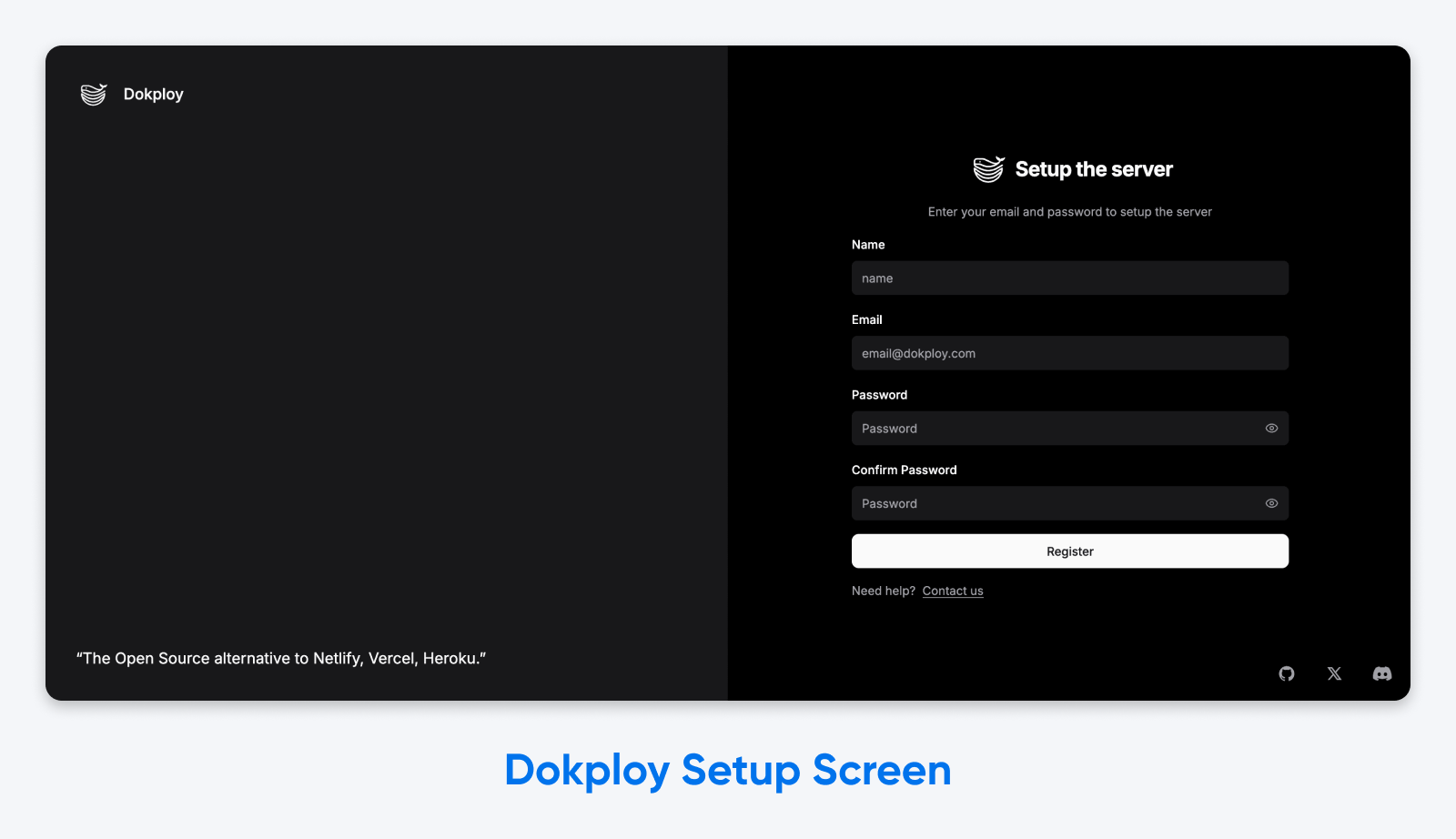
- Point a domain at the server, paste it into Dokploy, and Dokploy provisions a Let’s Encrypt SSL cert automatically.
- Close port 3000 to the public once HTTPS is live.
Here’s the install command itself, verbatim from the official docs:
curl -sSL | shThat script is a single HTTP fetch piped into `sh`, which is standard for trusted-source installs. If you’d rather inspect first, the manual install path is also in the docs.
What’s running when the script finishes is a four-container stack, which looks like this:
- Traefik: The reverse proxy. Routes traffic to the right container and handles Let’s Encrypt certs.
- Dokploy: The web UI and API on port 3000. The control plane.
- PostgreSQL: Dokploy’s metadata store. Internal Docker network only.
- Redis: The deployment job queue. It serializes builds and deploys (so two deployments don’t collide) and handles background job processing.
For SSL, enter a domain in the Dokploy UI. Traefik requests a 90-day Let’s Encrypt cert via the HTTP-01 challenge on port 80 and auto-renews it automatically about 30 days before expiry. If a cert request fails, the usual cause is that port 80 isn’t actually open or DNS hasn’t propagated yet.
For the full step-by-step with firewall configuration and post-install hardening, the Dokploy installation docs walk through everything.
How Does Dokploy Compare to Coolify and CapRover?
Dokploy, Coolify, and CapRover all have trade-offs when comparing idle footprint, Docker Compose support, and UX polish.
| Feature | Dokploy | Coolify | CapRover |
|---|---|---|---|
| Idle RAM | ~350 MB | ~500-700 MB | ~300-400 MB |
| Idle CPU | ~0.8% | ~5-6% | ~1-2% |
| Docker Compose | Native, multi-service | Native, multi-service | Limited (single-container focus) |
| Multi-server | Docker Swarm | Multi-server dashboard | Docker Swarm |
| GitHub stars (May 2026) | 34K | ~56K | ~14K |
| Best for | Lightweight, Compose-first | Polished UX on 8 GB+ | One-container templates |
Pick Dokploy on a 2-4 GB VPS or when the workload includes multi-service apps. Pick Coolify on 8 GB+ when polish matters. Pick CapRover when the workload is simple one-container apps.
Coolify is the most feature-rich of the three. The dashboard is the prettiest, the integrations are the most numerous, and on a well-provisioned 8 GB+ server it’s a delight. Its idle footprint is its downfall: around 500-700 MB and 5-6% CPU. Fine on big boxes, tight on small ones.
CapRover (originally CaptainDuckDuck, RIP) is the elder of the three (and shows it). The UI is simple, it has a solid template library for one-container apps, and the multi-service Docker Compose support is limited compared to the other two.
Ultimately, Dokploy lands between them. Lighter than Coolify and more flexible than CapRover for multi-container apps.
When Should You Self-Host With Dokploy (And When Shouldn’t You)?
Generally speaking, we recommend self-hosting with Dokploy when the math works, when you can spend about an hour a month on maintenance, and when you’d rather pay for a server than for seats.
By app number three, a flat-rate VPS is likely going to be cheaper than the equivalent on any per-dyno or per-seat platform.
Dokploy is the right call when:
- You have three or more small apps running 24/7. The cost of managed PaaS hits fast when your apps are always on.
- You need the guarantee of flat-rate billing. No usage meter, no bandwidth overage, and no per-seat add-on.
- You use Docker Compose. Multi-service apps deploy as one unit, the way they run locally.
- You care about data portability. Your apps, your databases, your server — all moveable to any web host that runs Docker.
- You can spend 30-60 minutes a month on maintenance. You’ll need to stay on top of OS patches, the occasional apt upgrade, and disk usage.
Don’t self-host with Dokploy when:
- You have one hobby app with low traffic. Heroku’s most basic plan is probably fine for you.
- The workload is spiky and needs autoscaling-to-zero. Dokploy runs containers, not Lambda functions.
- No one on your team can SSH into a server and read a log file. You don’t need to be a sysadmin, but someone needs to know how to run journalctl.
- You need enterprise SLAs. Workloads with contractual uptime guarantees still belong on managed cloud platforms or self-built Kubernetes.
How Do You Scale Dokploy Beyond One Server?
Dokploy supports multi-server deployments via Docker Swarm, where one server is the control plane and one or more remote servers are workers.
The control plane runs Dokploy and Traefik. Workers run the app containers. Traefik routes incoming traffic to whichever worker has the right container for a given route.
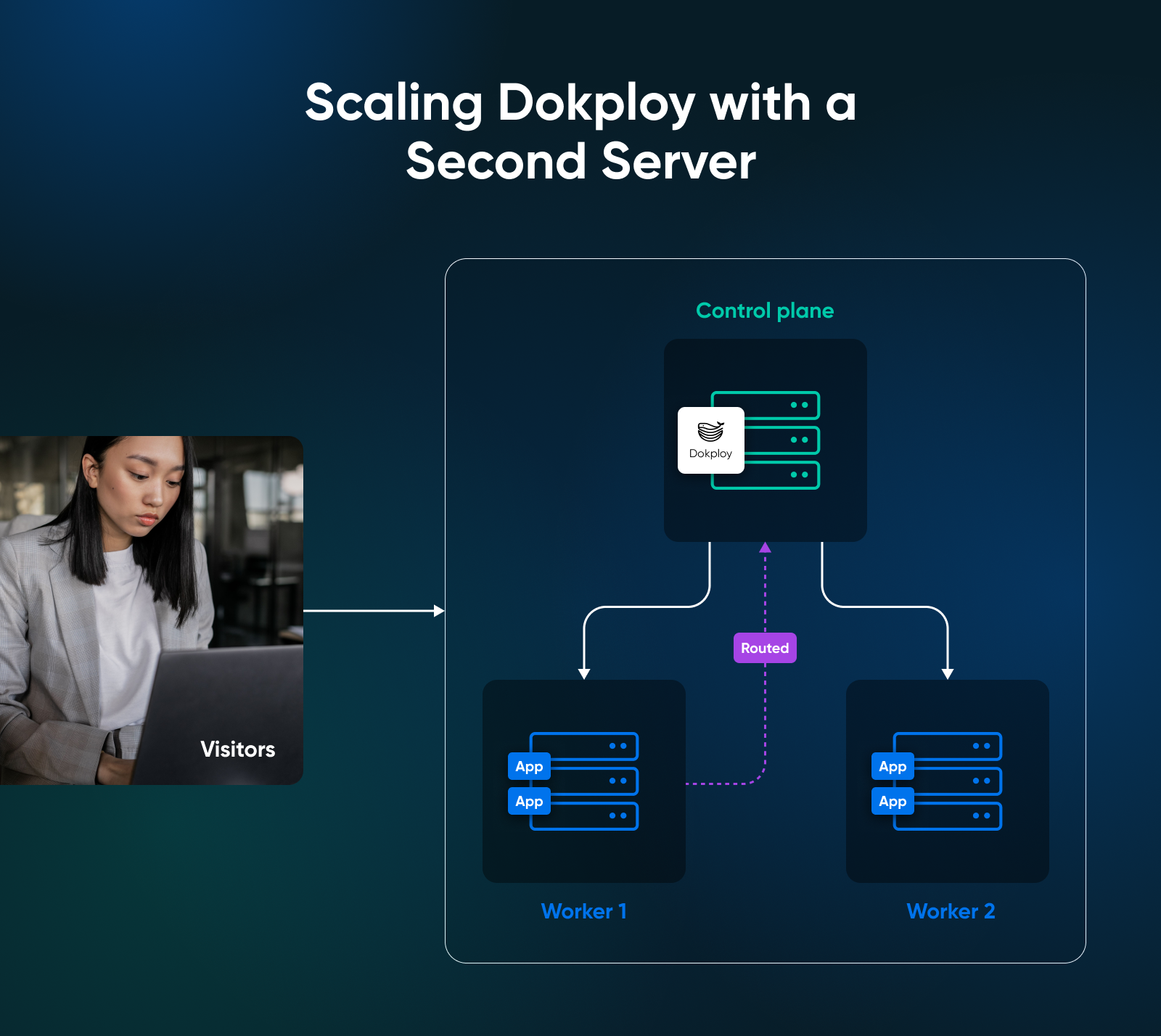
Here’s how to set up the architecture in three steps:
- Stand up a second VPS with Docker installed. Same provider, different region — doesn’t matter to Dokploy.
- In the Dokploy UI, add the new server as a worker and paste in its SSH details. Dokploy joins it to the Swarm cluster.
- Deploy apps to the cluster. Specify replicas and placement, Dokploy and Traefik handle the rest.
The trigger to add a second server is usually one of two things: You’ve outgrown a single box’s resources (RAM consistently tight, builds queue, restarts slow) or you’ve hit single-point-of-failure pain.
Backups still matter with multi-server, because cluster availability isn’t the same as data durability.
Dokploy supports automated backups of its managed databases to any S3-compatible store, and you should configure those off-server before putting real workloads on the cluster. A multi-server cluster with no off-server backup is still one bad day from a long restore.
So, Is Dokploy the Answer for You?
If the fees have started to feel arbitrary — per-dyno, per-seat, per-bandwidth-spike — a flat-rate VPS with Dokploy is the more honest deal.
The install is one shell command. The deploy flow is just like the one you already know, with managed databases and free SSL bundled in. The biggest catch is really a bit of maintenance time every month.
Honestly, that seems worth it to us for most cases.
If your workload is one tiny app that sleeps most of the day, a managed PaaS like Heroku is fine. If it’s three or more apps running 24/7, the math is already in favor of Dokploy.
Either way, run the numbers — then go ship something.

VPS
Own Your Entire Stack. Apps, AI, Databases, and More.
Keep every credential and conversation on a server you control, with NVMe speed and unmetered bandwidth built in.
Explore VPS Hosting Plans
Frequently Asked Questions About Dokploy on a VPS
Is Dokploy free?
Yes, Dokploy is free and open source under the Apache License 2.0. Future paid features will ship under a Dokploy Source Available License, but the platform you self-host today is genuinely free with no seats, no usage meter, no asterisks.
How much RAM does Dokploy need?
Technically Dokploy needs at least 2 GB of RAM and 30 GB of disk per the official docs, but 4 GB is the realistic recommendation for any production-leaning setup. Dokploy itself idles around 350 MB of RAM, leaving most of a 4 GB box free for app containers. Builds and active workloads push usage higher, which is why the official minimum is a floor, not a target.
Does Dokploy support Docker Compose?
Yes, Dokploy has native Docker Compose support. Paste in docker-compose.yml and Dokploy treats the full stack as a single application: web service, worker, database, and cache. This is a meaningful differentiator versus CapRover, where Compose support is limited to single-container deployments.
Can Dokploy deploy from GitHub?
Yes, Dokploy connects to GitHub, GitLab, Bitbucket, and Gitea; and auto-detects most runtimes. Nixpacks identifies Node.js, Python, Go, Ruby, and PHP projects without configuration. If your project has a Dockerfile, Dokploy uses that. If you’re migrating from Heroku, your existing Heroku Buildpack works, too.
How does Dokploy compare to Coolify?
Dokploy and Coolify are both self-hosted PaaS tools, but they have their differences. Dokploy is lighter (~350 MB idle vs. Coolify’s ~500-700 MB) and Compose-first. Coolify has the more polished UX and broader feature set, especially around integrations. The decision usually comes down to server size: Pick Dokploy on a 2-4 GB box, pick Coolify when you’re on 8 GB+ and want the polish.
What’s the easiest way to run Dokploy on a managed VPS?
DreamHost’s VPS for Dokploy, specifically the Stack 4 plan at 4 GB RAM, is a clean baseline. NVMe SSD storage handles container I/O fast, unmetered bandwidth means traffic spikes don’t bill extra, and full root access is non-negotiable for any self-hosted PaaS. Sizing maps to load: Stack 4 for 1-3 light apps, Stack 8 for a team’s worth, Stack 16 for production multi-tenant.
Is Dokploy production-ready?
Yes, Dokploy is production-ready for single-server and small multi-server deployments. Side projects, internal tools, agency client sites, and small SaaS all clear that bar. Enterprise SLA-grade workloads still belong on managed cloud platforms or self-built Kubernetes.
Can you migrate from Heroku to Dokploy?
Yes, Dokploy supports Heroku Buildpacks natively, so most Heroku apps redeploy with minimal config changes. Point Dokploy at the same Git repository, pick the buildpack, and deploy. The separate step is the database: Dump your managed Postgres from Heroku, restore it into a Dokploy-managed Postgres or an external host, and update the connection string.
Did you enjoy this article?