Cloud Contact Center Migration: Step-by-Step Checklist (2026)
You’re sold on the benefits, and it’s time to migrate your contact center to a new cloud environment. The only things in your way? The potential for downtime, cost overruns, customer disruption, and agent resistance.
It’s a lot to undertake, and there are a lot of potential risks. However, those risks only exist if you adopt the ‘rip and replace’ approach.
If you handle your cloud contact center migration with a strategic modernization approach, it’s not only achievable but has the potential to increase the success of your entire business. You’ll be able to keep pace with customer expectations and press on with digital transformation.
Why Legacy Systems Are Holding You Back
While your old Avaya, Cisco, or Mitel contact center may have served you well, there are some serious bottlenecks:
- Limited functionality restricts how customers can contact you.
- Legacy tech restricts the speed and efficiency of contact center agents.
- Vendor lock-in often means rising maintenance and licensing costs.
- Tool fragmentation results in multiple systems to manage and administrate.
Add to these the lack of innovation being rolled out to on-premises contact center technology, and it paints a bleak picture. You’re being left behind because of your chosen contact center vendor.
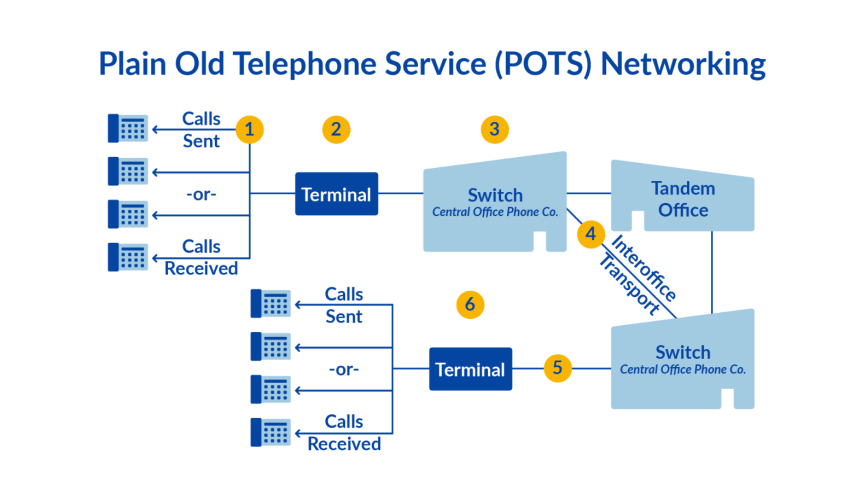
It’s the same case for plain old telephone service (POTS) technology. Searching for a PBX replacement will bring new features, higher uptime, and self-service support.
Rather than spending your time troubleshooting, you could be innovating. If you could provide agents with more efficient tools, customers would reap the benefits. The longer you remain with your outdated system, the more customers and agents continue to suffer.
A cloud-based contact center, often called contact center as a service (CCaaS), isn’t just a technical upgrade. It’s a unified platform that consolidates voice, chat, analytics, workforce management (WFM), and artificial intelligence (AI) into one system. You get updates via the cloud, and the supporting vendor looks after all hosting and maintenance needs.
Key features of a cloud-ready contact center include:
- Omnichannel routing with AI-driven support: Enables customers to contact you on their channel of choice and receive a more efficient experience, increasing first call resolution (FCR) rates and reducing average handle time (AHT).
- Real-time analytics and dashboards to guide leaders: Provides in-the-moment reporting and alerts when thresholds and benchmarks have been breached so you can take remedial action.
- Automation and self-service tools to reduce agent load: Outsource repetitive, menial tasks that cause long wait times and customer frustration.
Using a cloud-first contact center, such as Nextiva, allows you to unify customer experience management into a single, easy-to-use platform.

Before you leap into your contact center migration, take a step back and evaluate whether you’re ready to push forward.
Take time to understand your business needs and migration goals. Ask questions like: How many users or locations will be migrated? Which communication channels do you need to support? What CRM and third-party integrations are essential? Do you require AI-powered features or self-service options? How will you measure success after migration?
Once you’ve answered these questions, use this cloud migration readiness checklist to make sure you’ve completed the prerequisites before pressing go.
| Step | Task | Primary owner |
|---|---|---|
| 1. Team alignment | Define business goals, assign stakeholders, and establish a communication plan. | Leadership / IT |
| 2. Infrastructure evaluation | Audit existing systems, customer journeys, dependencies, and baseline performance. | IT/ Operations |
| 3. Integration priorities | Validate integrations, APIs, and develop a secure data migration strategy. | IT/ Security |
| 4. Regulatory considerations | Review compliance requirements, security controls, and vendor certifications. | Compliance / Legal / Security |
| 5. Agent readiness | Prepare training, change management, and user adoption activities. | HR/ Training |
| 6. Implementation and testing | Conduct pilot deployments, system testing, and phased rollout validation. | Project Manager / QA / IT |
| 7. Launch and optimization | Execute cutover, monitor performance, resolve issues, and optimize operations. | Operations / IT/ Vendor |
Note: Depending on the size and complexity of your business, some of these may not apply. Select what does and use this as your tool to decide when you’re ready to begin your migration process.
Now that you’ve assessed your migration readiness, let’s look at each step of the cloud contact center migration process in more detail.
Team alignment
Before migrating any technology, ensure everyone involved understands the project’s goals, timeline, and responsibilities. Early collaboration reduces delays and helps secure organization-wide support.
- Align IT leaders, CX stakeholders, operations, compliance teams, executive sponsors, and your cloud provider around shared objectives.
- Define measurable migration goals and success metrics, such as improved service levels, reduced average handle time (AHT), or higher first-call resolution (FCR).
- Create a communication plan so stakeholders receive the right updates before, during, and after the migration.
- Establish project governance, ownership, and escalation paths from the outset.
Infrastructure evaluation
Understanding your current environment is essential before moving to the cloud. A thorough assessment helps identify technical dependencies and migration risks early.
- Audit your existing contact center infrastructure, including your phone system, IVR, CRM, workforce management (WFM), ticketing software, analytics platforms, compliance tools, and third-party integrations.
- Map customer journeys and document system dependencies that support daily operations.
- Record baseline performance metrics such as AHT, FCR, customer satisfaction (CSAT), service levels, wait times, and call volumes to measure post-migration improvements.
- Review legacy hardware, licensing agreements, vendor contracts, and technical limitations that could affect the migration timeline.
Integration priorities
A successful migration depends on maintaining business continuity. Plan how your cloud contact center will connect with existing business systems before deployment begins.
- Identify critical integrations with CRM, WFM, ticketing, analytics, quality management, and compliance platforms.
- Validate API compatibility to ensure systems exchange data accurately.
- Test integrations in a staging environment before production deployment.
- Develop a secure data migration strategy for customer records, historical reports, call recordings, and platform configurations using encryption and secure transfer methods.
Regulatory considerations
Security and compliance should be addressed before migrating production workloads, not after.
- Identify regulatory requirements such as HIPAA, PCI DSS, GDPR, or industry-specific compliance standards.
- Verify your cloud provider’s compliance certifications, data residency options, and security capabilities.
- Implement encryption, identity management, access controls, logging, and monitoring to protect customer information.
- Review internal governance policies and confirm the migration meets organizational and regulatory requirements.
Agent readiness
Technology alone doesn’t determine migration success. Preparing employees for the new platform is just as important.
- Develop a structured change management and training plan before deployment begins.
- Identify training champions who can test workflows early and support colleagues throughout the rollout.
- Provide sandbox environments where agents can practice handling customer interactions without affecting live operations.
- Schedule training before go-live and continue coaching after deployment to encourage adoption and confidence.
Implementation and testing
Before moving production traffic, validate every component of the new platform through structured testing and pilot deployments.
- Start with a proof of concept or pilot group to validate workflows in a live environment before expanding across the organization.
- Conduct user acceptance testing (UAT), system integration testing, routing validation, IVR testing, and stress testing under peak call volumes.
- Verify user permissions, reporting, integrations, call quality, and routing accuracy before production cutover.
- Create and test rollback procedures so services can quickly return to the previous environment if unexpected issues occur during deployment.
Launch and optimization
The migration isn’t complete after go-live. The first few weeks are critical for stabilizing the platform and maximizing long-term value.
- Execute the final cutover with minimal business disruption by migrating users, routing traffic, and validating production systems.
- Establish a dedicated support team or war room during go-live so IT teams and your cloud provider can quickly resolve issues.
- Monitor KPIs such as service levels, AHT, FCR, call quality, latency, abandonment rates, and system health during the stabilization period.
- Gather feedback from agents and customers to identify workflow improvements and additional training opportunities.
- Once the platform is stable, introduce advanced capabilities such as AI-powered routing, automated call summaries, workforce management, analytics, and self-service automation to continue improving customer experience.
Now you know where you stand, it’s time to start planning your cloud contact center migration.
Planning Your Migration
In this section, we’ll detail how a typical contact center cloud migration unfolds.
People
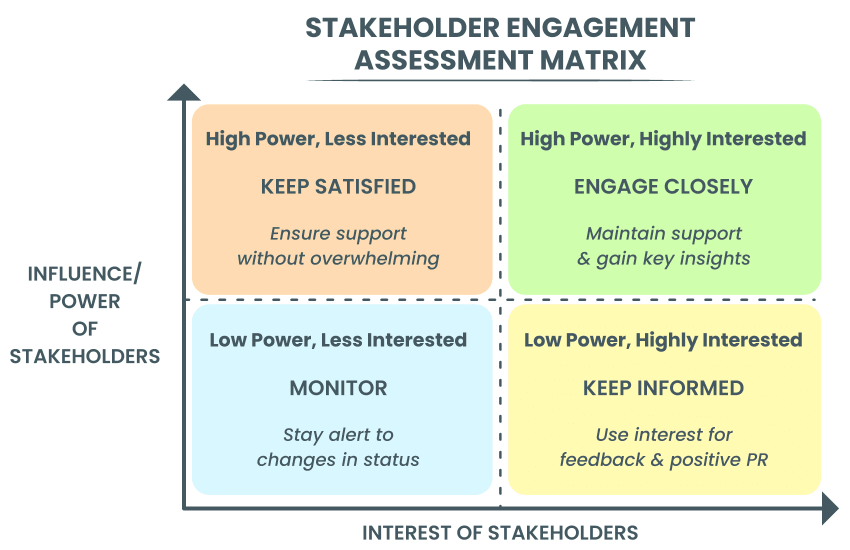
At the very start of your migration, it’s vital to identify all stakeholders and plan how to communicate each stage to them. It’s common to use a stakeholder engagement matrix to work out who you’re going to keep informed more than others.
Choose who gets daily, weekly, and one-off updates based on the balance of interest and influence. Doing this early on helps with buy-in and delays pushback when you start sending comms in the lead-up to your migration.
Phases
In large organizations or those with high call volumes, it’s advisable to conduct a phased rollout. Here, you take smaller steps with focus groups to prove the system works, gather feedback from agents (and/or customers), and reduce the chance of your team suffering teething problems.
The alternative, a big bang migration (where everything gets moved in one go), lends itself to potential error and downtime. Here, there may not be risks due to the new technology being simple to configure and administer, but there may be hiccups with planned routing, user adoption, or scheduling.
Note: In some cases, full cut-over migration is unavoidable. If this is the case, ensure sufficient safety barriers, such as overbooking technical support resources and walking the floor during go-live.
When it comes to migrating from an on-prem contact center, aim for a roadmap like this:
Months before migration:
- Proof of concept/pilot: Ensure the solution works as expected and provides the functionality you a) had before and b) are striving for. Check call quality, ease of use, and AHT.
- User acceptance testing (UAT): Strength test the solution with agents and contact center champions.
- Number porting scheduling: If your phone numbers are tied to your phone system, you may need to port numbers or redirect inbound queues.
Weeks before migration:
- Small-scale test migration: Move power users onto the new system for roleplay/real-time interaction handling. Ensure you reach your desired uptime and hit call center benchmarks before thinking about scalability.
- Feedback and optimization: Use suggestions from real-world scenarios to finalize the finer details before going live.
Day of migration (with suggested timings)
These timings are often unavoidable for businesses providing 24/7 support. You can, of course, tailor these as you see fit.
Migration day 1 (evening) — data freeze & backup:
- 18:00: Notify contact center of impending data freeze.
- 18:15: Take final snapshots of databases, file shares, and CRM records.
- 19:00: Validate the integrity of backups and archive to secure storage.
Migration day 1 (overnight) — core system migration:
- Redirect traffic (or port numbers) from an on-premises solution to the cloud contact center.
- Replicate user accounts, permissions, and interactive voice response (IVR ) flows in the cloud platform.
- Migrate historical reporting data and call recordings.
- Configure integrations (CRM, WFM, ticketing).
- Verify compliance controls (encryption, access logs) are active.
- Conduct end-to-end test calls and agent log-ins.
Migration day 2 (Morning) — validation & cutover:
- Perform a mini pilot with a select agent group handling live traffic.
- Collect immediate feedback, adjust routing, and resolve issues.
- Open lines to the full agent pool and officially cut over to the cloud system.
- Monitor dashboards for call quality, latency, and error rates.
Migration day 2 (afternoon) — stabilization & support:
- Convene a post-cutover review with IT, CX, and vendor teams.
- Triage any high-priority incidents and deploy hotfixes if needed.
- Begin phased ramp-up of new features (screen pops, advanced reporting).
Migration day 3 to day 5 (post-migration) — optimization
- Day 3 morning: Deep-dive performance tuning and resource scaling.
- Day 3 afternoon: Collect agent and customer feedback surveys.
- Day 4–5: Implement minor refinements and update documentation.
- End of day 5: Transition to steady-state support and continuous improvement cadence.
At any point in the cloud contact center migration, there’s a chance of delay. Here are the most common issues to avoid:
| Mistake | How to Avoid It |
|---|---|
| Skipping training and change management, leaving agents unprepared | Build a robust training plan with sandbox environments, designate training champions, and schedule sessions well before cutover |
| Attempting a full migration in one step without proper testing | Adopt a phased rollout: pilot with a small group and conduct system integration testing and UAT before full deployment |
| Underestimating integration complexity and vendor dependencies | Map out all required integrations up front, validate API compatibility, call paths/trunks, and include vendor partners in detailed dependency planning and rehearsal |
| Failing to account for network capacity and latency issues | Perform network assessments early, ensure sufficient bandwidth with QoS policies, and run load tests to validate performance under peak conditions, confirming with identical agent workstations and equipment |
| Not having a rollback or contingency plan in case of failure | Develop and document rollback procedures, maintain up-to-date backups, and schedule dry-run rehearsals to ensure the team can execute recovery steps swiftly |
Real-World Success: Cedar Financial Case Study
When stuck using an on-premises contact center, Cedar Financial was juggling seven different vendors, cumbersome manual processes, compliance risks, and low outbound call volume (70/day).
Appointing Nextiva to migrate its contact center to the cloud, Cedar Financial found comfort in vendor consolidation, AI-powered outbound dialing, and compliance segmentation.
Once implemented, Cedar Financial started to use previously unavailable features like:
- Predictive AI: Automated outbound dialing and skill-based routing.
- ACD inbound: Streamlined handling of inbound communications.
- Manual outbound: Enhanced control over outbound call strategies.
- Predictive SMS: Automated text messaging for client engagement.
- Omnichannel integration: Management of calls, emails, chatbots, social media, and SMS through a single platform.
- CRM integration: Seamless integration with CRM for seamless customer interaction.
- AI-powered compliance tools: Ensured compliance across teams and operations.
- Agent-facing survey: Feedback and performance monitoring.
As a direct result, Cedar Financial now boasts metrics like 471% increase in call volume (70 → 400/day). This increase correlates to a 30% revenue growth.
What’s more, following its cloud contact center migration, Cedar Financial experienced a 40% efficiency boost and 30% cost savings — a welcome bonus.


“Automation through Nextiva has notably boosted our productivity. It freed up our team to focus on elevating the customer experience. The platform has been instrumental in helping us track and personalize interactions, ensuring each client feels valued and heard.”
~Justin Franklin
Post-Migration Optimization
You’ve put in the hard yards during workflow validation and integration testing, and you witnessed a successful migration.
But the work doesn’t stop there.
After go-live and your initial support phase, it’s vital for the success of your contact center to embrace continuous improvement.
Here, we’re talking about agent enablement plans (training sessions, scripts, live support), both for the present and for when new features get added.
Likewise, you have a wealth of analytics and coaching capabilities when you choose a cloud contact center platform. Use these to unlock a long-term and ever-evolving return on investment by using the outputs of your contact center to inform business decisions, plan for future training, and allow customer feedback to make tweaks to live processes.

After putting a green stamp on your migration, don’t wait until something goes wrong. Take a proactive approach and ensure a smooth future for your contact center operations.
With a robust plan and the dependable support of an experienced cloud provider, migration is no longer a risk but a customer experience enabler. If you want to boost speed, personalization, and reliability, and experience the impressive figures of Cedar Financial, modernizing your contact center is a must.
Nextiva is your contact center partner that makes migration seamless, scalable, and ROI-driven. Our focus isn’t on shiny features (though we have many). Instead, it’s on guiding you toward your goals with our technology as the foundation.
Nextiva supports organizations throughout the migration journey, from planning and system configuration to deployment and post-launch optimization. Our implementation teams help with integration planning, workflow configuration, number porting, agent onboarding, and testing to ensure a smooth transition with minimal downtime.
With built-in AI, omnichannel engagement, workforce management, analytics, and automation, Nextiva gives you the tools you need to improve customer interactions long after the migration is complete.
Whether you’re replacing a legacy on-premises platform or consolidating multiple systems into a single cloud contact center, Nextiva helps you modernize with confidence.
Nextiva Named Strong Performer in Gartner® 2025 CCaaS Report
Nextiva is recognized as a Strong Performer in the 2025 Gartner® Peer Insights “Voice of the Customer” for Contact Center as a Service.
Frequently Asked Questions About Cloud Contact Center Migration
Contact center migration is the process of moving your contact center operations, applications, data, and integrations from an on-premises or legacy platform to a modern cloud contact center. The goal is to improve scalability, customer experience, and operational efficiency while minimizing business disruption.
Migrating to a cloud contact center gives businesses greater flexibility, easier scalability, improved business continuity, and access to advanced features such as AI-powered routing, omnichannel support, workforce management, and real-time analytics. It also reduces hardware maintenance, simplifies updates, and helps organizations adapt more quickly to changing customer expectations.
Migration timelines depend on the size of your contact center, the number of users, integrations, compliance requirements, and the data that needs to be migrated. Smaller deployments may take a few weeks, while enterprise migrations with multiple locations and complex integrations can take several months.
A phased migration reduces risk by moving users and workloads in stages instead of switching the entire contact center at once. This approach allows teams to validate integrations, resolve issues early, gather agent feedback, and maintain business continuity before expanding the rollout.
While eliminating downtime completely isn’t always possible, businesses can minimize disruption by using phased deployments, pilot groups, number porting strategies, backup procedures, and thorough testing before moving live customer interactions to the new platform.
No. In many cases, businesses can continue using compatible devices such as IP phones, headsets, and networking equipment. Whether existing hardware can be reused depends on its age, compatibility with the new platform, and overall condition. During the planning stage, your cloud provider can assess your current setup and recommend any upgrades needed to support the new environment.