Best Email Marketing Tools (2026): Top 9 Platforms Compared
Rented platforms, such as search engines, social media, and even AI tools like ChatGPT, are great for discovery. Unfortunately, those platforms are going out of their way to stop users from abandoning their sites for your website.
OpenAI is partnering with retailers like Walmart to support checkout within its platform. Google’s AI overviews have reduced the number of people visiting websites. While you still need these platforms for discoverability, you must do something to own the relationship with your customers. That’s where email marketing tools come in.
Email marketing tools allow you to own and control the relationship with your customers. They let you capture email addresses and establish a direct line of communication with your target audience.
The question is, which email marketing tool is right for your business? I analyzed more than a dozen email marketing service providers to bring you the nine best options.
TL;DR – The Best email marketing tools
Here’s a table summarizing the best email marketing tools, including their key features, main drawbacks, and starting prices.
| Platform | Best for | Free plan/trial | Paid plan | G2 rating |
| GetResponse | All-in-one marketing | Free plan available | From $15.58/mo, unlimited sends | 4.3 |
| Omnisend | Ecommerce stores | Free plan available | From $11.20/mo, 500 contacts | 4.6 |
| MailerLite | Simple newsletters | Free plan available | From $9/mo, 500 subscribers | 4.6 |
| Brevo | Send-volume pricing | Free plan available | From $8.08/mo, 5K emails | 4.5 |
| ActiveCampaign | Advanced automation | 14-day free trial | From $15/mo, 1,000 contacts | 4.4 |
| Kit | Content creators | Free plan available | From $33/mo, 1,000 subscribers | 4.4 |
| Constant Contact | Small businesses | Free trial available | From $12/mo, 500 contacts | 4.1 |
| Klaviyo | Ecommerce analytics | Free plan available | From $45/mo, 1,500 profiles | 4.6 |
| Mailchimp | Beginner campaigns | Free plan available | From $13/mo, 500 contacts | 4.3 |
How to pick the best email marketing tool
All email marketing tools do the fundamentals in mostly the same way. They support email list building through lead gen tools like sign-up forms and pop-ups. They also let you create emails through templates and send them with scheduling options.
But the devil is in the details. These tools provide different features that influence how you run email marketing campaigns.
Some email marketing software solutions are easier to use than others, for example. Some are cheap when you’re only sending a handful of emails, but get really expensive as your needs grow.
On the other hand, some tools have well-structured pricing plans so you never experience steep upgrades or pay for features you don’t need.
Here’s what to look for when picking an email marketing software:
Email list building capabilities
A high-quality email list is the foundation of a successful email marketing campaign. The best email marketing software providers offer several tools to help you capture email addresses.
For example, GetResponse, Omnisend, and MailerLite provide forms, pop-ups, and landing page builders. They even offer templates you can customize and deploy within a few clicks to start building your email list.
The lead generation tools are built to be CAN-SPAM and GDPR compliant. They include consent check boxes that website visitors can tick if they want to opt into marketing email campaigns.
The best email marketing software solutions also take it a step further by handling audience segmentation right from the sign-up form. These solutions can track the pages a user viewed before joining your email list. Or the lead magnet they downloaded to enter your contact list.
That data is used to automatically place the customer in the right audience segment. This makes sure customers receive relevant email messages from the moment they join your email list.
Automation features
Effective automation features give your business marketing and sales agents who work around the clock. It starts with simple trigger-based automation workflows that automate repetitive tasks.
A welcome email workflow is a good example of this. The workflow ensures everyone joining your email list receives a personalized welcome email (or a series of emails).
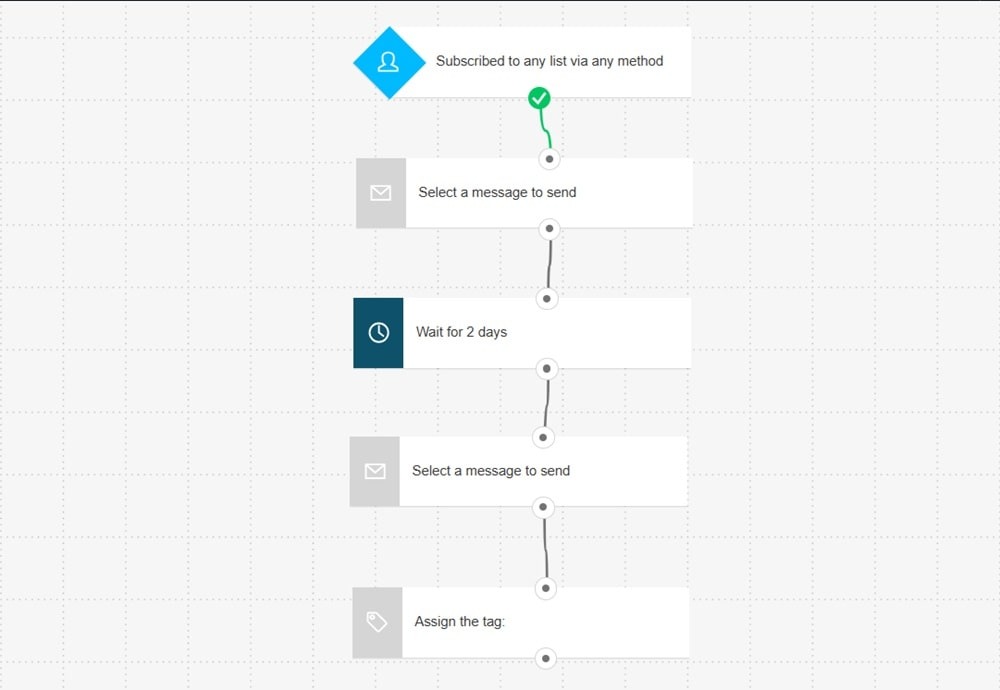
That workflow helps you make a good first impression, which is vital for building long-term customer relationships.
Then you have automation workflows that can actually generate revenue and recover lost sales for your business. An abandoned cart workflow falls under this category. This workflow is triggered when a customer adds items to their cart, but abandons it instead of completing their purchase.
Abandoned cart workflows contact the abandoner with a personalized email (or a series of emails) to recover that sale.
For example, European retailer Wurth MODYF used GetResponse’s abandoned cart feature to recover lost sales. Its abandoned cart emails saw a 59% open rate and 11% click rate. In general, Wurth MODYF’s email campaigns generated 46% more orders and a 72% turnover. Read more about the campaign here.
Automation features are a must-have for an email marketing software. Building these automation workflows should also be easy. You’ll need a visual workflow builder for that.
Automation templates, especially for common campaigns like welcome emails, abandoned cart recovery campaigns, and upsell and cross-selling emails, are also vital.
Ease of use
Email marketing is a crucial part of your business, but it shouldn’t be your full-time job. You want a tool that is easy to use, so your team can focus on strategic tasks.
Go for an email marketing service that has a clean, drag-and-drop editor. This editor helps you design visually stunning emails without writing any lines of code.
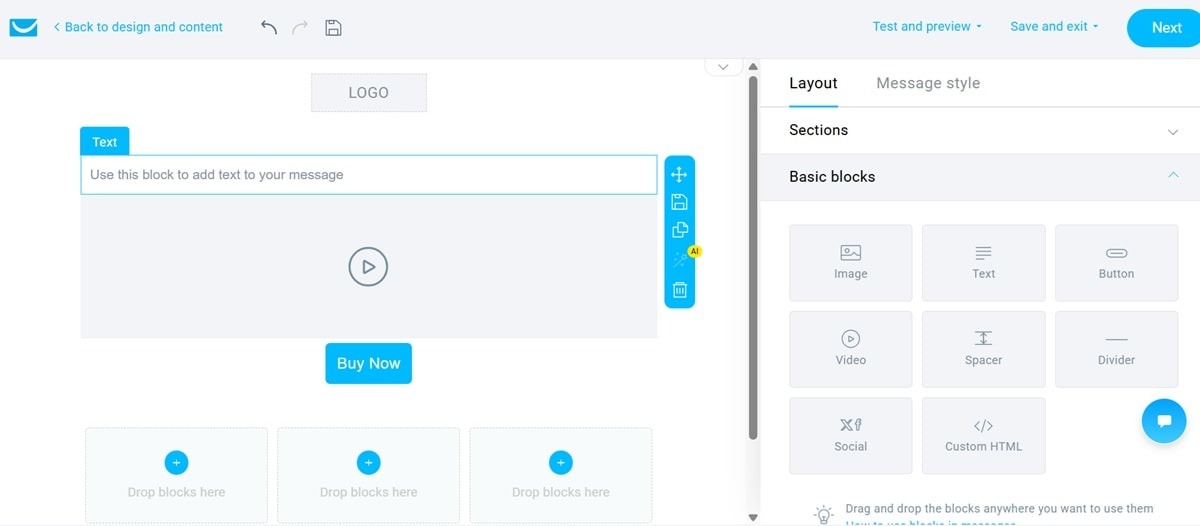
Secondly, templates are essential. They speed up your creative process. But don’t just look for a tool with plenty of templates. The more relevant those templates are to your industry, the better.
The templates must also be fully customizable. So you should be able to move around the elements and adjust the colors and fonts to align with your branding style.
Finally, can you reach the customer support team in case you run into any issues? The best email marketing tools have super-responsive customer support teams. They also provide several customer service channels.
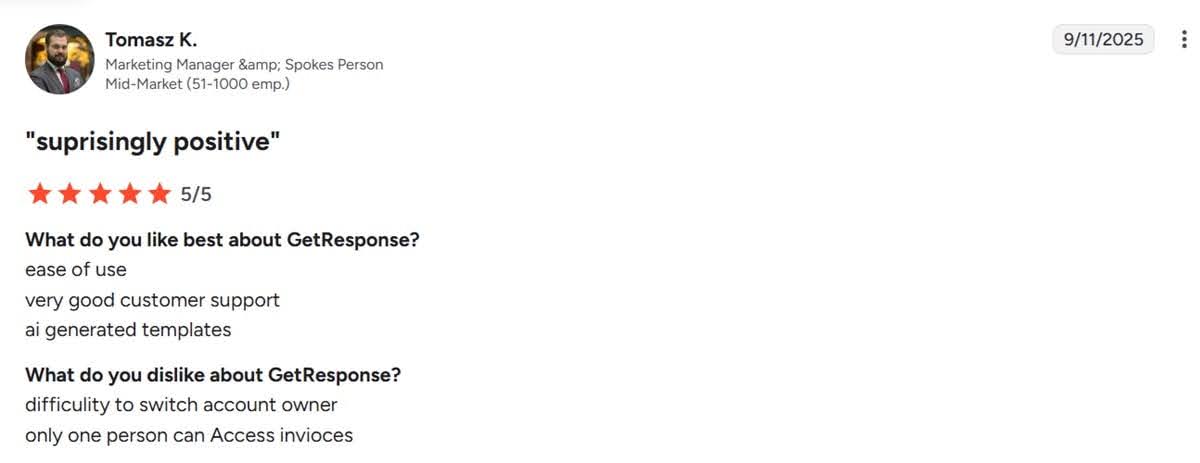
At GetResponse, we offer support through live chat and email. Our email support is also available in 7 different languages. GetResponse customers on independent platforms like G2 and Trustpilot have repeatedly praised our support team for being responsive and helpful.
Email deliverability rate
Email deliverability rate determines how likely your email is to reach a customer’s primary inbox. Email clients like Gmail, Outlook, and Yahoo have implemented several measures to detect and prevent spam emails from reaching users’ inboxes.
Your sender reputation takes a hit if these clients detect that your domain sends too many spam emails. A poor reputation stops future emails from ever reaching recipients’ inboxes. Your emails may be pushed to the spam folder or get blocked entirely.
To prevent that, the best email software solutions provide tools like DKIM, SPF, and DMARC authentication that confirm emails are coming from your domain, not spammers.
These providers also offer deliverability monitoring and reporting. They’ll alert you to spam complaints and deliverability issues early before they affect your sender reputation.
Additionally, built-in email verification and validation tools help maintain a clean email list. These tools alert you to invalid email addresses on your list.
Ultimately, an excellent email deliverability rate requires effort from both you and your email marketing service provider. You must follow email marketing best practices like maintaining a clean email list, watching your sending frequency, and sending quality email content that is genuinely helpful.
Your email marketing service provider supports your effort by providing a reliable infrastructure and the tools you need to maintain compliance.
Contact management
A good email marketing tool helps you segment and tag customers based on their behavior, purchase history, or demographics. Audience segmentation helps you target each customer with relevant content to maintain a high engagement rate and achieve your marketing goals.
The tool should sync with your eCommerce, CMS, and CRM systems and update your contact list automatically based on customer actions. For example, when a lead finally makes a purchase, your contact list should update and change their status from “lead” to “customer.”
Such an action can also trigger a post-purchase automation workflow.
Similarly, if a customer doesn’t engage with your business for a long time, your email provider can tag them as disengaged and trigger a win-back campaign.
An email platform with a good contact management system will also detect duplicate email addresses and manage unsubscribes.
Pricing
Email marketing tools charge you based on the number of emails you send, the size of your contact list, or a combination of both.
Paying based on the number of emails you send sounds reasonable because it scales with usage. The problem is that it can become expensive quickly. It might actually encourage your team to send fewer emails (and potentially lose out on sales) to keep the cost down.
Meanwhile, paying based on the size of your contact list is much more predictable and lets you focus on maximum engagement because you have unlimited emails. On the flip side, you must maintain a clean email list; otherwise, you’ll end up paying for invalid or disengaged contacts.
That said, you should look beyond the exact pricing figure and consider the features you’re getting in return. Remember, you can even get a free email marketing service that lets you send thousands of emails per month. But does it really provide all the features you need to create email campaigns that support your business’s bottom line?
My recommendation is to start by identifying your must-have features. Then, find a tool that gives you these features at the most reasonable price. Consider your future needs as well. The ideal email marketing software grows with your business, but without surprising you with a steep upgrade.
AI capabilities
Lastly, look for an email marketing software that offers helpful AI features. An AI writing assistant and subject line generator help you produce email content much faster, for example.
Some tools, like ActiveCampaign, let you prompt an AI to design emails and build entire campaigns.
The Best email marketing tools
Let’s take a look at each tool and what it has to offer:
1. GetResponse: best for scalable email marketing with automation and unlimited sends
GetResponse is best for teams that want newsletters, automation, landing pages, forms, ecommerce workflows, and unlimited email sends on paid plans.
The platform offers all the marketing tools you need to build and scale email campaigns. Not only that, but it provides solutions to support marketing campaigns across other channels, including paid media, SMS marketing, and push notifications.
GetResponse’s email marketing solution offers a suite of tools to support everything from building your list to recovering lost sales and nurturing customer loyalty.
Lead generation tools, like a landing page creator, as well as a signup and pop-up form builder, are included in our plans. The drag-and-drop landing page creator is super easy to use. It’s also powered by AI, which makes it easier for anyone, even folks with no coding skills, to create high-converting landing pages fast.
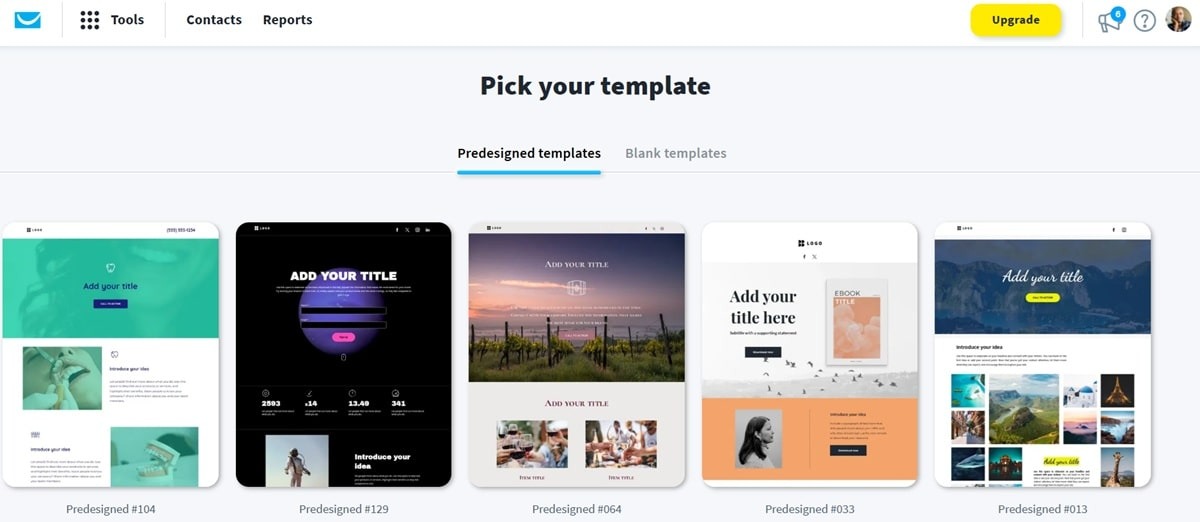
You can also pick a fully customizable landing page template from our library.
The signup and pop-up form builders are designed to help you turn website visitors into email subscribers. This is crucial in the current environment where lead generation is becoming increasingly expensive. Third-party platforms are also sending less traffic to websites.
You must make the traffic you’re getting count, and the best way to do that is to capture the email addresses of site visitors and engage with them via email.
We give you the tools to embed eye-catching email signup forms on your website or blog. The pop-up builder lets you create triggered pop-ups that are perfectly timed for maximum conversions. You can use exit-intent popups to capture emails of users who’re about to bounce from your website, for example.
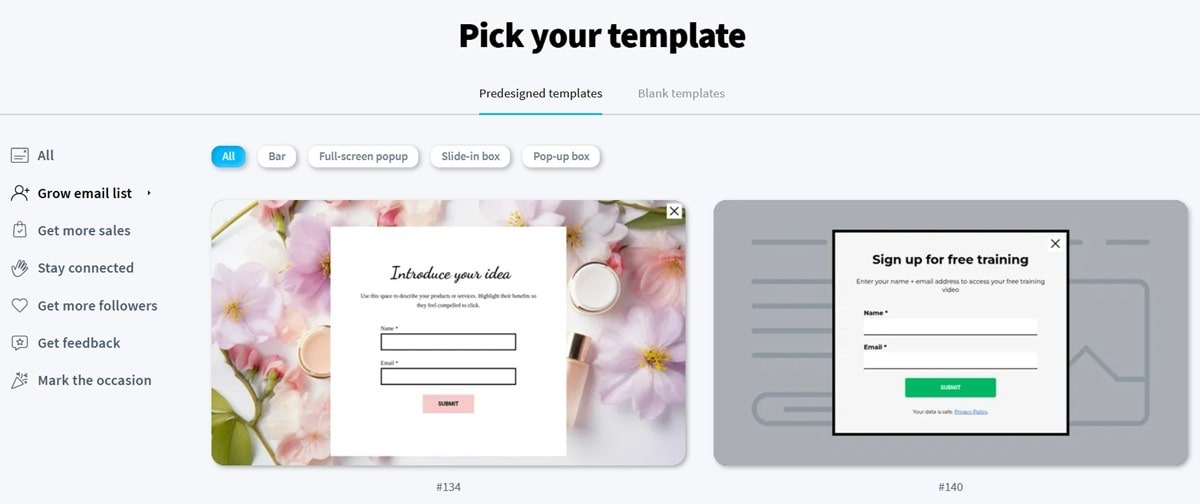
Our conversion funnel builder helps you generate more leads through lead magnets like discount codes, original research, and webinars. We conducted a study some time back and found that marketers get better lead generation results when they use the right lead magnets.
GetResponse’s visual email builder allows you to create beautiful emails by dragging and dropping elements like text, images, and buttons. Emails are responsive right out of the box, meaning they’ll look great both on mobile and desktop devices.
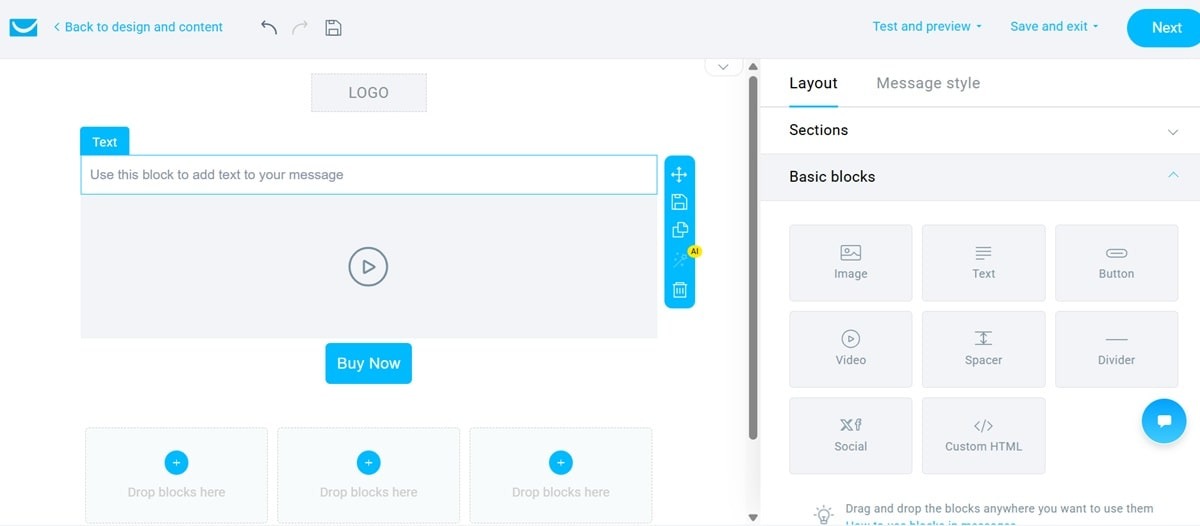
You don’t need to write any HTML code when designing your email campaigns on GetResponse. But we offer an HTML editor option for anyone who wants to get granular and customize even the finest of details.
The email templates library includes 200+ responsive email templates. We’ve also grouped them by industry and goals. That makes it easier for you to find relevant templates for the specific campaign you have in mind.
Whether it’s a Black Friday, a summer sale, or a Valentine’s Day campaign, you’ll find the right template for the occasion. And remember, you can customize these templates using our drag-and-drop editor.
The automation workflow builder is another feature that makes GetResponse one of the best email marketing tools. You can create automation workflows to target specific customer behaviors and actions, like cart abandonment. Our builder lets you create custom workflows for your unique business needs. It’s a visual drag-and-drop builder that also supports time delays and tagging.
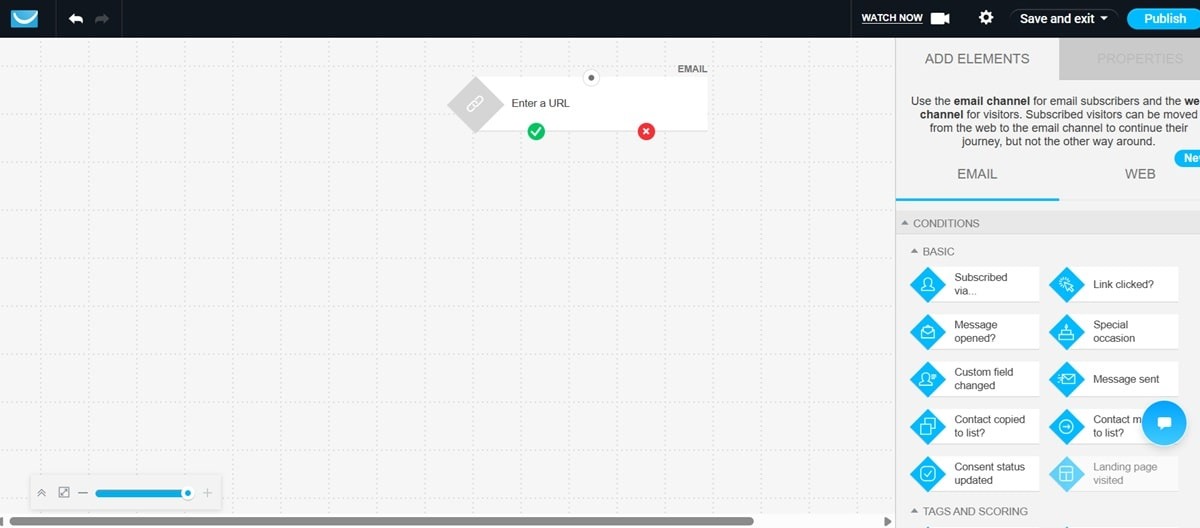
We’ve already created automation workflow templates for the most popular automations. Think welcome, re-engagement, abandoned cart recovery, and feedback collection campaigns.
AI tools like the AI product recommendation solution are built to generate more revenue for your business while making life easier for you. The AI product recommendation tool tracks your store’s visitors to see the items and product categories they browse. It then suggests the right items with the highest probability of converting.
Stores that use this tool witness 10% more sales, with an average order value increase of 33%.
We also provide an AI email subject line generator and an AI writing assistant.
Transactional emails are the vital business communications you send in response to specific customer actions like placing an order and requesting a password reset. Customers expect these emails to be delivered within seconds of that action.
GetResponse offers a transactional email service dedicated to these campaigns. The service is offered as an add-on to our Max plans. It delivers all your order confirmations, shipping alerts, receipts, and password reset email campaigns within one second. You can send these campaigns through an SMTP or API connection.
Our 99% deliverability rate ensures that all your emails (both marketing and transactional) reach your recipients’ inboxes. Not promotional or spam folders. We actively monitor your sender reputation to prevent your domain from getting flagged for spam. Plus, we provide SPF, DKIM, and DMARC authentication tools.
What we like
| Strength | Why it matters |
|---|---|
| Unlimited sends on paid plans | Useful for teams that send frequent newsletters, automations, and promotional campaigns. |
| Built-in landing pages, forms, popups, and automation | Reduces reliance on separate lead-generation tools. |
| Ecommerce workflows and AI product recommendations | Helps ecommerce teams recover carts and personalize offers. |
| Creator and MAX paths | Gives teams room to expand into monetization or enterprise features. |
What we don’t like
| Limitation | Who should care |
|---|---|
| Free plan is limited | Very small senders may want to compare free-plan allowances. |
| Advanced ecommerce and enterprise features require higher plans | Teams needing SMS, advanced ecommerce, or dedicated support should compare plan tiers. |
| Broad feature set may be more than basic newsletter senders need | Simple senders may prefer a lighter tool. |
Pricing
GetResponse has a free email marketing service. The Free plan includes a landing page builder, email list-building tools, basic email marketing tools inside the email creator, and up to 2,500 newsletters per month. During the first 14 days, you can add up to 500 contacts and test premium features.
Paid plans start at $15.58/mo, billed annually. One of the most significant differences between GetResponse and other email marketing services is that paid plans let you send unlimited emails. Even the entry-level Starter plan supports unlimited monthly email sends.
That Starter plan comes with a custom automation workflow, unlimited autoresponders, unlimited landing pages, email templates, signup forms & pop-ups, and 24/7 chat support.
The Marketer plan starts at $48.38/mo, billed annually. It comes with extra features like support for cart abandonment campaigns, promo codes, sales funnels, advanced segmentation, contact scoring, and newsletter revenue statistics.
The Creator plan starts at $56.58/mo, billed annually, and is custom-built for content monetization. It offers an AI course creator, website builder, premium newsletters, and webinars. There’s also a mobile app for students.
Finally, you have the GetResponse Max plan, tailored for enterprise needs. It offers dedicated IP addresses, SSO, AI product recommendations, SMS marketing, and priority customer support.
G2 rating: 4.3/5
2. Omnisend: best for ecommerce brands using email and SMS
Omnisend is best for online stores that want ecommerce-ready automation, SMS, push notifications, and product-focused campaigns in one platform.
Omnisend is also considered one of the best free email marketing services because it offers a pretty generous free plan. The plan includes automated workflows for cart abandonment recovery, welcome series, and order and shipping confirmation email campaigns.
The free plan supports automation splits, unlimited custom events for triggering automations, and conditional content blocks that support personalized email marketing campaigns.
That said, the free plan supports only up to 250 contacts and 500 email sends per month, which is not very practical for most businesses. In contrast, GetResponse’s free email marketing service supports up to 2,500 monthly email sends.
Omnisend’s email builder is quite easy to use. The workflow is slightly different from other email marketing services. With most tools, you start by picking and customizing an email template. With Omnisend, the process begins by writing the email subject line, sender’s name, sender’s email address, and other settings before you can pick and customize a template.
It’s still a straightforward process, and they provide AI assistants like an AI subject line generator that shares subject line ideas based on your campaign description.
The AI writing assistant is also present in the drag-and-drop email editor. As you add elements like text boxes within your chosen email template, you can prompt the assistant to write the text for you.
Omnisend’s automation builder lets you create automated email, SMS, and push notification campaigns from a single dashboard. The visual, drag-and-drop automation builder lets you set the steps, delays, and conditions for automation workflows. Skip the creation process entirely by selecting pre-built workflows for post-purchase, cart recovery, and welcome email series.
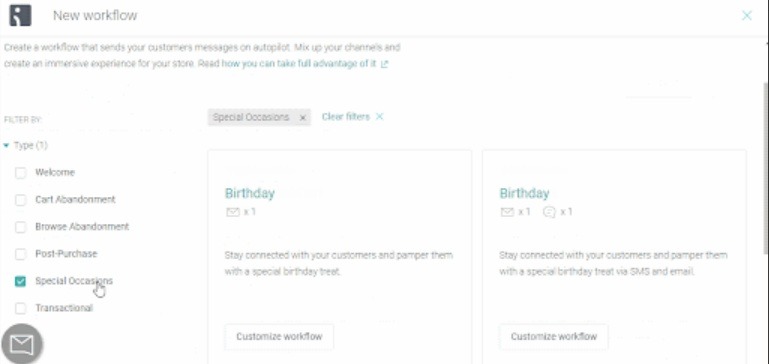
Automations built on Omnisend support both split paths and conditional logics. These allow you to create dynamic customer journey workflows that respond to customer behavior and actions. For example, split logic takes customers down a particular automation workflow path based on whether they open a welcome email or not.
What we like
| Strength | Why it matters |
|---|---|
| Ecommerce-first workflows | Strong fit for abandoned cart, welcome, post-purchase, and product campaigns. |
| Email, SMS, and push in one tool | Useful for online stores that want multichannel messaging. |
| Conditional automation paths | Supports personalized customer journeys. |
| 24/7 support positioning | Helpful for smaller ecommerce teams without in-house technical support. |
What we don’t like
| Limitation | Who should care |
|---|---|
| Send limits can matter quickly | Stores with frequent campaigns should model monthly volume. |
| SMS can add cost | Ecommerce teams using SMS heavily should calculate total cost. |
| Less suitable for non-ecommerce teams | Service businesses and creators may not need ecommerce-specific workflows. |
Pricing
Omnisend’s paid Standard plan is $11.20/mo for 500 contacts and 6,000 emails per month, with a 30% starter discount applied for the first 3 months. After that promotional period, pricing may change based on Omnisend’s current pricing terms.
It lets you send 6,000 emails/month, and comes with pre-built workflows and customer segments. Landing page, sign-up forms, and pop-ups are also included in the plan.
You can add the personalized product recommendation solution to your Standard plan for $5/mo.
The Pro plan is currently shown at $41.30/mo for 2,500 contacts, with unlimited monthly emails, unlimited web push notifications, advanced reporting, and 24/7 priority support. This price is also shown with a 30% starter discount for the first 3 months, so check Omnisend’s pricing page for the current post-discount rate.
Enterprise businesses can build a custom plan on Omnisend. That plan comes with free migrations, specialist onboarding, and a free account expert if you spend at least $400 per month.
G2 rating: 4.6/5
Transform your email campaigns with unlimited sends
Stop worrying about email limits and start focusing on what matters—growing your business with powerful automation, AI-driven personalization, and unlimited email sends at a predictable price.
3. MailerLite: best for small teams that want affordable newsletters
MailerLite is best for small businesses, creators, and lean teams that want a simple editor, landing pages, forms, and low-cost email marketing.
As you build your contact list, you’ll need to segment your audience to run personalized campaigns. MailerLite comes with several pre-built customer segments you can activate right away. These include repeat customers, high-spend repeat customers, first-time customers, and 0 purchase subscribers.
For email marketing itself, the solution offers an intuitive drag-and-drop email editor. The editor includes interactive content blocks like carousels, a countdown timer, quizzes, and surveys.
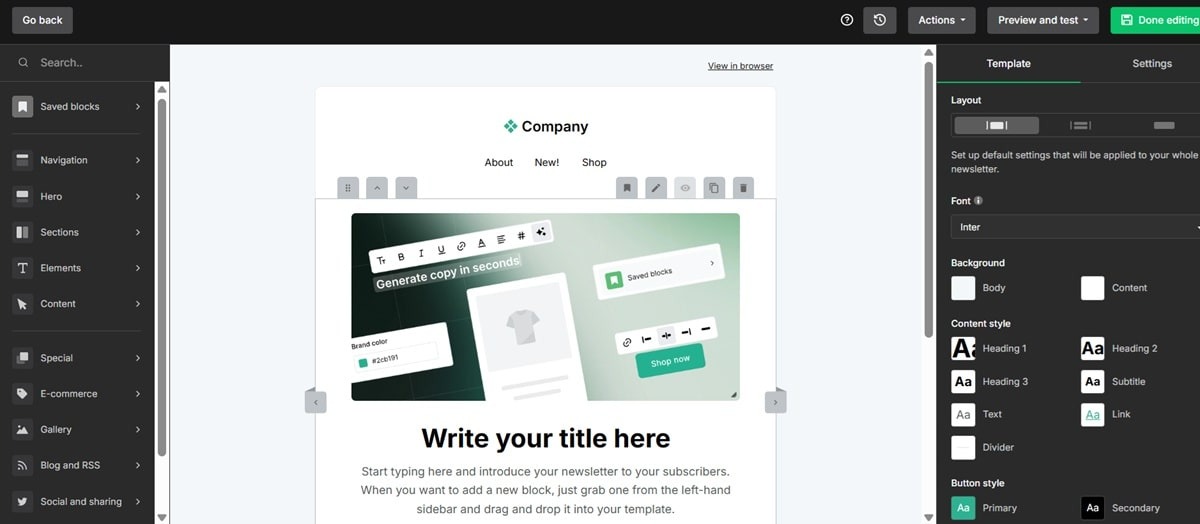
An AI writing assistant is included within the email editor. The assistant lets you choose the tone and content type before producing email content that reflects your brand’s voice.
The built-in image editor is another standout feature on MailerLite. Instead of having to edit and import your images from a third-party app like Canva, you can edit them within MailerLite’s email editor. Still, the platform integrates with design tools like Canva in case you prefer to edit and import your creatives from there.
Automation is another key part of MailerLite’s offerings. Create automation workflows that are triggered by actions like clicking a link, completing a form, and abandoning a cart.
You can also set up automation workflows that activate when customers buy a specific product or from a specific product category. Even date-activated workflows are possible. These help you run happy birthday and anniversary campaigns, which are critical for customer relationship building.
What we like
| Strength | Why it matters |
|---|---|
| Clean editor | Easy for beginners and small teams. |
| Forms, popups, and landing pages | Supports list growth without many extra tools. |
| Affordable entry plans | Good for budget-conscious senders. |
| Interactive blocks and AI features on higher plans | Useful for engagement-focused newsletters. |
What we don’t like
| Limitation | Who should care |
|---|---|
| Advanced automation depth is limited compared with heavier platforms | Lifecycle marketers may outgrow it. |
| Some AI and optimization features are plan-dependent | Buyers should compare plan-level access. |
| Account approval can slow setup | Teams with urgent launches should account for setup time. |
Pricing
MailerLite’s free email marketing service supports up to 500 subscribers and up to 12,000 monthly email sends. It includes an email automation builder, website builder, drag-and-drop email editor, comparative reporting, and signup forms and pop-ups.
The entry-level Growing Business paid plan starts at $9/mo when billed yearly, or $10/mo when billed monthly, for up to 500 subscribers. It’s quite cheap, but the plan lacks core email marketing features like Smart Sending and the AI writing assistant. Still, it gives you unlimited monthly email sends, unlimited templates, dynamic emails, multivariate testing, and campaign auto-send.
The Advanced plan starts at $18/mo when billed yearly, or $20/mo when billed monthly, for up to 500 subscribers. It has unlimited user seats, 24/7 live chat and email support, and unlimited monthly email sends. You also get a custom HTML editor, preference center, promotion pop-ups, and advanced marketing automations.
A custom enterprise plan for businesses with over 100K subscribers is available. It comes with a dedicated account success manager, dedicated IP addresses, deliverability consulting, and onboarding consultation and training.
G2 rating: 4.6/5
4. Brevo: best for send-volume pricing and multichannel messaging
Brevo is best for businesses that want email, SMS, WhatsApp, transactional email, and pricing that is driven more by email volume than list size.
For email marketing, Brevo promises a 99% deliverability rate and offers a bunch of tools to help you build and launch email campaigns.
That starts with a visual email builder. Use the editor to design responsive emails. You can also pick a customizable template to speed up your creation process even further.
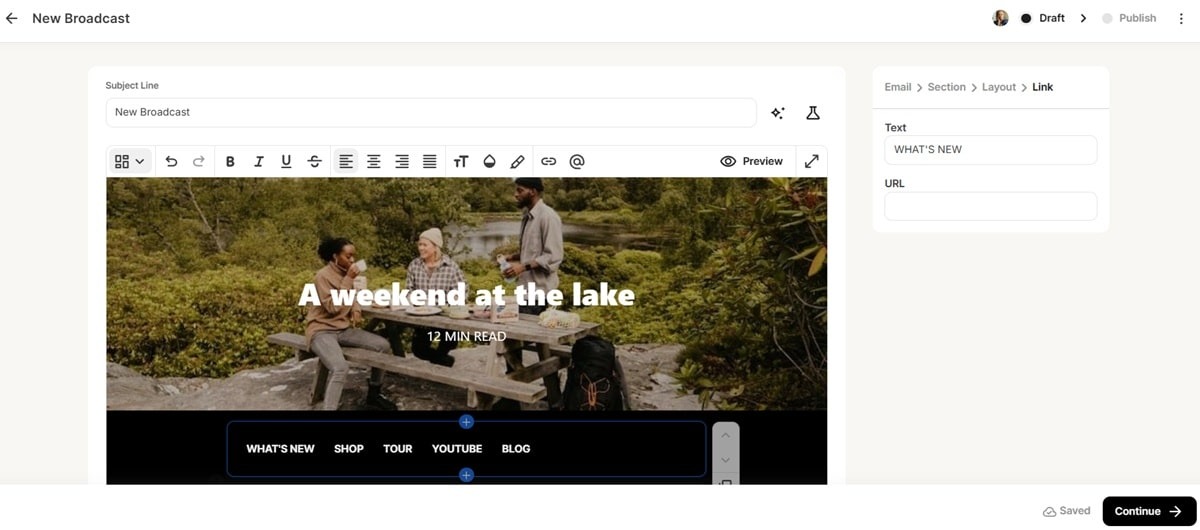
Built-in AI features help you create your emails even further and boost their performance. Use AI to generate subject lines, email content, and optimize send time based on individual recipients’ behavior.
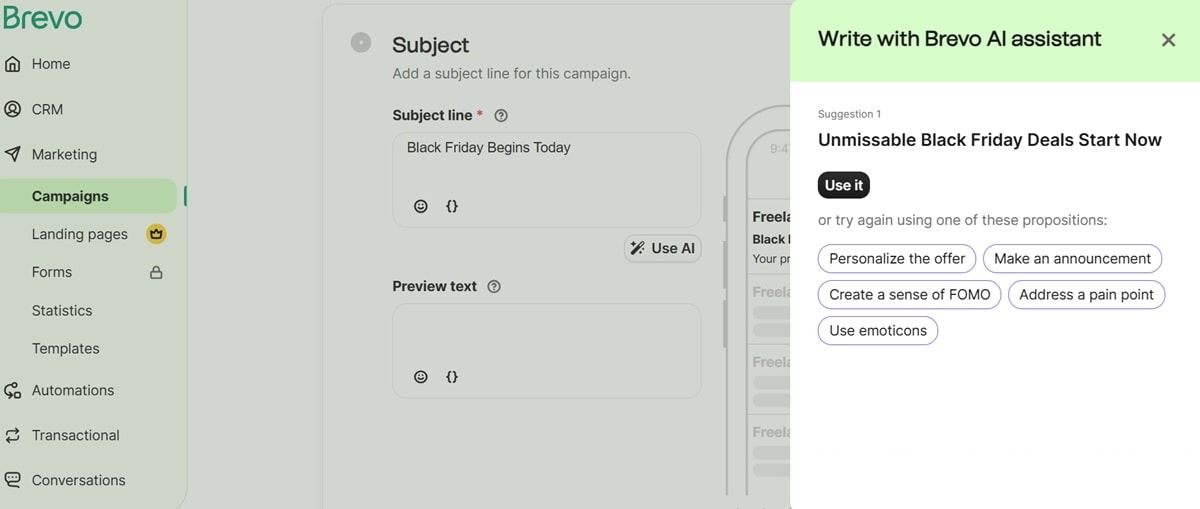
The predictive sending AI sends your emails at specific times when each recipient is most likely to open them.
Advanced segmentation is made possible on Brevo through dynamic email lists. This means customers are moved from one email segment to another automatically based on their engagement behavior.
Brevo helps you segment customers based on purchase history, demographics, engagement levels, or other parameters relevant to your business.
Ready-made automation workflows and autoresponders automate your campaigns to boost engagement and recover lost sales. Welcome series, abandoned cart recovery, and birthday workflows are all available. The automation builder also lets you create unique workflows from scratch, complete with time delays and split paths.
What we like
| Strength | Why it matters |
|---|---|
| Email-volume pricing | Can work well for large databases with moderate sending. |
| Email, SMS, WhatsApp, and transactional email | Useful for multichannel customer communication. |
| CRM-style features | Good for small teams that need basic contact management. |
| Free daily email allowance | Helpful for early testing and low-volume senders. |
What we don’t like
| Limitation | Who should care |
|---|---|
| Automation and advanced reporting are tier-dependent | Growing teams should compare Standard and Professional tiers. |
| Branding removal may require plan changes or add-ons | Brand-sensitive teams should check total cost. |
| UI performance complaints appear in reviews | Teams managing large campaigns should test workflow speed. |
Pricing
Many consider Brevo one of the best free email marketing services because the free plan lets you upload contacts and, once your account is approved for sending, send up to 300 emails per day. Basic email marketing features are available on the free plan, but advanced automation, reporting, and branding options depend on the plan you choose.
Paid Starter plans begin at $8.08/mo when billed yearly, or $9/mo when billed monthly, for 5,000 emails per month. If you want to remove Brevo branding, Brevo lists that as a separate monthly add-on unless you upgrade to a higher plan. That can make the Starter plan less attractive for brand-sensitive teams. In many cases, it may make more sense to compare the full cost of Starter plus branding removal against the Standard plan.
The plan supports both email and SMS campaigns, up to 5,000 monthly email sends, an AI content generator, forms, and basic reporting & analytics.
The Standard plan starts at $16.17/mo when billed yearly, or $18/mo when billed monthly, from 5,000 emails per month. It removes Brevo branding and includes marketing automation. A/B testing, advanced email reporting, event & website tracking, and send time optimization are included here.
The Professional plan starts at $449.08/mo when billed yearly, or $499/mo when billed monthly. It includes higher email volume and more advanced multichannel features such as WhatsApp, mobile and web push notifications, and pop-ups. Multi-user access, contact scoring, AI segmentation, deliverability specialist support, and an AI data analyst are part of the package.
Brevo’s Enterprise plan supports high-volume sending and custom needs. It includes dedicated IP addresses for optimal email deliverability, multi-account management to manage multiple brands from one dashboard, tailored onboarding, and SSO and SAML.
G2 rating: 4.5/5
5. ActiveCampaign: best for advanced automation and CRM-connected journeys
ActiveCampaign is best for experienced teams that need deep automation, CRM-connected workflows, and AI-assisted campaign building.
Active Intelligence creates entire campaigns based on your prompt or description. It can design emails, write subject lines and email copy, optimize send times, and personalize the messaging for each recipient. The AI even provides real-time suggestions to optimize your campaign performance.
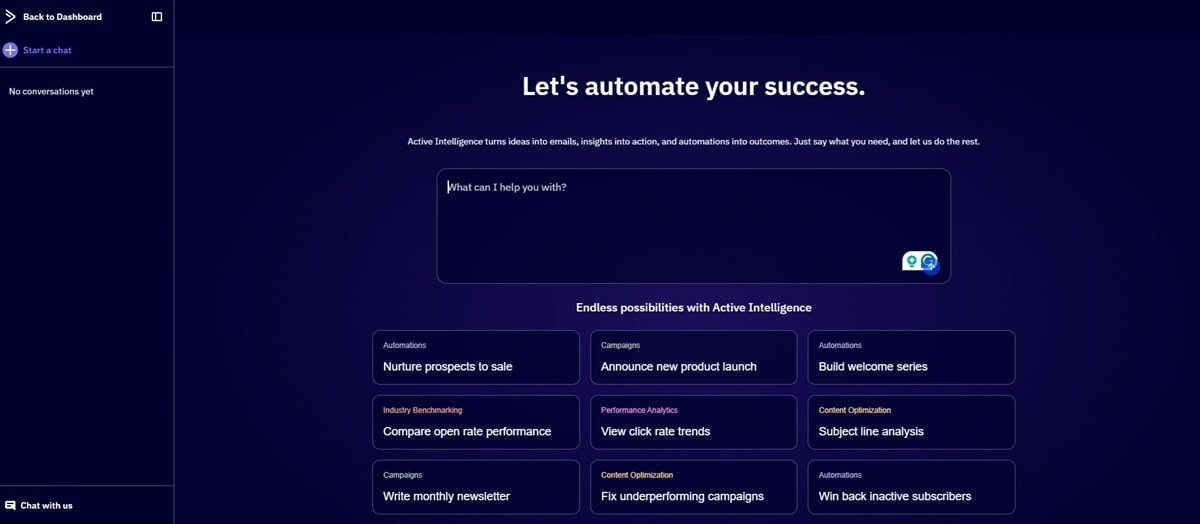
In case you still want to do it the old school way, ActiveCampaign provides a drag-and-drop email editor and customizable templates.
ActiveCampaign supports email automations powered by their AI tool. The AI uses real-time data on performance and customer sentiment to adjust your automation workflows for maximum engagement and results. You can prompt the AI to create workflows from scratch as well.
An automation builder is available if you want to build workflows yourself. The builder supports conditional logic and split paths to take customers down different automation paths based on their engagement with your campaigns.
What we like
| Strength | Why it matters |
|---|---|
| Deep automation builder | Strong for complex customer journeys. |
| CRM-connected workflows | Useful for sales-led or B2B teams. |
| AI-assisted campaign and automation features | Helps advanced teams move faster. |
| Strong segmentation options on higher tiers | Supports lifecycle and behavioral campaigns. |
What we don’t like
| Limitation | Who should care |
|---|---|
| Learning curve | Beginners may need setup time. |
| Advanced features are tier-dependent | Buyers should compare Plus, Pro, and Enterprise carefully. |
| CRM and sales features may add complexity or cost | Newsletter-only teams may not need the full system. |
Pricing
ActiveCampaign’s Starter plan starts at $15/mo when billed annually for 1,000 contacts and includes email sends equal to 10x your contact limit. It supports 5 actions per automation, A/B testing for emails, limited segmentation, and includes an AI-powered automation builder.
The Plus plan starts at $49/mo when billed annually for 1,000 contacts and includes email sends equal to 10x your contact limit. It includes web forms, landing pages, email & landing page templates, A/B testing for emails only, generative AI features, and standard segmentation.
ActiveCampaign is slightly more expensive than an email marketing software like GetResponse when you consider what you’re getting for the price.
For example, the Plus plan costs $49/mo, but you don’t get unlimited email sends. Conditional content, advanced segmentation, and predictive sending are also not included in that plan. In contrast, GetResponse’s Marketer plan provides all those features at a starting price of $48.38.
You must upgrade to ActiveCampaign’s $79/mo Pro plan, billed annually, to access those features. Even then, monthly email sends are capped at 12X your contact list size.
Check out our ActiveCampaign alternatives guide for more information about better or more affordable solutions.
The Enterprise plan starts at $145/mo when billed annually for 1,000 contacts. It includes 5 users, premium segmentation, SSO, and higher-tier support features.
SMS and WhatsApp messaging are available as an add-on, but you must be on the Plus plan or above.
G2 rating: 4.4/5
6. Kit: best for creators monetizing newsletter audiences
Kit is best for creators who want to grow an audience, send newsletters, build simple automations, and monetize with digital products or paid content.
Other marketing tools you may want to look at in that category are Beehiiv and GetResponse’s content monetization platform.
Kit’s email platform provides web forms and a landing page creator for collecting email addresses. It also features a simple email editor, where you can design an email from scratch or customize a template from the library.
Kit automations let you engage customers and sell digital products on autopilot. Several pre-built automation workflows are available. The workflow builder also helps you create custom customer journeys.
Since it’s a creator-focused platform, Kit provides content monetization tools for selling digital products, subscriptions, and even ads. You can use the platform to create premium newsletters and sell online courses, for example.
Kit ads allow creators to monetize their newsletters through brand partnerships.
What we like
| Strength | Why it matters |
|---|---|
| Creator-first positioning | Strong for newsletter creators, educators, bloggers, and solo businesses. |
| Generous free Newsletter plan | Lets creators build an audience before paying. |
| Forms, landing pages, and tagging | Covers core audience growth needs. |
| Monetization tools | Useful for selling digital products and paid newsletters. |
What we don’t like
| Limitation | Who should care |
|---|---|
| Limited cross-channel marketing | Ecommerce and multichannel teams may need more. |
| Advanced analytics and testing require higher tiers | Serious newsletter operators should compare Creator Pro. |
| Less suitable for B2B or ecommerce lifecycle automation | Teams needing sales pipelines or cart recovery may need another platform. |
Pricing
Kit has only three plans. A free Newsletter plan that lets you send emails to up to 10,000 subscribers. The free plan includes one basic visual automation, one email sequence, and one user. It also supports landing pages, unlimited opt-in forms, audience tagging, subscription/paid newsletters, and selling digital products.
The free plan lacks A/B testing and deliverability reporting. Newsletters will also contain the Kit branding.
The Creator paid plan starts at $33/mo, billed yearly, for 1,000 subscribers. Pricing increases with the number of subscribers.
The plan removes Kit branding and adds more creator growth features, including Paid Recommendations, where you’ll get paid for promoting other newsletters and creators from the Kit creator network. Kit collects 23.5% in paid recommendations fees.
The Creator Pro plan adds more features like deliverability reporting, the ability to edit links in emails you’ve already sent, A/B testing, Facebook custom audiences for ad targeting, and an insights dashboard showing campaign performance.
All plans attract a 3.5% + 30c transaction fee on digital products and subscriptions.
G2 rating: 4.4/5
7. Constant Contact: best for small businesses that need simple campaigns and event promotion
Constant Contact is best for small businesses and nonprofits that want simple email marketing, basic automation, event promotion, and guided setup
Constant Contact’s email marketing software includes a drag-and-drop editor. It also offers a selection of beautiful email templates you can customize to reflect your own branding style.
The automation builder helps you create workflows to automate repetitive tasks like welcoming new subscribers, re-engaging lapsed customers, and recovering abandoned carts. Use the platform to create workflows from scratch by describing the triggers, conditional splits, time delays, and actions.
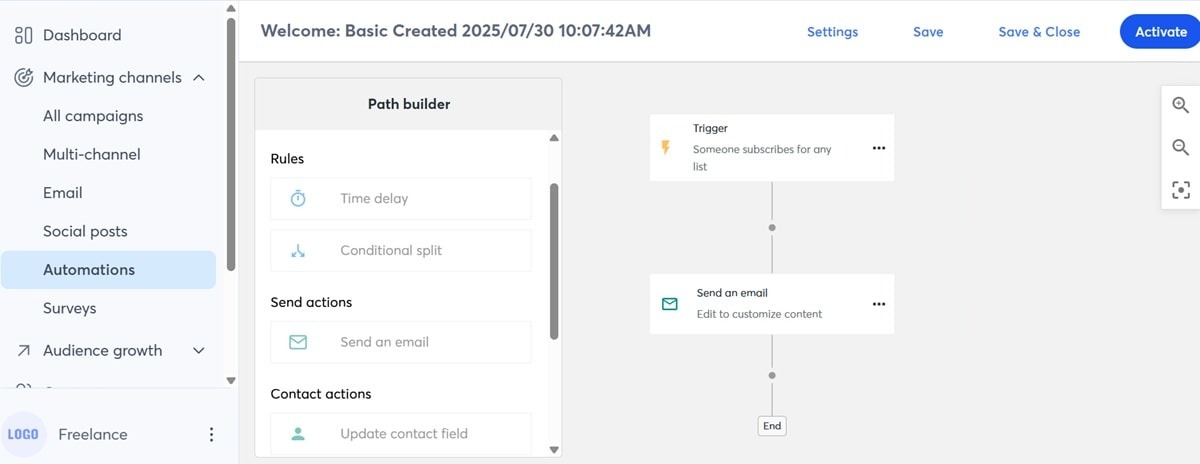
The platform includes AI features like the conversational AI writing assistant. The AI tool helps with content repurposing as well. It can repurpose email content into a social media post, for example.
What we like
| Strength | Why it matters |
|---|---|
| Simple campaign creation | Good for small businesses without dedicated marketers. |
| Event and nonprofit fit | Useful for local businesses, organizations, and community-driven marketing. |
| AI writing and brand kit features | Helps small teams produce campaigns faster. |
| Broad small-business positioning | Good for teams that need guidance and templates. |
What we don’t like
| Limitation | Who should care |
|---|---|
| No permanent free plan | Budget-sensitive teams may prefer tools with free tiers. |
| Some useful features sit on higher tiers | Teams needing A/B testing, dynamic content, or deeper automation should compare plans. |
| Email preview add-on can increase cost | QA-heavy teams should include this in total cost. |
Pricing
Constant Contact’s Lite plan starts at $12/mo for 500 contacts. Email volume is 10X your contact size, so 5,000 monthly email sends.
The plan provides basic email marketing features. It lacks critical capabilities like dynamic content, scheduled email sends, and A/B testing for subject lines. You also get just one automation template and one contact segmentation.
The Standard plan starts at $35/mo for 500 contacts and 12X monthly email sends (6,000 emails). You get unlimited automations, up to three users, and subject line A/B testing. It also includes AI content recommendations and a social media marketing tool.
The Standard plan includes more automation and testing features than Lite, but inbox preview is still sold as a $10/mo add-on.
You must spend at least $80/mo on the Premium plan to get dynamic content. The plan’s monthly email sends are 24X your contact list size. It includes engagement heat maps, unlimited users, eCommerce automation templates, custom automations, and eCommerce segmentation.
G2 rating: 4.1/5
8. Klaviyo: best for data-heavy ecommerce lifecycle marketing
Klaviyo is best for ecommerce teams that need advanced segmentation, predictive analytics, email, SMS, and customer-profile-based campaigns.
The email marketing service integrates with your eCommerce, CMS, and CRM to pull customer data and personalize campaigns. Klaviyo even provides a data management platform to unify and manage your customer data from one place. But the service is sold separately at quite a steep price of $500/mo.
Designing emails on Klaviyo is pretty straightforward. There’s a library with a good selection of templates to pick from. The drag-and-drop editor and AI assistant also simplify the design process.
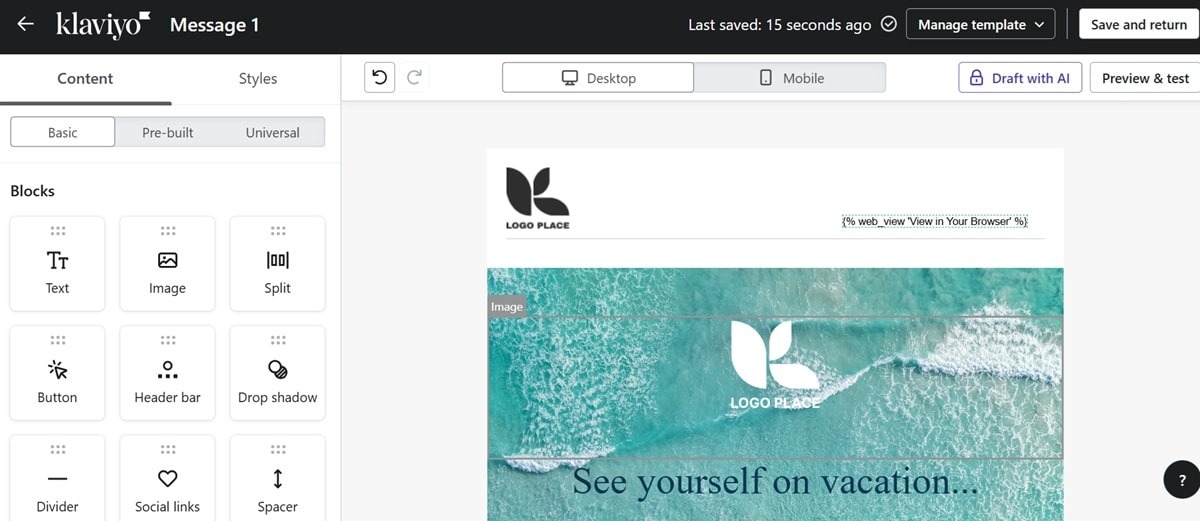
Klaviyo’s AI tool, called K:AI, helps teams create and deploy marketing campaigns within minutes. Upload your site’s URL, and the tool will pull together your branding. It then analyzes your business and suggests relevant campaigns.
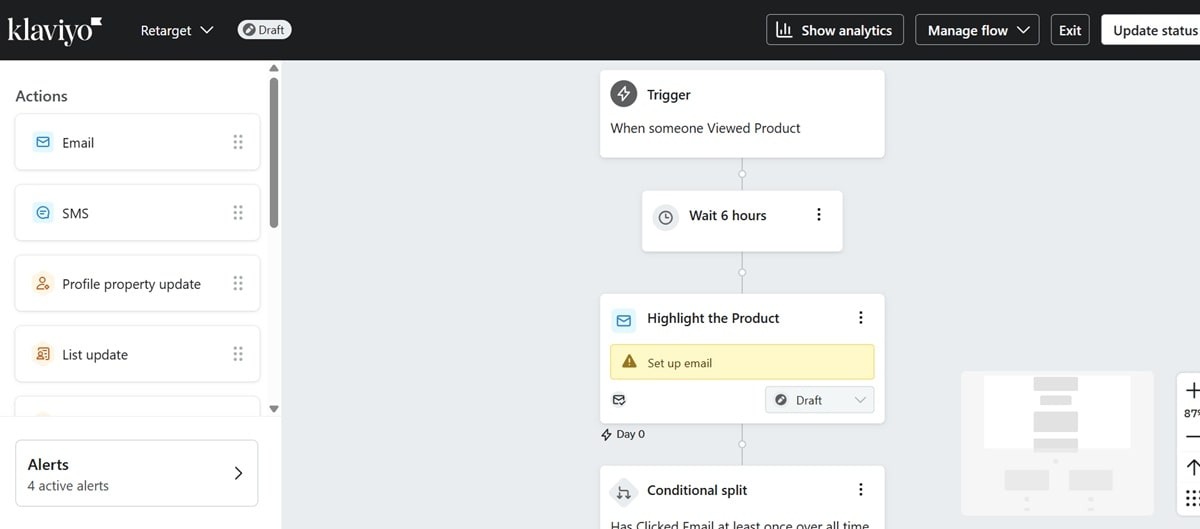
There’s also an AI assistant that helps with marketing automation. Write a prompt describing the campaign you have in mind, and Flows AI will create that workflow for you.
What we like
| Strength | Why it matters |
|---|---|
| Strong ecommerce data model | Useful for Shopify, WooCommerce, and product-led lifecycle campaigns. |
| Predictive analytics and customer profiles | Helps teams segment by behavior and purchase intent. |
| Email and SMS support | Strong for ecommerce lifecycle messaging. |
| Advanced personalization | Useful for mature stores with enough customer data. |
What we don’t like
| Limitation | Who should care |
|---|---|
| Expensive as needs grow | Smaller ecommerce teams should model costs carefully. |
| Advanced features and add-ons can raise total cost | Teams should include analytics, reviews, SMS, and CDP-style needs in the comparison. |
| Steep learning curve | Teams without lifecycle marketing experience may need onboarding time. |
Pricing
Klaviyo has a free plan for up to 250 active profiles and 500 email sends per month. It also includes 150 monthly mobile message credits, built-in reporting, and email support for the first 60 days.
Paid email marketing plans scale by active profile count and email volume. For 1,500 active profiles, Klaviyo currently shows email pricing from $45/mo with 15,000 monthly email sends.
If you want both email and SMS marketing at the 1,500 active profile tier, Klaviyo currently shows Email + SMS pricing from $60/mo, including email sends and mobile message credits. SMS marketing features like SMS smart opt-in are also included.
One key drawback with Klaviyo is that you must spend an extra $100/mo on Marketing Analytics for up to 1,500 active profiles to personalize cross-selling campaigns and target users based on purchase behavior.
Review requests are also sold separately, starting at $25/mo.
G2 rating: 4.6/5
Looking for transparent pricing without hidden fees?
Unlike platforms that charge extra for essential features like deliverability monitoring, product recommendations, and analytics, GetResponse includes everything you need in straightforward plans with no surprises.
9. Mailchimp: best for beginners who want a familiar email platform
Mailchimp is best for beginners and small teams that want a familiar editor, broad integrations, and standard email marketing workflows.
The Mailchimp email automations pull contact data from your CRM or eCommerce platforms like Shopify to automate personalized campaigns. It can send personalized product recommendation emails based on the items a customer browsed on your store, for example.
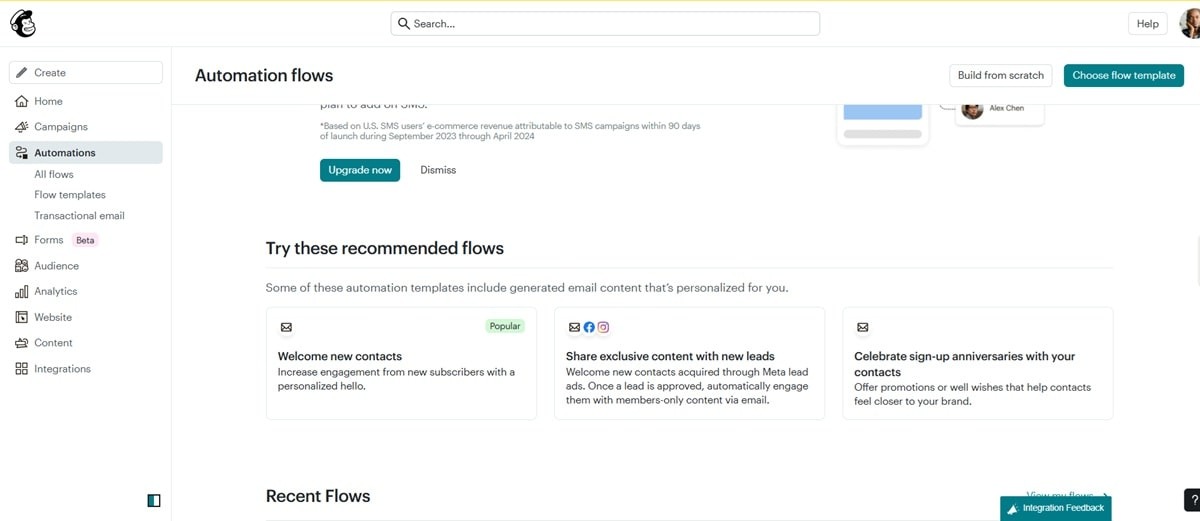
Marketing automation flows help you build custom workflows for specific goals or to target certain types of customers. You can create workflows that target your biggest spenders, for example. It also lets you create workflows that drive repeat purchases and customer loyalty.
Intuit Assist is Mailchimp’s AI assistant that helps with creating email content. Simply prompt the AI by describing your campaign goal.
The audience management tool lets you segment customers and target them with relevant email campaigns. The solution provides real-time insights into your customers’ interests, behaviors, and purchase patterns. The data is used to create insightful contact profiles.
The major drawback with Mailchimp that forces most people to go with alternative solutions is that it gets expensive fast. Each plan has contact limits. Upgrades tend to be steep once you hit those limits.
What we like
| Strength | Why it matters |
|---|---|
| Familiar interface | Reduces onboarding friction for beginners. |
| Broad integrations | Useful for teams already using common SMB tools. |
| Good template and campaign basics | Works for standard newsletters and promotions. |
| AI and automation features on paid tiers | Gives growing teams more capability over time. |
What we don’t like
| Limitation | Who should care |
|---|---|
| Free plan is limited | New senders may outgrow it quickly. |
| Costs can rise with list size and send volume | Growing lists should calculate future tiers. |
| Send caps can restrict frequent campaigns | High-frequency senders may prefer unlimited-send plans. |
Pricing
Mailchimp’s free email marketing software supports fewer than 250 contacts, with a maximum of 500 email sends per month or 250 sends per day. It doesn’t support any automations, though. That means MailerLite, Brevo, and GetResponse have better free email marketing services.
Paid plans start at $13/mo for Essentials, with monthly email sends equal to 10x your contact limit. At 500 contacts, that equals 5,000 monthly email sends. The monthly email send volume adjusts based on how many subscribers you have. For example, the Essentials plan allows monthly email sends equal to 10x your contact limit, so a 1,500-contact tier would allow up to 15,000 monthly email sends.
Most people would consider this pricing model limiting when compared to alternatives like MailerLite and GetResponse that offer unlimited email sends, even in entry-level plans.
The Essentials plan supports up to 4 automation flow steps, 3 audiences, and removes Mailchimp branding.
The Standard plan starts at $20/mo for 500 contacts. It includes up to 200 automation flows, monthly email sends equal to 12x your contact limit, five seats, five audiences, dynamic content, and custom reports.
The Premium package is built for larger teams that want advanced tools, priority support, unlimited users, and unlimited audiences. Pricing starts at $350/mo after the current promotional period shown on Mailchimp’s pricing page.
G2 rating: 4.3/5
In closing
The best email marketing platform supports lead generation, is easy to use, offers powerful automations, and maintains a high deliverability rate.
Of course, we’d like it if you tried our email marketing solution. We support unlimited monthly email sends across all our paid plans, something that most other providers don’t offer. Our deliverability rate has also been at 99% for over 20 years.
Plus, we have intuitive drag-and-drop editors for building emails and automation workflows.
That said, we understand that one solution can’t work for everyone. Analyze your needs, then use our buyer’s guide above to find the best email marketing software for your business. Try GetResponse for free, no credit card required.
FAQ: Choosing the best email marketing tool
What is the best email marketing tool overall?
There is no single best email marketing tool for every business. GetResponse is a strong all-in-one option for teams that want email marketing, automation, forms, landing pages, ecommerce workflows, and unlimited sends on paid plans.
Which email marketing tool is best for ecommerce?
Omnisend and Klaviyo are strong ecommerce-focused platforms. GetResponse is also a strong choice for ecommerce teams that want email automation plus landing pages, popups, forms, and broader marketing tools.
Which email marketing platform is best for beginners?
Mailchimp, MailerLite, Constant Contact, and GetResponse are all beginner-friendly options. MailerLite is strong for simplicity and affordability, while GetResponse gives beginners more room to grow into automation and multichannel marketing.
Which email marketing tool has the best free plan?
The best free plan depends on whether you care more about contacts, monthly sends, automation, or branding. Kit is generous for creators, MailerLite is useful for small newsletter lists, Brevo works for low daily sending, and GetResponse offers a free entry point with list-building tools.
Which tool is best for advanced automation?
ActiveCampaign is strong for advanced automation and CRM-connected workflows. GetResponse is a strong option for teams that want automation plus ecommerce tools, landing pages, forms, popups, and unlimited sends on paid plans.
Which email marketing tool is best for creators?
Kit is the most creator-focused platform in this list. GetResponse Creator is also worth considering for creators who want email marketing, premium newsletters, webinars, courses, landing pages, and broader monetization tools.
Is Klaviyo worth it for small businesses?
Klaviyo is usually best for ecommerce teams that can use advanced segmentation, predictive analytics, customer profiles, and SMS. Smaller businesses that mainly need newsletters and basic automations may find simpler tools more cost-effective.
Is Mailchimp still worth using?
Mailchimp can still be a good choice for beginners and teams that want a familiar email platform with broad integrations. Growing teams should compare future pricing, send limits, automation access, and ecommerce features before committing.
What should I compare before choosing an email marketing platform?
Compare contact limits, monthly send limits, automation access, list-building tools, landing pages, ecommerce integrations, SMS pricing, support, branding removal, migration effort, and pricing at your future list size.
When should I switch email marketing tools?
Consider switching when your current platform becomes too expensive, limits your send volume, lacks the automation you need, slows down your team, or forces you to rely on too many extra tools for basic marketing workflows.
![SMS Compliance Checklist for Ecommerce [2026 ]](https://programmerschallenge.tech/wp-content/uploads/2026/07/SMS-Compliance-Checklist-for-Ecommerce-2026-768x385.png)


![Examples and Strategy [2026 ]](https://programmerschallenge.tech/wp-content/uploads/2026/07/Examples-and-Strategy-2026-768x385.png)