Customer support automation: What works in 2026
Customer support teams are handling more tickets without a matching increase in headcount. At the same time, 67% of customers expect companies to resolve their issues within three hours.

Many teams still layer AI onto manual routing, siloed tools, and rule-based bots that deflect tickets rather than resolve them. Effective AI in customer service connects AI agents, automated workflows, knowledge, and CRM data so teams can resolve repeatable requests quickly and reserve human judgment for sensitive or complex issues.
HubSpot is a customer platform that gives humans and AI agents shared access to complete customer context in one place. Service Hub automation brings tickets from chat, email, calling, WhatsApp, and Facebook Messenger into the help desk, where teams can route, prioritize, and manage them.
Customer agent uses synced content and CRM context to answer questions, take approved actions, and hand off conversations when it cannot confidently resolve them. HubSpot reports that the customer agent has resolved more than half of support conversations for some customers.
Table of Contents
What is customer support automation?
Customer support automation uses AI agents, chatbots, automated workflows, and self-service tools to handle repetitive support tasks with minimal human involvement. Those tasks can include creating and routing tickets, answering frequently asked questions, sending status updates, collecting feedback, and completing approved account actions.
Automation can answer a shipping question with a knowledge base article, reset a password through an AI agent, or route a billing dispute to a trained human. Its purpose is to resolve predictable requests efficiently while giving support agents more time for cases that require empathy, judgment, or complex troubleshooting.
Rule-based bots represent the earliest form of support automation. They rely on keywords and decision trees, which work well for tightly scripted scenarios but often fail when customers phrase questions in unexpected ways.
AI-assisted tools add reply recommendations, ticket summaries, and relevant knowledge suggestions. A human agent still reviews or completes the work.
Autonomous AI agents can interpret intent, ask clarifying questions, execute approved actions across connected systems, and resolve some inquiries end-to-end. That move from deflection to resolution distinguishes modern generative AI in customer service from earlier bots.
How does customer support automation work?
Customer support automation identifies a customer’s needs, selects the appropriate automated or human path, completes the available actions, and records the result. Effective systems connect four mechanisms:
- AI agents interpret customer intent, answer questions, complete approved actions, and resolve eligible inquiries.
- Automated workflows route, prioritize, assign, update, and escalate tickets according to defined conditions.
- Self-service knowledge gives customers and AI agents access to approved answers before a ticket requires human attention.
- Conversation analysis identifies patterns in support interactions that teams can use for coaching and process improvement.
A typical interaction begins when a customer sends a message through chat, email, or another connected channel. The system classifies the request by factors such as intent, topic, urgency, and available customer context.
The system can assign a repeatable request to an AI agent, route a specialized case to an appropriate human team, or escalate a sensitive issue immediately. When automation resolves the request, it records the interaction and can trigger follow-up actions such as a satisfaction survey. When a human takes over, the system should transfer the conversation history and relevant customer context with the case.
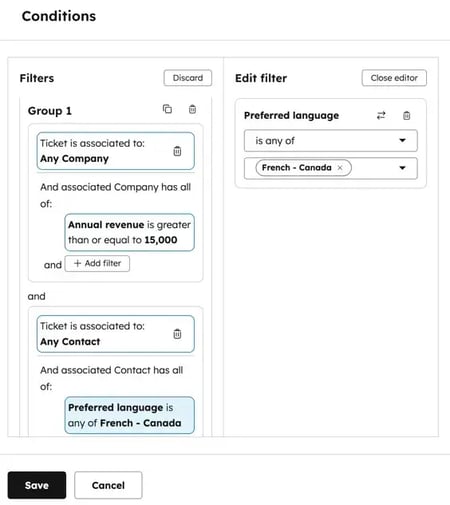
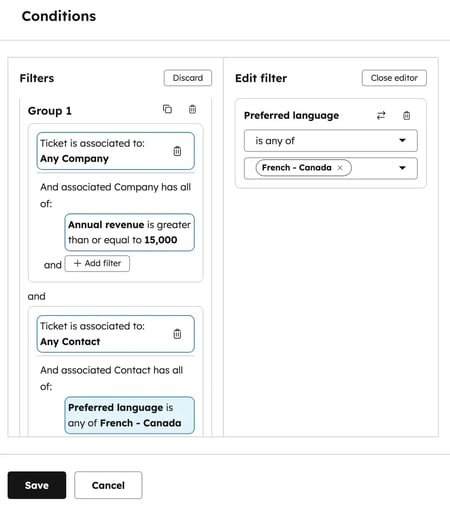
In Service Hub, intelligent ticket routing can assign incoming tickets to users, teams, or customer agents. Service Hub Enterprise also supports skill-based routing by criteria such as language and custom expertise.
What are the benefits and risks of customer support automation?
Customer support automation can improve response time, lower the cost of repeatable resolutions, extend service availability, and give agents more time for complex work. But it can also erode trust when teams automate sensitive cases or deploy bots without reliable context and escalation paths. The strongest AI service strategies define clear boundaries between automation and human support and measure both operational efficiency and customer outcomes.
Benefits
Faster Resolution Times
Automation can answer routine inquiries as soon as they arrive, rather than making each customer wait for a human agent. Freshworks reported that organizations using AI-powered support reduced first-response times from more than six hours to less than four minutes.
Youth on Course saw the same benefit while managing higher volume. Its support ticket volume increased 75%. Customer satisfaction still increased 7%.
Pro tip: Start with a narrow set of high-volume questions and sync only current, approved sources. Test the agent’s answers and handoff behavior before expanding the share of traffic it handles.
Lower Cost Per Interaction
Automation can lower a support team’s blended cost per resolution by moving repeatable work from human queues to AI agents. The result depends on the use case, the cost of the underlying systems, the percentage of inquiries automation resolves successfully, and the amount of human review or rework each resolution requires.
HubSpot’s customer agent uses HubSpot Credits and costs $0.50 per resolved conversation. Additional credits cost $0.01 each.
Support leaders should treat that figure as one component of total cost rather than compare it with a universal “human ticket” price. Total cost also includes software subscriptions, implementation, knowledge maintenance, integrations, quality review, and escalations.
HubSpot’s support migration shows how consolidation can create operational savings. After HubSpot moved its global support team from Salesforce and BoldChat to Service Hub, the company estimated $2.3m in annual headcount savings. Agent productivity increased 1.6x.
The larger opportunity comes from reallocating capacity. When agents spend less time on password resets and order-status requests, they can focus on retention, troubleshooting, and other work that requires judgment and relationship context.
Support Outside Standard Business Hours
Automation can answer eligible routine questions outside standard business hours, helping customers in different time zones get basic support sooner. Human agents remain essential for escalations, safety concerns, sensitive disputes, and cases the automated system cannot resolve.
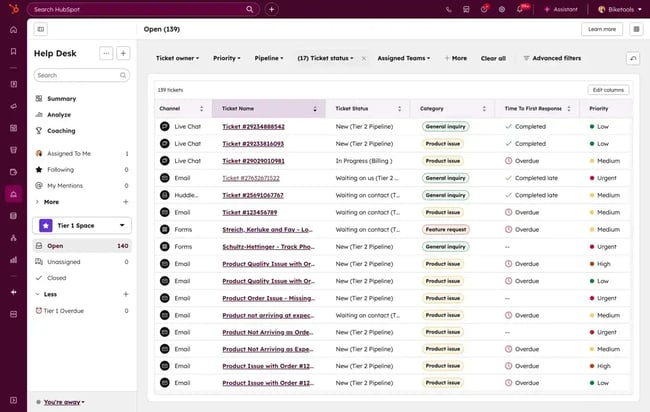
Service Hub help desk consolidates connected support channels into a single workspace. Customer agent can respond through assigned channels, use approved sources, and transfer a conversation according to the team’s handoff settings.
Kaplan Early Learning Company reported that AI chat resolved 25% to 30% of customer inquiries without human intervention, including inquiries outside business hours. Kaplan also reduced its average response time by more than 30%.
More Focus on Higher-value Work
When automation handles repetitive, well-documented requests, human agents can spend more time on complex troubleshooting, sensitive conversations, retention risks, and cases that require judgment.
That shift works best when support leaders pair automation with agent development. Managers can coach agents on escalated cases, improve advanced troubleshooting skills, and use recurring handoff patterns to identify gaps in workflows or knowledge.
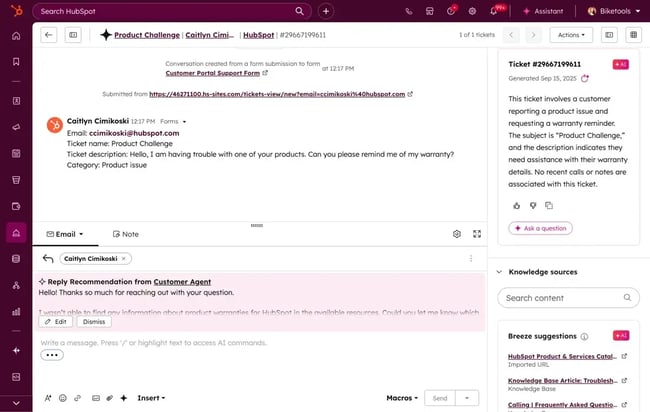
Service Hub help desk management supports ticket context, reply recommendations, custom views, and support macros that can apply a prepared response and trigger multiple ticket actions at once.
Camp Network reported that customer agent now handles 60% to 70% of its support inquiries. “It was remarkably easy to set up and has freed our team to focus on sales and marketing efforts,” says Andrew Downing, director of business development at Camp Network.
Risks
Over-automation erodes customer trust.
Automation creates friction when it handles situations that require empathy, negotiation, or subjective judgment. Billing disputes, account cancellations, emotionally charged complaints, security concerns, and unfamiliar edge cases usually require a human agent.
HubSpot research found that 54% of customer service leaders believe a human assisted by AI provides the best support for complex requests. That model uses automation to gather context, summarize the issue, and recommend information while a person makes the judgment call.
Support operations teams can protect trust by defining which issues automation may resolve, which signals require immediate escalation, and what context must accompany each handoff. Automate predictable work and route sensitive work to a prepared human.
A bad bot damages brand perception.
A bot provides poor customer service when it sends irrelevant articles, repeats the same response, ignores the customer’s context, or delays a timely human handoff. These failures add work for the customer instead of resolving the original problem.
Fragmented data often causes the problem. A bot cannot personalize an answer or transfer useful context when it operates separately from the knowledge base, ticket record, and interaction history.
Service Hub help desk connects tickets to HubSpot Smart CRM. That shared context helps customer agents use the current conversation and available customer information when responding or handing the ticket to a person.
Reliable knowledge and a clear handoff path matter just as much as the AI model. Teams should review source content regularly, test failed and low-confidence scenarios, and make human help easy to reach.
Customer Support Automation Use Cases
Customer support automation works best for repeatable interactions with a clear desired outcome, reliable source information, and rules that identify when a human should take over.
The five use cases below give support teams practical starting points. Each one pairs a support process with a recommended HubSpot tool, while the final section identifies the cases that human agents should handle.
FAQ Deflection and Self-service
Self-service automation answers repetitive questions using approved information before the customer needs to join a human queue. Common examples include return policies, setup instructions, shipping questions, password resets, and product documentation.
Recommended tools: Service Hub knowledge base and customer agent
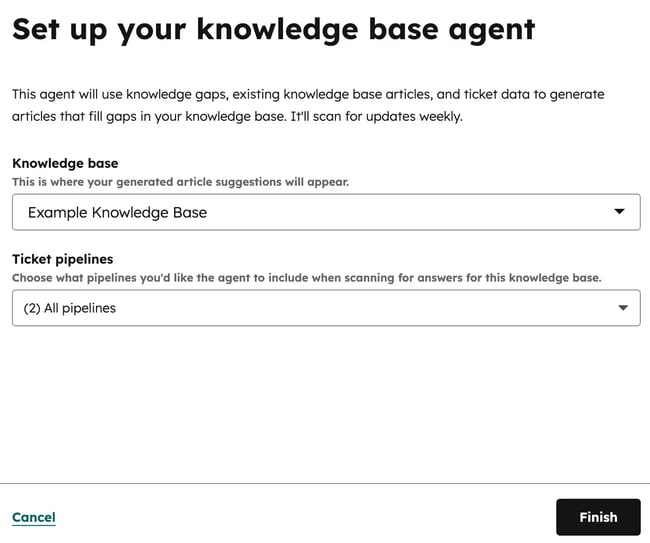
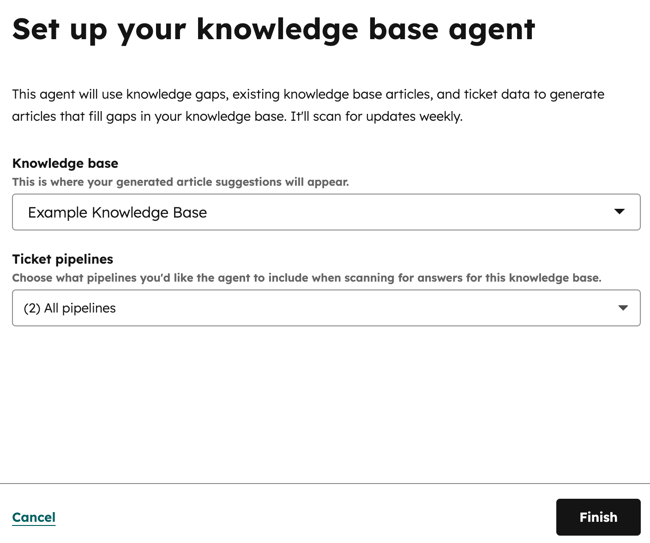
Service Hub knowledge base provides customers with a searchable source of support information. Knowledge base agent, currently in beta, can analyze closed tickets, identify missing topics, and prepare article drafts for human review and publication.
Customer agent uses synced knowledge base articles, website pages, files, and other approved sources to answer questions. It can ask a clarifying question or transfer the conversation when it cannot provide a confident, source-backed response.
- Knowledge-gap detection: Knowledge base agent analyzes ticket patterns to identify recurring questions that lack an article.
- Article drafting: The agent prepares drafts from historical ticket answers for a human to review, edit, and publish.
- Automated resolution: Customer agent uses synced content to answer eligible customer questions and to hand off cases according to configured rules.
Best for: Teams with a high volume of repeatable questions and enough approved support content to answer them consistently.
Pricing: Service Hub Professional starts at $90 per seat per month when billed annually and requires a $1,500 onboarding fee. Service Hub Enterprise starts at $150 per seat per month and requires a $3,500 onboarding fee. Customer agent costs $0.50 per resolved conversation and runs on credits; additional credits cost $0.01 each.
What we like: The knowledge base and customer agent reinforce each other. Ticket patterns can reveal missing content, and stronger content gives the customer agent a more reliable source for future answers.
Ticket Routing and Prioritization
Automated routing assigns incoming tickets according to defined business rules instead of requiring an agent to triage every request manually. Teams can use routing to separate routine questions, urgent cases, specialized issues, and requests that the customer agent should handle first.
Recommended tool: Service Hub help desk
Service Hub help desk can route incoming tickets to specific users, teams, contact owners, or customer agents. Service Hub Enterprise adds skill-based routing, which can match tickets to agents based on language or custom expertise.
- Automatic assignment: Route tickets to a selected user, team, contact owner, or customer agent.
- Workload distribution: Distribute eligible tickets through round-robin or load-balanced assignment.
- Skill-based routing: Service Hub Enterprise can match tickets to agents based on language and custom skills.
Best for: Teams that lose response time to manual triage or regularly misroute specialized, multilingual, or high-priority cases.
Pricing: Service Hub Professional starts at $90 per seat per month when billed annually and requires a $1,500 onboarding fee. Service Hub Enterprise starts at $150 per seat per month and requires a $3,500 onboarding fee. Skill-based routing requires Service Hub Enterprise.
What we like: The same routing structure can send a routine request to a customer agent while preserving a direct route to a qualified human for cases that require specialized judgment.
Automated Follow-ups and Satisfaction Surveys
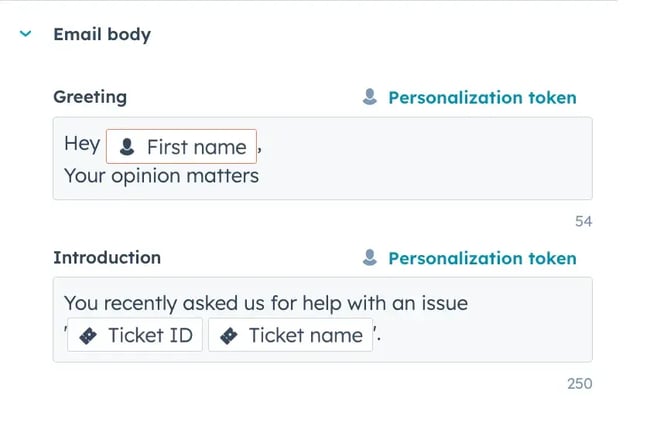
Support teams can trigger a survey or follow-up action when a ticket reaches a defined stage, such as closure. This captures feedback while the interaction remains recent and removes a follow-up task from the agent’s queue.
Recommended tool: Service Hub feedback surveys and workflows
Service Hub supports customer satisfaction, customer effort, net promoter score, and custom surveys. Teams can associate responses with contact records and use workflows to notify employees or initiate follow-up based on the result.
- Standard feedback measures: Collect customer satisfaction, customer effort, or net promoter score responses.
- Custom surveys: Add questions and formats that reflect the company’s support goals.
- Automated follow-up: Use workflows to notify teams or initiate an appropriate response after submission.
Best for: Teams that struggle to collect feedback consistently or need survey results to inform retention and service-improvement workflows.
Pricing: Feedback surveys and workflows are available with Service Hub Professional and Enterprise. Professional starts at $90 per seat per month when billed annually and requires a $1,500 onboarding fee. Enterprise starts at $150 per seat per month and requires a $3,500 onboarding fee.
What we like: Survey responses become part of the customer record rather than remaining in a disconnected feedback tool, giving service teams more context for follow-up.
Proactive Notifications and Outage Alerts
Proactive automation informs affected customers about service disruptions, shipping delays, account changes, or known product issues before they submit individual tickets. Timely outreach can reduce duplicate inquiries and help customers understand what has happened and what to expect next.
Recommended tool: Service Hub workflows
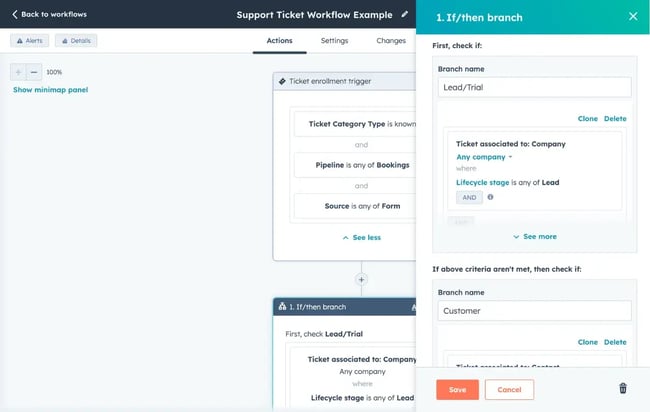
Service Hub workflows can enroll records when defined conditions are met and perform actions such as sending a message, updating a property, creating a task, or notifying an internal team. Support operations teams can use branches to tailor the response by customer segment, product, region, or ticket status.
- Enrollment triggers: Begin a workflow when a record meets the defined criteria for tickets, contacts, companies, or activities.
- Conditional branches: Send different records down different paths based on customer or issue context.
- Automated actions: Send notifications, update records, create tasks, and coordinate internal follow-up.
Best for: Companies that experience predictable volume spikes during incidents, delays, maintenance windows, or product changes.
Pricing: Workflows are available with Service Hub Professional and Enterprise. Professional starts at $90 per seat per month when billed annually and requires a $1,500 onboarding fee. Enterprise starts at $150 per seat per month and requires a $3,500 onboarding fee.
What we like: The workflow can use CRM and ticket data to limit outreach to customers who are actually affected, rather than sending a generic announcement to everyone.
Agent Assistance and Reply Recommendations
Agent-assistance tools support a human during an interaction rather than resolving the request independently. They can prepare a response, summarize the available context, and apply repeatable ticket actions while the agent retains control of the final answer.
Recommended tool: Service Hub help desk
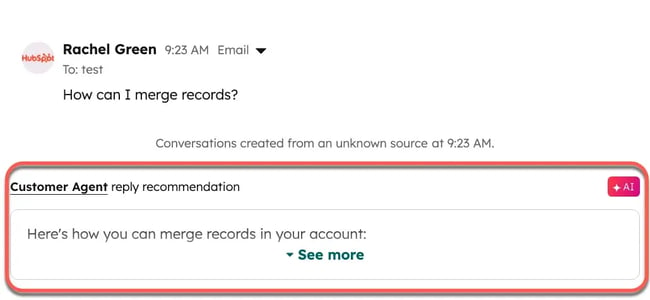
Reply recommendations in help desk use the conversation and content synced with the customer agent to prepare suggested responses. An agent can edit the suggestion, use it, review its sources, or dismiss it. Support macros can also apply a prepared response and trigger a linked ticket-based workflow.
- Reply recommendations: Generate a response from the current conversation and synced support content.
- Ticket context: Give agents relevant ticket and customer information in the same workspace.
- Support macros: Apply a reusable response and automate associated ticket actions through a workflow.
Best for: High-volume teams that want faster, more consistent responses without removing human review from complex cases.
Pricing: Reply recommendations, advanced help desk features, and macros are available with Service Hub Professional and Enterprise. Professional starts at $90 per seat per month when billed annually and requires a $1,500 onboarding fee. Enterprise starts at $150 per seat per month and requires a $3,500 onboarding fee.
What we like: The agent can review and edit the recommendation rather than automatically sending an AI-generated answer. Teams can also reinforce their positive scripting standards through approved source content and reusable responses.
What Not to Automate: Keep Humans in the Loop
Support teams should keep a human involved when an issue requires empathy, negotiation, subjective judgment, or specialized expertise. Keep humans in the loop for decisions with significant financial, legal, security, or relationship consequences as well.
Pro tip: Build escalation rules before expanding automation. Route sensitive, high-priority, security-related, or specialized cases to an appropriate human, and transfer the available conversation and customer context with the ticket.
How to Automate Customer Support
Effective automation begins with a clear map of customer needs, reliable source data, defined guardrails, tested workflows, and measurable rollout stages. The following five-step process helps support operations teams build customer support automation without sacrificing accuracy or human escalation.
Step 1: Map customer journeys and segment intents.
Start by identifying the customer intents that create the most support work, where they occur in the customer journey, and which ones follow a predictable resolution path. This map shows where automation can create value and where a human still needs to make a decision.
- Export at least 90 days of ticket data.
- Group tickets by the customer’s desired outcome, not just the words used in the subject line.
- Record the channel, volume, resolution time, escalation history, and whether the case required human judgment.
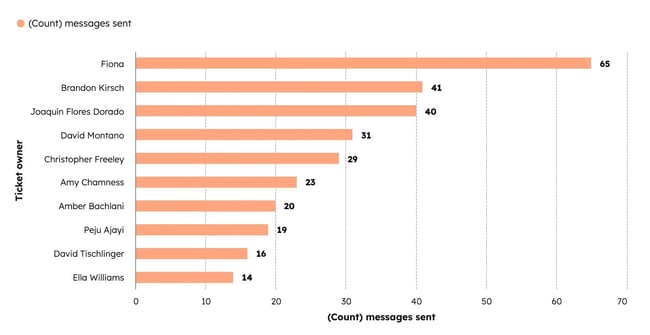
- Rank each intent by volume, complexity, risk, and the availability of approved source content.
Service Hub’s service analytics can surface ticket and service performance metrics. Teams can use those reports to identify large repeatable categories before choosing an automation tool.
My experience: I’ve found that teams often overestimate the complexity of their ticket mix. When we mapped intents for a mid-market SaaS team, 60% of its tickets fell into five categories that existing knowledge base content could support. The remaining 40% required human judgment, but removing the repeatable volume gave agents more time to handle those cases carefully. The mapping exercise took two days and shaped every later automation decision.
Step 2: Prepare data and guardrails.
Prepare the information automation will use and define the boundaries it must follow before building a live workflow. AI agents need current, approved sources and explicit instructions about what they may answer, what actions they may take, and when they must hand the case to a person.
- Review knowledge base articles for accuracy, duplication, ownership, and last-updated date.
- Remove or revise content that conflicts with current policies.
- Compare the knowledge base with the intent map to identify unanswered high-volume questions.
- Define escalation topics, prohibited actions, approval thresholds, tone, and handoff requirements.
- Assign an owner and review schedule to each critical source.
Knowledge base agent can analyze closed tickets and prepare draft articles for gaps it identifies. A human should review the sources, revise the draft, and approve it before publication.
Guardrails should specify which topics the customer agent may resolve, which customer or issue conditions require a human, and which approved actions it may perform. For example, an organization might allow the agent to report an order status but require a human to negotiate a refund.
My experience: I once watched a bot serve a return policy that the company had changed six months earlier. The customer received the wrong answer and filed a complaint, and the support team spent more time correcting the bot’s response than it would have spent answering the original question. Current source content determines whether an AI agent reduces work or creates more of it.
Step 3: Build workflows and customer-agent flows.
Turn the intent map and guardrails into workflows that route internal work and customer-agent configurations that handle eligible conversations. Build each path around a defined trigger, action, success condition, and human handoff.
- In HubSpot, open More, then navigate to Automation > Workflows. If More does not appear, open Automation > Workflows directly.
- Create the workflow with AI, a template, or a blank workflow.
- Define the records that should enroll and any conditions that should remove or re-enroll them.
- Add actions such as assigning a ticket, updating its status, sending a notification, creating a task, or routing the ticket for review.
- Configure customer agent with approved content, permitted actions, response guidelines, and handoff triggers.
- Test every branch, exception, and escalation path before activating the workflow.
Customer agent can use HubSpot content, public URLs, and supported files as knowledge sources. Teams can also configure actions, such as retrieving account information or resetting a password, once the required integrations and permissions are in place.
For voice interactions, conversation intelligence captures call data in HubSpot Smart CRM and helps teams identify coaching opportunities, competitive trends, recurring objections, and tracked terms. Managers can use those patterns to update knowledge, workflows, and agent training.
Pro tip: Track terms that signal recurring product questions, complaints, or competitor mentions. Use those patterns to identify new knowledge gaps or escalation scenarios instead of waiting for ticket volume to spike.
Step 4: Test with human agents in the loop.
Test every automated response, action, routing decision, and handoff before sending the workflow to the full customer base. Human reviewers should look for inaccurate answers, missed escalations, incomplete context, loops, policy exceptions, and intents the system classifies incorrectly.
Run a two- to four-week pilot with a limited set of high-volume, low-complexity intents. During the pilot, give agents a way to review, correct, and report problems with AI responses. Track at least four measures:
- Answer accuracy: Did the system provide the correct, current answer?
- Handoff rate: How often did it transfer a conversation to a human?
- Missed escalations: Which cases should it have transferred but did not?
- Customer satisfaction: How did customers rate automated interactions compared with similar human-handled interactions?
Customer agent includes a test experience where teams can ask sample or custom questions, test configured actions, rate responses, and coach the agent before deployment.
My experience: I’ve seen teams skip the pilot, launch automation to 100% of traffic, and spend the next month correcting misclassified tickets and frustrated-customer handoffs. Teams that started with 10% to 20% of volume for two to three weeks caught those gaps while the impact remained limited and the correction cycle stayed short.
Step 5: Roll out in phases and measure.
Expand automation by use case and customer volume only after the current phase meets its accuracy, handoff, and customer-experience targets. A phased rollout limits the number of customers affected by an error and gives the support team time to improve each workflow before adding more complexity. A practical rollout might follow this sequence:
- Phase 1, weeks 1 through 4: Automate first-response acknowledgments, straightforward routing, and well-documented frequently asked questions.
- Phase 2, weeks 5 through 8: Add customer-agent resolution for a small number of proven, high-volume intents.
- Phase 3, weeks 9 through 12: Add proactive notifications, agent-assistance features, and carefully tested channel or audience expansions.
Measure each phase against a baseline. Useful weekly measures include:
- Automation resolution rate
- Customer satisfaction for automated and human-handled interactions
- Handoff rate and handoff accuracy
- Repeat contact after an automated resolution
- Average time to resolution
- Cost per successful resolution
Service Hub service analytics and customer agent performance reports can help teams monitor support outcomes, identify knowledge gaps, and compare performance over time.
My experience: I track automation resolution, customer satisfaction, and escalation accuracy each week during a rollout. If one of those measures remains below its baseline for two consecutive weeks, I pause the expansion and correct the problem before beginning the next phase.
Frequently Asked Questions About Customer Support Automation
How do I decide what to automate first?
Start with high-volume, low-complexity intents that follow a predictable resolution path, use approved source content, and carry limited risk if the customer needs a human handoff. Review at least 90 days of ticket data and rank each intent by volume, time required, complexity, escalation history, and knowledge coverage.
Service Hub service analytics can help teams examine ticket and resolution performance, but support leaders should make the final prioritization decision after reviewing the underlying cases.
How do I keep agents bought in and trained?
Involve agents in intent mapping, workflow design, testing, and quality review before deployment. Show which repetitive tasks automation will remove, explain which decisions remain with people, and give agents a clear process for reporting inaccurate answers or failed handoffs.
Zendesk research found that 79% of agents believe an AI copilot strengthens their abilities. Teams can support that outcome by treating agent feedback as part of the automation-improvement process rather than imposing a finished system without explanation.
Managers can also use conversation intelligence to identify coaching opportunities and recurring call patterns. Training should focus on the complex cases automation escalates, including de-escalation, advanced troubleshooting, policy exceptions, and judgment calls.
How do I handle multilingual support without breaking quality?
Choose the languages the customer agent should use and give it accurate, approved source content in those languages. If no languages are selected, the customer agent can detect the language of the customer’s first message and respond accordingly.
Language detection does not replace content governance. A fluent reviewer should validate high-risk policies, legal or financial language, product terminology, and culturally sensitive phrasing before the team uses translated content as an automated source.
Configure human handoffs for languages or topics that lack complete approved coverage. Service Hub Enterprise can also use language skills in its routing rules to route a ticket to an agent who is appropriately fluent.
When should I escalate to a human agent?
Escalate when the customer asks for a person, the issue involves emotional distress, financial negotiation, account security, legal or safety concerns, an unsupported language or topic, or an action that requires human approval.
The customer agent can respond with a source-backed answer, ask a clarifying question, or reassign the conversation based on its confidence and handoff settings. Teams should also define handoff triggers for repeated failed attempts, prohibited topics, and cases that exceed the agent’s permitted actions.
Transfer the conversation history and available customer context with the case. A timely handoff to a prepared human creates less friction than asking the customer to repeat the issue or continue through a path that cannot resolve it.
How do I avoid a bad bot experience?
Give the automated system current-source content, define what it may and may not do, test for likely failures, and make human help easy to reach. Review low-confidence answers, abandoned conversations, repeat contacts, and handoffs to identify where customers encounter friction.
Connect support automation with the ticket record and HubSpot’s AI-powered Smart CRM so the system can use the available conversation and customer context. Keep the knowledge base current, remove contradictory guidance, and assign owners to high-risk policies.
Finally, tell customers when they are interacting with AI and provide a clear path to a person. Automation should reduce customer effort, not require people to repeatedly prove that the bot cannot solve the problem.
Customer support automation works best when AI and people share context.
Effective customer support automation connects reliable knowledge, clear workflows, customer context, and human judgment. Teams should begin with repeatable, low-risk intents, define escalation rules before launch, test with agents, and expand only when the data shows that automation resolves issues accurately.
Service Hub brings intelligent ticket routing, help desk, and knowledge base together with HubSpot’s AI-powered Smart CRM. Customer agent can handle eligible questions and approved actions, then transfer cases that need human expertise.
The goal is not to automate every interaction. It is to resolve predictable work efficiently and give human agents the context and capacity to handle the moments that matter most.