Be prepared with business continuity tools from Proton
Technical outages are becoming more frequent, ransomware attacks are spreading to smaller businesses, and the US administration has become more aggressive in restricting access to American technology.
No matter the cause or duration, every tech stack disruption stops your team from collaborating and your clients from reaching you. If you’re running a business, it means costly downtime. For governments or nonprofits, your mission could be at stake.
To help you stay operational through an outage, Proton services are now available as a business continuity solution. Over 100,000 organizations already use Proton Mail as their primary email provider because it’s more secure and private than Big Tech tools and operates on independent infrastructure based in Europe. Our Easy Switch for Business tool makes the transition simple. But for organizations that aren’t yet ready to ditch Big Tech entirely, you can now get the benefits of Proton for out-of-band communications.
When a crisis hits, you’ll be able to keep sending emails in Proton Mail, hosting video calls with Proton Meet, and staying productive in Proton Workspace. Setup is easy, and switching over during an outage is as simple as updating a single setting.
Why plan for outages
Many of the services you use every day share the same underlying infrastructure. The email and messaging apps your team relies on often run on a small handful of providers behind the scenes — Amazon Web Services, Microsoft Azure, and Google Cloud underpin most of the internet’s third-party software.
When one of them goes down, it can take your inbox and business communications down with it, all at once.
But the risk of relying on Big Tech is much bigger than the risk of downtime. US-based providers are legally obligated to comply with their own government — including orders to restrict or cut off service to customers outside the US.
No matter where your business is headquartered, your access to the tools you depend on could be revoked, not by a technical failure, but by a political one.
By design, Proton’s European infrastructure exists safely outside the Big Tech ecosystem, and our legal jurisdiction is in neutral Switzerland. We also have a 10-year track record of industry-leading uptime (we guarantee 99.95% under our SLA). All this makes Proton perfectly suited for any business seeking secure communication tools in an emergency.
Learn how to restore communication with Proton
A fallback that keeps you connected in a crisis
Your entire team can switch over to Proton Mail and Proton Meet for end-to-end encrypted email and video conferencing the instant your main communication service becomes unavailable.
You’ll be able to stay in touch with colleagues, communicate with partners, and support your clients seamlessly.
Here’s how to get set up and switch over during an incident:
Before an incident
1. Consult with our team
We start by understanding your existing business continuity framework — what you already have in place, where the gaps are, and which people and functions need to stay operational in a crisis. From there, we recommend the right mix of active and dormant accounts for your organization.
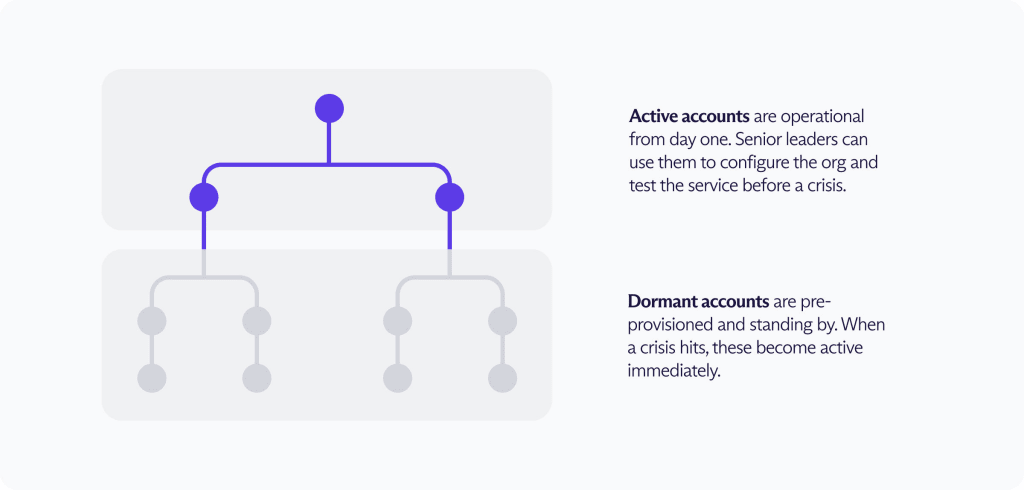
2. Designate your accounts
Active accounts go to the people who need to be operational at any minute, such as your IT administrators, business continuity coordinators, and senior leadership.
They can log in, configure the environment, and test the service at any time — before an incident occurs.
Dormant accounts are for other users who would only be activated during an incident. They’re pre-provisioned — set up with addresses that are tied to the right user and permission group and ready in the system to be activated instantly — at a reduced price.
3. Configure your domain
You can set up your organization’s email domain (e.g., “yourbusiness.com”) inside Proton Mail in advance.
By doing so, you’ll be ready to use your same email addresses within Proton Mail without any interruption. Or set up a new domain in advance, so you can forward mail and test the service before you need it.
You can also do both, combining a seamless transition for your team with the ability to prepare and test ahead of time.
During an incident
1. Activate dormant accounts
When a trigger event occurs, your IT administrator makes one DNS change — updating the MX record to point to Proton’s mail servers instead of your primary email service (whether Google’s or Microsoft’s or another). That’s all it takes.
Administrators can distribute credentials to their team ahead of time or share access links after the trigger event. Dormant accounts become active once users log in.
2. Your team logs in
Employees access their Proton Mail inbox using the credentials or access link provided by their administrator. There’s nothing new to install, no credentials to reset, and no training required in the middle of a crisis.
3. Keep operating
Your team has access to Mail and Meet. All of it runs on Proton’s independent infrastructure in Europe — separate from Google, Microsoft, and AWS — so whatever took down your primary stack won’t affect Proton.

How MX records switch over
Learn how to restore communication with Proton
Start preparing for disruption of your primary mail system today
Outages of some kind are all but inevitable. Whether it’s in a week or a year, preparing now will make the difference between a managed response and an operational crisis.