What Is Hosted VoIP? The Complete Business Phone Guide (2026)
Outdated phone systems are expensive, inflexible, and harder to support as teams become more distributed and customers expect faster communication.
Hosted VoIP gives businesses a cloud-based alternative to on-premises phone systems, with calling, messaging, mobility, and business phone features managed through a provider’s platform.
This guide explains what hosted VoIP is, how it works, how it compares to hosted PBX and cloud VoIP, what it costs, and how to choose the right provider for your business.
What Is Hosted VoIP?
Hosted VoIP is a cloud-based phone system where a third-party provider hosts and maintains all telecommunications hardware and software off-site. Instead of relying on traditional phone lines or on-site PBX equipment, calls travel as digital data over your internet connection.
Users access the phone system through the provider’s platform using desk phones, softphones, mobile apps, or browser-based tools. This gives employees business calling capabilities from the office, home, or on the road without requiring your business to manage in-house telephony infrastructure.
A hosted VoIP solution typically includes features such as call forwarding, voicemail transcription, auto attendants, call routing, video conferencing, and mobile access. For businesses, the main advantage is that infrastructure, maintenance, updates, and many reliability responsibilities shift to the provider, while the phone system remains scalable as teams, locations, and call volumes change.

How does hosted VoIP work?
Traditional phone systems use the Public Switched Telephone Network (PSTN), the legacy network of copper wires, switches, and carriers that connects landline calls. With an analog phone, your voice travels through that network as electrical signals.
Hosted VoIP works differently. VoIP technology converts your voice into digital data packets and sends them over an IP network, usually your business internet connection, instead of traditional phone lines.
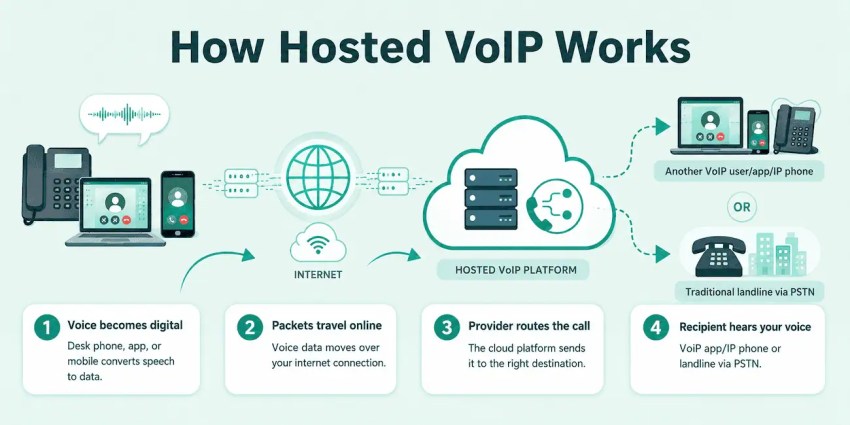
Here’s how a hosted VoIP call works:
- Your voice becomes digital: When you use a VoIP desk phone, softphone, or mobile app, your voice is converted into digital data.
- The packets travel over the internet: Those voice packets are sent through your internet connection to your hosted VoIP provider’s cloud platform.
- The provider routes the call: The VoIP provider acts like a cloud-based switchboard, using the number you dialed to route the call to another VoIP user, a mobile phone, or a traditional landline.
- The recipient hears your voice: If the call goes to another VoIP user, the data is decoded by their app or IP phone. If it goes to a traditional phone, the provider connects the call to the PSTN so the recipient can hear it on a regular phone.
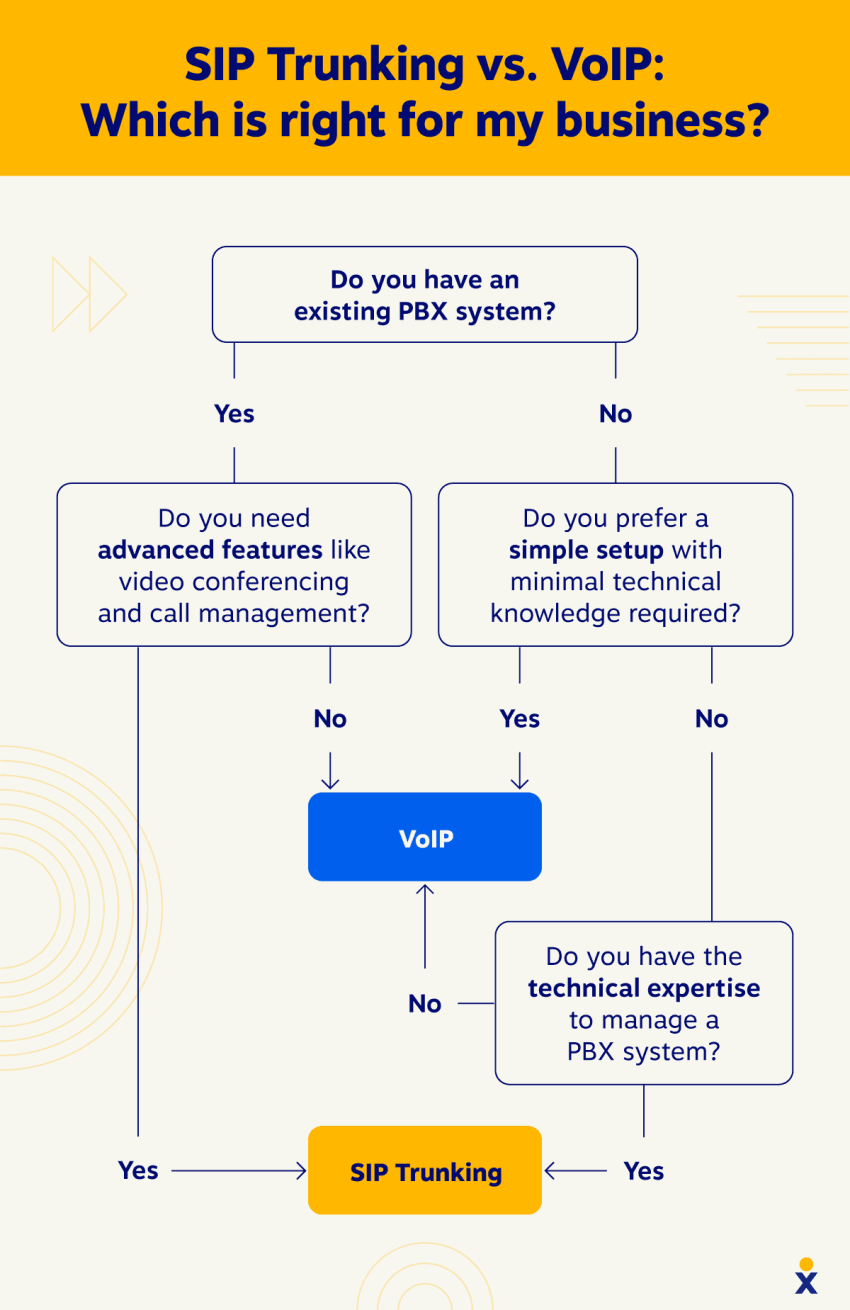
Some businesses also use SIP trunking to connect an existing PBX to internet-based calling. Session Initiation Protocol (SIP) Trunking can provide some VoIP benefits without replacing the entire phone system, while hosted VoIP moves the phone system itself to the provider’s cloud platform.
Benefits of Hosted VoIP
Hosted VoIP solutions offer a cost-effective, scalable, and feature-rich solution for businesses looking to improve communication and collaboration. Instead of maintaining on-site PBX hardware, businesses can add users, route calls, support mobile employees, and scale communication tools through a provider-managed system.
Reduce communication costs
Removes the need for expensive on-site PBX hardware, phone system maintenance, and many legacy phone line costs. Businesses can also lower domestic, long-distance, and international calling expenses compared to traditional phone service.
Many hosted VoIP plans include features such as voicemail, call routing, auto attendants, online faxing, and mobile apps, which can reduce the need for separate tools or add-on services.
Improve productivity and collaboration
Connects voice calling with tools employees already use, such as CRM systems, email, calendars, team messaging, and help desk platforms. This helps teams place calls, review customer history, log interactions, and follow up without switching between disconnected systems.
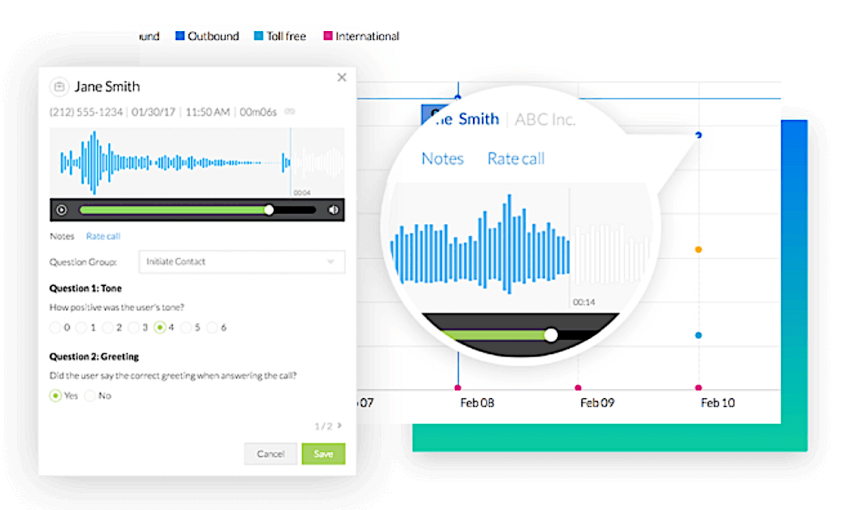
Features like voicemail-to-email, call recording, call notes, shared inboxes, and internal messaging also help teams respond faster and keep conversations organized.
Scale users, locations, and call flows faster
Easily add or remove users, phone numbers, devices, departments, and locations as your business changes. Unlike traditional phone systems, scaling does not usually require new PBX hardware or major on-site upgrades.
Employees can use desk phones, softphones, mobile apps, or browser-based calling, so teams can work from the office, home, or on the road with the same business phone system.
Centralize business communications
Consolidate voice calls, video meetings, team messaging, SMS, voicemail, and customer conversations into one platform. This reduces tool sprawl and gives employees a more consistent way to communicate across departments and locations.
For growing businesses, this centralized setup can also create a path toward UCaaS or contact center tools without replacing the entire phone system later.
Strengthen security and compliance controls
Leading hosted VoIP providers can support stronger security through encryption, secure data centers, network monitoring, access controls, and administrative permissions. These protections help reduce the risks that come with unmanaged devices, outdated phone hardware, or inconsistent communication tools.
Businesses should still review each provider’s security standards, compliance support, and admin controls before choosing a hosted VoIP solution.
Increase reliability and business continuity
You can improve availability when it is backed by redundant infrastructure, uptime SLAs, real-time monitoring, call forwarding, mobile apps, and failover options. If an office phone or local connection is unavailable, calls can often be rerouted to another device, location, or number.
This gives businesses more ways to keep customer calls moving during local outages, office closures, or unexpected disruptions.
Improve customer service
Provides customer-facing teams tools to answer and route calls more efficiently. Features like call routing, call queues, auto attendants, IVR, voicemail, call recording, analytics, and CRM integrations help businesses reduce missed calls and connect customers with the right person faster.
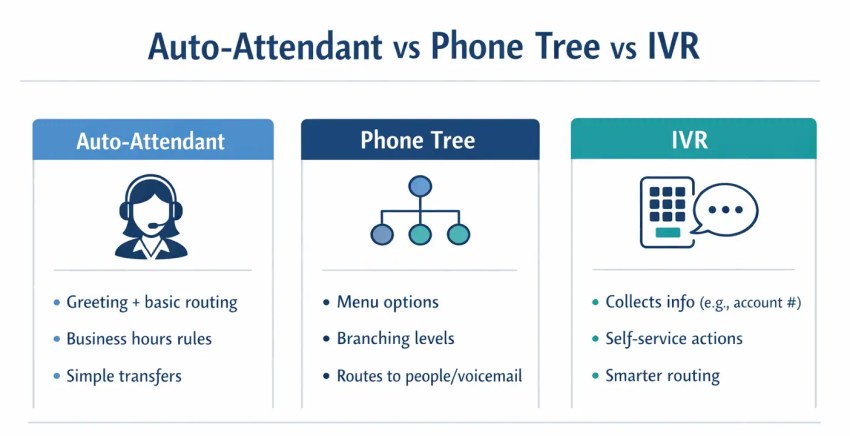
For teams with higher call volume, hosted VoIP can also integrate with call center or contact center tools, making it easier to provide 24/7 customer support across voice, chat, SMS, email, and other channels.
Hosted VoIP Reliability: Internet Dependency, Uptime, and Failover
Hosted VoIP relies on your internet connection, so overall reliability depends on both your business network and your provider’s infrastructure. If your internet or power goes down, calls can be disrupted unless you have backup routing and failover protections in place. With the right setup, however, hosted VoIP can remain highly dependable for everyday business use.
Your business can reduce interruptions with a stable high-speed connection, QoS configuration to prioritize voice traffic, battery backup, redundant internet, SD-WAN, cellular failover, mobile apps, call forwarding, and failover routing. Nextiva also recommends options such as 4G/5G-enabled routers, VoIP mobile apps, backup internet connections, and automatic failover to help keep calls moving during outages.
Provider infrastructure matters just as much. Look for features like geographically distributed data centers, redundant systems, continuous monitoring, transparent status updates, and a strong uptime SLA. Nextiva publishes 99.999% uptime and supports reliability with multiple points of presence, carrier-grade data centers, real-time monitoring, and automatic failover.
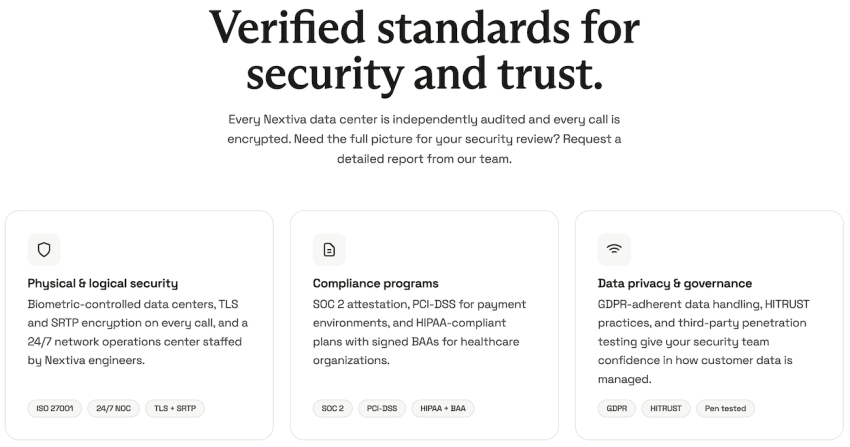
In short, hosted VoIP does depend on the internet, but that dependency can be managed. With the right mix of network planning, backup options, and provider redundancy, businesses can keep customer calls connected even when something goes wrong.
Key Features of Hosted VoIP
Hosted VoIP goes beyond simple phone calls, transforming your communication into a feature-rich hub packed with productivity and AI capabilities. Here’s a glimpse of the powerful tools you get with a hosted VoIP service:
- Auto Attendant: A virtual receptionist that answers calls, guides callers with a menu, and routes them automatically to the right team.
- Conference Calls: Reliable multi-party conferencing with simple host controls and screen-sharing-ready connections.
- Mobile App (Softphone): Full calling, voicemail, and feature control from iOS/Android so you can use your business number anywhere.
- CRM Integration: Two-way sync with CRM systems to log calls, surface customer records on ring, and shorten resolution time.
- HD Call Quality: Clear voice quality and background-noise suppression for professional-sounding conversations.
- Local Phone Numbers: Establish a local presence in target markets and build trust with regional customers.
- Toll-Free Phone Numbers: Give callers a no-cost way to reach your business and reinforce a professional brand image.
- Voicemail-to-Email Transcription: Voicemails delivered as searchable email text and attachments for faster follow-up.
- AI-Powered Transcription: Accurate, searchable transcripts for live calls and recordings that accelerate note-taking, compliance checks, and content reuse.
- Sentiment Analysis: Real-time or post-call sentiment scoring to flag unhappy callers, surface coaching opportunities, and prioritize escalation workflows.
- Smart Call Routing: AI-driven routing that matches callers to the best agent by intent, language, sentiment, skills, or historical data and improves first-call resolution.
- Security & Compliance Features: Encryption, role-based access, and logging to meet industry regulations and protect customer data.
- Unlimited Scalability: Add users, extensions, and features in minutes without heavy capital expenditure.
- Advanced Call Analytics: Dashboards and reports for call volume, wait times, agent performance, and trend analysis to reduce cost per contact.
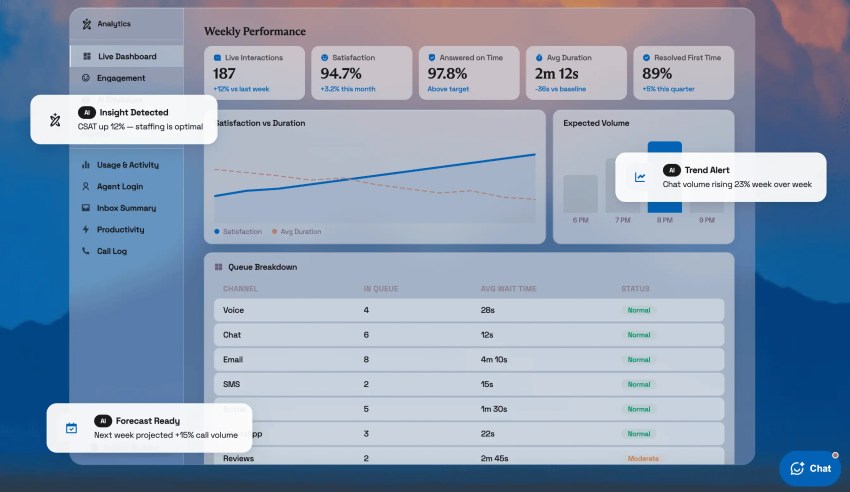
Why this matters: These features reduce manual work, shorten resolution times, improve agent coaching, and turn voice interactions into measurable business insights, making hosted VoIP a strategic tool rather than just a phone line.
What Is the Difference Between Hosted and Cloud VoIP?
These terms are often used interchangeably. There’s a very subtle difference.
Hosted VoIP specifically refers to the service model where the provider manages the hardware and software for your phone system in the cloud.
Cloud VoIP is a broader term encompassing any voice service delivered over the internet, which could include features beyond traditional phone calls. Hosted VoIP is a type of cloud VoIP, but not all cloud VoIP solutions are hosted.
Hosted VoIP vs. Hosted PBX: What’s the Difference?
Hosted VoIP and hosted PBX are closely related, but they are not exactly the same.
VoIP is the technology that sends voice calls over the internet instead of traditional phone lines. Hosted VoIP refers to a cloud-managed business phone service, so your business does not need on-site phone system hardware.
A PBX, or Private Branch Exchange, is a traditional business phone system that offers features like extensions, call routing, and voicemail which rely on hardware that’s housed on-site. Hosted PBX is a cloud-based phone system that delivers traditional PBX features over VoIP without on-premises PBX hardware.
In simple terms, hosted VoIP is the broader service model, and hosted PBX is the PBX-style version of that service.
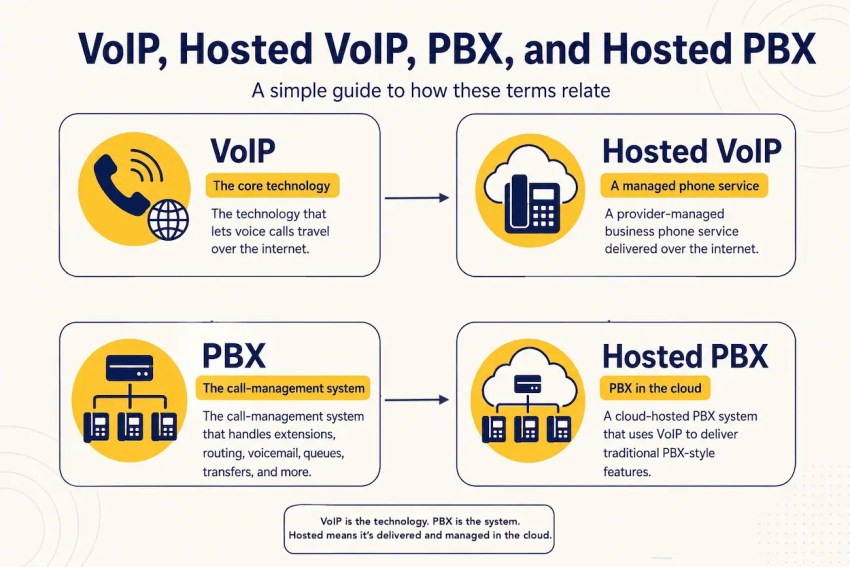
For many businesses, the difference comes down to use case. If you need internet-based business calling, mobility, voicemail, and basic routing, hosted VoIP may be the better fit. If you are replacing a legacy PBX and need familiar PBX-style features like extensions, call flows, departments, queues, and multi-location routing, hosted PBX may be the better fit.
Either way, the provider manages the infrastructure in the cloud, while your team makes and receives calls using desk phones, softphones, mobile apps, or browser-based calling.
For a deeper breakdown of hosted PBX architecture, features, and migration considerations see our full hosted PBX guide. 👇
Beyond Hosted VoIP: UCaaS for Unified Communication
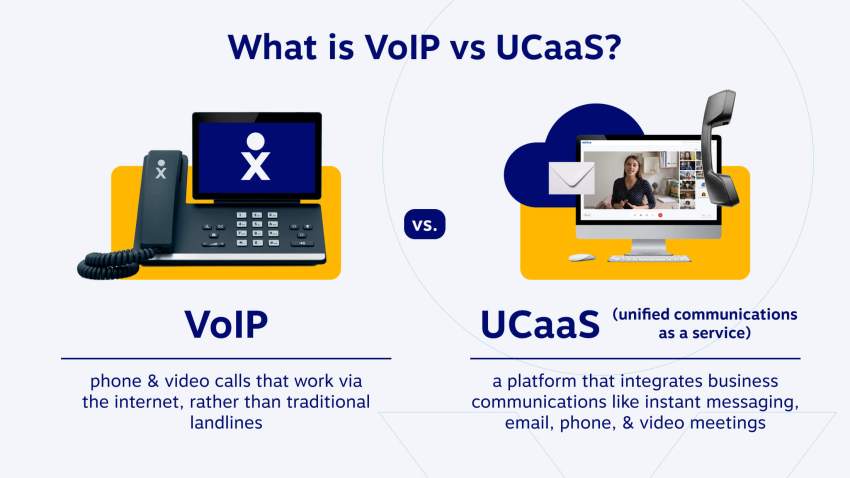
If you want a truly unified communication experience, consider UCaaS (Unified Communications as a Service). UCaaS builds upon the foundation of Hosted VoIP, seamlessly integrating features like:
- Video conferencing: Collaborate with colleagues and clients in real-time, regardless of location, with high-definition video conferencing capabilities.
- Business SMS: Enhance communication with team members and customers through secure and convenient business text messaging.
- File sharing: Effortlessly share documents, presentations, and other files within your team for streamlined collaboration.
- Instant messaging: Foster real-time communication and team discussions with instant messaging functionalities.
UCaaS offers a comprehensive communication solution that empowers businesses to connect, collaborate, and achieve success in today’s dynamic world.

Is Hosted VoIP Right for You?
Hosted VoIP is a strong fit for businesses that want to reduce on-site phone hardware, support remote or hybrid teams, add users easily, and manage calls through a scalable cloud-based system.
It works especially well for small businesses, startups, multi-location teams, and growing companies that need features like auto attendants, call routing, voicemail, video meetings, mobile apps, and softphones without maintaining a traditional PBX.
Hosted VoIP may be less ideal if your business has unreliable internet, limited bandwidth, strict compliance requirements, or legacy equipment that cannot be replaced right away. In those cases, you may need network upgrades, backup internet, SD-WAN, QoS configuration, SIP trunking, or a phased migration plan.
To decide, assess your internet reliability, call volume, security needs, compliance requirements, existing phone system costs, and whether your team needs cloud calling, mobility, and collaboration tools.
Hosted VoIP Pricing: How Nextiva Compares to Zoom Phone, Dialpad, and 8×8
Hosted VoIP pricing often starts around the same headline number, but the real comparison is what each plan includes, how it scales, and which features require upgrades or add-ons.
Zoom Phone is often used as a low-cost benchmark because its published plans start at $10.50/user/month for metered calling and $16/user/month for US & Canada unlimited calling. Nextiva’s Core plan also starts in this range at $15/user/month, so buyers should compare overall value rather than treating the lowest advertised price as the deciding factor.
| Provider | Starting price | Entry plan focus | Pricing note |
|---|---|---|---|
| Nextiva | $15/user/month | Unified voice, video, business SMS, team chat, call routing, screen and file sharing, and mobile app access | Core gives small teams a full business communications starting point, with higher tiers adding more SMS capacity, toll-free minutes, call recording, reporting, live chat, and customer engagement tools. |
| Zoom Phone | $10.50–$16/user/month | Cloud phone service with metered or unlimited domestic calling, SMS/MMS, call recording, integrations, and multi-device calling | Metered pricing can look lower upfront, while unlimited calling, Workplace bundles, AI Companion features, and add-ons may change the total cost. |
| Dialpad | $15/month | AI-forward business calling with calling, fax, messaging, texting, meetings, unified app access, and smart call routing | Dialpad is strong for teams that want AI-powered call workflows, including live transcription and post-call summaries in contact center use cases. |
| 8×8 | Custom quote | Unified communications, contact center options, global voice coverage, video, chat, and team messaging | 8×8 directs buyers to create a custom business communications plan, which can fit larger or global teams but makes entry-level price comparison less transparent. |
Zoom’s low advertised price is useful as a benchmark, but it does not go unanswered. Nextiva starts at the same general entry level while bundling business calling, SMS, video, team chat, routing, and mobile access into its Core plan. Dialpad stands out for AI-powered calling and conversation intelligence, while 8×8 is a stronger comparison point for businesses that need global voice or more enterprise-style communications.
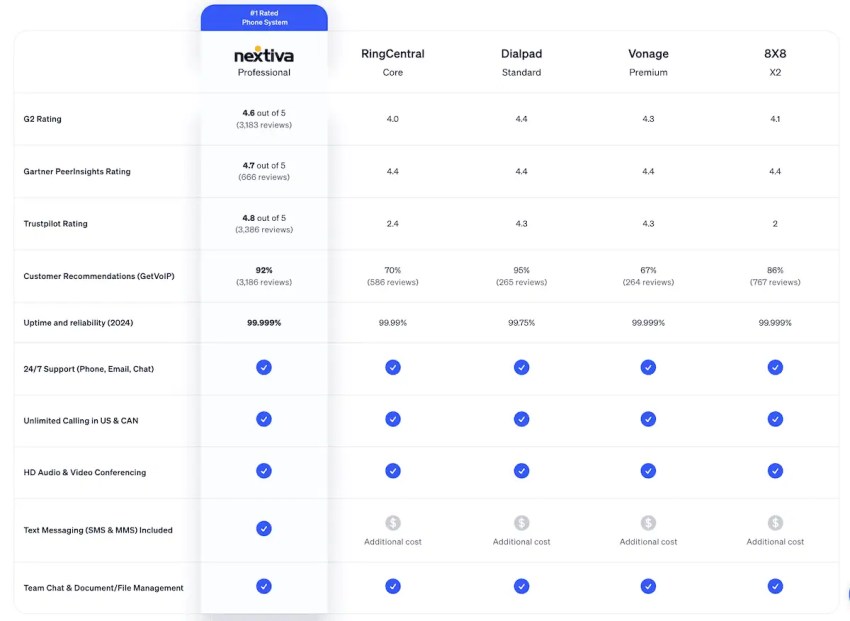
For most businesses, the best question is not which provider shows the lowest number first. It is which plan includes the features, support, reliability, AI capabilities, scalability, and upgrade path the business will actually use.
Choosing the Right VoIP Provider
Choosing a hosted VoIP provider is not just about finding the lowest monthly price. Before switching, compare your current phone system costs against the full hosted VoIP quote, including users, phone numbers, hardware, support, internet upgrades, and add-ons.
Use this checklist to evaluate providers and plan your migration:
- Current phone system costs: Add up analog lines, PRI circuits, SIP trunks, PBX maintenance, desk phones, licenses, support contracts, long-distance charges, taxes, fees, and the IT time required to manage the system.
- Plan features: Confirm which features are included, such as call routing, auto attendants, call queues, voicemail transcription, SMS, video meetings, call recording, analytics, and integrations.
- Reliability: Look for uptime SLAs, redundant data centers, QoS support, SD-WAN compatibility, call forwarding, mobile apps, backup internet options, and failover routing.
- Scalability: Check how easily you can add users, phone numbers, locations, departments, devices, and higher-volume call features as your business grows.
- Support and migration help: Ask whether the provider supports number porting, onboarding, device setup, admin training, pilot testing, and post-launch troubleshooting.
- Security and compliance: Review encryption, access controls, monitoring, logging, and compliance support for requirements such as HIPAA, PCI, or GDPR.
The best hosted VoIP provider is the one that lowers total communication costs while giving your team the reliability, support, security, and features it needs to serve customers without disruption.
Why Choose Nextiva for Your VoIP Provider
Need a new VoIP phone system or want to integrate your existing PBX with VoIP? Nextiva has you covered.
We offer a seamless migration process, exceptional customer support recognized by Gartner and GetVoIP reviews, and a reliable, secure network built for business continuity.
A 99.999% uptime is enterprise-level system availability. Nextiva also offers HIPAA-compliant hosted VoIP solutions for enhanced security.
Nextiva conducts regular security testing to scale its network. We pair that with award-winning customer service so businesses can focus on what matters: customers.
Whether setting up the new VoIP system, transferring existing data, or training your team, Nextiva offers a smooth transition to hosted VoIP so you can use it without interruptions.
The most reliable VoIP service, period.
Get high-quality calls, video meetings, and secure business messaging in one platform. Easy setup. Reliable. Trusted by millions.
VoIP FAQs
VoIP PBX and cloud PBX are related but not the same thing.
VoIP PBX and cloud PBX are related, but they are not exactly the same thing. VoIP is the technology that carries voice calls over the internet. A VoIP-enabled PBX uses that technology to provide business phone features such as extensions, call routing, voicemail, and call queues. Cloud PBX is a PBX system hosted by a provider in the cloud, so businesses do not need to manage on-site PBX hardware.
In simple terms, cloud PBX is a type of VoIP-based PBX, but not every VoIP PBX is cloud-based
Hosted VoIP often starts around $15 per user per month for entry-level business plans, though pricing can go as high as $40+ per user per month depending on features, support, and add-ons. Some providers also offer metered, bundled, or quote-based pricing, so the true cost depends on your call volume and the tools you need.
Hosted VoIP is a cloud-based phone system where a third-party provider hosts and maintains all telecommunications hardware and software off-site. Calls travel over the internet, and features like voicemail, call routing, and call forwarding are handled by the provider’s system.
VoIP stands for Voice over Internet Protocol, which means voice calls are sent over the internet rather than traditional phone lines. It is used because it can lower calling costs, support remote work, and add business features like messaging, conferencing, and mobile calling.