The AI Chatbot That Answers Your Customers’ Questions in Seconds
Ever wanted to build an AI support agent for your WordPress website or WooCommerce store?
Imagine customers asking a question at 2 a.m. and getting an instant, accurate answer, pulled straight from your own help docs, website content, and custom private SOPs. Plus, it can cut the repetitive 80% of support questions, so your team can focus on the questions that actually need a human.
Sadly, most AI support tools on the market are either crazy expensive or very complicated to set up.
It simply shouldn’t be this hard to give your customers fast, helpful answers.
That’s why today, I’m excited to announce HelpJet, an AI-powered support chatbot that learns your documentation and answers customer questions automatically, 24/7, built by our team at HeroThemes, a WPBeginner Growth Fund company.

What Is HelpJet?
HelpJet is a standalone AI support chatbot that trains on your own content and resolves the bulk of your repetitive tickets automatically.
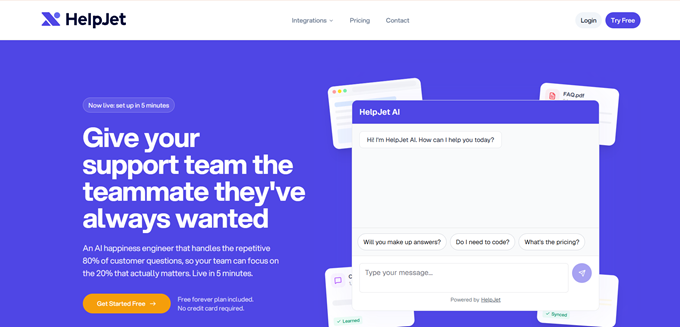
It can read between the lines, understand what customers actually mean and respond with genuine empathy, especially when the customers are frustrated. In other words, it offers the human touch you’d expect from your best support person, combined with capabilities no human could ever match.
Aside from WordPress, it seamlessly integrates with BigCommerce, Shopify, Webflow, and more.
Here’s why every small business needs HelpJet:
- Create a custom GPT trained on your own website content.
- Add an AI support agent for your business that works 24/7.
- Speed up WooCommerce store support and boost sales.
Train Your AI Chatbot in Five Minutes
Train your AI chatbot by dropping your content like private SOPs, URLs, help articles, and more.
If you drop a URL from your WordPress site, then HelpJet asks you which post types to fetch. Select the post types, and it trains from your content.
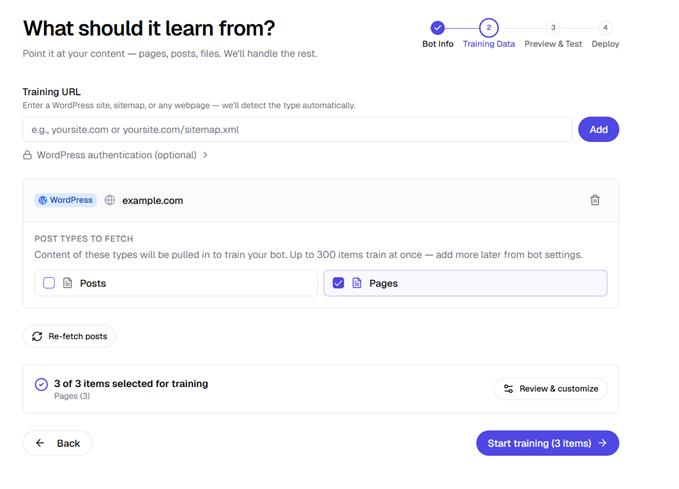
HelpJet also automatically re-scans your site weekly to stay up-to-date. You can also trigger a manual refresh anytime from your dashboard.
Easily Embed the Chatbot on Your Site
The easiest way to embed HelpJet’s chatbot on your website is by installing its WordPress plugin.
As soon as the plugin is activated, a floating chat widget will appear on your site.

You can choose which corner of the screen the widget should appear in, right or left.
Additionally, you can embed the chatbot in any articles with the ‘HelpJet Chatbot’ block or with a shortcode.
Built to Understand WooCommerce Stores
If you run a WooCommerce store, then HelpJet can help you with pre-sales and post-sales questions. The best part is that it can read product variations, stock levels, shipping classes, and tax rules.
So when a shopper asks, “Is this available in blue?” or “Do you offer shipping to Texas?”, it answers with real information instead of providing a generic answer.
For store owners, that’s the difference between a lost sale and a closed one.
Route Complex Questions to Your Team
Here’s the objection I always hear: “What happens when the bot can’t answer?”
When a question is too complex, or the customer simply wants a human, HelpJet routes the conversation to your team smoothly.
And here’s the clever part: when your support agent answers, HelpJet learns from that resolution. Next time, it can handle the question on its own.
That means your bot gets smarter every single day.
Clean Analytics Dashboard to See Exactly What’s Working
HelpJet includes a clean analytics dashboard so you’re never guessing.
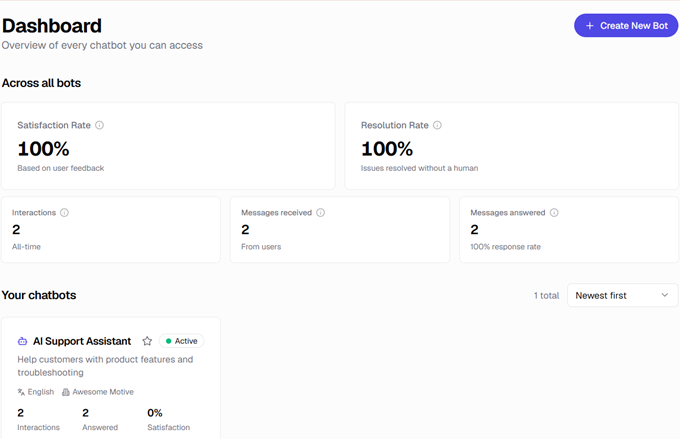
You can track conversation volume, satisfaction rate, and resolution rate at a glance. You’ll see the questions customers ask most, which quietly reveal the gaps in your documentation.
Every answer gets a thumbs up or down, and the whole activity log is tagged by sentiment.
Test Your Chatbot Before You Go Live
You’d never want an under-trained bot talking to real customers. HelpJet includes a built-in preview environment for exactly this reason.
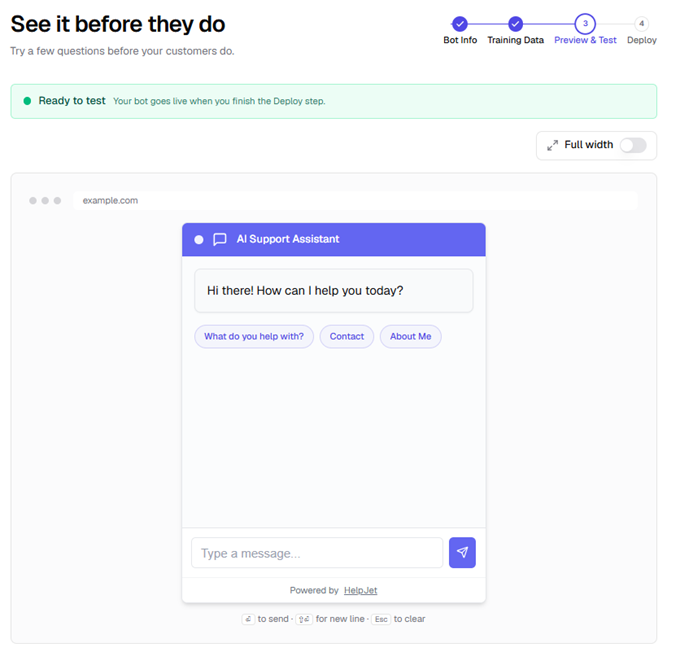
You can ask the bot real questions, check its answers, and fine-tune its tone and behavior… all before a single customer ever sees it.
Built by the Team Behind Heroic Themes
HelpJet comes from HeroThemes, a team that’s been building WordPress support software for roughly 15 years. They’re the folks behind Heroic KB, the popular knowledge-base plugin, and Heroic Inbox, their shared-inbox ticketing tool.
Over those years, HeroThemes kept running into the same frustration with Heroic KB customers: businesses had genuinely great documentation, but most visitors never read it. Customers would rather ask or just leave. HelpJet is their answer to that, turning the docs you’ve already written into instant answers your customers actually get.
If you’re already using Heroic KB or other knowledge base plugins on your site, then HelpJet works alongside them.
Getting Started With HelpJet
Getting up and running takes just a few minutes:
✅ Sign up for a free HelpJet account (no credit card required).
✅ Point it at your help docs, URLs, or PDFs to train your first bot.
✅ Preview and fine-tune the answers in the testing environment.
✅ Install the WordPress plugin to embed the chatbot on your site.
The free plan is genuinely free forever. You get one bot and 100 interactions per month, which is a great way to see the value before you commit to anything.
When you’re ready to scale, the Pro plan runs $29/month (or about $23/month billed annually) with three bots and 1,000 monthly interactions. It also comes with a 14-day free trial, again with no credit card.
I’d love to hear how you’d use HelpJet on your own site. If there’s a feature you’d like to see, let the team know… this is exactly the kind of feedback that shapes a young product.
Thanks, as always, for being part of our community. I truly believe HelpJet levels the playing field, giving small businesses the kind of live support that used to be reserved for the giants.
Talk soon,
Syed Balkhi
Founder of WPBeginner
P.S. Want me to invest in your business? Learn more about the WPBeginner Growth Fund.