MCP Security | Security Risks & Mitigation Strategies
Model Context Protocol, or MCP, is changing how artificial intelligence interacts with enterprise systems.
Instead of building a separate custom integration for every data source, application, or tool, developers can use MCP to give AI applications a standardized way to:
- retrieve contextual data
- discover available tools
- invoke approved functions
- interact with external services
- support multi-step agentic workflows
This makes MCP valuable for copilots, coding assistants, security workflows, analytics, customer support, and autonomous AI agents.
It also creates a new security boundary.
An MCP-enabled agent may be able to read files, query databases, call APIs, update records, trigger scans, open tickets, or execute other consequential actions. If the surrounding controls are weak, attackers may manipulate the agent, abuse its credentials, expose sensitive information, or cause it to invoke the wrong tool.
MCP standardizes connectivity, but it does not automatically make that connectivity secure.
Organizations must secure the complete MCP ecosystem as part of a broader AI security and governance strategy, including the host application, clients, servers, tools, resources, prompts, credentials, transport channels, enterprise data, and agent behavior.
Key Takeaways: MCP Security
• MCP gives AI applications a standardized way to connect with external data sources, tools, and services.
• MCP does not provide security automatically. Hosts, clients, servers, tools, credentials, and data flows must each be governed.
• Major risks include prompt injection, excessive permissions, tool poisoning, token misuse, confused deputy attacks, malicious servers, and sensitive data exposure.
• Secure implementations require strong authentication, audience-bound tokens, least privilege, tool validation, human approval, sandboxing, and continuous monitoring.
• BigID gives AI agents governed access to enterprise data context and metadata while enforcing authentication, role-based access, and existing data governance controls.
What Is Model Context Protocol?
Model Context Protocol is an open protocol that standardizes how AI applications connect to external data sources and tools.
MCP provides a common interface through which an AI application can discover available capabilities, retrieve context, and invoke approved actions. It reduces the need to create and maintain a separate proprietary integration for every model, tool, or data source.
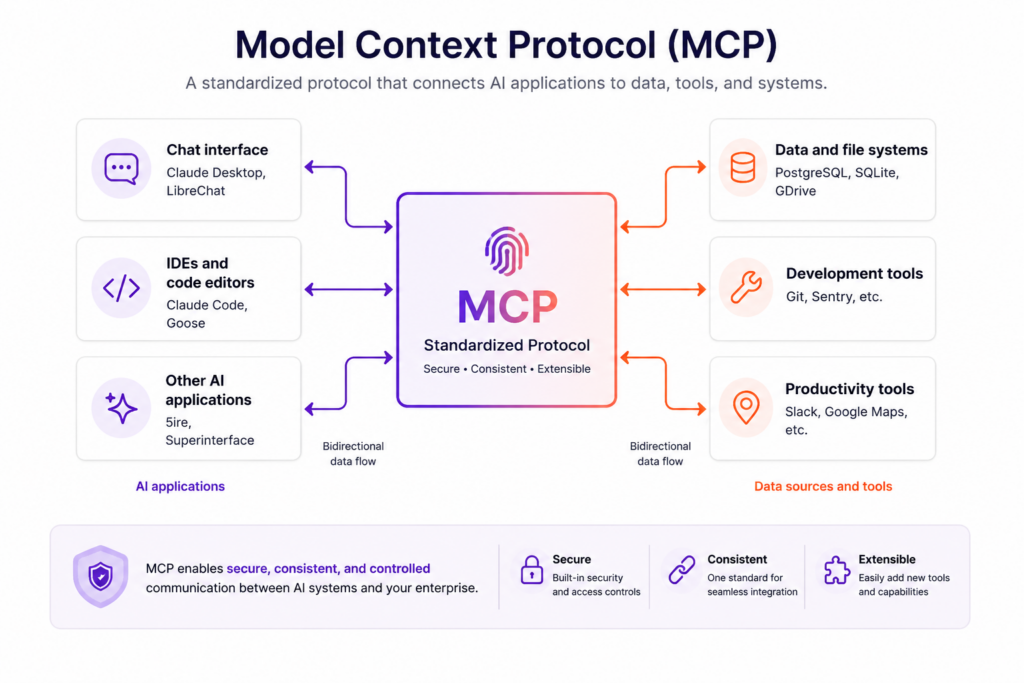
The protocol can support connections to:
- file systems and document repositories
- databases and data platforms
- source-code repositories
- cloud services
- business applications
- security platforms
- ticketing systems
- enterprise APIs
MCP is especially important for autonomous agents. Agents need more than a language model to complete real work. They need context, credentials, tools, and permission to interact with external systems.
However, every new connection may also create another path to sensitive data or privileged action. MCP must therefore be treated as part of the organization’s application, identity, data, and AI security architecture.
How MCP Architecture Works
MCP follows a host-client-server architecture.
A host can create multiple MCP clients, with each client maintaining a connection to an MCP server. The security of the overall environment depends on the controls enforced by the host, each client, and every connected server.
MCP Host
The MCP host is the AI application that coordinates the user experience, language model, MCP clients, permissions, and security policies.
The host decides:
- which servers may connect
- which tools and resources are exposed
- what user consent is required
- which actions require approval
- how context is shared and isolated
Security concern: A host that exposes too many tools or automatically approves high-impact actions can give an agent more authority than its task requires.
MCP Client
An MCP client runs inside the host and maintains a connection with a specific MCP server. It negotiates capabilities, exchanges protocol messages, retrieves resources, presents tools, and returns results to the host.
Security concern: A client that fails to validate server responses, tool definitions, requested scopes, or results may pass malicious instructions or unsafe content into the language model.
MCP Server
An MCP server exposes resources, prompts, or executable tools to a client. Servers may run locally or remotely and can connect to enterprise data, business applications, APIs, or security systems.
Security concern: An MCP server may hold credentials, expose privileged functions, access sensitive systems, or influence agent behavior. Organizations should treat servers as production application components rather than lightweight plugins that can be installed without review.
Data and Transport Layers
MCP uses JSON-RPC messages to exchange tools, resources, prompts, requests, notifications, and results.
The current protocol defines:
- stdio: Communication with a local server process through standard input and output.
- Streamable HTTP: HTTP-based communication that can support remote connections and optional streaming.
The official MCP transport specification requires Streamable HTTP servers to validate incoming Origin headers. It also recommends binding local servers to localhost and authenticating connections.
Security concern: Exposed endpoints, weak authentication, invalid origin handling, or leaked bearer tokens may allow unauthorized interaction with an MCP server.
What Are MCP Primitives?
MCP primitives define the capabilities clients and servers can offer one another.
Server-Side Primitives
Resources provide contextual data, such as files, database records, schemas, or API responses.
Tools are executable functions that can query systems, modify records, create tickets, launch scans, or perform other actions.
Prompts are reusable templates that structure interactions with a language model.
Client-Side Capabilities
Sampling allows a server to request a model completion through the client.
Roots communicate the file-system or URI boundaries within which a server may operate.
Elicitation allows a server to request additional information or confirmation from a user.
These capabilities are powerful, but their descriptions and outputs should not automatically be trusted. Tool annotations should be treated as untrusted unless they come from a trusted server. Inputs should be validated, outputs sanitized, and consequential calls shown to users before execution.
Why MCP Security Matters
Traditional AI chat interfaces primarily return text.
MCP-enabled AI systems can act.
A compromised or manipulated agent may be able to:
- retrieve customer records
- modify or delete files
- send messages
- change permissions
- trigger workflows
- execute code
- call downstream APIs
- combine several tools into one action chain
A malicious instruction may therefore influence an action carried out with legitimate enterprise credentials, not just the text of a model response.
Organizations need data access governance to understand which users, agents, applications, and tools can reach sensitive enterprise information.
MCP security also requires visibility into:
- which servers and tools are connected
- who approved and owns them
- which identities and credentials they use
- what data they can access
- what actions they can perform
- how those actions are monitored
- how risky access can be revoked
Major MCP Security Risks
1. Excessive Agent Permissions
The fastest implementation path may be to grant an MCP server broad credentials or expose a large collection of tools. Over time, those permissions can expand beyond the original business requirement.
An overprivileged agent may be able to:
- read sensitive files it does not need
- modify or delete records
- invoke administrative APIs
- combine individually safe tools into a dangerous workflow
- inherit access through a user or service account
AI agents function as non-human identities that authenticate to enterprise systems, inherit permissions, and execute actions on behalf of users or business processes.
Organizations should map each agent, server, tool, identity, entitlement, and accessible data source before enabling autonomous execution.
2. Prompt Injection and Context Manipulation
Prompt injection occurs when malicious or untrusted content influences an AI system’s instructions.
In an MCP workflow, the instruction may originate from:
- a document retrieved as a resource
- a webpage
- a database record
- a tool response
- a compromised server
- a user-submitted field
For example, an attacker could place an instruction in a document telling an agent to disregard its constraints and transfer sensitive records to an external destination.
This is known as indirect prompt injection because the attacker manipulates content the agent later retrieves rather than communicating directly with the model.
AI prompt security, content inspection, tool restrictions, and action-level approvals help prevent untrusted context from becoming an executable instruction. Prompt protection is also an important component of AI TRiSM.
3. Persistent Context Poisoning
Context poisoning occurs when an attacker compromises a source that an agent repeatedly relies on, such as:
- a policy document
- a knowledge base
- agent memory
- a vector database
- a configuration record
- a server-provided prompt
Unlike a single malicious prompt, poisoned context may influence future interactions until the affected information is discovered and corrected.
Organizations should validate data provenance, monitor trusted sources for changes, restrict who can modify retrieval data, and maintain lineage across AI workflows. These controls should form part of a broader AI model security strategy.
4. Tool Poisoning and Tool Shadowing
A malicious or compromised server may expose a tool with:
- a deceptive name
- a misleading description
- hidden behavior
- unsafe default parameters
- instructions designed to manipulate tool selection
Tool shadowing occurs when an unsafe tool resembles a legitimate tool closely enough that a host, model, or user selects the wrong capability.
Clients should treat tool metadata as untrusted, monitor tool-definition changes, display sensitive inputs before execution, validate outputs, and require confirmation for consequential actions.
5. Token Passthrough and Exposure
Token passthrough occurs when an MCP server accepts a token from a client and forwards that same token to a downstream API.
The official MCP authorization specification requires tokens to be validated for their intended audience and explicitly prohibits token passthrough.
An MCP server calling a downstream service should obtain a separate token issued specifically for that service. Otherwise, access controls, rate limits, monitoring, and audit boundaries may be bypassed.
Tokens may also be exposed through:
- debug logs
- URLs or query strings
- insecure local storage
- error messages
- tool parameters
- untrusted downstream services
Access tokens should be short-lived, securely stored, audience-bound, rotated where appropriate, and sent only through authorization headers over secure channels.
6. Confused Deputy Attacks
A confused deputy attack occurs when a more privileged service performs an action for a less privileged requester without adequately verifying the requester’s authority.
For example, an MCP proxy may possess credentials for a third-party system. If it checks only its own permissions rather than the initiating user’s authority, an attacker may convince it to retrieve or modify information they could not access directly.
Mitigations include:
- per-client consent
- exact redirect URI validation
- state validation
- token audience checks
- separate downstream credentials
- verification of initiating-user authority
7. Malicious or Compromised MCP Servers
An MCP server may be intentionally malicious, compromised after deployment, or weakened by a vulnerable dependency.
A malicious server could:
- return poisoned context
- misrepresent tool behavior
- collect prompts or sensitive inputs
- exfiltrate data
- request excessive scopes
- alter tool results
Organizations should maintain an approved server inventory and evaluate publisher identity, ownership, source code, dependencies, permissions, credential storage, network behavior, logging, and update processes.
8. Local Server and Supply Chain Risk
Local MCP servers may be installed through package managers, configuration files, source repositories, or one-click setup workflows.
Because they execute on the user’s machine, a malicious package or startup command may inherit the MCP client’s local privileges.
Potential risks include:
- arbitrary code execution
- credential and secret theft
- unauthorized file-system access
- dependency compromise
- data exfiltration
- persistent endpoint access
Organizations should verify publishers, inspect installation commands, pin approved versions, scan dependencies, require explicit consent, and sandbox new local servers with minimal file, credential, and network access.
9. Insufficient Human Oversight
Not every tool call requires manual approval, but high-impact operations should not execute solely because a model predicts that they are appropriate.
Human or policy approval should be considered for:
- deleting data
- changing permissions
- transferring sensitive records
- executing production code
- making financial transactions
- modifying critical infrastructure
Approval requirements should be based on risk and impact. Organizations can use AI risk management to identify which systems and actions require stronger oversight.
10. Incomplete Logging and Auditability
Agents may call several tools in rapid succession. Without detailed telemetry, security teams may not be able to reconstruct:
- which user initiated a request
- which agent and identity acted
- what prompt influenced the action
- which resources were retrieved
- which tool was selected
- what parameters were submitted
- what downstream systems changed
Logs should preserve the complete chain of activity while avoiding unnecessary storage of credentials, secrets, and sensitive content.
Give AI Agents Context Without Exposing Raw Data
See how BigID’s MCP Server provides governed access to enterprise metadata, sensitivity, lineage, risk, and policy intelligence.
Explore BigID MCP Server for AI
MCP Security Risks and Mitigations
| MCP Security Risk | Recommended Mitigation |
|---|---|
| Excessive agent permissions | Apply least privilege, narrow OAuth scopes, separate read and write tools, and review effective access continuously. |
| Prompt injection | Inspect untrusted context, separate instructions from data, constrain tools, and require approval for sensitive actions. |
| Context poisoning | Validate provenance, monitor trusted sources for changes, preserve lineage, and restrict who can modify retrieval data. |
| Tool poisoning or shadowing | Approve servers and tools, monitor definition changes, validate inputs and outputs, and isolate untrusted capabilities. |
| Token passthrough | Validate token audiences and issue separate credentials for the MCP server and each downstream service. |
| Confused deputy attacks | Verify initiating-user authority, obtain explicit consent, validate redirect URIs, and bind actions to the correct identity. |
| Malicious MCP servers | Maintain an approved inventory, assess dependencies, monitor network behavior, and review requested scopes. |
| Local server or supply chain compromise | Verify publishers, inspect startup commands, pin dependencies, restrict local privileges, and sandbox new servers. |
| Insufficient auditability | Log users, agents, prompts, resources, tool calls, inputs, outputs, downstream requests, and policy decisions. |
MCP Security Best Practices
Require Strong Authentication and Authorization
Remote MCP servers should authenticate every connection and validate that tokens were issued specifically for the server receiving them.
For HTTP-based authorization, use:
- audience-bound access tokens
- authorization headers rather than query parameters
- PKCE for authorization-code protection
- HTTPS for authorization endpoints
- validated redirect URIs
- secure token storage
- short token lifetimes where appropriate
Authorization remains optional at the protocol level because local or constrained deployments may use other security models. For networked servers accessing enterprise systems, strong authentication and authorization should be treated as mandatory.
Eliminate Token Passthrough
Do not forward a token received from an MCP client directly to a downstream API.
The MCP server should validate the token intended for itself and separately authenticate to the downstream service using a properly issued credential. This preserves audience boundaries, user consent, rate limits, request validation, auditability, and service-specific policies.
Apply Least Privilege Everywhere
Least privilege should apply to:
- human users
- AI agents
- MCP clients and servers
- service accounts
- tools
- downstream APIs
Separate read-only capabilities from tools that modify data. Restrict tools to specific resources, actions, environments, and time periods.
Regularly review inherited permissions and remove stale or unnecessary access.
Validate Tools and Require Risk-Based Approval
Servers should validate every input against a strict schema and enforce authorization before execution.
Clients should:
- verify tool definitions and publishers
- monitor descriptions and schemas for changes
- show sensitive inputs before execution
- sanitize and validate results
- set timeouts and resource limits
- log tool use
High-risk actions may also require user confirmation, manager approval, policy evaluation, two-person authorization, or step-up authentication.
Sandbox New Servers and Protect Sessions
Test new or untrusted MCP components in isolated environments with restricted:
- network connectivity
- file-system access
- environment variables
- credentials
- downstream tools
- production data
For local HTTP servers, bind to localhost and validate Origin headers.
Servers should authenticate every inbound request and should not treat a session identifier as proof of identity. Generate unpredictable identifiers, bind sessions to authenticated users, expire them appropriately, and protect against replay or event-injection attacks.
Protect Sensitive Data Before Exposing Context
Before making enterprise context available through MCP, understand:
- what data exists
- where sensitive data resides
- which resources expose it
- which agents can retrieve it
- whether access is necessary
- how the information is used after retrieval
Data discovery and classification provide the context needed to restrict access according to sensitivity, regulation, ownership, and business purpose.
Monitor MCP Runtime Activity
Maintain an inventory of hosts, clients, servers, tools, resources, identities, credentials, and permissions.
Monitor for:
- unusual tool chains
- unexpected sensitive-data access
- new or unapproved servers
- changed tool descriptions
- privilege escalation
- repeated authorization failures
- activity outside the agent’s intended purpose
Prepare an MCP Incident Response Plan
Incident procedures should cover:
- revoking server and agent credentials
- disabling compromised tools
- disconnecting malicious servers
- isolating affected hosts
- reviewing prompt and tool-call history
- identifying exposed data
- restoring trusted context
- documenting remediation
How BigID Secures Enterprise MCP Access
BigID’s MCP Server gives AI agents governed access to enterprise data context and intelligence.
Rather than exposing unrestricted raw enterprise data, BigID provides authorized agents with metadata and insights such as:
- data classifications
- sensitivity
- lineage
- ownership
- risk
- retention
- compliance context
- remediation recommendations
BigID uses token-based authentication and role-based access control so agents receive only the metadata and insights available to the authenticated user. This extends existing security and governance controls into MCP-enabled workflows.
With BigID MCP Server, organizations can:
- connect AI agents to governed enterprise data intelligence
- query data context using natural language
- discover sensitive-data risks
- generate contextual reports and dashboards
- extend data policies into AI workflows
- preserve role-based access restrictions
- support auditable AI-assisted operations
Through Headless BigID, approved AI workflows can also invoke governed discovery, classification, access control, labeling, redaction, and remediation capabilities through APIs and MCP endpoints while remaining subject to RBAC and audit controls.
The Bottom Line
MCP can make AI applications more useful by connecting them to enterprise tools and data.
It can also give AI systems access to sensitive resources and consequential actions.
Securing MCP requires more than encrypting the connection. Organizations must govern the servers, tools, identities, permissions, tokens, data, prompts, and autonomous behavior surrounding every integration.
The strongest MCP security programs combine:
- approved server and tool inventories
- strong authentication and authorization
- audience-bound credentials
- least-privilege access
- prompt and context protection
- human oversight
- continuous runtime monitoring
- data-aware policy enforcement
MCP should give AI agents the context they need, not unrestricted access to everything the enterprise owns.
Connect AI to Enterprise Data Securely
Give AI agents governed access to trusted data context, enforce role-based controls, and extend security and compliance intelligence into MCP-enabled workflows.
See BigID MCP Security in Action
MCP Security Frequently Asked Questions
What is MCP security?
MCP security is the practice of protecting the hosts, clients, servers, tools, resources, credentials, data, sessions, and agent actions involved in Model Context Protocol integrations.
Is Model Context Protocol secure?
MCP provides a standardized connection protocol but does not guarantee security by itself. Secure deployments require authentication, authorization, least privilege, tool validation, data controls, monitoring, and user consent.
What are the biggest MCP security risks?
Major risks include prompt injection, context poisoning, excessive agent permissions, malicious servers, tool poisoning, token exposure, token passthrough, confused deputy attacks, supply-chain compromise, and insufficient monitoring.
What is token passthrough in MCP?
Token passthrough occurs when an MCP server accepts a client token and forwards the same token to a downstream service. The MCP specification prohibits this pattern because it weakens audience validation, security controls, consent, and auditability.
How does least privilege improve MCP security?
Least privilege limits each user, agent, server, and tool to the data and actions required for an approved task. This reduces the potential impact of compromised credentials, malicious prompts, and unintended autonomous actions.
How can organizations prevent MCP prompt injection?
Organizations can reduce prompt-injection risk by treating external content as untrusted, separating instructions from data, inspecting retrieved context, restricting tool access, validating outputs, and requiring approval for sensitive actions.
What is tool poisoning in MCP?
Tool poisoning occurs when a malicious or compromised server provides deceptive tool names, descriptions, parameters, annotations, or behavior intended to manipulate an AI application into invoking an unsafe capability.
Is MCP safe for enterprise use?
MCP can be used securely in enterprise environments when organizations approve and inventory servers, enforce strong identity controls, restrict tool permissions, protect sensitive data, validate credentials, monitor runtime activity, and require oversight for consequential actions.
How is MCP security different from API security?
Traditional API security focuses mainly on endpoints, authentication, authorization, input validation, and traffic protection. MCP security must also address model-driven tool selection, untrusted retrieved context, prompt injection, autonomous action chains, dynamic capability discovery, and agent identities.
How does BigID support MCP security?
BigID gives AI agents governed access to enterprise data context and metadata while enforcing token-based authentication, role-based access controls, sensitivity intelligence, policy controls, and existing data governance permissions.