What It Is, How It Works + 10 Examples
Key takeaways
An SMS flow is an automated sequence of text messages triggered by a customer’s specific shopping behavior, like abandoning a cart or completing a purchase
Automated texts generate $0.74 per send as opposed to just $0.15 for manual campaigns
Start with the welcome series, cart abandonment reminders, post-purchase follow-ups, and shipping updates before going to complex flows
The quality of your signup forms and list directly controls how much revenue your automations can generate
In ecommerce, an SMS flow is an automated sequence of text messages triggered by customer behavior.
The best thing about it is that you can set and forget (at least for a while). If a customer leaves items in their cart, the flow waits for 30 minutes of inactivity and then automatically sends a reminder to complete the purchase. Or, it could be a winback sequence that sends a message to someone who hasn’t engaged with you in 60 days.
In this guide, I’ll show you exactly how to set up profitable flows, complete with message templates and strategies from top ecommerce brands.
Get your first SMS flow live in minutes with Omnisend’s templates
Quick sign up | No credit card required
What is an SMS flow?
An SMS flow is a sequence of automated text messages sent to a customer based on their shopping behavior, like browsing a product, abandoning a cart, or completing a purchase. Each flow has a trigger (the action that starts it), optional delays between messages, and branching logic that changes what gets sent next based on what the customer does.
Once set up, the flow runs on its own and doesn’t require any manual sending, time-tracking, or anything else. You’ll need to review it from time to time to optimize it, and that’s all.
Other terms for an SMS flow include SMS automations, triggered SMS marketing campaigns, and SMS drip campaigns. The concept is the same either way.
The most common triggers for SMS flows include:
| Trigger type | How it works | Examples |
|---|---|---|
| Action-based | Fires when a customer does something specific | Adds items to cart but doesn’t check out → reminder sent 30 minutes later |
| Time-based | Fires after a set period has passed | No purchase in 60 days → winback offer sent |
| Inaction-based | Fires when a customer doesn’t do something | Opened previous SMS but didn’t click → follow-up sent 24 hours later |
Are automated SMS flows effective?
If you’re wondering how effective automated SMS flows actually are, our 2025 data makes it clear: they consistently crush one-off broadcast campaigns.
Here’s how automated texts compare to manual sends:
- Revenue: They generate $0.74 per send versus $0.15 for manual campaigns, which is nearly a 5x difference
- Engagement: Automations achieve a 20.32% click-to-sent rate, beating the 12.38% standard campaign average
- Conversion: They deliver a 0.77% overall conversion rate (vs. 0.12%) and a 3.81% click-to-conversion rate (vs. 0.97%)
Some triggers do even better than the averages above. Abandoned cart texts convert anywhere from 3.7% to 10.2%, and back-in-stock alerts land between 6.0% and 14.3%. That’s not luck. You aren’t just shooting into the dark when someone might want a promotion. Their own behavior tells you when they’re ready to buy.
How SMS flows work
An SMS flow has four components that work together:
- Trigger: The event that starts the flow. A customer subscribes, adds to cart, completes a purchase, or views a product page.
- Delays: The waiting periods between messages. You might wait 30 minutes before a cart reminder, then 24 hours before a follow-up.
- Messages: The SMS or MMS message sent at each step. Make sure each SMS aims to achieve one task, be it to confirm an order, recover a cart, or request a review.
- Conditional splits: Logic that sends customers down different paths based on what they do (or don’t do). If they purchased before, they may go on another path; if this is their first purchase, they may go on another.
💡 Expert tip
Set quiet hours and smart sending before you launch any flow. Quiet hours block messages from going out late at night or early in the morning. Smart sending holds a message if a customer was contacted too recently. Both are available in Omnisend and take two minutes to configure — they’ll save you unsubscribes from day one.
10 SMS flows every ecommerce brand should use
These SMS flows are the absolute foundation of any successful ecommerce SMS marketing strategy. Each flow focuses on specific actions that customers take and can generate revenue when used effectively.
| SMS flow type | When it triggers | Main purpose |
|---|---|---|
| Welcome series | Customer joins SMS list | Convert new subscribers into buyers |
| Browse abandonment | Product page visit without cart addition | Recapture interested browsers |
| Cart abandonment | Items added to cart but not checked out | Recover abandoned purchases |
| Order confirmation | Purchase completion | Confirm transaction details |
| Shipping confirmation | The package ships from the warehouse | Provide delivery tracking |
| Post-purchase/review request | Product delivery estimated | Collect customer feedback |
| Winback campaign | No purchase in 60+ days | Reactivate dormant customers |
| Back-in-stock alert | Waitlisted item restocks | Capture demand immediately |
| Replenishment reminder | Consumable product runs out | Encourage repeat purchases |
| Special occasion (birthday, anniversary, etc.) | Birthdays or anniversaries | Celebrate customer milestones |
I’ll now go through each SMS flow and show you how to successfully set them up.
1. Welcome series
Trigger: New subscriber joins your SMS list through signup forms or checkout
Audience: First-time subscribers who haven’t purchased from your store yet
Goal: Encourage the first purchase and set clear expectations for future communications
Recommended timing:
- The first message is sent five minutes after signup
- A second message follows 24 hours later
- A third message arrives 72 hours after the signup
This flow turns ecommerce SMS lead generation efforts into actual sales while introducing new subscribers to your brand.
SMS example template:
Welcome to [Brand Name], {first_name}! Here’s 15% off your first order with code NEW15: {shop_url}
Reply STOP to opt out.
Copy text
2. Browse abandonment
Trigger: Customer views a product page but doesn’t add anything to their cart
Audience: Shoppers who showed purchase intent but didn’t take the next step
Goal: Re-engage potential customers and encourage them to go further down the sales funnel
Recommended timing:
- The first message is sent two hours after viewing a page
- A second message follows 24 hours later if no action is taken
A browse abandonment SMS flow works well for higher-priced items where customers need time to decide.
SMS example template:
Still considering the {product_name}, {first_name}? Here’s why you shouldn’t miss out: {product_benefits_url}
Reply STOP to opt out.
Copy text
3. Cart abandonment
Trigger: Customer adds items to the cart but doesn’t complete the checkout process
Audience: High-intent shoppers who are one step away from making a purchase
Goal: Recover lost revenue from customers who already showed strong buying signals
Recommended timing:
- The first message is sent 30 minutes after abandonment
- A second message follows 24 hours later
- Another message arrives 72 hours after initial abandonment
A cart abandonment SMS flow offers the opportunity to convert the most. These customers have already decided they want your products.
SMS example template:
Hey {first_name}! You left {product_name} in your cart. Complete your order now: {abandoned_cart_url}
Reply STOP to opt out.
Copy text
4. Order confirmation
Trigger: Customer successfully made a purchase
Audience: All customers who just bought something from your store
Goal: Immediately reassure and build trust during post-purchase moments
Recommended timing: Immediately after the purchase is processed and completed
Include details like order number, delivery ETA, and customer service contact information.
SMS example template:
Order confirmed! Thanks, {first_name}. Order #{order_number} ships within 24 hours. Track progress: {tracking_url}. Any questions, just email us
Reply STOP to opt out.
Copy text
5. Shipping confirmation
Trigger: The order status has changed to “shipped”
Audience: Customers who have their orders in transit
Goal: Provide tracking information and reduce unnecessary support workload
Recommended timing: Right after the product has shipped from your warehouse
Include tracking numbers and estimated delivery dates when available.
SMS example template:
Your order #{order_number} is on the way, {first_name}! Expected delivery: {delivery_date}. Track here: {tracking_url}
Reply STOP to opt out.
Copy text
6. Post-purchase/review request
Trigger: Depends on your product, but generally speaking, a few days to a couple of weeks after the order has been delivered
Audience: Customers who recently received their orders and had time to test the product
Goal: Get genuine social proof through reviews and create opportunities for more sales
Recommended timing: Three to five days after the estimated delivery date (or a week or two if your product warrants it)
Offer incentives like discount codes to increase response rates.
SMS example template:
How’s your {product_name}, {first_name}? Share your experience and get 10% off next time: {review_url}
Reply STOP to opt out.
Copy text
7. Winback
Trigger: Customer hasn’t purchased in a defined period (typically 60–90 days)
Audience: Customers who have become inactive or dormant
Goal: Engage inactive customers who used to buy from you in the past to see if they still want to receive content from you or buy from you
Recommended timing: 60 days after the last purchase date
Use exclusive offers or showcase what they’ve missed while they were away
SMS example template:
We miss you, {first_name}! Here’s 25% off to welcome you back. Code: RETURN25. Shop now: {shop_url}
Reply STOP to opt out.
Copy text
8. Back-in-stock
Trigger: Customer subscribes to notifications for out-of-stock products
Audience: Interested shoppers who specifically requested updates on product availability
Goal: Notify the recipient that the item they wanted is now available again
Recommended timing: Immediately once the product becomes available again
Emphasize limited quantities to encourage immediate action.
SMS example template:
Great news, {first_name}! The {product_name} is back. Limited stock available: {product_url}
Reply STOP to opt out.
Copy text
9. Replenishment reminder
Trigger: Based on how long the product usually lasts
Audience: Customers who purchased consumable goods that need regular restocking
Goal: Remind customers to reorder products before they run out, and before they find a competitor.
Recommended timing: Depends on product type (for example, 30 days for skincare and 90 days for supplements)
A replenishment SMS flow works exceptionally well for consumable products like supplements, skincare, or pet food.
SMS example template:
Running low on {product_name}, {first_name}? Replenish it now with free shipping: {reorder_url}
Reply STOP to opt out.
Copy text
10. Birthday/anniversary
Trigger: Customer’s birthday or account anniversary date arrives
Audience: Customers celebrating personal milestones or account anniversaries with your brand
Goal: Build brand loyalty and drive sales with personalized, celebratory offers
Recommended timing: On the birthday or anniversary date
Make the offer exclusive to the customer on their special day.
SMS example template:
Happy birthday, {first_name}! Celebrate with 20% off everything. Your special code: BDAY20. {shop_url}
Reply STOP to opt out.
Copy text
SMS flow compliance: consent, opt-in, and what “subscribed” means
Every SMS flow only fires for subscribers who have explicitly opted in. In the US, the TCPA requires prior express written consent, and violations cost $500 to $1,500 per message. TCPA litigation filings rose 95% in 2025, so keeping your list compliant is not optional.
- Single opt-in: A customer submits their number and is immediately added to your list.
- Double opt-in: A customer submits their number, then confirms by replying “YES” before being added.
Every message must also include a working opt-out option. Omnisend processes these opt-outs instantly to keep your list clean.
💡 Tip
Your SMS list quality directly controls how much revenue your flows generate. The fastest way to grow a compliant list is a well-placed SMS signup form. Omnisend’s forms collect SMS consent and email in a single step.
How to build your first SMS flow in Omnisend
Building your first SMS flow is easy when you follow these proven steps. With a platform like Omnisend, the process is intuitive, as you’ll have access to powerful automation features that drive results.
Step 1: Choose a pre-built workflow or start from scratch
I appreciate Omnisend’s extensive library of pre-built automation sequences for common ecommerce scenarios.
These templates include cart abandonment, birthday campaigns, welcome series, and more, reducing setup time significantly. You can customize any template to match your brand voice and specific business needs.
Alternatively, you can build a custom SMS workflow from scratch. This option works well when you have unique business requirements or want to test new SMS automation ideas.
Step 2: Add an SMS block to your workflow
The drag-and-drop workflow builder lets you add SMS or MMS messages anywhere in your automation sequence. Simply drag an SMS block from the toolbar and drop it where you want the message to go.
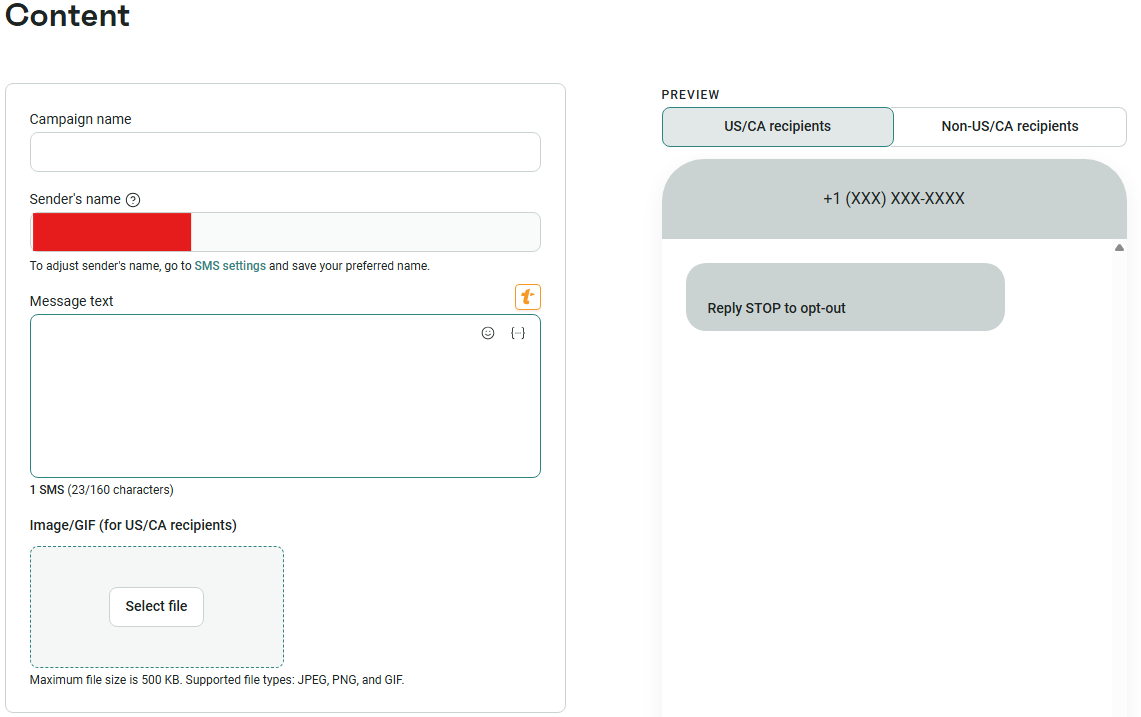
You can combine SMS with email and push notifications in the same workflow for maximum impact.
I like how the visual interface clearly defines how your automation will flow from one step to the next. You’ll see exactly when each message is sent and how different customer actions affect the sequence.
Step 3: Write your message and add personalization
You can create your SMS content using the built-in message editor.
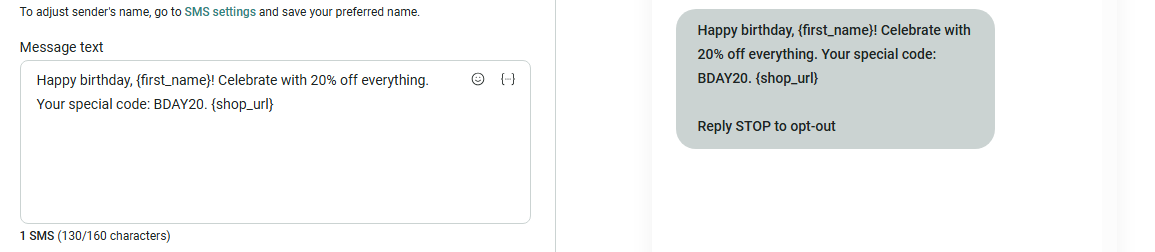
Insert dynamic personalization tags like {first_name} to make your messages feel personal.
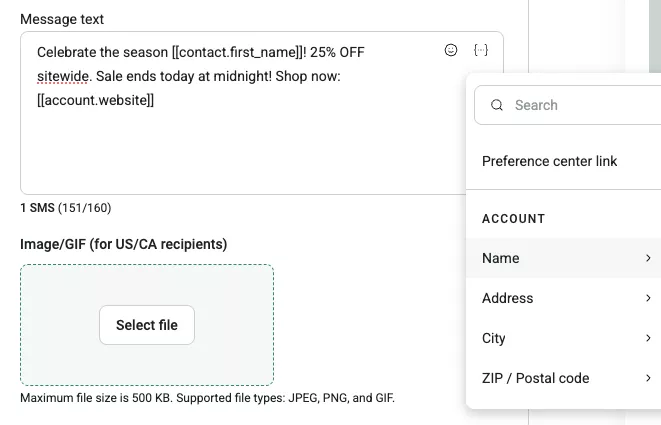
You can also include product-specific tags like {abandoned_cart_url} or {product_name} to create highly targeted content.
Personalization significantly improves SMS performance because customers respond better to messages that apply to their situation.
Step 4: Configure your channel settings for compliance
Navigate to the Workflow Channel Settings to ensure legal compliance with SMS regulations.
Choose Subscribed for marketing SMS flows to send only to customers who opted in. Select the Any subscription status exclusively for transactional messages, such as order confirmations that every customer needs to receive.
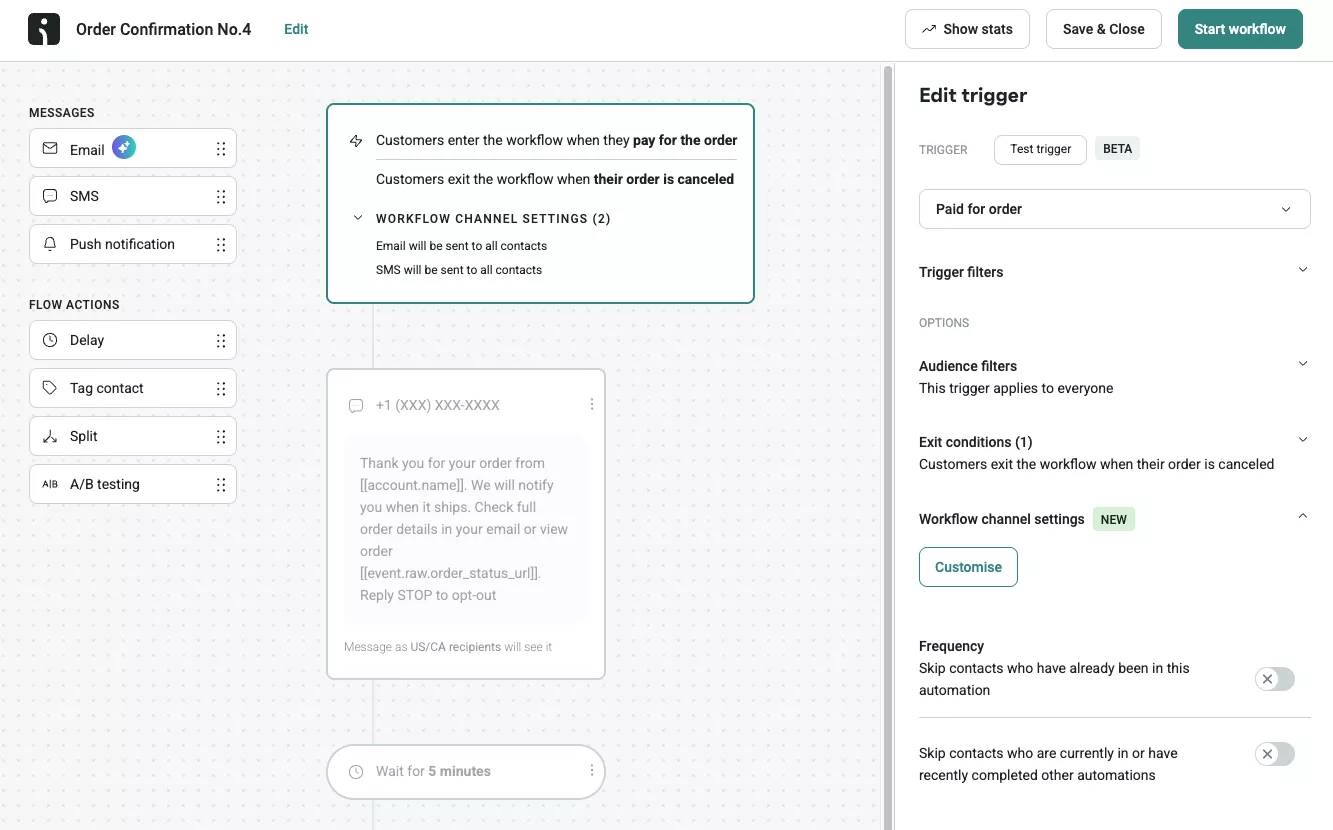
This step prevents SMS compliance violations while ensuring your messages reach the right audiences.
Step 5: Test and activate your SMS flow
Send test messages to yourself before making the flow live. Check that all personalization tags populate correctly and that links work as expected. Review the message formatting on different phone types to ensure that it reads well.
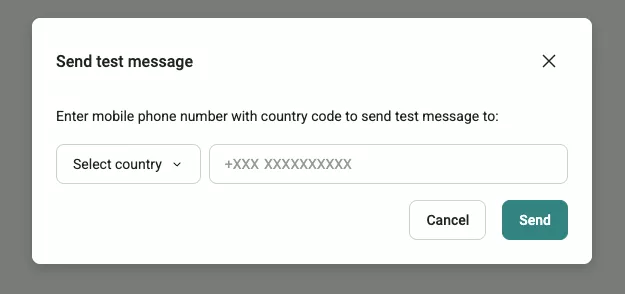
After confirming that everything works properly, you can activate your SMS flow. The automation will start running immediately and continue working around the clock without additional intervention from your team.
 |
SMS marketing success story: Vagari Bags
“The cost and lack of support were the biggest issues with our previous platform. Sometimes, you just want to bounce ideas around or get help building flows. With click rates of 6–7% and a return on ad spend of 5.18 on our best-performing campaign, SMS became a key part of our strategy. For every £1 spent on Omnisend, we see a return of £121.38.” Jake Hughes Read how Vagari Bags builds customer loyalty through strategic SMS campaigns |
The four SMS flows to launch first
- Welcome flow: Deliver the promised incentive immediately; introduce the brand and top products
- Abandoned cart flow: Send 2–3 messages with a timely reminder and a direct cart link
- Post-purchase flow: Thank the buyer to reduce buyer’s remorse, and recommend complementary products if applicable
- Replenishment flow: Remind customers to reorder consumables, especially effective for beauty, health, food, and pet brands
- Shipping and fulfillment updates: Send transactional texts that confirm shipping and delivery so your support team doesn’t get overwhelmed with support tickets
💡 Tip
Omnisend pre-builds all four with templates and compliance-ready settings.
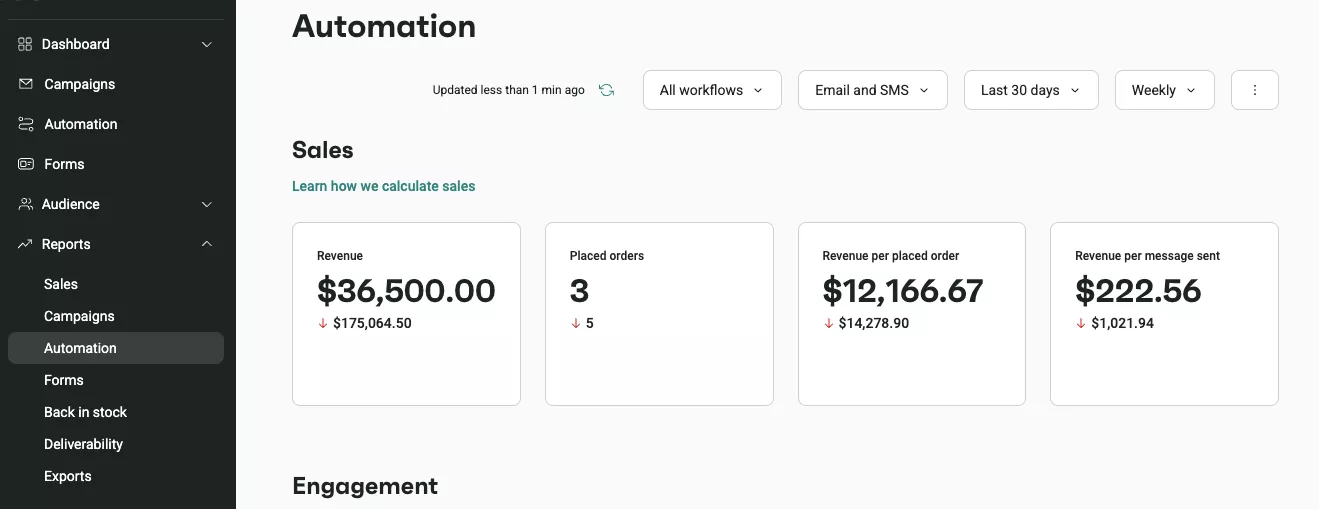
How to measure SMS flow performance
When measuring SMS flow performance, focus on business-critical metrics that tie directly to revenue:
- Click-through rate: The percentage of recipients who clicked a link, which shows how compelling and relevant your message is
- Conversion rate: The percentage of people who purchased after clicking, which reveals the flows that actually generate sales
- Revenue per recipient: The average revenue from each SMS recipient, which combines your conversion rate and order value to show this metric
- Unsubscribe rate: The percentage of people who opted out, which can signal either too-frequent sending or irrelevant content
Here’s an example of the intuitive visual presentation of an SMS channel dashboard on Omnisend:
Frequently asked questions about SMS flows
What are SMS flows?
SMS flows are automated text message sequences that are sent based on customer actions or time intervals. They help ecommerce businesses deliver relevant messages at the right moments without manual sending. Common examples include welcome messages, cart reminders, and order confirmations.
What is the best time of day to send an SMS flow message?
Most SMS flows perform best when sent between 10 AM and 8 PM in your customer’s local time zone. Avoid texting before 9 AM and after 9 PM to avoid disturbing your customers. Test different send times to discover what works for your specific audience.
Can I use SMS flows for transactional messages globally?
Transactional SMS messages, such as order confirmations and shipping updates, can be sent globally. Marketing SMS flows, however, face different regulations that vary by country/region. It’s in your best interest to check local SMS compliance requirements before launching promotional campaigns in international markets.
Should I use SMS or MMS in my flows?
SMS works better for most ecommerce flows. It’s more reliable and costs less per message. MMS earns its place when you already know product images or other visuals drive conversions for your brand. We recommend starting with SMS, then running an A/B test to see if MMS pulls ahead.
What’s the difference between an SMS flow and an SMS campaign?
An SMS campaign is a message you schedule yourself and send to your whole list at once, like a promo for a weekend sale. An SMS flow is triggered by a customer’s actions. When someone abandons a cart or joins your list, the message goes out automatically. Moreover, flows tend to outperform campaigns because they reach people at the moment they’re most likely to act.
![Back to School Email Subject Lines: 130+ Examples [2026 ]](https://programmerschallenge.tech/wp-content/uploads/2026/07/Back-to-School-Email-Subject-Lines-130-Examples-2026-768x385.png)