How To Get a Business Phone Number (Guide & Top Providers)
A dedicated business phone number is a company-owned line that employees can use for business calls and texts without sharing their personal numbers. Unlike a personal phone line, it can support shared access, call routing, business hours, and other tools for managing customer communication.
A business phone number helps a company create a professional image, protect employee privacy, and give customers a consistent way to reach teams across locations and devices.
This guide explains how to get a business phone number, choose the right number type, and set it up for your team. We also compare costs, essential features, and top providers so you can find a service that matches your needs and budget.
Key Takeaways
- You can get a new business phone number from a VoIP provider, mobile carrier, or traditional phone company.
- Cloud VoIP phone service is usually the quickest option for teams that want to use one number across computers, desk phones, and mobile apps.
- Choose a local number for a recognizable local presence, a toll-free number for a wider service area, or a vanity number for memorability.
- Business phone systems commonly cost $15 to $50 or more per user per month, depending on the business phone provider, billing term, features, and add-ons.
- Check advanced call routing, SMS support, emergency calling, number porting, integrations, security, and total cost before choosing a provider.
- Do not cancel your current phone service before an existing number has been ported successfully.
What Is a Business Phone Number?
A business phone number is not just a phone number; it’s a dedicated business line used for company phone calls and, when supported, text messages. It can serve one person, an entire business, a department, or a specific location.
The number may run through a landline, mobile service, or Voice over Internet Protocol (VoIP). With VoIP service, calls travel over an internet connection rather than traditional phone lines. Employees can typically use the number through a desk phone, computer, or mobile app while a virtual phone system manages routing and other calling features in the cloud.
Whether a solo entrepreneur or scaling a distributed multi-site team, establishing a dedicated professional line eliminates the logistical chaos of running a company off a personal cell phone.
A business number can also connect callers to features a personal line may not offer, such as extensions, call queues, an auto-attendant, shared voicemail, scheduled call routing, call recording, analytics, and CRM integrations.
How To Get a Business Phone Number
Setting up a business phone line is an optimized process divided into four key phases.
Step 1. Set your industry scope and budget
Before taking a business phone plan, analyze the geographic distribution and communication habits of your target audience. Small business owners should also consider how customers contact them and how much call management their teams require.
If your business serves walk-in customers or a regional service area, a local phone number immediately builds trust within the local community. If you serve customers nationwide, a toll-free number will work better. Consider:
- How many employees need to make or receive calls
- Whether you need one shared number or direct numbers for each user
- Where your customers and employees are located
- Whether customers will call, text, or use both channels
- Whether you need forwarding, extensions, an auto-attendant, queues, recording, analytics, or integrations
- Whether you plan to use mobile apps, computers, desk phones, or a mix of devices
Then estimate the full monthly cost. Separate basic user license fees from hidden hardware costs or per-minute charges for toll-free calls to keep your overhead costs fully predictable.

Step 2. Pick a dedicated cloud communications provider
Look past basic voice dialers and choose a service provider with a secure, highly available architecture that can support a robust business phone system as your needs grow. Conduct a needs analysis to determine your required functionality:
- Do you simply need basic call forwarding and an automated voicemail box?
- Or does your workflow require advanced features such as instant voicemail-to-text conversion, live call analytics, or CRM integration?
You can purchase a number from three main sources:
| Option | Best for | What to consider |
|---|---|---|
| Cloud VoIP provider | Most small and growing businesses, remote teams, and multi-location companies | Requires a suitable internet connection; features and SMS availability vary |
| Mobile carrier | Solo business owners who primarily work from a cell phone | May provide fewer routing, collaboration, and reporting features |
| Traditional landline provider | Locations with limited internet access or a specific need for fixed lines | May require installation and hardware and can be harder to scale |
Look beyond the advertised starting price. Pay attention to platform availability and look for providers with high uptime and responsive, 24/7 customer support, included minutes, security controls, number availability, integrations, and the features included in the plan you want to buy.
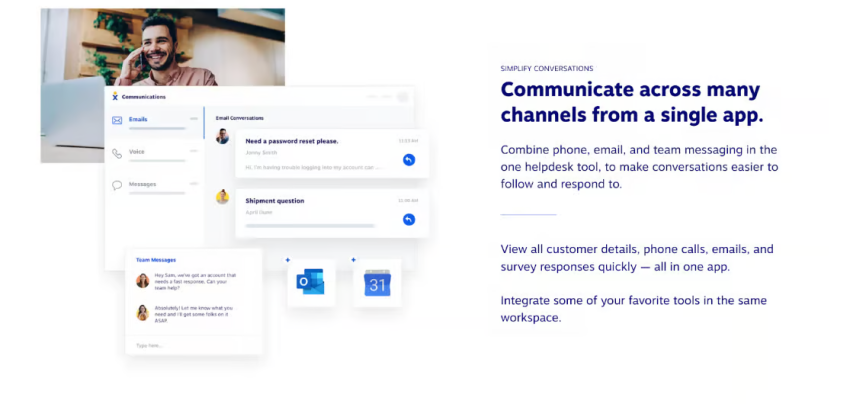
Start calling for just $15/mo.
See why over 100,000 businesses switched to Nextiva. Now you can get it all for $15/month per user.
Step 3. Select your phone number type
After choosing a provider, pick your primary phone number. Most business phone services offer various number options directly in the provisioning portal:
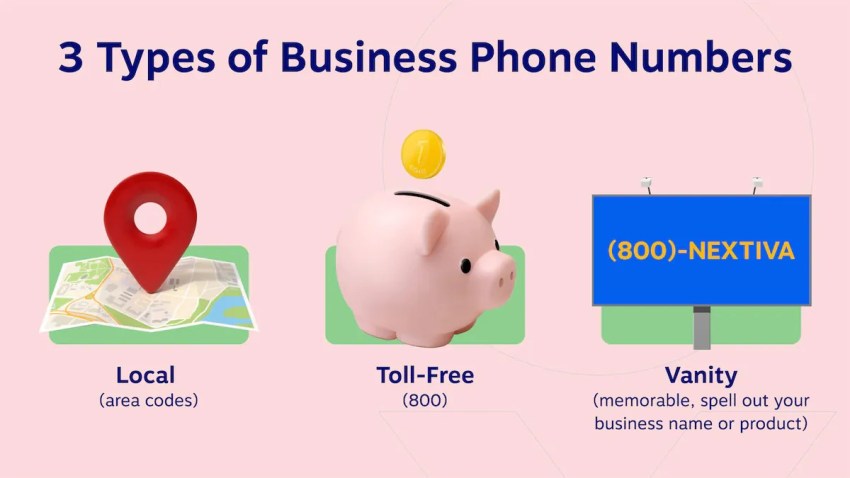
- Local numbers: Use a local area code associated with a city or region to build a local presence in your desired area codes.
- Toll-free numbers: National 800, 888, 877, 866, 855, 844, or 833 prefixes that save your callers from long-distance call charges.
- Vanity numbers: Spell a word or contain a memorable, personalized combination (e.g., 1-800-COMPANY) to increase brand awareness.
- International routing: Virtual phone numbers for international customers, allowing them to reach your team at local rates.
If you want to keep an active number, ask the new provider to initiate a port. You will usually need a recent bill, account number, service address, and porting PIN or letter of authorization. Keep the account details exactly as they appear with the current carrier. Do not cancel the old service until the transfer is complete.
Step 4. Configure extensions and call routing
The final phase involves designing your internal call distribution architecture. Develop an intuitive numbering system and set up phone extensions for your phone lines; for example, forwarding all 200-series numbers to your sales team and all 300-series numbers to your support technicians.
Implement multi-level automated attendants, create separate call groups for different departments, and define custom call routing rules for time-of-day-dependent calls to ensure customer inquiries reach the correct device immediately and without interruption.
Test inbound and outbound calls, transfers, voicemail, caller ID, texting, and after-hours rules before publishing the number. If you ported a number, test it from multiple carriers after the transfer finishes.
Which Type of Business Phone Number Should You Choose?
Choosing the right type of company phone number requires a clear understanding of your corporate identity, advertising strategy, and geographic expansion plans.
| Number type | Best for | Main advantage | Limitation |
|---|---|---|---|
| Local number | Local stores, contractors, clinics, and regional services | Reinforces a regional presence with a familiar area code | May not signal a nationwide operation |
| Toll-free number | National sales and customer support teams | Lets customers call without ordinary long-distance charges | Incoming minutes may be limited or metered |
| Vanity number | Businesses running memorable advertising campaigns | Makes the number easier to recognize and remember | Desirable numbers may cost more or be unavailable |
| Virtual/VoIP number | Remote, hybrid, and multi-location teams | Works across compatible desk phones, computers, and mobile apps | Requires a suitable internet connection for VoIP calling |
| International number | Companies serving customers in other countries | Creates a familiar contact point in a supported market | Rules, documentation, and availability vary by country |
| Direct Inward Dialing (DID) | Teams that need direct numbers for employees or departments | Lets callers bypass the main company menu | Each additional number may increase the cost |
1. Local phone numbers
Local phone numbers are virtual numbers assigned to a specific geographic area code. A local business phone number suits businesses that serve a defined market or want a presence in several cities. A company can use local numbers in multiple regions and route every call to the same team. An area code does not prove a business has a physical office there, so check local requirements.
2. Toll-free phone numbers
Using distinctive 800, 888, 877, 866, 855, 844, or 833 prefixes, toll-free lines allow long-distance callers to contact your business without incurring long-distance charges. This configuration projects national presence, authority, and corporate scale, making it ideal for centralized support hubs. Review how many toll-free minutes a plan includes and the per-minute overage rate.
3. Vanity phone numbers
A vanity number is a customized local or toll-free line that translates into a memorable word or phrase (e.g., 1-800-FLOWERS). Some providers offer toll free vanity numbers, but availability and pricing vary. These configurations act as high-value marketing assets, boosting ad response rates across billboard, radio, and television campaigns by making your contact path immediately memorable.
4. Virtual and VoIP numbers
A virtual phone number is not permanently tied to one physical phone line. It may forward calls to another number or connect to a cloud phone system.
A VoIP number uses internet-based calling technology. Employees can make and receive calls through compatible desk phones, computers, and mobile apps while displaying the company number.

5. International numbers
Establishing an international virtual presence allows cross-border operations to expand into foreign markets seamlessly. For instance, an agile North American or European enterprise targeting Southeast Asian digital commerce hubs can provision a local nomor telepon bisnis (Indonesian business phone number).
This allows international clients to dial a localized regional number that routes instantly to your centralized team over IP networks, bypassing international toll charges and building immediate cross-border trust.
6. Direct Inward Dialing (DID) numbers
DID allows organizations to assign unique direct phone numbers to individual staff members or internal departments, completely bypassing the main reception desk or primary auto-attendant menu. This streamlines communication for high-priority accounts and internal teams.
Best Practices for Choosing a Business Phone Number
Here are a few key best practices for choosing the right company phone number:
- Know your audience and reach: Determine your target market’s location. Local businesses should prioritize local numbers. Businesses with regional, national, or international reach should consider toll-free or international options, so customers can easily contact you without incurring extra costs.
- Match your business style: Consider how customers interact with your business. Customer support-heavy businesses benefit from toll free numbers, while professional services might prefer local numbers for a personal touch. Also, think about your internal communication needs (multiple lines, departments).
- Use your number for marketing: Use your phone number as a marketing tool. Vanity numbers boost brand recall. Using different numbers for marketing campaigns helps track their effectiveness and make data-driven marketing decisions.
- Prioritize essential features: Don’t just focus on the number itself. Ensure your phone system offers essential features like call routing, forwarding, voicemail-to-email, recording, analytics, and CRM integrations. Choose a scalable system that grows with your business.
Business Phone Number vs. Personal Phone Number
Business and personal phone numbers may handle calls and texts, but they serve different purposes. A business phone system keeps personal and business calls separate while providing shared access, routing, reporting, and other features designed for company use. The table below compares their features, privacy, and day-to-day use.
| Area | Business phone number | Personal phone number |
|---|---|---|
| Privacy | Keeps the owner’s personal number off public listings | Exposes a private number to customers and directories |
| Caller experience | Supports company greetings, routing, extensions, and queues | Usually sends calls to one person and a voicemail box |
| Team access | Can assign permissions and route calls among employees | Typically controlled by one account holder |
| Business hours | Can follow schedules and after-hours rules | Calls may ring at any time unless silenced manually |
| Reporting | May track call volume, outcomes, wait times, and activity | Offers limited business-level reporting |
| Scalability | Add users, numbers, and locations through an admin portal | Often requires another line or device for each person |
| Integrations | May connect with CRM, help desk, calendar, and collaboration tools | Usually remains separate from business software |
Why You Need a Business Phone Number (Benefits)
A business phone number gives your company control over customer communications, creates a recognizable point of contact, and keeps conversations accessible as your team grows or changes. You may need it for several reasons. Here are the key benefits:
Protect your personal privacy
Publishing a personal number on your website, directories, invoices, and advertisements exposes it to customers, marketers, and data collection services. A business number lets you keep work and personal calls separate. You can still answer both from the same phone (or personal cell phone) through a business app.
Give customers a consistent way to reach you
Employees may change roles, leave the company, or replace their devices. A company-owned number stays with the business, so customers do not lose their point of contact. You can reassign calls, messages, and extensions without changing the number advertised publicly.
Create a professional first impression
A dedicated phone number gives customers one clear contact point and creates a more professional image. Custom greetings, business hours, voicemail, and department options also confirm that callers have reached the right company, even when you run a small or remote team.
Reduce missed calls and lost opportunities
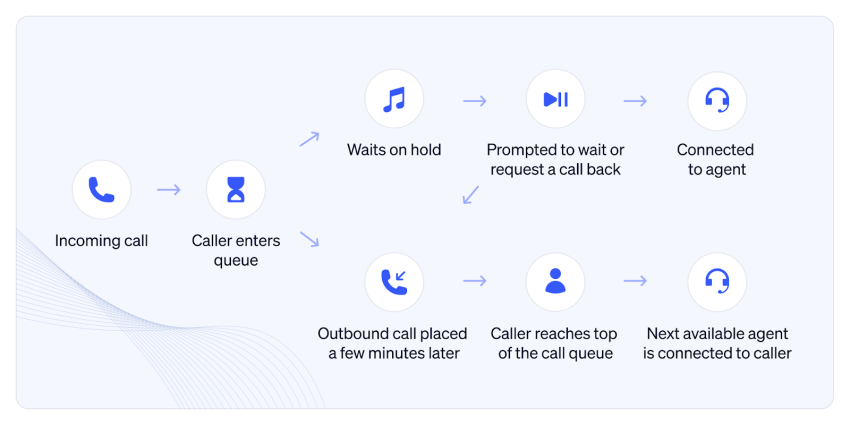
Call forwarding, simultaneous ringing, queues, and overflow rules direct incoming calls to available employees. If nobody answers, the system can route the caller to voicemail, an answering service, or an on-call employee instead of leaving the call tied to one person’s phone.
Keep customer conversations with the business
When employees use personal numbers, call histories and text conversations may leave with them. A business phone system keeps records under the company account, where authorized employees can review earlier interactions and continue the conversation.
Set clear boundaries after business hours
Scheduled routing can send after-hours calls to voicemail, an answering service, or an on-call employee. Team members can protect their personal life by using a business number on a personal mobile phone without publishing private contact details or receiving work calls at all hours.
Manage calls across teams and locations
One business number can route callers to sales, support, billing, or specific locations. Employees can answer from desk phones, computers, or mobile apps, giving customers a consistent point of contact across remote teams and physical offices.
Add users without rebuilding your phone setup
Cloud phone systems let administrators add users, extensions, departments, and locations through an online dashboard. You can expand without installing a physical line for every employee or replacing the number customers already know.
Connect calls with customer records
Many business phone systems integrate with CRM and help desk platforms. These connections can display customer details during a call, log interactions, and give employees access to previous conversations, reducing the need for customers to repeat information.
Measure calls and marketing performance
Call reports can show missed calls, answer rates, wait times, peak calling periods, and team activity. You can also assign separate numbers to advertisements or landing pages to see which marketing campaigns generate phone inquiries.
Key Features to Look for in a Business Phone Service
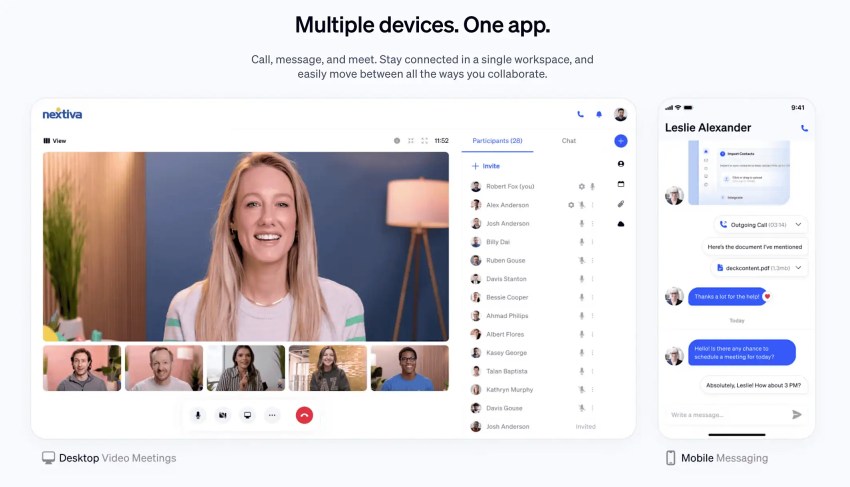
Available features vary by provider and plan, but many business phone services now offer extensive functional tools as standard in their basic plans. These include:
- Auto-attendants (virtual receptionists): Automated interactive voice menus that greet inbound callers and route them seamlessly across internal branches via touch-tone inputs.
- Advanced call forwarding: Reroutes calls dynamically to cell phones, home lines, or alternative branches based on staff availability or custom schedules.
- Business text messaging (SMS/MMS): Allows your team to exchange secure text reminders, order updates, and multimedia images directly from your business number.
- Cross-device softphone apps: Native desktop and mobile applications that transform existing personal laptops and smartphones into enterprise-grade business communication tools.
- Automated call recording: Captures audio records of interactions safely within cloud storage for quality management, staff training, and compliance protection.
- Voicemail transcription: Automatically translates voice messages into clean text strings, delivering them straight to your email inbox or team chat window for rapid review.
- AI notes and summaries: AI tools can transcribe conversations, extract action items, and create call summaries for faster review and follow-up. Availability may depend on the provider or plan.
- Analytics: Call analytics track metrics such as call volume, missed calls, answer rates, wait times, call duration, and user activity.
- Integrations: Integrations connect the phone system with CRM, help desk, calendar, and collaboration platforms. They may sync customer records, log calls, and display relevant information during conversations.
- Security and administration: Security features may include encryption, multifactor authentication, role-based permissions, single sign-on, audit logs, and administrator controls for managing users and numbers.
- Reliability and failover: Reliability features include redundant data centers, uptime commitments, backup routing, and call forwarding to alternate numbers during an internet, power, or service outage.
- Emergency calling: Emergency calling connects users with emergency services and provides a registered dispatchable location when supported. Administrators and remote employees must keep location information current.
How Much Does a Business Phone Number Cost?
The cost of a business phone number depends on the pricing model, number of users, features, and usage. A cloud business phone system commonly costs $15 to $50 or more per user per month. A simple virtual number for one person may cost less, while advanced routing, analytics, contact center features, AI, or international coverage can increase the price.
Use this formula to estimate your monthly cost:
Estimated monthly cost = user licenses + additional numbers + usage charges + add-ons + taxes and regulatory fees
For example, a five-person team on a $25-per-user plan would start at $125 per month before additional charges. When comparing plans, account for billing terms, toll-free usage, international calling, messaging registration, number porting, hardware, recording, storage, integrations, and regulatory fees.
Some apps advertise a free business phone number through a limited plan, trial, or promotion. However, a free business number may restrict calling, texting, number selection, routing, customer support, or portability. Confirm that you control the number and can transfer it before using it as your company’s main contact number.
Top Business Phone Number Providers Compared
Selecting the right provider requires balancing availability, software functionality, and contract pricing. Here are a few top options available:
| Provider | Best for | Key features | Pros | Cons | Starting price |
|---|---|---|---|---|---|
| Nextiva | Growth-oriented businesses that need unified, reliable features | Omnichannel auto-routing, video conferencing, built-in team chat, advanced CRM sync | 99.999% uptime, 24/7 in-house support, highly scalable platform | Advanced analytics restricted to premium tiers | $15 per user/month with annual billing |
| Google Voice | Solopreneurs and teams running on Google Workspace | Voicemail transcription, basic call forwarding, number porting | Clean, familiar user interface; affordable baseline pricing | Lacks deep enterprise call center routing tools | $10 per user/month; Workspace may also be required |
| RingCentral | Large enterprises requiring extensive integrations | High-volume VoIP, team messaging, cloud faxing, robust analytics | Massively scalable, robust developer API ecosystem | Interface can be complex for small teams | $20 per user per month |
| Ooma Office | Traditional micro-businesses seeking simple setups | Virtual receptionist, basic extension dialing, mobile device app | Predictable, simple deployment; low starting hardware limits | Very limited native software integrations | $19.95 per user/month |
| Grasshopper | Remote teams focused strictly on virtual forwarding | Vanity numbers, simple call routing, professional greetings | Extremely easy setup; runs completely on existing phones | Lacks team collaboration or video tools | From $14/month with annual billing |
| Vonage Business | Teams seeking customizable, modular software features | Team messaging, video spaces, basic CRM integration links | Flexible configuration paths; user-friendly UI layout | Entry-tier plans lack robust advanced features | $13.99 per user per month |
Prices may reflect annual billing, introductory offers, contract requirements, or limited plan features. Confirm current pricing and terms with each provider.
1. Nextiva: Best unified communications platform for growing businesses
Nextiva is a leading unified cloud communications platform, known for its industry-leading 99.999% uptime and exceptional customer service. The platform integrates voice, video, and team communication, along with customer satisfaction analytics, into a single, unified interface.
Nextiva’s scalable platform allows small businesses to start with simple setups and seamlessly add advanced call center or AI automation capabilities as their workforce grows. Its plans also include unlimited domestic calling, subject to its service terms, and support mobile and desktop access.
2. Google Voice: Best for individuals and small teams
For teams fully integrated into the Google Workspace environment, Google Voice offers a streamlined and easily accessible communication extension. It provides simple calling features, automatic spam filtering, and clear voicemail logging, making it ideal for individual users and small teams with limited budgets.
3. RingCentral: Best for international calling
RingCentral offers an enterprise-class unified communications as a service (UCaaS) solution specifically designed for large or rapidly growing organizations. It features a comprehensive suite of native third-party software integrations and powerful, custom API options, making it ideal for distributed teams with complex technical workflows.
4. Ooma Office: Best for micro-businesses
Ooma Office is a standard and uncompromising VoIP solution for brick-and-mortar stores, local businesses, and operations with minimal internal IT infrastructure. It offers reliable virtual reception services and user-friendly mobile app extensions without complex configuration requirements.
5. Grasshopper: Best for solopreneurs
Grasshopper is a mobile, virtual call forwarding engine designed to give remote freelancers and lean agencies a professional business image. Instead of replacing your mobile provider, Grasshopper acts as a professional virtual layer on top of your smartphones, seamlessly managing greetings, extensions, and SMS forwarding.
6. Vonage Business: Best budget-friendly VoIP number service
Vonage Business offers a modular cloud telephony solution that allows businesses to customize its features. Its app ecosystem enables easy calling, texting, and video conferencing, making it a reliable and cost-effective choice for teams setting up a professional virtual sales floor.

How To Choose the Right Business Phone Number Provider
The right provider should fit your calling needs, team size, budget, and plans for growth. Ask the following questions before choosing a service:
- Does it offer the number you need? Check area codes, toll-free inventory, vanity availability, international coverage, and porting.
- Does the plan include your required features? A feature shown on a provider’s site may not be in its entry plan.
- Will it support your volume? Review queues, simultaneous calls, toll-free minutes, SMS limits, and fair-use terms.
- Can it work during an outage? Ask about uptime, failover, mobile connectivity, and backup forwarding.
- Does it fit your tools? Confirm the plan needed for CRM, help desk, calendar, or collaboration integrations.
- What support will you receive? Compare hours, channels, onboarding, response commitments, and escalations.
- What is the full cost? Request an itemized quote for your present team and expected growth.
- Who controls the number? Confirm that you can port it to another provider and ask about port-out fees or contract restrictions.
Do not assume that most providers offer a free trial. Some provide a trial, demo, or money-back guarantee instead. When available, use it to test call quality, apps, routing tools, unlimited calling terms, and customer support before committing to a long-term plan.
Get a Business Phone Number With Nextiva
Choosing a reliable business phone service is just as critical as selecting the phone number itself. To optimize your brand’s reach, we recommend a dual-number approach: use a local business number to build deep community trust during localized outbound campaigns, and place a toll-free number prominently on your website and corporate collateral to welcome national inquiries.
With Nextiva, you can establish your complete communication footprint quickly with minimal technical bottlenecks. Simply pick your numbers, map your routing paths, and activate your apps to experience what a dependable, business-grade phone system looks like.
Get your business phone number in minutes.
No technical expertise required. Choose your number, customize your call flows, and you’re up and running with a professional business phone system.
Business Phone Number FAQs
A professional phone identity changes based on your geographic target. Standard configurations include:
Local format: (555) 123-4567 (tied to a specific regional community)
Toll-free format: 1-800-555-0199 (national scale with zero cost to callers)
Vanity format: 1-800-NEW-BALANCES (optimized for marketing recall)
Virtual VoIP format: +1 (555) 987-6543 (cloud-routed across multiple devices)
Early-stage startups may get a free phone number through a limited personal communication app or a provider’s free trial or promotion. While these free options offer a cost-effective start, they’re severely limited: limited customer support, few call forwarding features, no professional extensions, and calls may be interrupted by advertising. Upgrading to a dedicated, paid VoIP business plan, on the other hand, ensures a professional company image and reliable security.
Yes, you can download your cloud provider’s native softphone app (like Nextiva ONE) onto your existing smartphone, and you can place and receive professional calls and business texts seamlessly. The application completely segregates your business communication data from your personal lines, allowing you to see exactly when an incoming call is from a corporate customer.
Baseline virtual numbers paired with professional VoIP platforms range between $15 and $50 per user, per month. While local and toll-free numbers are included for free within service packages, highly targeted custom vanity numbers can incur specialized upfront purchase or licensing fees depending on their market demand.
Under federal regulatory frameworks, you can legally transfer your existing local or toll-free numbers to a new communications provider through a process called number porting. Your incoming vendor manages the coordination steps directly with your legacy carrier behind the scenes. Make sure you don’t cancel your old service until the porting process is fully completed to avoid service drops.
While technically possible, it’s not recommended. Running a business off a personal cell number blurs the lines between your professional and personal life, making it difficult to maintain a healthy work-life balance. A dedicated business number protects your personal privacy and allows you to track and evaluate business calls independently.
Yes. Many business phone numbers, especially those deployed through cloud-hosted VoIP providers, natively handle both high-definition voice calls and two-way SMS/MMS text messages. This is incredibly useful for modern customer service pipelines, allowing clients to engage with your brand on their preferred communication channel.
![Which Is Better in 2026? [Comparison]](https://programmerschallenge.tech/wp-content/uploads/2026/08/Which-Is-Better-in-2026-Comparison.webp-768x456.webp)