How to build an app without coding (using AI)
Many aspiring app creators assume they need to learn programming, hire a developer, or invest thousands of dollars before they can get started. That belief stops a lot of great ideas before they ever have a chance to grow.
In reality, building an app is more accessible than ever. Modern no-code and AI-powered platforms make it possible to create functional apps of all kinds without writing any code.
If you have an innovative app idea you can’t seem to get out of your head, use this guide to learn how to build an app without coding from start to finish.
Why most people give up before they launch
Most great app ideas start with excitement and motivation. Then, the person creating the app opens a development platform, starts researching tools, or begins sketching features, and quickly feels overwhelmed. There are too many options, too many decisions, and no clear next steps.
The development platform you choose is rarely what’s holding you back from building a functional app.
Oftentimes, stalled app projects have the same problem: they begin without a plan. People focus on tools, features, and technology before they have defined what they are building, who it is for, and what success looks like. Before diving into the details, set yourself up for success by writing down your app idea, target audience, and end goals.
What no-code actually means — and what it doesn’t

No-code app development lets you build an app using visual tools rather than coding languages like JavaScript, Python, or Swift. The approach makes app development faster and more accessible, but it doesn’t make it effortless.
Many people assume no-code platforms can turn any idea into a finished app with a few clicks. While modern tools can dramatically reduce complexity, you still need to make decisions about your app’s structure, user experience, features, and goals.
A better way to think about no-code is that it removes the need to learn programming languages, not the need to learn how apps work.
What no-code means
- You can build an app without traditional code.
- You use visual builders, templates, and prebuilt components instead of programming from scratch.
- You can create functional web and mobile apps faster than with traditional development methods.
- You can test, update, and improve your app without relying on a developer for every change.
What no-code doesn’t mean
- You can build any app instantly with no planning.
- Every feature is available with a simple drag-and-drop action.
- You never have to learn new concepts or workflows.
- Complex apps require no problem-solving or decision-making.
- You can skip testing, user feedback, or ongoing improvements.
No-code vs. low-code: a simple explanation
No-code platforms are designed for people who want to build apps without writing programming code. Low-code platforms still use visual development tools but may require some coding to create custom features or integrations. No-code is usually the best path for beginners who want to quickly turn an idea into a working app.
Still not sure how to choose between no-code vs. low-code vs. traditional code for your app? Take a closer look at some of their use cases:
| Development approach | Best for |
|---|---|
| No-code | Beginners, entrepreneurs, small business owners, and anyone who wants to build a relatively simple app without coding skills. |
| Low-code | Users with some technical knowledge who need greater customization and are comfortable adding code when necessary. |
| Traditional code | Professional developers building highly customized, complex, or large-scale applications with complete control over functionality and infrastructure. |
What you still need to learn
No-code platforms remove the need to learn programming languages, but every app creator still needs to understand a few core concepts.
- Databases: A database is where your app stores information such as user accounts, products, appointments, or messages, making it possible to organize and retrieve data when needed.
- User permissions: Permissions determine who can view, edit, or manage different parts of your app, helping you protect sensitive information and create the right experience for each user type.
- Logic and conditionals: Logic tells your app what should happen when certain actions occur, such as displaying a message after a form submission or restricting access to specific content.
- Publishing: Publishing is the process of making your app available to users, which may involve connecting a domain, configuring settings, or submitting the app to an app marketplace.
- Integrations: Integrations allow your app to connect with other tools and services, helping you automate tasks and share data across your software stack.
These are often easier to learn than coding languages, and many platforms will guide you as you build. You can decide whether you want to master these concepts before starting your build, or pick them up as you go.
Common mistakes beginners make (and how to avoid them)
Every year, thousands of people start building apps and never make it to launch because of a few simple (and often avoidable) mistakes.
- Building before validating the idea: It is tempting to start building as soon as inspiration strikes, but investing weeks into an app nobody wants is one of the fastest ways to lose momentum. Before you build anything, talk to potential users, research competitors, and confirm that the problem is worth solving.
- Skipping the database structure: Many beginners focus on screens and features first, only to realize later that their data is disorganized. Taking time to define what information your app needs to store and how different pieces of data connect will save hours of rework. Tools like GoDaddy Airo® App Builder can help generate and organize much of this underlying structure, reducing the chance of costly mistakes.
- Picking the wrong platform: Not every app builder is designed for the same use case. Some are ideal for internal business tools, while others are better for customer-facing apps or online stores. Start by identifying your app’s core purpose, then choose a platform that supports those requirements instead of chasing the platform with the longest feature list.
- Trying to build every feature at once: One of the most common patterns in online communities is someone attempting to build the next Facebook, Reddit, or Instagram as their first project. Complex social platforms require user accounts, content feeds, moderation tools, notifications, messaging systems, and much more. Focus on the smallest version of your idea first, then add features after users start providing feedback.
- Ignoring user workflows: Beginners often think about features instead of user journeys. Before building, map out the actions a user needs to take to accomplish a goal. A simple app that solves one problem clearly is usually more valuable than a feature-packed app that feels confusing.
- Launching without testing: Even the best app builders cannot predict every issue. Test your app with a small group of real users before launch and pay close attention to where they get stuck. Their feedback will often reveal improvements you would never spot on your own.
How to build your app without coding: a real step-by-step guide
Outlined below is the actual process successful no-code app builders follow, not a simplified checklist. Each step builds on the one before it, and the order matters; most stalled app projects can be traced back to skipping a planning step or trying to build before the foundation is in place.
Follow these steps in order, and you’ll move from a rough idea to a functional app with far fewer headaches along the way.
Step 1: Define your MVP: what’s the one thing your app must do?
An MVP, or minimum viable product, is the simplest version of your app that solves the core problem for users.
Before you think about features, integrations, notifications, or design, write down the single most important action your app needs to perform. If you can describe it in one sentence, you’re on the right track.
Example: A restaurant reservation app that lets customers pick a date and reserve a table for a specific number of people.
Notice what’s missing from that example: loyalty programs, reviews, social sharing, waitlists, promotional offers, and dozens of other features that could be added later.
This is where a lot of first-time app builders get stuck; they want to add every possible feature immediately. However, you should resist the urge to build everything at once. Your goal at this stage is not to create the final version of your app, but to identify the one thing your app must do well enough for someone to use it and provide feedback.
Step 2: Map your app: users, actions, and data
Before you open an app builder or start designing screens, answer three simple questions:
- Who will use the app? Identify the people who will interact with it. Example: Customers use the app to make reservations, while restaurant staff use it to manage bookings.
- What can they do? List the key actions each type of user needs to perform. Example: Customers can search for available times and reserve tables. Staff can approve, edit, or cancel reservations.
- What data does the app need to store? Write down the information required to support those actions. Example: Customer names, contact information, reservation dates, party sizes, and table availability.
This exercise creates a lightweight blueprint for your app and helps you avoid many of the structural problems that trip up beginners later. A simple way to organize your thinking is with a table like this:
| Users | Actions | Data |
|---|---|---|
| Customer | Search availability, reserve a table | Name, contact info, party size, date, time |
| Restaurant staff | Manage reservations, update availability | Reservation records, table schedules |
Step 3: Validate your idea before touching any tool
It’s tempting to start building immediately, but a few hours of validation can save you weeks of development time. The goal is simple: confirm that real people care about the problem your app solves before you invest time creating it.
Try one or more of these quick validation methods:
- Talk to five potential users. Ask people in your target audience how they currently solve the problem and what frustrates them about existing solutions.
- Build a simple landing page. Create a page that explains your app idea and includes a sign-up form. Interest from visitors can help you gauge demand before you start building.
- Research competitors. Look for apps that already solve a similar problem. Existing competitors often signal that there is real demand, while gaps in their offerings may reveal opportunities for your app.
Step 4: Structure your database
Your database is the backbone of your app. Every user account, booking, product listing, message, or transaction lives there.
Think of your database as a spreadsheet. Each row represents a record, and each column represents a piece of information about that record. For example, a restaurant reservation app database may look like this:
| Customer Name | Reservation Date | Reservation Time | Party Size | Phone Number | Reservation Status |
|---|---|---|---|---|---|
| Sarah Jones | July 10 | 5:30 PM | 2 | 000-000-0000 | Confirmed |
| Alex Chen | July 11 | 6:30 PM | 6 | 000-000-0000 | Pending |
| Priya Singh | July 12 | 6:00 PM | 3 | 000-000-0000 | Confirmed |
Most apps require multiple tables that connect to one another, such as users, bookings, products, orders, or appointments.
Tools like GoDaddy’s Airo AI Builder simplify this process by helping you create and manage your database structure visually. Instead of writing queries or configuring complex backend systems, you can focus on defining the information your app needs and how different pieces of data connect.
Step 5: Build your interface
This is the stage where your app starts to feel real. You move from planning and structure to creating the screens, forms, buttons, and workflows that users will interact with.
Most no-code app builders take one of two approaches when creating their interface:
- AI prompt-based builders: You describe the app you want in plain language, and the platform generates the initial structure, interface, and workflows for you. GoDaddy Airo AI Builder follows this approach, helping you turn ideas into a working app without manually assembling every component.
- Drag-and-drop builders: You build each screen manually by placing elements such as buttons, forms, images, and text blocks onto a visual canvas. This approach provides more hands-on control but often requires more setup time.
No matter which method you choose, start simple. Focus on building one screen at a time and make sure each screen supports your MVP before moving on to additional features. A clean, functional app is far more valuable than a half-finished app packed with features users may never need.
Step 6: Set up your logic
Logic is what makes your app respond to user actions. It connects screens, data, and workflows so your app can do more than simply display information.
Think of logic as a set of rules that tell the app what should happen when something occurs.
Simple app logic examples:
- If a user submits a reservation form, then send a confirmation email.
- If a user is not logged in, then redirect them to the login page.
- If a payment is successful, then update the order status to “Complete.”
This is one of the most important steps in the process, and it is also one of the most commonly rushed. Many beginner apps look great on the surface, but break down because the underlying logic was never fully planned or tested.
The good news is that you do not need to build every workflow manually. Airo AI Builder, for instance, can help generate app logic based on your requirements and make it easier to apply those workflows throughout your app. For beginners, this can remove much of the guesswork involved in connecting user actions, data, and outcomes.
As you build, focus on one workflow at a time. Make sure each action produces the expected result before moving on to the next feature.
Step 7: Test, publish, and ship
Before you publish your app, take time to test every major user flow. Many creators only test the ideal scenario where everything works perfectly; real users do not behave that way.
Your testing should cover both successful actions and situations where something goes wrong. The goal is to make sure your app handles mistakes gracefully and provides a good experience even when users enter incorrect information or encounter an error.
| Use this checklist before launch: |
|---|
| ☐ Create a new user account and verify the sign-up process works correctly. |
| ☐ Test every form using valid information. |
| ☐ Submit forms with missing or incorrect information and confirm error messages appear. |
| ☐ Verify login and logout functionality. |
| ☐ Test user permissions to ensure users only see what they should access. |
| ☐ Confirm emails, notifications, or automated workflows trigger correctly. |
| ☐ Test payments, bookings, or transactions if your app includes them. |
| ☐ Review the app on multiple devices and screen sizes. |
| ☐ Check that all buttons, links, and navigation paths work as expected. |
If you’re using an AI-powered app builder, the platform itself can help create a quality assurance plan. For example, you could use a prompt such as:
“Act as a testing engineer and develop and execute a QA plan for this app.”
This can help you identify workflows, edge cases, and testing scenarios that might otherwise be overlooked.
Once your core workflows pass testing, publish your app, gather feedback from real users, and improve it over time. Remember, launching a simple app that works is far more valuable than endlessly perfecting an app nobody can use.
GoDaddy Airo AI Builder vs. other AI app builders: which one is right for you?
Choosing the right app builder can have a bigger impact on your project than almost any other decision you make. Some platforms give you nearly unlimited flexibility but require a significant time investment to learn. Others focus on helping you get a working app into users’ hands as quickly as possible.
For beginners, the biggest challenge usually isn’t designing screens; it’s figuring out databases, workflows, user permissions, and integrations. The more of that setup a platform can handle for you, the faster you can move from idea to launch.
GoDaddy’s Airo AI Builder is designed for people who want to create practical business applications without getting bogged down in technical details. Instead of manually configuring every component, you can describe what you want to build and let AI generate much of the foundation for you.
Here’s how GoDaddy’s no-code builder tool compares to other no-code app builders.
| Tool | Best For | Out-of-the-Box Functionality | Level of Technical Setup Required |
|---|---|---|---|
| Airo AI Builder | Small business owners, entrepreneurs, and first-time app builders | Contact forms, appointment booking, testimonials, database tools, and basic CRM workflows | Low; very easy to use |
| Bubble | Small business owners, entrepreneurs, and first-time app builders | Strong customization options, but requires more configuration | Moderate to advanced |
| Softr | Client portals, internal tools, and directory-style apps | Strong data-driven app capabilities | Low to moderate |
| Glide | Lightweight business apps and internal tools | Mobile-friendly workflows and operational apps | Low; easy to use |
| Adalo | Simple mobile app projects | Mobile app-focused functionality | Low to moderate |
Airo AI Builder can be a great option for beginners because it helps reduce many of the decisions that typically slow projects down. Instead of spending hours designing databases, planning workflows, and connecting components, you can focus on the problem your app solves and let AI help build the structure around it.
GoDaddy Airo AI Builder
Describe your idea. We’ll build your live website in minutes.
With a few prompts, Airo AI Builder generates your website, web app,
pages, databases and logic in minutes — no coding required.
Start for free with 50 AI credits a month. No credit card required.
Build for Free
What you can build with GoDaddy Airo AI Builder: real examples
GoDaddy Airo AI Builder is not just a generic app builder. It helps businesses create practical applications that solve real operational challenges, with built-in functionality that can accelerate development and reduce setup time.
The examples below show what that looks like in practice. Alongside native app capabilities, you can also create custom applications and integrate third-party tools when your workflow requires additional functionality.
General apps
Many businesses need tools that help them collect information, manage customer relationships, schedule appointments, and streamline day-to-day operations, not a highly specialized app. Airo AI Builder can create general business apps like the following from scratch:
- Contact form apps: Collect inquiries, leads, support requests, and customer information through custom forms.
- Database apps: Create and manage structured records for customers, inventory, projects, memberships, or other business data.
- Appointment booking apps: Allow customers to schedule appointments, consultations, or service visits online.
- Basic CRM apps: Track leads, customers, communications, and sales opportunities in one place.
- Chat functionality: Provide visitors with a way to communicate and engage directly through your app.
- Testimonial management apps: Collect, organize, and display customer reviews and success stories.
- FAQ apps: Create searchable knowledge bases that help users find answers quickly.
- Payment-enabled apps: Accept payments through integrations with platforms such as Stripe and Square.
When building a general app without code, you will provide an initial prompt, then be asked additional questions by your development tool to clarify the requirements. For example, the prompt used to build the app below was, “Create an inventory app for my cookie business.”
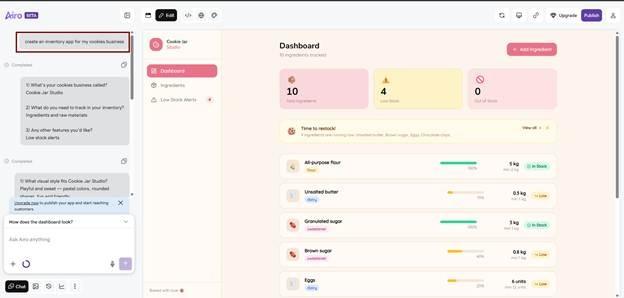
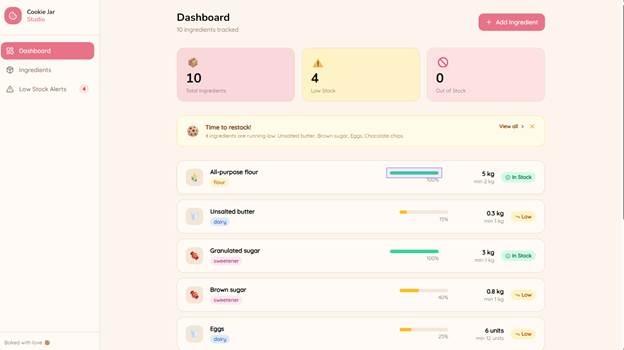
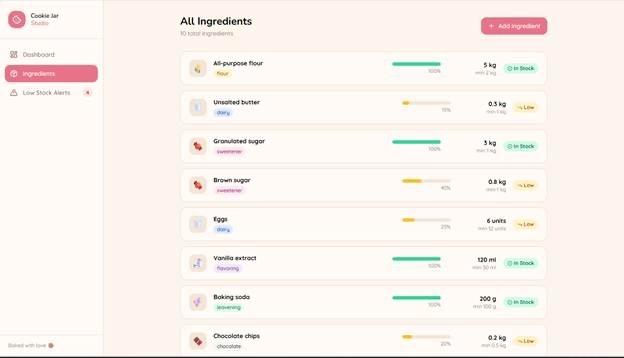
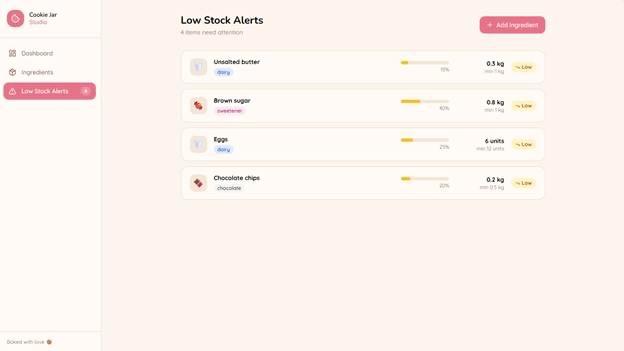
All of this was created in just a few minutes, including this low stock alert page, which is great for tracking inventory and ordering more items before running out.
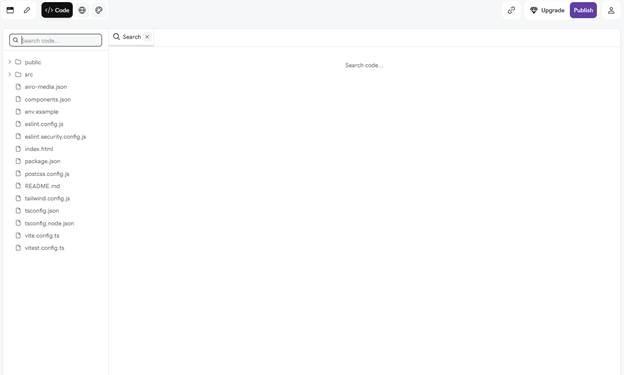
You can also check out the code behind the app:
Home services
Home service businesses often rely on software to manage jobs, dispatch technicians, create estimates, and communicate with customers. GoDaddy Airo AI Builder can help bring those workflows into a custom application experience while connecting with tools your business may already use.
- Job scheduling apps: Surface scheduling information and appointment workflows connected to existing service management platforms.
- Customer management apps: Give teams access to customer records, service histories, and account information.
- Estimate and quote workflows: Connect users with existing quoting and proposal processes.
- Technician resource hubs: Provide access to schedules, customer details, job notes, and operational information.
- Business operations dashboards: Centralize key information from multiple systems into a single experience.

Common home service platforms that can be embedded, linked, or connected within Airo AI Builder include:
- Jobber
- ServiceTitan
- Housecall Pro
- Workiz
Some integrations work with minimal setup, while others may require API credentials or additional configuration depending on your specific workflow and software environment.
Restaurants and food
Restaurants often look for a way for customers to view menus, reserve tables, place orders, and interact with the business across multiple platforms. GoDaddy Airo® AI Builder can help bring those experiences together by supporting restaurant-focused integrations and embedded functionality.
- Reservation apps: Add table booking capabilities through reservation platforms that customers already know and use.
- Online ordering apps: Give customers a direct path to place pickup or delivery orders from your app.
- Digital menu apps: Display menus, specials, pricing, and featured items in a mobile-friendly format.
- Customer inquiry forms: Collect catering requests, private event inquiries, and customer feedback.
- Restaurant CRM workflows: Track customer interactions, reservations, and business inquiries in one place.

Here are a few restaurant and food service platforms that can be integrated with your Airo AI Builder-based app:
- Yelp Reservations
- OpenTable
- Resy
- Tock
- Toast
- Uber Eats
- DoorDash
- Fantuan
- Chowbus
Pairing your app with a branded web presence can help strengthen your restaurant’s online identity. You can even get a .restaurant domain to create a unique web address that clearly reflects your business.
Health, beauty, and wellness
Salons, spas, fitness studios, personal trainers, and wellness businesses depend on smooth booking experiences and efficient scheduling. GoDaddy Airo® AI Builder can help bring those systems into a custom app experience, making it easier for customers to book services and engage with your business.
- Appointment booking apps: Allow clients to schedule services, consultations, classes, or treatments online.
- Membership management apps: Provide members with access to schedules, account information, and business updates.
- Service catalogs: Showcase treatments, classes, packages, pricing, and service details in one place.
- Customer intake forms: Collect appointment requests, preferences, and other information before visits.
- Client management workflows: Organize customer information and interactions through simple CRM-style functionality.

Some well-known health, beauty, and wellness platforms that can be connected to your app through Airo AI Builder include:
- Fresha
- Vagaro
- Mindbody
- Zenoti
- Gymdesk
Professional services
Professional service firms often need a secure and convenient way for clients to schedule meetings, access resources, submit information, and stay connected throughout an engagement. Instead of building a custom client portal from scratch, Airo AI Builder can help bring together the tools many firms already use into a single, client-friendly experience.
- Consultation scheduling apps: Allow prospects and clients to book meetings, strategy sessions, or consultations online.
- Client intake portals: Collect questionnaires, onboarding information, and required documents before an engagement begins.
- Resource hubs: Share forms, guides, FAQs, and other materials clients may need throughout the relationship.
- Client communication centers: Provide a centralized location for updates, requests, and next steps.
- Lead management apps: Track inquiries, prospects, and client opportunities in one organized system.

Professional service businesses can connect or embed popular platforms such as:
- Calendly
- TaxDome
- Soraban
- Canopy
- Clio
Real estate
Real estate businesses manage a constant flow of listings, leads, appointments, documents, and client communications. GoDaddy Airo AI Builder can help organize those moving parts into a single application, making it easier to manage properties behind the scenes while creating a better experience for buyers, sellers, renters, and investors.
- Property listing managers: Organize and display available properties, listing details, photos, and status updates.
- Administrative dashboards: Manage listings, leads, client information, and operational tasks from a centralized backend.
- Client portals: Give buyers and sellers access to documents, updates, resources, and property information.
- Lead capture systems: Collect inquiries from prospective clients and route them into a structured workflow.
- Showing and consultation scheduling: Allow clients to book property tours, meetings, and consultations online.
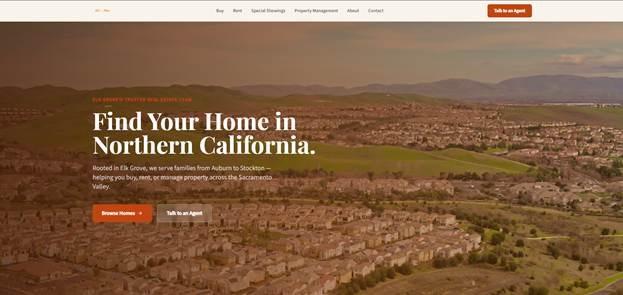
The core listing management and administrative functionality can be built natively within Airo AI Builder. More advanced MLS and IDX data connections may require API credentials or additional setup, depending on the provider. Some integration examples include:
- Calendly
- TaxDome
- Soraban
- Canopy
- Clio
If you’re looking to break into this industry, check out this article on real estate business ideas before building your app.
What to do after you launch
Launching your app is a big milestone, but it is not the finish line. The most successful apps improve over time based on how real users interact with them.
Getting your first users
Finding your first users doesn’t require a massive marketing budget. Start by getting your app in front of people who already have the problem it solves.
- Share your app in relevant online communities. Look for forums, social media groups, subreddits, and industry communities where your target audience already spends time.
- Reach out directly to potential users. Contact people who fit your target audience and ask them to try the app and provide feedback.
- Post in local groups and business communities. Local Facebook groups, chamber of commerce organizations, and networking communities can be great sources of early users.
- Create a simple waitlist or email list. Even after launch, collecting email addresses gives you a direct way to communicate updates and gather feedback.
- Ask existing users for referrals. Early adopters are often willing to share a useful tool with colleagues, friends, or others facing the same problem.
Iterating without breaking everything
Making updates to a live app can feel intimidating, but a few simple habits can reduce the risk.
- Test new features in a staging or development environment before pushing them live.
- Make one meaningful change at a time so you can easily identify what caused a problem.
- Back up your database before major updates or structural changes.
- Verify that critical workflows still function after every update.
- Review analytics and user feedback before deciding what to improve next.
Small, consistent improvements tend to outperform large, risky overhauls. Focus on solving one user problem at a time and let your app evolve based on real-world usage.
Final thoughts: you don’t need to code — but you do need a plan
No-code app builders have transformed development, but the truth is that the technology was never the biggest obstacle. Most projects stall because people jump into tools before defining their MVP, organizing their data, validating their idea, and mapping out how everything fits together. Now you have a clear process to follow, realistic expectations about what no-code development involves, and a framework you can use to move forward.
If you’re ready to turn your idea into a working application, explore GoDaddy’s AI app builder. It can help you move faster through the planning, building, and launching process so you can focus on solving real problems for your users.
GoDaddy Airo AI Builder
Describe your idea. We’ll build your live website in minutes.
With a few prompts, Airo AI Builder generates your website, web app,
pages, databases and logic in minutes — no coding required.
Start for free with 50 AI credits a month. No credit card required.
Build for Free
Frequently asked questions
How much does it cost to build an app without coding?
The cost of building an app without coding can range from free to several hundred dollars per month, depending on the platform, features, integrations, and number of users. Many no-code tools offer entry-level plans for simple projects, while more advanced business apps may require paid subscriptions. Still, no-code development is typically far less expensive than hiring a developer to build an app from scratch.
Can I build a free app without coding?
Yes, many no-code platforms offer free plans that let you build and test an app without paying upfront. Free plans are often a great way to validate an idea, though they may include limitations on users, features, storage, or publishing options. As your app grows, you may need to upgrade to a paid plan.
Is GoDaddy Airo AI Builder free to use?
GoDaddy Airo AI Builder offers a free trial that allows you to explore the platform and begin building your app. After the trial period, a paid subscription is required to continue using and publishing your application. Pricing varies based on the features and functionality your project requires.
What’s the difference between a no-code app and a coded app?
A no-code app is built using visual tools and AI-assisted workflows instead of traditional programming languages. A coded app is developed by writing software code, which typically provides more customization and flexibility but requires technical expertise and more development time. For many business use cases, a no-code app can deliver the functionality users need without the complexity of custom development.