How to end a professional email: 5 steps + examples
Knowing how to end a professional email helps you close your message clearly and leave the right impression.
Most professional email closings include three parts: the final sentence before you sign off, the sign-off phrase itself, and the signature block underneath. When these parts work together, your email feels complete, and the reader understands the tone, next step, or expected response.
Start by matching the level of formality to the person you’re writing to. Then, write a closing sentence that does one thing well: thank the reader, make a clear request, or set expectations. Your sign-off phrase, such as “Sincerely,” or “Best regards,” should match that same tone. Your signature should be clean, easy to scan, and ideally no longer than six lines.
The right ending also depends on the situation. A job application, a cold outreach email, and a team update each need different phrasing.
Email etiquette also changes across countries, industries, and workplaces. A sign-off that feels natural in one setting may sound too warm, too formal, or too blunt in another.
1. Identify your recipient and formality tier
Before you start writing a professional email, decide how formal it needs to be. Your formality tier is how polite and reserved your language sounds. A formal email uses full sentences and careful wording, while a casual one sounds more like how you’d talk to a coworker.
Ask yourself a few quick questions: How well do you know this person? Are they senior to you? What industry are they in? And if it’s a reply, what tone did they use?
Finance, legal, and government emails usually need to be formal. Tech and creative teams are more relaxed. If you’re replying, match the other person’s tone. That’s the easiest way to avoid sounding too stiff or too casual.
The biggest mistake is defaulting to the same sign-off for every email. What works for your teammate won’t work for your CEO.
Sign-off norms also vary by geography. Brits and Europeans lean on “Kind regards.” Americans are more likely to sign off with “Best.”
| Formality tier | Recipient type | Example tone |
| Formal | Executives, legal contacts, first-time outreach, unknown recipients | Reserved, precise, no contractions |
| Semi-formal | Clients you know, colleagues at other companies, hiring managers mid-process | Warm but professional, some contractions |
| Casual professional | Teammates, ongoing project threads, close collaborators | Conversational, direct, minimal formality |
2. Write a closing line that matches your purpose
The closing line is the sentence right before your sign-off, and it should do one job well: thank the reader, prompt an action, or set expectations. Trying to do all three makes the ending feel cluttered.
Which job you pick depends on the email. Cold emails almost always need a call to action (CTA). Ongoing reply threads often don’t, because the next move is already understood.
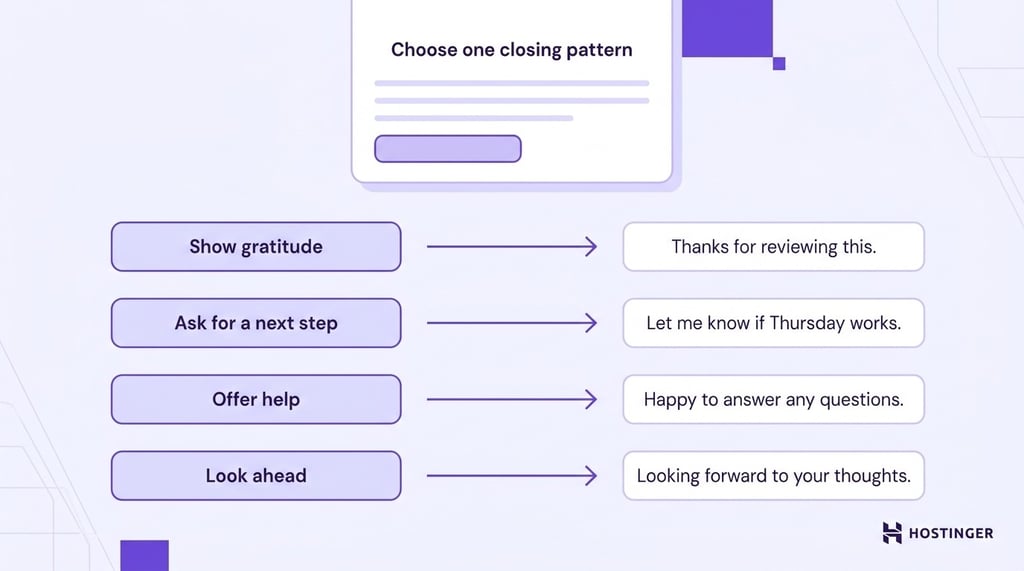
Here are four closing-line patterns in most professional emails:
- Gratitude – “Thanks for taking the time to review this.”
- Next-step CTA – “Let me know if Thursday at 2pm works for a 20-minute call.”
- Offer of help – “Happy to answer any questions before Friday.”
- Forward-looking close – “Looking forward to your thoughts.”
Then, there are some common closing lines that sound polite on the surface, but annoy the reader or send the wrong message:
- “Thanks in advance”. It comes across as pushy because it assumes the person will do what you ask before they’ve agreed. Replace it with a specific thank-you tied to what you actually appreciate. “Thanks for pulling the numbers on short notice,” reads far better than a generic advance thanks.
- “Hope this helps”. This only works when you’ve solved something. Save it for replies where you’ve genuinely answered a question rather than tacking it onto every message.
- “Please advise”. It reads as blunt and dated. A direct question about what you need next will land better every time.
3. Choose the right sign-off
The sign-off is the short phrase between your closing line and your name. It should match the formality tier you chose for the email.
Most people slip up by picking a sign-off that clashes with the relationship. “Sincerely” feels stiff when you’re writing to a teammate, and “Cheers” comes across as too casual for a first-time client in a formal industry.
| Sign-off | Formality | When to use |
| Sincerely, | Formal | Cover letters, legal emails, formal complaints |
| Yours sincerely, | Formal | Formal UK letters to a named person |
| Respectfully, | Formal | Emails to senior executives, government, military |
| Kind regards, | Formal to semi-formal | First email to someone new, UK and EU business email |
| Best regards, | Semi-formal | Clients, external colleagues, most business contexts |
| Regards, | Semi-formal | Neutral professional emails |
| Best, | Semi-formal | US professional email, colleagues you’ve met |
| All the best, | Semi-formal | Warm closings to known contacts |
| Warm regards, | Semi-formal | Established relationships |
| Thanks, | Casual professional | Teammates, quick internal exchanges |
| Thanks again, | Casual professional | Follow-up to a favor or help |
| Cheers, | Casual professional | Informal UK/AU contexts, close colleagues |
| Talk soon, | Casual professional | Known contacts, ongoing conversation |
Punctuation in your sign-off is easy to overlook, but the recipient sees it right next to your name. Capitalize only the first word (“Best regards,” not “Best Regards”), and end with a comma before your name on the next line. A period or no punctuation at all reads as either abrupt or careless.
If you have five seconds to pick and can’t remember any of this, use “Best regards,” for anyone outside your team. Use “Thanks,” for anyone inside it.
4. Set up a professional email signature
Your email signature is the block of text below your sign-off. It tells the reader who you are and how to reach you. Setting one up takes five minutes, and most email apps let you save it so it shows up on every message.
Include these elements in this order, since people scan from the top down, and your name and role should register first:
- Full name
- Job title
- Company name
- Phone number (optional)
- Company website
- One relevant link, like a LinkedIn profile or a booking link
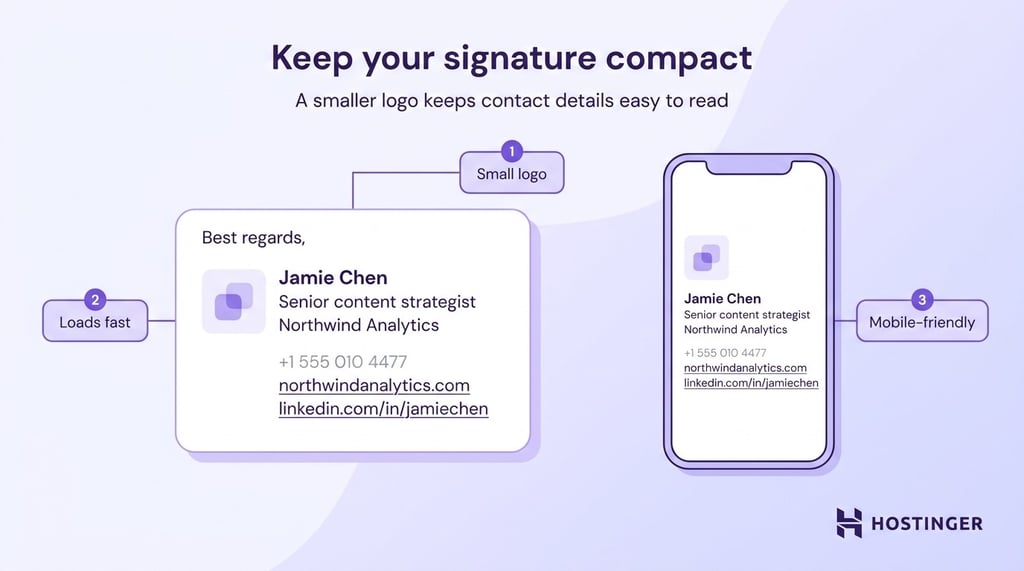
Here’s an email signature example that works in any professional context:
Best regards,
Jamie Chen
Senior Content Strategist
Northwind Analytics
+1 (555) 010-4477
northwindanalytics.com
linkedin.com/in/jamiechen
But even a clean signature looks less professional if it comes from a free Gmail or Yahoo address. A custom domain (like name@yourcompany.com) looks more trustworthy, especially in cold outreach. If you need one, a business email service like Hostinger Business Email can help you set it up and manage it in one place.
Beyond those six lines, only add elements that help the reader reach you or understand your role. Pronouns help with cross-team communication, a scheduling link eliminates back-and-forth for sales and recruiting, and a certification or legal disclaimer may be required in regulated industries like finance or healthcare.
Leave out motivational quotes, animated GIFs, and oversized logos. Social media handles belong in your signature if your work involves social media, but skip them if they’re purely personal. These extras clutter the signature and can clash with the reader’s expectations, especially in a first email.
Keep formatting plain. Stick to text, one link color, and test your signature on a phone before saving it.
How long should a professional email signature be?
Your email signature should be at four to six lines maximum, with each line kept under roughly 60 characters to prevent awkward wrapping on mobile screens. Stick to name, title, company, and one or two contact methods, then stop.
If you include a company logo, keep the image under 20 KB and no wider than 200 pixels. A small signature loads fast, reads well on a phone, and doesn’t push your contact info out of view.
5. Review your ending before you hit send
Once you’ve written your closing line, chosen a sign-off, and set up your signature, read all three back-to-back before sending. You’re checking for three things: that the tone is consistent, that names and titles are spelled correctly, and that the reader knows what to do next.
A formal ending should look and feel formal all the way through. Here’s an example for a hiring manager:
Thank you again for considering my application. I’m happy to provide any additional materials that would be helpful.
Sincerely,
Priya Ramanathan
priya.ramanathan@email.com
+1 (555) 010-2288
linkedin.com/in/priyaramanathan
A semi-formal ending for a team update should be shorter and more relaxed:
The staging build is live and ready for review. Ping me on Slack if anything looks off before tomorrow’s standup.
Thanks,
Priya
Watch for mismatches. A “Cheers,” followed by a legal disclaimer feels off. So does a “Sincerely,” on top of a signature packed with emoji and social links. If anything clashes, adjust the part that doesn’t fit the tier you chose in step one.
How to end emails in different professional scenarios
A job application and an internal team update need different endings, even if the same steps apply to both. Here’s how to end a professional email in different situations:
| Scenario | Recommended closing line | Recommended sign-off |
| Job application | “Thank you for considering my application. I’ve attached my resume and portfolio for your review.” | Sincerely, |
| Cold sales outreach | “Would 15 minutes on Tuesday or Wednesday work for a quick call?” | Best regards, |
| Follow-up after no reply | “Wanted to check in on this. Let me know if a different week works better.” | Best, |
| Post-interview thank-you | “Thank you again for the conversation today. I enjoyed learning about the team.” | Kind regards, |
| Apology or mistake email | “I take full responsibility, and I’ll have a corrected version to you by end of day.” | Sincerely, |
| Internal team update | “Ping me if anything needs adjusting before Thursday.” | Thanks, |
| Client status update | “Happy to walk through any of this on our next call.” | Best regards, |
| Resignation email | “Thank you for the opportunities I’ve had here. I’m committed to a smooth handover over the next two weeks.” | Sincerely, |
How to end a professional email in different cultures and regions
Sign-off norms are different by region, and using the wrong one can make an otherwise polished email feel off. Norms also vary by company and industry, so treat these guidelines as starting points rather than strict rules.
- US business email – “Best,” “Thanks,” and “Best regards” cover most exchanges. Formality is lower than in Europe, and first-name basis kicks in earlier.
- UK and much of the EU – “Kind regards” is the standard. For formal letters to a named person, “Yours sincerely” is traditional. “Yours faithfully” still shows up when you don’t know the person’s name (as in “Dear Sir or Madam”).
- Japanese and Korean business email – Expect more formal structures, often with honorifics in both the opening and closing. Look up the local convention before writing to contacts in these regions for the first time. A casual English sign-off won’t translate well in more formal business cultures.
If you’re unsure, use “Best regards.” It works in almost every English-speaking business context.
Sign-offs to avoid in professional emails
These sign-offs will weaken the tone of an otherwise strong email, no matter how well the rest of it is written.
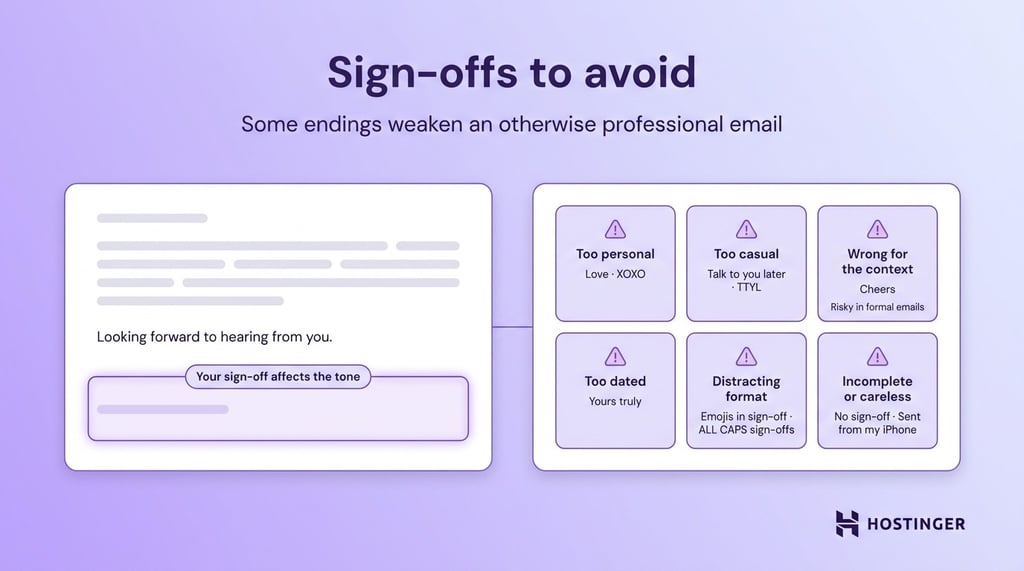
- Sent from my iPhone – reads as either lazy or as an excuse for typos.
- Love – over-familiar in any professional context.
- XOXO – same problem, amplified.
- Cheers in formal contexts – fine with UK/AU colleagues, wrong for a first email to a bank.
- Yours truly – dated and now reads as stilted in most business emails.
- Talk to you later or TTYL – too casual, and TTYL reads as text-message shorthand.
- Emojis in the sign-off line – tone mismatch outside of very casual internal threads.
- ALL CAPS sign-offs – read as shouting.
- No sign-off at all in cold outreach – feels abrupt and unfinished when the recipient doesn’t know you.
How to keep improving your email endings
Your email endings get better with practice, not with a one-time setup. Review your last 10 sent emails and check whether the closing line, sign-off, and signature match the formality tier for each person. Mismatches are usually the first thing to fix.
You can start improving your endings this week:
- Audit your saved signature in Gmail, Outlook, or your webmail client and trim anything that doesn’t earn its line.
- Practice writing the same email at two formality tiers so the shift becomes automatic.
- Ask a colleague to review your sent emails for a week and flag any tone mismatches.
- Read up on etiquette in your industry. Finance, legal, and healthcare all have their own rules worth learning.
If your signature still points to a Gmail or Yahoo address, a professional email address on your own domain makes your closing feel more credible, especially in cold outreach and client emails.
A business email service like Hostinger Business Email pairs with your domain and works with most email clients out of the box.
Revisit your endings whenever your role changes, your title updates, or you start writing to a new type of recipient.

All of the tutorial content on this website is subject to
Hostinger’s rigorous editorial standards and values.

Alma is an AI Content Editor with 9+ years of experience helping ideas take shape across SEO, marketing, and content. She loves working with words, structure, and strategy to make content both useful and enjoyable to read. Off the clock, she can be found gaming, drawing, or diving into her latest D&D adventure.