Multichannel Contact Center: A Beginner’s Guide
A multichannel contact center manages all customer interactions — via telephone, email, live chat, SMS, or social media — through a single platform. Recent research by McKinsey on customer service highlights a significant shift in consumer behavior: more than half of all customers actively use three to five different channels to resolve a single issue.
Without a unified communications platform to link these channels, support teams suffer. Employees work in silos, customer frustration mounts due to constant repetition, and service quality deteriorates due to operational inefficiencies. A multichannel contact center offers a solution: it consolidates diverse communication channels and routes every interaction to the right place, no matter where the conversation originally began.
A multichannel contact center is a unified customer service platform designed to organize, route, and manage customer communication across various touchpoints — such as telephony, live chat, email, and text messaging.
Unlike a traditional call center that focuses exclusively on phone traffic, a cloud-based multichannel platform works digitally, allowing team members to service customers via their preferred channels without switching between disconnected software applications.
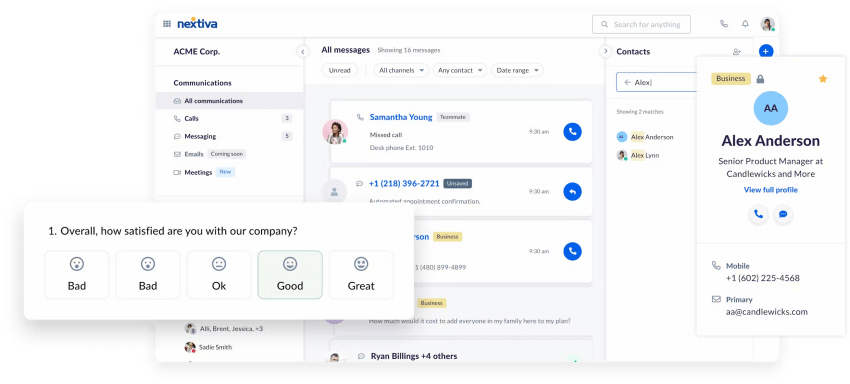
Typically deployed as a cloud Contact Center as a Service (CCaaS) platform, multichannel contact center software manages workflows across common channels, including:
- Inbound and outbound voice calls
- Interactive voice response (IVR) systems
- Email support tickets
- Real-time website live chat
- Social media messaging platforms (e.g., Facebook, Instagram)
- SMS message threads
Multichannel routing directs incoming customer interactions to the appropriate support or sales agent based on custom rules, improving overall operational efficiency and customer satisfaction.
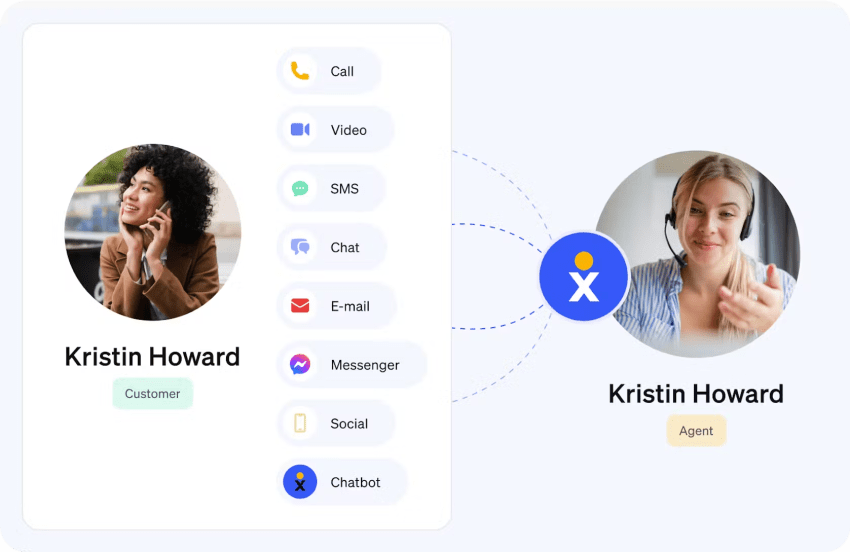
Example of a multichannel contact center in a real-world scenario
Consider an e-commerce company experiencing a seasonal surge in demand. A customer calls a toll-free number to resolve an urgent shipping question. The system automatically detects that the caller’s email address on file is invalid due to recent bounced emails.
While resolving the shipping issue, the agent updates the customer’s details in the unified dashboard and triggers an automated welcome message to the correct email address — preventing future communication dead ends and keeping the customer engaged.
Similarly, a company might offer a website chatbot for quick product inquiries (first-level support), a public social media feed for general questions, and an email ticketing system for complex, escalated issues. To learn more about modern setups, check out Nextiva’s analysis of contact center technology solutions for customer experience.
Adopting a multichannel strategy helps your brand deliver a consistent message across every touchpoint, building credibility and deepening customer trust. Key advantages for both businesses and their customers include:
- Enhanced customer experience (CX): Customers can reach your business through their preferred channels (email, phone, live chat, social media, or SMS), making interactions more convenient and flexible.
- Higher customer engagement: Meeting customers on the platforms they use most increases interaction rates, speeds up response times, and boosts satisfaction.
- Streamlined agent efficiency: Centralizing communications into a unified interface reduces platform-switching and shortens resolution times. CRM integrations and automated routing send queries to the right department immediately.
- Richer data and business insights: Aggregating metrics across communication channels provides a broader view of customer behavior, helping contact center leaders optimize service strategies and personalize future interactions.
- Scalability and operational agility: Businesses can easily introduce new communication channels or adjust existing ones as customer preferences evolve and volume scales.
- Competitive edge: Providing accessible, multi-platform support differentiates your brand from competitors using restrictive, single-channel communication.
Evaluating contact centers? Get the buyer’s guide.
This guide reveals the five pillars of a modern platform, key questions to ask, and red flags to avoid.
Drawbacks of Multichannel Contact Centers
Despite its flexibility, a multichannel approach isn’t without operational challenges, especially when channels operate in isolation. Primary limitations include:
- Siloed channels and fragmented journeys: Without full cross-channel integration, customer data remains trapped in individual channels. When context isn’t shared, customers are forced to repeat their issues whenever they switch platforms, leading to elevated handle times and customer frustration.
- Management complexity: Running standalone channels requires managing distinct tools, processes, and protocols. Juggling disconnected software strains agents, leads to inconsistent service quality, and makes it harder for supervisors to maintain standards.
- Higher operational costs: Integrating multiple standalone technologies, managing recurring software licenses, and continuously training agents across disparate platforms require significant capital, which can be cost-prohibitive for smaller businesses.
Key Features of Multichannel Contact Center Software
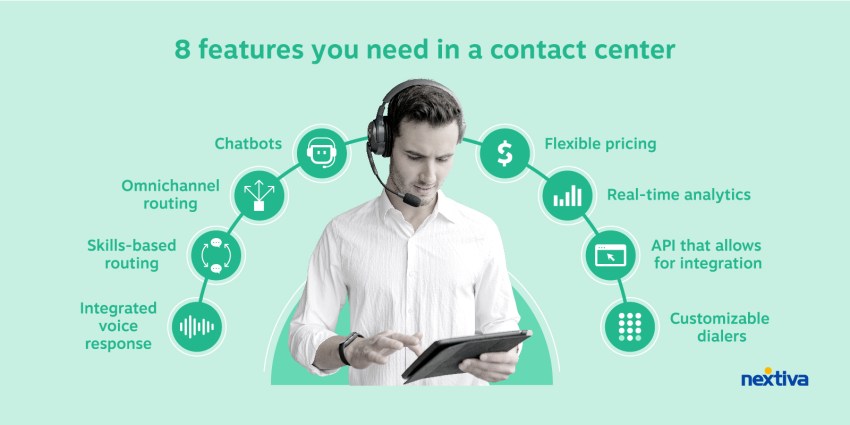
When evaluating contact center platforms, look beyond basic messaging capabilities. High-performing solutions offer the following five key functional features to maintain operational efficiency:
- Unified routing: Automatically distributes incoming interactions across all channels to the best-suited agent based on current workload, technical skillset, or tier level.
- Channel-specific analytics: Tracks granular, real-time metrics tailored to each medium—such as Average Speed of Answer (ASA) for voice call queues versus First Response Time (FRT) for live chat.
- Agent desktop integration: Consolidates disjointed communication streams into a single workspace, eliminating toggle fatigue and reducing handle times.
- Bi-directional CRM sync: Continuously updates customer profiles across your CRM and communication software to ensure records and interaction histories remain completely accurate.
- Real-time reporting dashboard: Displays live queue activity, quality monitoring metrics, and supervisor override tools to keep service level agreements (SLAs) on target.
While the terms multichannel and omnichannel are often used interchangeably, they reflect distinct operational strategies.
A multichannel contact center offers customers several communication options, but those channels operate in isolated silos. By contrast, an omnichannel contact center unifies every touchpoint into a continuous conversation.
For example, in an omnichannel setup, if a customer initiates a ticket via live chat and later calls customer service for an update, the phone agent can instantly review the previous chat transcript and continue the resolution without forcing the customer to repeat information.
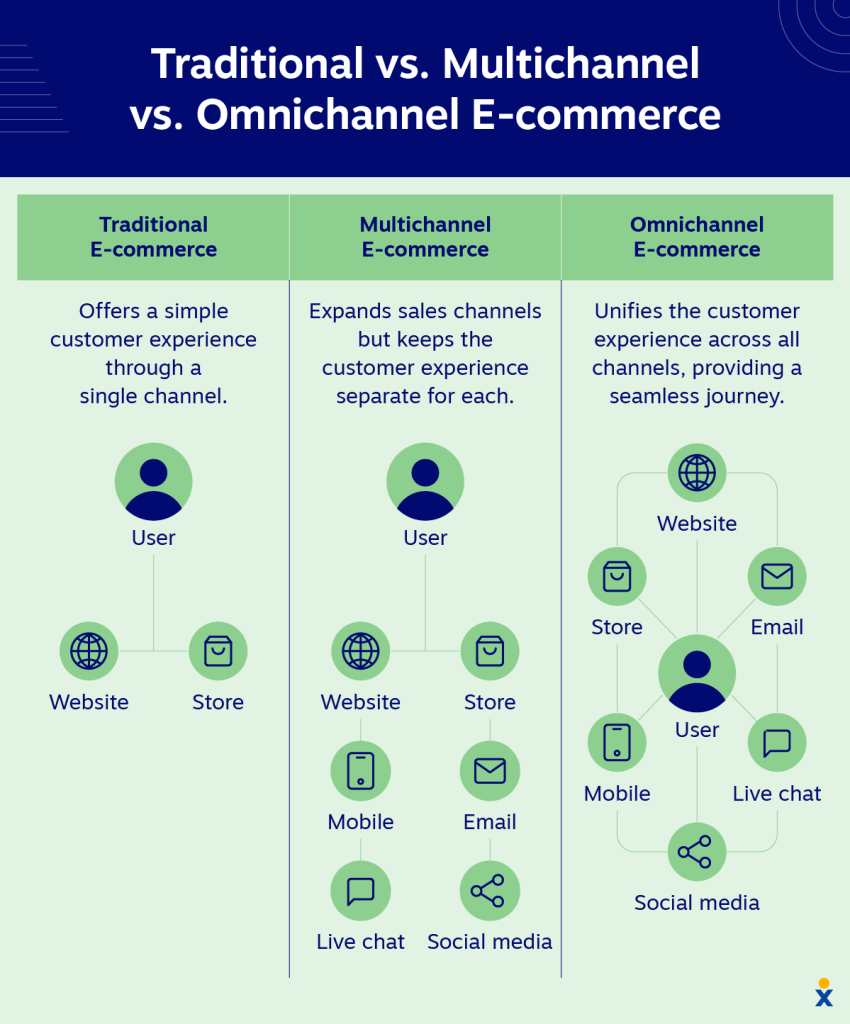
Here’s a breakdown of how these models differ (also with traditional setups):
| Key feature | Traditional call center | Multichannel contact center | Omnichannel contact center |
|---|---|---|---|
| Communication channels | Voice only (inbound/outbound) | Voice, email, chat, SMS, social | Voice, email, chat, SMS, social |
| Data integration | Isolated to voice logs | Disconnected or siloed databases | Fully integrated single customer view |
| Context retention | N/A (voice only) | Missing; customers must repeat details | Seamless; conversation history follows the user |
| Agent workspace | Single voice interface | Multi-window or split dashboards | Unified communications |
| Operational Focus | Managing call queues | Expanding channel availability | Syncing the complete customer journey |
For a deep dive into how these design choices alter daily workflows, review Nextiva’s feature video:
Transitioning to a multichannel contact center requires a structured, phase-based rollout plan to minimize system downtime, safeguard customer data, and prevent workflow disruptions.
Follow this step-by-step framework for a seamless deployment:
1. Audit customer touchpoints
Identify where your target audience actively engages before expanding into new channels. Review website traffic and phone logs, and use post-interaction surveys to pinpoint top-volume platforms.
Focus deployment on the 3–4 channels your customers actually prefer and avoid burning resources on channels your audience rarely uses.

2. Select software architecture
Choose a cloud contact center platform that integrates seamlessly with your channel strategy and technology stack. Prioritize platforms that offer a unified agent desktop, flexible native APIs, and robust CRM integrations.
Your contact center software should comply with relevant data protection and security standards (such as PCI DSS for payment processing or HIPAA for health data). Adherence to strict data protection protocols is crucial for maintaining customer trust.
3. Set standard operating procedures
Develop operational processes and governance guidelines tailored to the specific workflows and pacing of each channel. Establish clear Service Level Agreements (SLAs) based on expected response times (e.g., under 2 minutes for live chat versus under 4 hours for email responses).
Also, configure skills-based routing rules to automatically route customer queries to the appropriate agent or support tier, based on expertise and workload.
4. Empower agents and deploy self-service
Prepare your team for multi-channel workflows while creating self-service options to manage inquiry volumes. Train your staff to switch flexibly between different tones and communication styles (e.g., formal emails versus concise, casual chats).
Implement IVR systems, AI chatbots, and public knowledge bases to handle simple, recurring inquiries, allowing staff to focus on resolving complex issues.
Selecting the right contact center solution provider requires evaluating how well a given platform aligns with your operational scale, existing technology stack, and key communication channels. While many providers cover basic voice and digital channels, their strengths vary, ranging from digital-first ticketing architectures and AI-powered agent support to comprehensive workforce optimization solutions for large enterprises.
To assist you in researching and comparing various software solutions, the following table contrasts five leading multichannel contact center platforms:
| Solution | Focus | Best for | Key features |
|---|---|---|---|
| Nextiva | Unified customer communications & journey orchestration | Scaling mid-market and enterprise teams | Centralized platform replacing scattered apps; blends voice and digital channels with cross-channel reporting and automated workforce workflows. |
| Dialpad | Built-in AI & real-time intelligence | Fast-paced, AI-driven support and sales teams | Delivers real-time call transcription, live customer sentiment tracking, and in-the-moment predictive agent coaching on-screen. |
| Genesys Cloud CX | Enterprise customization & infrastructure | High-volume, complex enterprise operations | Deep workflow customization, advanced multi-tier routing architectures, and resilient global infrastructure scaling. |
| Zendesk (Talk & Support Suite) | Digital-first ticketing & case management | Support teams focused on digital messaging | Converts digital touchpoints (email, live chat, social messaging) into unified, easily trackable support tickets. |
| NiCE CXone | Workforce engagement & conversational AI | Large enterprise contact centers that need deep operational analytics | Industry-leading workforce optimization (WFO) tools, automated agent forecasting, quality scheduling, and conversational AI. |
When considering these platforms, request product demonstrations that put your team’s specific workflows to the test, rather than exploring generic feature lists. Pay particular attention to how easily staff can switch between different channels and how well the system integrates with your existing CRM.
It’s best to keep it simple when you explore a new multichannel or omnichannel solution. Then, as your business grows, it’s easy to connect channels to your customer service team.
With Nextiva’s contact center solution, you can replace over a dozen apps with one enterprise-grade customer communication platform. Exceed customer needs with a feature-rich cloud contact center and track your progress with unified reporting across every channel.
With Nextiva Contact Center, you can:
- Manage all the inbound and outbound channels easily
- Integrate your phone system and contact center
- Leverage workforce automation to scale
- Roll out 24/7 customer support options
- Access the latest features without any interruptions
Help your agents reach their full potential with the Nextiva Contact Center.
Upgrade your contact center.
See why thousands of businesses made the switch to Nextiva’s contact system solution.
FAQs
A traditional call center handles customer interactions exclusively through voice calls (both inbound and outbound). A contact center supports multiple communication channels, including voice, email, live chat, SMS, social media, and messaging apps, allowing customers to connect through their preferred medium.
Your business likely needs a multichannel setup if you notice any of the following triggers:
– Your primary phone lines are overwhelmed with routine, low-complexity questions.
– Customers are reaching out on social media or messaging channels where your team has no official presence.
– Your current team struggles to track customer history across separate tools, leading to missed messages or delayed responses.
– Your target audience spans demographics with distinct communication preferences (e.g., younger buyers preferring live chat/SMS over phone calls).
While both models offer multiple communication channels, multichannel systems manage each channel in an isolated silo with separate databases. Omnichannel systems integrate all channels into a unified data layer, allowing interaction history and customer context to sync in real time as a customer moves from one platform to another.
CCaaS stands for Contact Center as a Service. It’s a cloud-based software deployment model that allows companies to run their contact center operations online without purchasing or maintaining expensive on-premises hardware. Most modern multichannel and omnichannel contact center platforms are delivered as CCaaS solutions.
More channels aren’t always better. Rather than trying to cover every existing platform, start by auditing your audience to identify the 3 to 4 channels they use most (e.g., voice, email, live chat, and WhatsApp/SMS). Adding channels without adequate staffing or integration leads to poor response times and fragmented service.