What is an onboarding email sequence and how to create one
An onboarding email sequence is a series of automated emails sent after a user signs up, subscribes, or makes a purchase.
Each message guides the user toward a specific action, such as activating a product feature, completing a profile, or making a first purchase, so they reach value faster and remain engaged after the initial signup.
Steps for building an onboarding email sequence:
- Defining the goal. Choose the one outcome the sequence should drive, such as a first login, purchase, or product activation.
- Mapping the user journey. List the steps between signup and that outcome so each email addresses a specific blocker.
- Deciding how many emails to send. Match the sequence length to the product’s complexity and time-to-value.
- Writing each email around one action. Give every message one primary CTA and one clear next step.
- Setting timing delays. Schedule emails around how quickly users can reasonably progress, rather than following an arbitrary calendar.
- Segmenting users. Split the sequence when the plan, signup source, use case, or behavior changes what a user needs next.
- Automating sending. Use a drip campaign tool that sends emails based on elapsed time, user events, or both.
- Tracking results and iterating. Monitor open rates, click rates, activation rates, and unsubscribes, then improve or remove weak emails.
What an onboarding email sequence does
An onboarding email sequence turns a new signup into an active user by guiding them toward a measurable goal.
Unlike a general marketing campaign, each email reflects where the user is in the onboarding journey and encourages the next action.
Most products require users to complete a few key steps before they understand why the product is useful.
Without guidance, many users stop before reaching that point. An onboarding email sequence fills that gap by sending a series of automated emails over time or in response to user actions. This approach is commonly known as a drip campaign, where each message moves the user one step closer to the goal.
Five characteristics distinguish onboarding sequences from other email campaigns:
- Event-triggered. The sequence starts when a user signs up, subscribes, enrolls, or makes a purchase, not on a marketing calendar.
- Time-bound. The sequence focuses on the early onboarding period and ends once the user reaches the goal or completes the planned journey.
- Goal-oriented. Every email supports one measurable outcome, such as activating a feature, completing a profile, or making a first purchase.
- Sequential. Each message builds on the user’s progress, so the order reflects the journey from signup to activation.
- Has a defined end. Users leave the sequence after reaching the goal or receiving the final email, preventing unnecessary onboarding messages once guidance is no longer needed.
How to build an onboarding email sequence in eight steps
Define the goal first, then work through the user journey, email content, automation, and measurement in that order. Each step builds on the decisions made before it.
1. Define the goal of the sequence
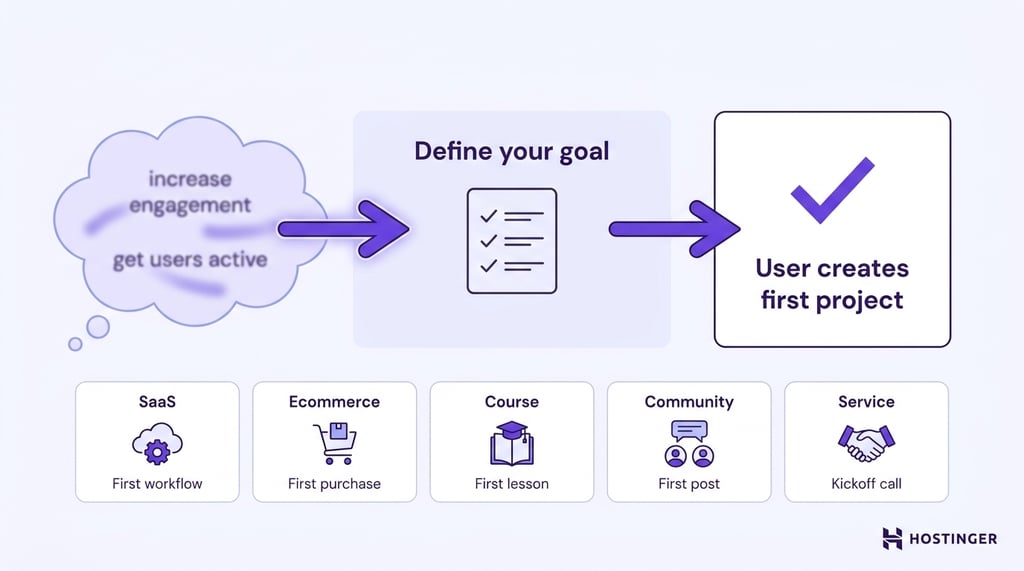
An onboarding sequence needs one primary goal: the measurable action that shows a new user has made meaningful progress toward a successful first experience.
The goal might be creating a first project, completing a purchase, finishing a course module, or submitting an intake form.
Broad outcomes such as “increase engagement” or “improve adoption” are too vague to guide the content of individual emails.
A clear goal gives every message a purpose. It determines what users need to do, which obstacles the sequence should address, and when the automation should stop.
The right onboarding goal depends on the product or service, but it should always represent the first meaningful milestone in the user’s journey:
- SaaS or software. Reaching the product’s activation event, such as creating a first workflow, publishing a project, or inviting a teammate.
- Ecommerce. Making a first purchase, registering a product, or returning for a repeat purchase.
- Course. Completing the first lesson or module.
- Membership community. Creating a profile, publishing a first post, or leaving a first comment.
- Service business. Submitting an intake form, booking a kickoff call, or attending the first appointment.
Phrase the goal as an event that can be recorded in your analytics or customer system. The event should occur within the product’s expected onboarding period, whether that takes a day, a week, or longer.
If you cannot identify or measure the event, refine the goal before writing the first email.
2. Map the user journey from signup to goal
Once you’ve defined the onboarding goal, map the steps users need to complete before they reach it.
This journey becomes the foundation of your onboarding sequence, with each email helping users move from one milestone to the next.
Start by identifying what happens immediately after signup or purchase. Then list the actions users need to take before reaching the goal you defined in the previous step.
Focus on the decisions, questions, or obstacles that could prevent them from moving forward.
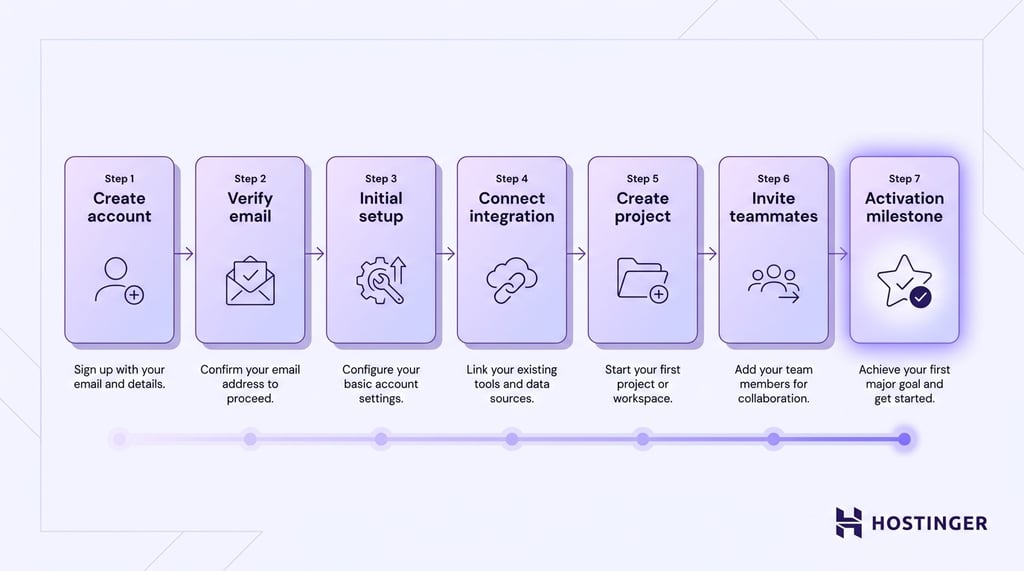
For example, a SaaS onboarding journey might look like this:
- Create an account.
- Verify the email address.
- Complete the initial setup.
- Connect the first integration.
- Create the first project.
- Invite teammates.
- Reach the activation milestone.
An online course might follow a different path:
- Enroll in the course.
- Access the learning platform.
- Complete the first lesson.
- Download supporting materials.
- Join the community.
- Finish the first module.
Not every step requires its own email. Some users will move through multiple stages on their own, while others may need reminders or additional guidance.
The purpose of mapping the journey is to identify where communication adds value, such as explaining the next step, answering common questions, or encouraging users who have stopped progressing.
The user journey also determines when people should leave the onboarding sequence. Once someone reaches the goal, continuing to send onboarding emails adds little to no value and can become repetitive.
Instead, move them into a different automation that matches their new stage, such as customer education, retention, or promotional campaigns.
3. Decide how many emails to send
Simple journeys may only need a few messages, while products with longer setup processes or multiple milestones often need more guidance.
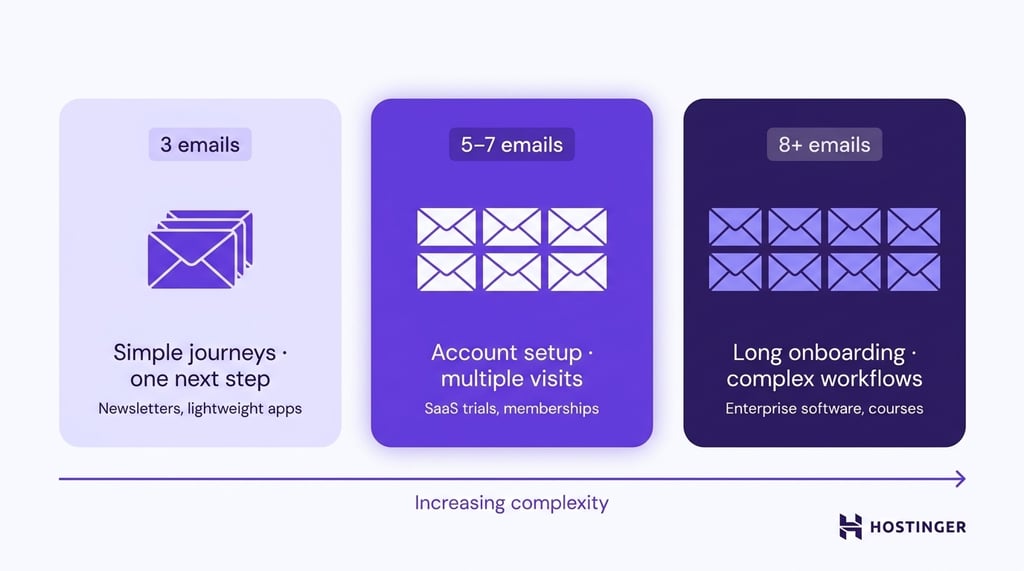
The goal is to send enough emails to help users reach the goal without repeating information they already know.
As a general guideline:
- Three emails. Suitable for simple onboarding journeys with one obvious next step, such as newsletter subscribers, lightweight apps, or products with little or no setup.
- Five to seven emails. Common for products that require account setup, education, or several return visits before users experience the product’s value. Many SaaS trials, membership platforms, and ecommerce post-purchase journeys fall into this range.
- Eight or more emails. Appropriate for products with long onboarding periods, multiple activation milestones, or complex workflows, such as enterprise software, multi-week courses, or services that involve several onboarding stages.
4. Write each email around one action
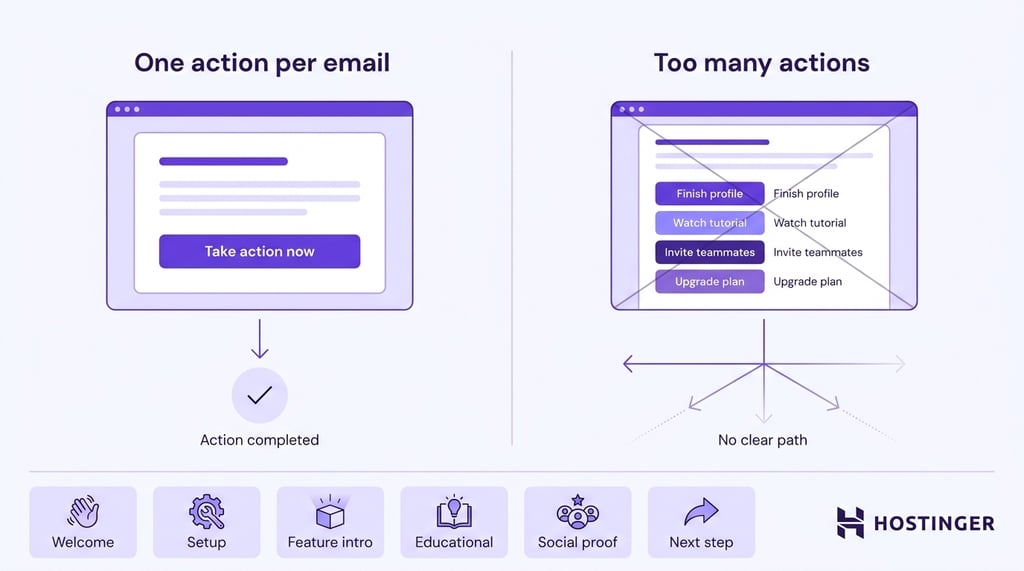
Start by identifying the action you want users to complete, then build the rest of the email around it.
Explain why the action matters, provide any information users need to complete it, and finish with a clear call to action (CTA).
For example:
- Welcome email – Verify an email address or sign in for the first time.
- Setup email – Complete the initial account or product setup.
- Feature introduction – Try a key feature or workflow.
- Educational email – Read a guide or watch a tutorial.
- Social proof email – Learn how other customers achieved results.
- Next-step email – Upgrade a plan, invite teammates, or complete another milestone after experiencing value.
Avoid asking users to complete multiple unrelated tasks in the same email. For example, don’t ask them to finish their profile, watch a tutorial, invite teammates, and upgrade their subscription all at once. Too many competing actions make it less likely they’ll complete any of them.
Personalize emails where it helps users move forward. Referring to a user’s name, selected plan, purchased product, or onboarding progress makes the guidance more relevant, but only include personalization when it improves the experience rather than simply inserting dynamic fields.
5. Set timing delays between emails
The best time to send an onboarding email is when users are ready for the next step in their journey.
Sending messages too early can overwhelm people who are still completing the previous task, while waiting too long increases the chance that they lose momentum or forget to return.
Most onboarding sequences use one of two scheduling approaches:
- Fixed delays. Emails are sent after a set amount of time, such as one day after signup or three days after the previous email. Fixed schedules are easy to configure and work well when users tend to progress at a similar pace.
- Behavior-triggered. Emails are sent after users complete a specific action, such as verifying an email address, creating a project, or finishing the first lesson. This approach keeps messages aligned with the user’s progress, but it requires reliable tracking of product events.
Many onboarding sequences combine both approaches. A welcome email is usually sent immediately after signup, while later emails may wait for a completed action or fall back to a time delay if the user stops progressing.
For products that rely on fixed delays, a welcome email is typically followed by another message within one or two days, with later emails spaced several days apart.
Products with short free trials or limited-time offers usually benefit from a faster cadence, while courses, enterprise software, and other longer onboarding journeys often require more time between messages.
6. Segment users where needed
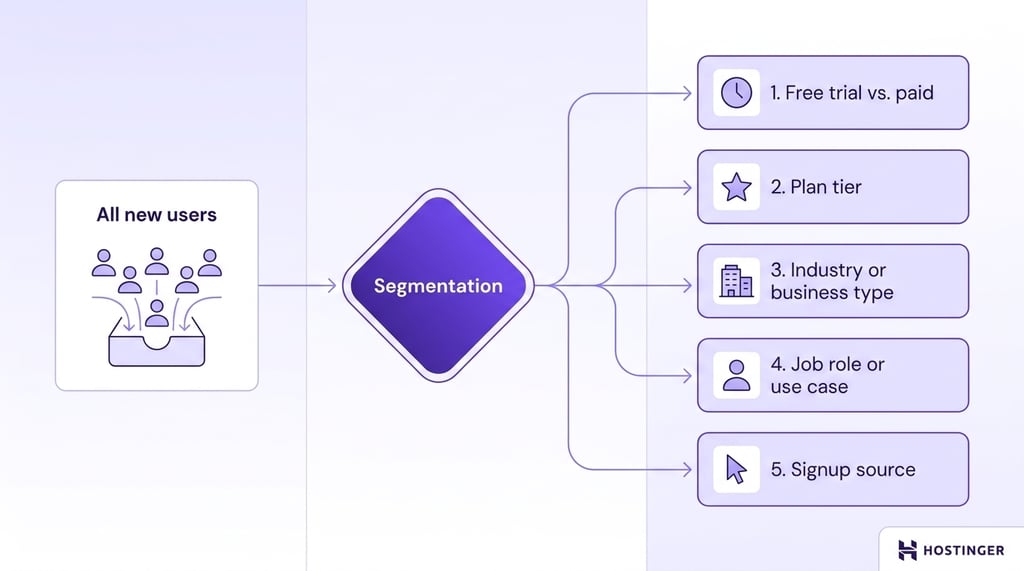
Segmentation helps when different groups need different guidance to complete the same goal. For example, a free trial user and a paying customer may both want to create their first project, but the steps, available features, and prompts they see are different.
Free trial users often need reminders about feature limits, remaining trial time, or upgrade options. Paying customers usually benefit from emails that introduce advanced features and encourage deeper product adoption.
Sending the same onboarding emails to every user reduces relevance and makes the sequence less useful.
Common ways to do email list segmentation for onboarding sequences include:
- Free trial vs. paid customer. Free trial users usually need help experiencing enough value before the trial ends, while paying customers need guidance that helps them succeed quickly and justify their purchase. The onboarding sequence, calls to action, and educational content should reflect those different objectives.
- Plan or subscription tier. Higher-tier plans often include features that lower tiers cannot access. Tailor the sequence to the capabilities of each plan, so users learn the tools they can actually use instead of receiving emails about unavailable features.
- Industry or business type. The same product may solve different problems for different industries. Replace generic examples with workflows, terminology, and use cases that match how each audience uses the product, making the guidance immediately recognizable and more relevant.
- Job role or intended use case. A marketing manager may need to build campaigns, while a developer focuses on integrations and APIs. Showing each audience the features that matter most helps them reach their first success faster.
- Signup source. Users arrive with different expectations depending on where they discovered the product. Someone who signed up after a webinar may already understand the product’s value and needs help getting started, while someone from a paid search ad may still need a broader introduction before moving into setup.
Create segments only when you have reliable user data and a clear reason to change the onboarding experience.
Dividing a small audience into too many groups makes performance harder to measure. Building segments from information you do not collect can place users in the wrong onboarding sequence or prevent them from receiving one at all.
7. Automate the sequence
Once you’ve planned the onboarding sequence, automate it so every new user receives the right email at the right time.
Email marketing automation ensures a consistent experience, eliminates manual work, and allows the sequence to scale as your audience grows.
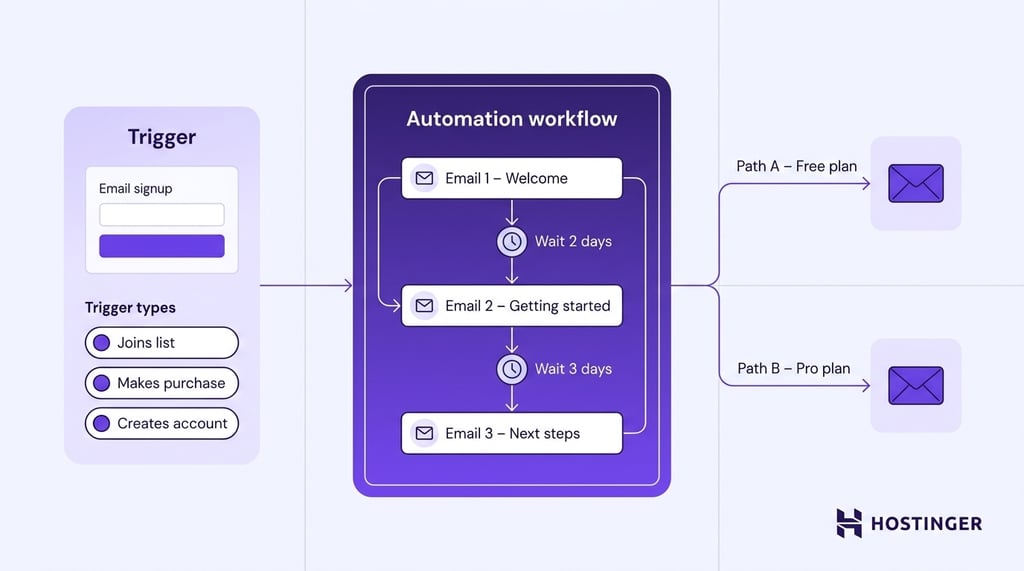
Create a workflow that starts when someone joins your email list, creates an account, makes a purchase, or completes another onboarding trigger.
Then add each email in the order you planned, inserting delay steps between messages so users have enough time to complete the previous action before receiving the next one.
If different groups of users need different guidance, create separate onboarding paths for each group.
Email automation examples include sending the right sequence based on information such as a user’s plan, purchase, signup source, or actions.
Tools like Hostinger Reach simplify this process by combining AI-assisted email creation with automation features designed for multi-step campaigns.
You can generate email copy with AI prompts, build onboarding sequences with multiple email and delay steps, manage contacts, automate follow-up emails, and monitor campaign performance from a single platform.
As your onboarding process evolves, you can update the sequence by adding or removing steps without rebuilding the entire workflow.
For step-by-step instructions on setting up triggers, delay steps, and automation workflows, see the Hostinger Reach drip campaign automation guide.
After setting up the workflow, create the emails for your onboarding workflow by following our guide to creating an email campaign in Hostinger Reach.
8. Track results and refine the sequence
Regular reviews help you identify which emails move users toward the onboarding goal and which ones create unnecessary friction.
Measure performance at two levels: individual emails and the sequence as a whole. Email-level metrics reveal how recipients respond to each message, while sequence-level metrics show whether the automation is successfully guiding users to the onboarding goal.
Email-level metrics:
- Open rate. Indicates whether subject lines, sender recognition, and delivery timing encourage users to open the email.
- Click rate. Shows whether the content and call to action motivate users to take the next step.
- Unsubscribe rate. Highlights emails that feel irrelevant, repetitive, or too frequent.
Sequence-level metrics:
- Activation rate. The percentage of users who complete the onboarding goal. This is the most important measure of whether the sequence is working.
- Time to activation. How long users take to reach the onboarding goal after entering the sequence.
- Sequence completion rate. The percentage of users who finish the workflow without exiting early or abandoning the onboarding process.
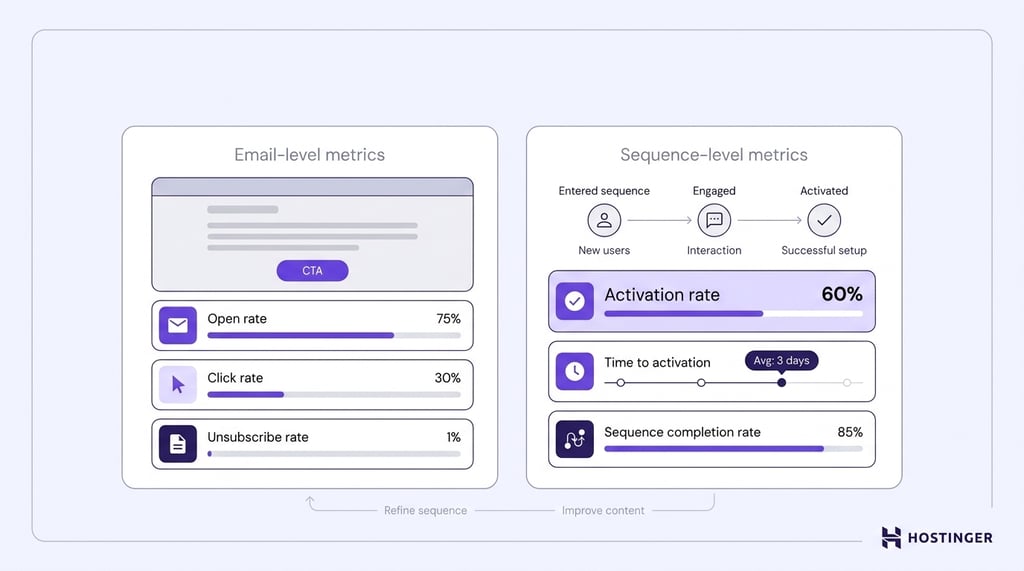
Use the metrics to diagnose specific problems. Falling open rates usually point to issues with subject lines, sender recognition, send timing, or email deliverability.
Healthy open rates combined with low click rates suggest the message or call to action is not convincing users to continue.
A spike in unsubscribes on one email often indicates that the message adds little value or arrives at the wrong time.
Review the sequence regularly, especially after major product changes or once enough new users have completed the workflow to reveal consistent patterns.
Avoid reacting to a single cohort or a short-term fluctuation. Look for trends that appear repeatedly before changing the sequence.
Common types of onboarding email sequences
Onboarding sequences follow the same principles across every business, but the trigger, goal, and email content change depending on what users signed up for.
New subscriber onboarding
A newsletter signup triggers this sequence. Because there is no product to activate, the goal is to turn a new subscriber into an engaged reader who regularly opens, clicks, or replies to emails.
The first few emails should confirm what subscribers signed up for, explain how often they’ll hear from you, and immediately deliver value through useful resources, practical advice, or your best-performing content.
Early engagement matters because email providers use opens, clicks, and replies as signals that subscribers want future messages.
These sequences are usually short, often three to four emails, because the onboarding journey ends once subscribers develop a habit of engaging with your emails.
From there, they should move into your regular newsletter or another campaign that matches their interests.
Subject: Welcome! Here's what to expectEmail: Thanks for subscribing. You'll receive one practical email every Tuesday covering SEO, content marketing, and website growth. To get started, here's our most popular guide on improving search rankings.
CTA: Read the guide
SaaS or product onboarding
Creating an account or starting a free trial begins the onboarding sequence for software products.
The objective is to help users reach the activation milestone that predicts long-term retention, such as creating a first project, inviting teammates, publishing content, or connecting an integration.
Most users abandon software during the first few interactions, before they experience the product’s value.
Successful onboarding sequences, therefore, focus on removing friction one step at a time.
Early emails explain what to do next, answer common setup questions, and encourage users to complete the actions that move them closer to activation.
Later emails introduce additional features only after users understand the core workflow.
Software onboarding often requires the longest sequences because activation depends on multiple steps.
Many products also combine time-based delays with behavior-triggered emails so guidance arrives when users complete a milestone or stop progressing.
Subject: Create your first project in under 5 minutesEmail: Your account is ready. The fastest way to experience the product is by creating your first project. Follow the setup guide below to complete the initial configuration and unlock the core workflow.
CTA: Create your first project
Customer onboarding
Customer onboarding starts after someone upgrades to a paid plan or purchases a product or service.
Unlike trial users, paying customers have already decided to buy, so the objective shifts from convincing them to continue to helping them succeed as quickly as possible.
The sequence should reinforce the purchase decision by showing customers how to get value immediately.
Depending on the product, that may include completing account setup, importing existing data, inviting team members, scheduling training sessions, or learning the features they are most likely to use first.
Customer onboarding also lays the foundation for long-term retention. Customers who achieve an early success are more likely to continue using the product, renew their subscription, or purchase additional services.
Once they reach that point, they should move into customer education, feature adoption, or retention campaigns instead of continuing to receive onboarding emails.
Subject: Let's get your account fully set upEmail: Welcome aboard! Your subscription is active, and you're ready to get started. Complete your account setup, import your existing data, and invite your team so you can begin using every feature included in your plan.
CTA: Finish account setup
Course or membership onboarding
Enrollment in a course or joining a membership community triggers this sequence. The onboarding goal is to help new members become active participants by completing the first lesson, finishing the first module, introducing themselves to the community, or taking another meaningful first step.
The biggest challenge is rarely access to the platform. Maintaining momentum is usually more important.
New members often enroll with good intentions but lose motivation if they postpone getting started or feel overwhelmed by the available content.
Effective onboarding emails keep members moving forward with clear next steps, reminders, and encouragement that follow the pace of the course or community.
A self-paced course may benefit from progress reminders after periods of inactivity, while a cohort-based course should align emails with scheduled lessons, assignments, and live sessions.
Subject: Your first lesson is waitingEmail: Welcome to the course! Start with Lesson 1 to build the foundation for everything that follows. You can complete it in about 20 minutes, then introduce yourself in the community.
CTA: Start Lesson 1
Ecommerce post-purchase onboarding
Checkout starts the onboarding sequence for ecommerce customers. The immediate goal is to help customers successfully use what they purchased, while the longer-term objective is to encourage repeat purchases and build loyalty.
Many stores stop communicating after sending an order confirmation and shipping update. A stronger onboarding sequence continues after delivery by explaining how to assemble, use, maintain, or get the best results from the product.
Helping customers succeed reduces frustration, lowers return rates, and increases satisfaction.
Later emails can naturally shift toward long-term retention. Depending on the product, the sequence may recommend complementary items, request a review after customers have had enough time to use the product, or remind them to reorder consumable products before they run out.
Subject: Get the best results from your new coffee grinderEmail: Your order has arrived! Before your first use, follow this quick guide to adjust the grind size, clean the burrs, and brew your first cup. A few small adjustments can make a noticeable difference in flavor.
CTA: View the setup guide
Service-client onboarding
Booking a service, signing a proposal, or accepting a contract starts this onboarding sequence. The objective is to prepare clients for the engagement and remove uncertainty before the work begins.
Unlike software or ecommerce onboarding, service onboarding focuses on setting expectations instead of teaching product features.
New clients want to know what happens next, who their point of contact is, what information they need to provide, and how the project or engagement will unfold.
A strong sequence answers those questions before clients have to ask them. Typical emails include intake forms, document requests, kickoff meeting details, timelines, communication expectations, and preparation instructions.
Clear onboarding reduces missed appointments, shortens project delays, and helps the working relationship begin smoothly.
Subject: Here's what happens nextEmail: Thanks for choosing us. Before our kickoff call, please complete the client questionnaire and upload any documents you'd like us to review. We'll use this information to prepare a tailored plan for our first meeting.
CTA: Complete the onboarding form
Common mistakes that break onboarding email sequences
Most onboarding sequences fail for the same six reasons. Each mistake weakens either relevance, clarity, or the sequence’s ability to improve over time:
- Sending too many emails. Excessive frequency increases fatigue and unsubscribes, reducing the audience available for future lifecycle campaigns.
- Unclear next steps in each email. If the reader finishes an email and does not know what to do, activation stalls, and the sequence’s timing loses meaning.
- Generic content that could apply to anyone. Generic copy gives users little reason to believe the message reflects their situation.
- Weak or missing segmentation. Sending identical emails to free trial users and paying customers lowers relevance for both groups and depresses click rates across the sequence.
- No A/B testing. Without testing subject lines and CTAs, weak versions stay in production indefinitely, and the sequence never improves past its launch state.
- Ignoring engagement metrics. A sequence you do not measure is one you cannot improve, and the emails that hurt activation stay hidden because nothing surfaces them.
Best practices for onboarding email sequences
Once the sequence is in place, these best email marketing practices help improve activation and keep onboarding relevant as your product and users change:
- Optimize the product before the emails. If most users abandon the same setup step, simplify the onboarding flow before writing another reminder email. Email should reinforce a good user experience, not compensate for a poor one.
- Front-load the biggest win. Help users experience the product’s core value as early as possible. Every extra step before that moment increases the chance they will abandon the onboarding process.
- Introduce features when users need them. Resist the temptation to explain every capability in the first week. Teach one feature at the moment it becomes useful instead of overwhelming users with a product tour.
- Write for users who forgot they signed up. Many people open onboarding emails days after creating an account. A short reminder of what they were trying to accomplish makes the next step much easier to understand.
- Remove unnecessary emails over time. Sequences tend to grow as new emails are added, but old ones are rarely removed. Review the workflow regularly and delete messages that no longer contribute to activation.
- Coordinate emails with the product experience. Every email should match what users see after clicking the CTA. An email promising a two-minute setup should not lead to a complicated form or an unexpected paywall.
- Treat onboarding as a living workflow. Product updates, pricing changes, new features, and revised signup flows can make onboarding emails outdated within months. Review the sequence whenever the onboarding experience changes, not just when engagement declines.
I would make it feel less like a checklist and more like a post-launch roadmap. For example:
What to do after the sequence ends?
The first version of your onboarding sequence is based on assumptions. The next version should be based on evidence.
Once the workflow has been running for a few weeks, use real customer behavior to decide what to change instead of relying on guesswork.
Here is how:
- Review new support tickets. Look for questions that appear repeatedly during onboarding, such as account setup, feature configuration, or billing. If the same question appears often, answer it earlier in the sequence or link to a relevant resource before users get stuck.
- Watch how new users move through the product. Session recordings, heatmaps, and product analytics reveal where users hesitate, abandon a task, or repeatedly click the wrong element. Compare those moments with your email timeline. If users struggle before receiving guidance, send help sooner or adjust the onboarding flow itself.
- Interview users who completed onboarding and those who didn’t. Ask what convinced them to continue, what felt confusing, and which email they found most or least useful. A 15-minute conversation often uncovers problems that metrics alone can’t explain.
- Keep a running list of onboarding improvements. Instead of rewriting the sequence after every campaign, collect ideas from support, product, sales, and customer success teams. Review the list regularly and prioritize changes that remove friction for the largest number of users before adding new emails.
All of the tutorial content on this website is subject to
Hostinger’s rigorous editorial standards and values.


Ksenija is a digital marketing enthusiast with extensive expertise in content creation and website optimization. Specializing in WordPress, she enjoys writing about the platform’s nuances, from design to functionality, and sharing her insights with others. When she’s not perfecting her trade, you’ll find her on the local basketball court or at home enjoying a crime story. Follow her on LinkedIn.