Text Messaging in Business: Benefits & Best Practices
Customers rarely ignore a company because they never want to hear from it. They ignore communication that arrives in the wrong place, lacks context, or asks for too much effort.
Business text messaging gives companies a faster, more convenient way to handle interactions that cannot wait for email but do not require a phone call. According to Nextiva’s Customer Patience Benchmark, 73% of consumers expect a response to an SMS support request within five minutes.
That expectation makes text messaging valuable in business communication, but it also raises the standard. A company cannot simply send messages and assume the channel will work. It needs permission, clear writing, fast routing, reliable automated workflows, and a practical way for customers to reach a person.
This guide explains how business texting works, where it provides the most value, how to compare text messaging services, and how to build an SMS strategy that supports the rest of your business communication.
What Is Business Text Messaging?
Business text messaging is the use of SMS, MMS, or related mobile messaging technologies to communicate with customers, prospects, employees, or other stakeholders.
Unlike personal texting, business texting typically occurs through a registered business phone number and a managed texting platform. The platform enables authorized employees to send and receive messages, view customer context, automate follow-ups, and maintain appropriate records.
Companies use business text messaging for appointment reminders, order updates, billing notices, customer support, lead follow-ups, meeting reminders, internal coordination, and marketing campaigns.
The channel is best suited to short, timely exchanges. Text messages can answer routine questions or quickly confirm an action, but they are not ideal for every lengthy, emotional, or highly sensitive conversation.
Business texting vs. personal texting
Personal texting happens between individuals using personal phones and private numbers. Business texting is an organized company process.
A business texting service should allow employees to communicate using an approved business identity rather than exposing their personal details. It should also provide access controls, reporting, opt-out management, and a shared record of each interaction.
This distinction protects both the employee and the company. When customer conversations remain on personal phones, the organization may lose access to the conversation history when an employee leaves. It also becomes more difficult to monitor service quality, protect private data, or verify whether a customer withdrew consent.
Types of text messages
- SMS: Short Message Service sends plain-text messages to a mobile device. Standard SMS remains widely useful because recipients can receive SMS messages without installing a specific texting app or connecting to an internet-based account.
- MMS: Multimedia Messaging Service allows messages to include images, videos, audio files, and longer text. Businesses can use MMS for product photos, visual instructions, promotional videos, GIFs, and content created with text-to-video tools.
- RCS: Rich Communication Services adds app-like features such as branded senders, suggested replies, interactive buttons, higher-quality media, and read indicators when the recipient’s device and network support them.
Internet-based messaging apps such as WhatsApp and Facebook Messenger are other forms of mobile messaging. They can be important communication channels, particularly in markets where customers use those apps more frequently than standard SMS.
A strong business communication strategy does not assume that one format will replace all others. It selects the appropriate communication channel based on the customer, purpose, urgency, and sensitivity of the interaction.
The Four Types of Business Text Messages
Transactional messages relate to a customer action or an existing service relationship. They include order confirmations, billing alerts, delivery updates, security notices, and appointment reminders. These text messages work because they answer an immediate question without requiring a phone call.
Conversational messages support an active exchange between a customer and an employee or automated system. A customer might ask whether an item is available, request a new appointment time, or check the status of a service call. The company can respond through the same channel and move the interaction to a voice call when the issue becomes more complex.
Promotional messages encourage a purchase or another marketing action. They may announce flash sales, product launches, loyalty offers, new services, or limited-time events. SMS marketing campaigns should target an appropriate segment, reflect the permission the subscriber granted, and provide clear opt-out instructions.
Internal messages help companies coordinate employees who may not spend the day at a desk. Retail teams can receive schedule changes, field employees can receive updated service locations, and managers can issue operational notices across multi-location businesses. Frequent notifications can become distracting, so internal business communication should distinguish urgent updates from information better suited to email or project-management tools.
Benefits of Text Messaging for Businesses
Business texting performs best when it removes friction from a specific part of the customer journey. It is not inherently better than every other communication channel. Its advantage comes from matching a short message with a situation that benefits from speed, convenience, and a simple response.
Here are three of the clearest benefits of adding text messages to a broader business communication strategy.
Faster attention for urgent updates
Text messages are useful for brief updates that customers need soon, including appointment changes, service delays, payment reminders, and delivery windows. Nextiva’s research found that 34.3% expect an SMS support response within one minute, while 73% expect one within five minutes.
A company that offers text support therefore needs enough automation and staffing to meet the expectation it creates. Adding a texting app without a clear response process can make the customer experience worse rather than better, especially when an urgent issue is not addressed before it escalates.
Lower effort and better customer engagement
Sending text messages can streamline customer service by answering routine questions before they turn into phone calls. A customer may only want to know whether an order shipped, whether an appointment is confirmed, or when a technician will arrive.
Nextiva found that 73% of consumers expect a response to an SMS support request within five minutes. A business texting service needs routing, automation, and human coverage that can meet that expectation.
A short business text can provide an answer immediately or let the customer request help. Useful personalization can reference the correct order, appointment, service location, or assigned representative rather than relying only on a first-name merge field.
Fewer duplicate contacts
When a company responds too slowly, customers often try multiple channels. Nextiva found that 56.3% typically switch to another support method when a response takes longer than expected. One unanswered issue may then appear as an email, a phone call, a support ticket, and several text messages. An all-in-one platform can reduce that duplication by linking each interaction to the same customer record.
How Business Text Messaging Works
Business texting may feel simple to the customer, but several systems operate behind each message.
The company first needs an appropriate number or sender identity. It then needs a texting service that can route messages, connect them with customer data, manage permissions, and handle both individual conversations and larger campaigns.
1) Choose a business number
Most U.S. organizations choose among local 10DLC numbers, toll-free phone numbers, and short codes.
A 10DLC number looks like a standard local phone number but is registered for application-to-person business messaging. It works well for conversational business text exchanges, appointment reminders, follow-ups, and moderate messaging volume.
Toll-free numbers can support recognizable national customer service and two-way messaging after the required verification process. Toll-free numbers may be useful for businesses that already use the same number for support or voice calls.
Short codes are five- or six-digit senders commonly associated with high-volume alerts, voting programs, SMS campaigns, and mass texting. They can provide greater throughput but generally require a different approval process and operating model.
The right sender depends on the use case. A specific business may need a local identity for customer conversations, while a high-volume notification program may have different requirements.
2) Select a business texting service
The texting service becomes the operating center for the program.
A small business may only need contact management, scheduled SMS campaigns, direct replies, and straightforward mass messaging. A larger organization may require a unified inbox, automated workflows, CRM integrations, permission controls, analytics, multiple locations, and coordinated communication across voice, email, SMS, and web chat.
The best texting app is therefore not the platform with the longest feature list. It is the one that supports the company’s actual communication strategies without adding unnecessary complexity.
3) Connect customer systems
A texting platform becomes more valuable when it connects with CRM platforms, scheduling systems, ecommerce tools, help desks, and customer management applications.
That connection allows a business to send messages in response to a real customer event. An order confirmation can be triggered when an order is placed. Automated reminders can arrive before an appointment. A support update can include the correct case information without an employee copying it manually.
Integrated business SMS also helps employees understand what happened before the text arrived. Instead of treating each message as an isolated request, the employee can see relevant customer data and respond in context.
4) Create automated workflows
Automated text messages are useful for events with clear triggers and predictable actions.
A scheduling system might send appointment reminders 24 hours before a visit. An ecommerce platform might send an order confirmation and shipping notice. A sales workflow might create a polite follow-up after a prospect requests information.
Automation should remove routine tasks, not judgment. If a customer asks an unusual question, expresses frustration, or needs an exception, the texting service should route the conversation to an employee.
5) Support two-way messaging
Business text messaging should not become a one-way broadcast system unless the use case genuinely requires one.
Two-way messaging lets customers confirm, ask questions, request help, or correct information. It can also prevent unnecessary phone calls. Someone who only needs to move an appointment by one hour should not have to navigate an automated phone menu.
A well-designed business texting service identifies incoming intent, routes the conversation to the appropriate team, and preserves messages already exchanged.

Business Texting vs. Other Communication Channels
Email, phone calls, live chat, and business SMS each serve a different purpose. Email works well for detailed information and attachments. Phone calls and VoIP are better when a situation is complex, emotional, or sensitive. Live chat helps customers who are actively using a website and need immediate assistance.
The limitations of each channel explain why businesses increasingly support multiple channels:
- Email can carry more detail, but the recipient may not see it quickly.
- Phone calls provide real-time clarity, but both people must be available at the same time.
- Live chat works while the customer is actively browsing, but the session may end when the customer leaves the site.
SMS fills the gap between these channels. It lets customers respond on their own time while still supporting fast, mobile-first business communication. The goal is not to make text messages replace every other channel, but to let conversations move between them without losing context.
| Channel | Best use | Limitation | Escalation path |
|---|---|---|---|
| Business SMS | Confirmations, brief updates, appointment reminders, and short follow-ups | Limited room for detail and not suitable for all sensitive information | Phone, secure portal, or email |
| Phone calls | Complex, urgent, emotional, or high-value conversations | Requires both people to be available at once | Follow-up text or email recap |
| Formal communication, attachments, and detailed instructions | Can be delayed or overlooked | Text alert or scheduled call | |
| Live chat | Real-time help while a customer is using a site or application | The session may end when the customer leaves | Continue through SMS or email |
| Messaging apps | Rich conversations in markets where a particular app is widely used | Adoption varies by customer and region | SMS, phone, or email |
Common Business Texting Use Cases
Businesses use texting for marketing campaigns, customer support, reminders, operational updates, lead follow-ups, and employee communication. These use cases work because SMS accelerates moments when timing and a simple action matter most.
Marketing campaigns and promotions
SMS marketing is most effective when messages are relevant, expected, and easy to act on. Retailers may use SMS campaigns for flash sales, back-in-stock notices, early product access, or loyalty rewards. Service businesses may announce seasonal availability or a limited number of appointment openings.
Mass texting should not mean sending the same offer to every contact. A better SMS marketing program segments the audience according to location, purchase history, preferences, and permission.
SMS surveys can also collect a quick rating after an appointment, delivery, or support interaction. A short request such as “How did we do today? Reply with a number from 1 to 5” is easier to complete than a lengthy survey presented without context.
Customer service and support
Support teams can use SMS to handle straightforward order questions, billing clarifications, troubleshooting links, and status updates. This reduces the need to pull customers into long phone calls or back-and-forth email threads.
A customer might text, “Where is my order?” and receive a tracking link. If the shipment appears delayed, an employee can continue the conversation through the same business texting service or move it to another appropriate channel.
Appointment reminders and confirmations
Healthcare providers, salons, home service companies, professional firms, and other scheduled businesses use appointment reminders to reduce manual follow-ups and make rescheduling easier.
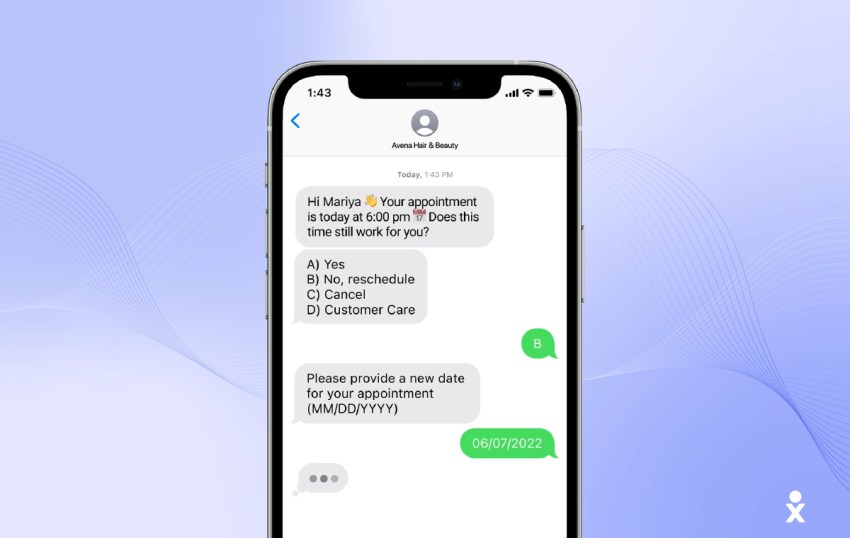
When connected to scheduling or CRM tools, the customer’s response can update the calendar automatically. A dental office might send, “Your cleaning is tomorrow at 10 a.m. Reply C to confirm or R to request another time.” Meeting reminders can support consultations, interviews, demonstrations, and account reviews in the same way.
Internal team communication
Texting helps companies reach employees who are traveling, working in the field, or serving customers away from a computer. SMS works well for workplace communication when an update cannot remain unread in an inbox.
Common examples include:
- Human resources teams sending benefits or enrollment deadlines
- Retailers informing store managers about schedule or inventory changes
- Field service companies sending updated locations or arrival instructions
Routine documents, policy explanations, and detailed project discussions should remain in systems designed for longer content. Text messages are most useful when employees need a short, timely piece of information.
Use SMS for brief updates and simple actions. Move complex, sensitive, or highly emotional discussions to a phone call, secure portal, email, or another channel that can support more context.
Business Texting Compliance and Privacy
Business texting is regulated according to the sender, message purpose, technology, recipient, and jurisdiction. Organizations should obtain advice from qualified legal counsel for their specific program. A platform can support compliance processes, but software does not make a campaign lawful by itself.
Although exact requirements vary, a responsible business texting program should address three core areas:
- Consent: For covered marketing robotexts in the United States, the TCPA generally requires the appropriate prior consent unless an exemption applies. Promotional programs may require prior express written consent.
- Opt-outs: Customers must be able to withdraw permission through reasonable methods. Recurring promotional SMS communications should include clear opt-out instructions where required, and the texting service should preserve a record of the request.
- Privacy: Standard SMS is not a secure vault. Organizations should not send passwords, complete financial data, detailed medical information, or other sensitive information through ordinary text messages.
Registering a 10DLC number, toll-free sender, or short code does not replace customer consent. Consent also does not replace the technical registration or verification required by carriers and messaging providers.
The opt-in should identify the business, describe the type of messages the subscriber will receive, disclose expected frequency where appropriate, and explain how to stop them.
A compliance-focused communication platform can help record when and how permission was granted, process common opt-out requests, and prevent suppressed contacts from being included in future SMS campaigns.
Businesses should also send messages during reasonable local hours, limit frequency to what the customer expected, and direct recipients to an authenticated portal when private data or sensitive documents are involved.
Best Business Texting Platforms
Choosing the right texting platform depends on the company’s goals, technical resources, compliance needs, and expected message volume. A small business may prioritize fast setup and prebuilt workflows, while a software company may need programmable infrastructure and custom integrations.
Nextiva, Textla, and Twilio address different needs: unified business communication, focused SMS marketing, and developer-controlled messaging.
1. Nextiva
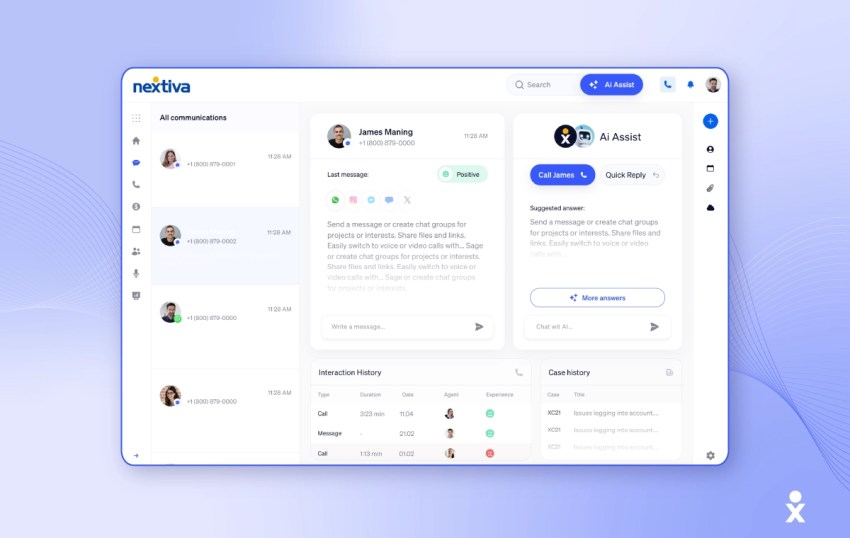
Best for: Small businesses and growing organizations that want texting, phone calls, and customer conversations connected in one business communication platform.
Nextiva allows employees to send and receive business text messages through desktop, browser, and mobile applications without exposing personal numbers. Texting can operate alongside business phone service and other customer conversations.
Because Nextiva supports a broader communications environment, teams can reduce app switching and preserve context as a conversation moves among SMS, phone, and digital channels.
For a small business, this means business texting can be part of the same system used for calls and customer communication. For larger organizations, it creates a path toward unified profiles, routing, automated workflows, and more coordinated customer journeys.
Nextiva also guides customers through applicable business messaging registration processes, including 10DLC requirements for eligible U.S. use cases.
Nextiva’s key features
- Connected communications: Brings business SMS together with phone and broader customer conversations.
- Mobile and desktop access: Lets authorized employees text customers without using personal phones.
- Shared context: Helps teams retain useful customer and conversation information as interactions change channels.
- Automation: Supports reminders, follow-ups, routing, and other repeatable communication workflows.
- Business identity: Allows organizations to communicate through approved business numbers.
- Broader platform: Provides a path beyond a standalone texting app for companies that also require voice and customer experience capabilities.
2. Textla
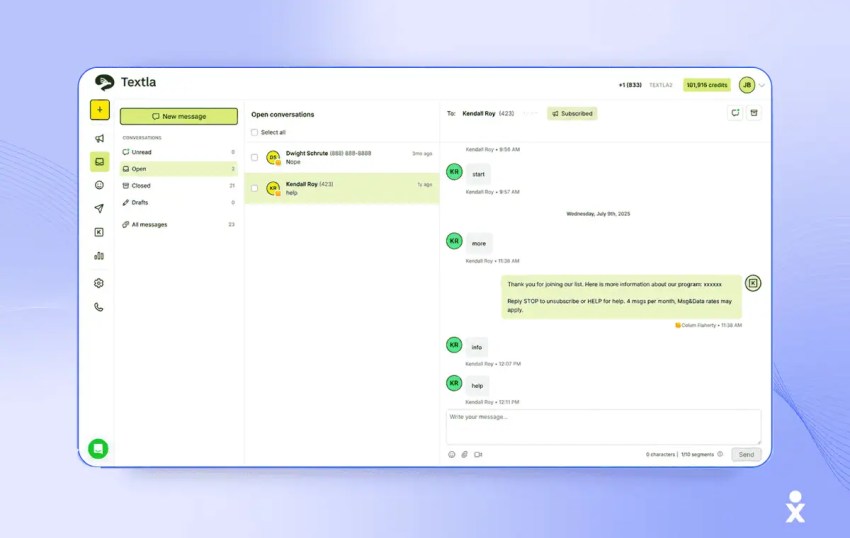
Best for: Small businesses and marketing teams focused on SMS campaigns, mass texting, segmentation, and direct replies.
Textla is a specialized business texting and SMS marketing platform designed around bulk messaging, individual replies, campaign scheduling, contact segmentation, and delivery reporting.
Textla can suit businesses that mainly need promotional SMS campaigns, service announcements, recurring messages, and a reply inbox without a broader communications suite.
Its public pricing model combines a platform subscription with usage-based message charges. Pricing plans and feature availability can change, so buyers should verify current costs, carrier fees, user limits, and campaign features directly before purchasing.
Textla’s key features
- Mass texting: Supports bulk SMS campaigns for opted-in audiences.
- Reply inbox: Allows businesses to receive messages and continue individual conversations.
- Segmentation: Helps teams organize contacts and target relevant audiences.
- Campaign scheduling: Supports planned and recurring messaging workflows.
- Delivery analytics: Provides reporting for sent campaigns and message activity.
3. Twilio
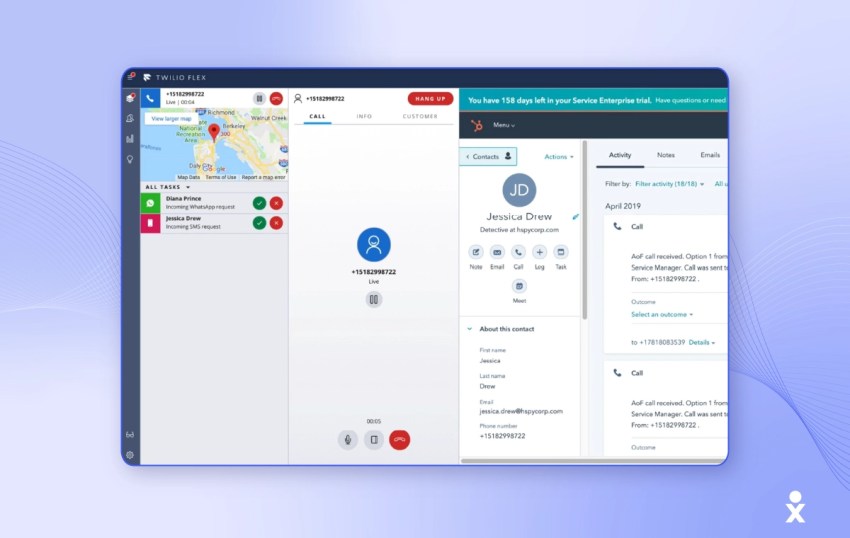
Best for: Development teams building custom messaging products or deeply tailored communication workflows.
Twilio provides APIs, SDKs, and communications infrastructure that technical teams can use to build their own customer-facing messaging experiences.
Its programmable tools can support SMS, MMS, WhatsApp, RCS, delivery tracking, and configurable sender types. Businesses can connect messaging to proprietary applications, CRM platforms, and backend systems.
The flexibility comes with greater implementation responsibility. The organization generally needs technical resources to design, build, monitor, secure, and maintain the messaging experience.
Twilio’s key features
- Programmable messaging: Lets developers create custom SMS communications and workflows.
- Multiple messaging channels: Supports SMS, MMS, WhatsApp, and RCS use cases.
- Flexible integrations: Connects messaging to applications, CRM platforms, and backend services.
- Delivery tooling: Provides status data and infrastructure controls for technical teams.
Choosing the right business texting platform
Evaluate a texting service according to the workflow it needs to support, rather than choosing from a generic feature checklist.
- Automation: The platform should support appointment reminders, follow-ups, order updates, and routing without forcing every interaction into the same workflow.
- Analytics: Look for delivery results, response rates, opt-outs, resolution time, conversions, and workload reporting.
- Scalability: Confirm that the platform can support additional users, locations, contacts, and message volume.
- CRM integration: Customer context should travel with the conversation instead of remaining in a disconnected texting app.
- Compliance support: Useful capabilities include consent records, opt-out processing, sender-registration guidance, and audit information.
A standalone SMS marketing platform may be enough for a focused campaign program. A company that also needs voice calls, customer support, routing, and shared conversation history should compare the total cost and complexity of several point solutions with a unified platform.
According to our CX Trends research, companies use an average of 6.3 tools for customer interactions. Eighty-one percent of CX leaders said consolidating data from interaction points into one system of record could improve the customer experience.
Connected business communication helps employees manage conversations with less tab switching, fewer duplicate messages, and more context about what the customer has already experienced.
Best Practices for Effective Business Texting
The strongest SMS strategies respect the customer’s time, provide useful context, and make the next action easy. Messages should also reflect the consent granted by the recipient and the purpose of the workflow.
Business texting should feel helpful rather than intrusive. Measure success by whether customers complete an action with less effort, not by how many messages the company can send.
Ensure compliance and consent
Compliance begins with obtaining and documenting the appropriate permission before sending marketing or promotional text messages. Consent should not be assumed from a past purchase, an email subscription, or the presence of a phone number in a CRM.
Build three controls into every recurring program:
- Explain what messages the subscriber will receive and identify the business requesting permission.
- Recognize reasonable opt-out requests and suppress future sends appropriately.
- Retain consent and preference records in a form the business can retrieve later.
These controls help ensure that SMS communications reach people who expect them and have not withdrawn permission.
Craft effective messages
The quality of the message matters as much as the technology used to deliver it. The five C’s of business communication—clear, concise, complete, correct, and courteous—are especially useful when writing a business text.
- Keep one primary purpose: Standard SMS segments have character limits, but clarity matters more than forcing every message below an arbitrary length.
- Identify the business: Do not assume the recipient saved the number. Begin with the company or representative’s name.
- Give one clear next step: Ask the customer to confirm, choose an option, open a secure link, or request help.
- Protect sensitive information: Move passwords, full financial details, medical information, and private documents to a secure system.
- Test automated workflows: Check names, links, dates, time zones, routing, empty merge fields, opt-out handling, and duplicate-message prevention.
- Use the three-text rule thoughtfully: This informal guideline means pausing after three unanswered outreach follow-ups rather than continuing indefinitely. It is not a law or universal compliance rule.
- Measure outcomes: Review response rates, confirmations, resolution time, conversions, opt-outs, duplicate contacts, and escalations.
Future Trends in Business Text Messaging
Business texting will increasingly operate as part of a coordinated customer journey rather than a standalone channel. The most useful platforms will connect SMS with voice, email, messaging apps, customer records, automation, and human support.
MMS and rich communication services can make mobile conversations more visual and interactive. AI can classify incoming messages, draft replies, summarize conversations, translate text, and identify when a customer needs a human employee.
Fact: 92% of companies had adopted AI for customer interactions to some degree. That adoption makes accurate customer data, clear automation boundaries, and reliable human handoffs increasingly important.
AI and automation in SMS
AI can help businesses manage routine tasks without requiring employees to write every reply manually. It can recognize intent, recommend responses, route conversations, and alert a person when a message suggests frustration or a complex request.
| Capability | Useful application | When a person should step in |
|---|---|---|
| Automated workflows | Order confirmations, appointment reminders, shipping updates, and meeting reminders | When the customer requests an exception or the workflow cannot complete the task |
| Intent-based routing | Directing billing, scheduling, sales, and support messages to the correct team | When the intent is unclear or the issue spans several departments |
| AI-assisted replies | Drafting concise responses and summarizing conversation history | When the response involves policy judgment, sensitive information, or emotional context |
| Sentiment detection | Flagging frustration, urgency, or a likely escalation | When the customer appears dissatisfied or asks directly for human help |
AI should shorten the path to a useful answer rather than trap customers in repetitive automated exchanges. The business texting service should preserve context when the conversation moves to a live employee.
Nextiva can connect automated communication with voice, SMS, customer data, and broader workflows so routine messages do not operate as isolated interactions.
Richer mobile experiences
RCS expands business texting beyond the limitations of standard SMS by supporting features such as branded senders, high-quality images, videos, carousels, suggested replies, buttons, and read indicators.
These advanced features should serve a practical purpose. A delivery confirmation may only need a short line of text. A product-selection conversation may benefit from images and suggested replies.
Richer messaging should make the next action easier, not turn a simple customer update into an unnecessarily complex advertisement.

Make Texting Part of the Whole Conversation
Text messaging increasingly works alongside AI voice solutions to create more flexible customer experiences. By combining SMS with AI-powered voice agents, businesses can support quick text updates, conversational voice responses, and escalation to live employees without forcing every customer into the same channel.
Business text messaging is most useful when it solves a clear problem: slow lead follow-up, missed appointments, repetitive status calls, disconnected service interactions, or limited channel choice. It becomes less useful when it is simply another inbox.
A connected business SMS platform combines text messages with phone calls, customer records, automation, and the employees responsible for the relationship. That gives customers faster answers while preserving the human support needed for important moments.
FAQs
The four practical categories are transactional, conversational, promotional, and internal messages. Transactional messages provide service information, conversational messages support two-way messaging, promotional messages support SMS marketing, and internal messages coordinate employees and operations.
Yes, provided it has the appropriate consent, sender registration, opt-out process, audience controls, and texting platform. A small business should segment its audience and make each campaign relevant rather than treating mass texting as permission to contact everyone in the database.
Usually not. Business texting works best for short updates, straightforward questions, and simple actions. Move the conversation to phone, email, video, or a secure portal when it requires a detailed explanation, document sharing, sensitive information, or substantial back-and-forth.
The three-text rule is an informal outreach guideline, not a law. It generally means pausing after three unanswered text follow-ups instead of continuing to contact the person indefinitely. The sender can wait for a reply or consider another permitted communication channel.
Sometimes. Eligibility depends on the number type, provider, current configuration, and applicable registration or verification requirements. Confirm that enabling text messages will not disrupt voice service and that the provider supports the intended use case.
Nextiva is the best overall choice when a business wants text messaging integrated with voice and broader customer communication. Twilio suits teams building custom messaging applications. Textla suits small businesses and marketers prioritizing SMS campaigns, direct replies, and mass texting. The best choice depends on the channels, integrations, technical resources, message volume, and pricing model the company needs.