Elementor Pro Pricing: Free vs. Pro Compared
If you’ve spent hours designing a WordPress site for your small business, you know this: getting it to look perfect can feel like putting together a jigsaw puzzle — one where half the pieces are missing.
That’s why Elementor has become a lifesaver for countless site owners.
Now for the real question: is the free version enough? Or do you need Pro to unlock your site’s full potential?
After testing Elementor’s limits, reading through subreddits packed with user questions, and seeing how different sites work with either version, we have to say that the decision comes down to your specific needs (ugh, I know, right?)
To help you decide, we’ll compare the features, strengths, and limitations of both Elementor Free vs. Pro so you can skip the guesswork and start your web design process.
Let’s jump in!
What Is Elementor?
Elementor is one of the most popular WordPress website builders around today. It’s widely used among site owners and web designers for these reasons:
- Its intuitive drag-and-drop editor allows you to create custom layouts for pages and posts. With Elementor, you can customize your website without learning to code. However, even if you’re a developer or experienced WordPress user, there’s still plenty to gain from using the plugin.
- Elementor has invested heavily in performance in recent versions, though like any page builder it adds some overhead — keep your page designs lean and your site will stay fast.
Doesn’t WordPress already offer a website builder?
Well, technically, yes. The WordPress Full Site Editor is a page builder that is built into the WordPress core. It simplifies the process of creating and customizing posts and pages within your editor.
Alas, the default WordPress editor doesn’t offer nearly as many features as Elementor.
By using the page builder, you’ll get access to more customization options than you otherwise would using only the WordPress Full Site Editor.
What Are the Benefits of Using Elementor?
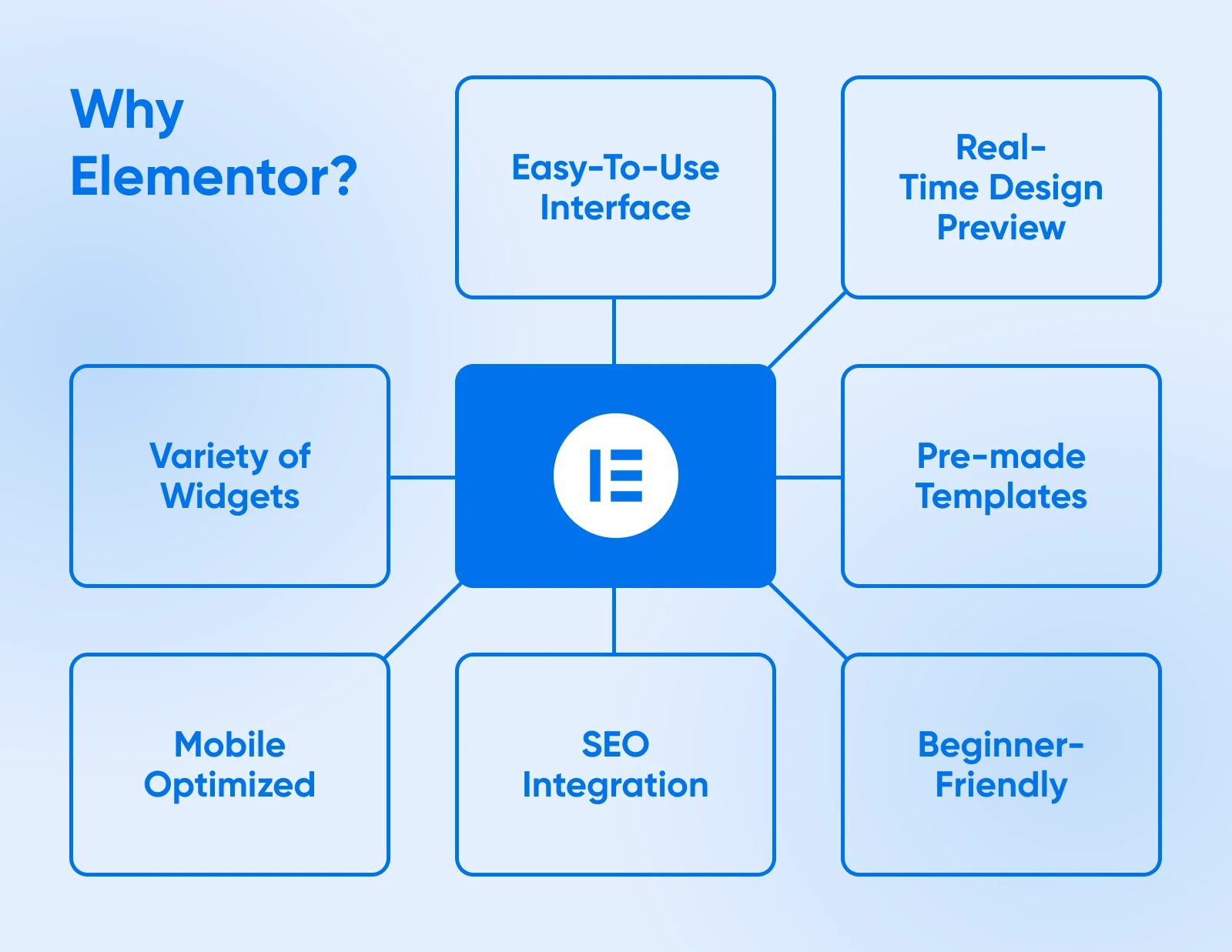
Why do so many users swear by Elementor? Let’s look at its standout benefits through the lens of building a website for your small business.
1. Intuitive Interface
Imagine you’re setting up a homepage for your small business website. You could hire a developer, but with Elementor, you don’t have to.
Anyone can create sleek, professional-looking pages using its drag-and-drop editor without writing a single line of code. You can highlight your services, showcase customer testimonials, and add stunning visuals — all on your own.
2. Real-Time Previews
As you build your homepage, every change you make will be updated instantly in Elementor’s editor. You won’t have to toggle between the backend and a preview window.
Want to tweak the layout of your hero section or adjust the color scheme for a seasonal promotion? You’ll see your changes live, saving time and ensuring everything looks perfect.
3. Widgets for Every Need
Your small business website needs more than just text and images. Elementor provides a robust library of widgets to help you create engaging content.
Widget
WordPress widgets can add features to your website’s sidebars, footers, or other areas. Some default WordPress widgets are Categories, Tag cloud, Search, Navigation Menu, Calendar, and Recent Posts.
Read More
Add a contact form so customers can reach out, display a gallery of your products, or include an FAQ section to address common queries. These widgets make your site functional and user-friendly.
4. Time-Saving Templates
Don’t have the time to design each page from scratch? The templates provided by Elementor give you a great starting point.
Select a layout for your “About Us” page, customize it with your business’s story, and match the colors to your brand.
You can also save your designs as templates to reuse across multiple pages, providing you consistency throughout your website, irrespective of the WordPress theme.
5. Mobile Optimization
Just over half of all website traffic — 51.5%, per StatCounter, June 2026 — comes from phones, so your small business site needs to work perfectly well on mobile.
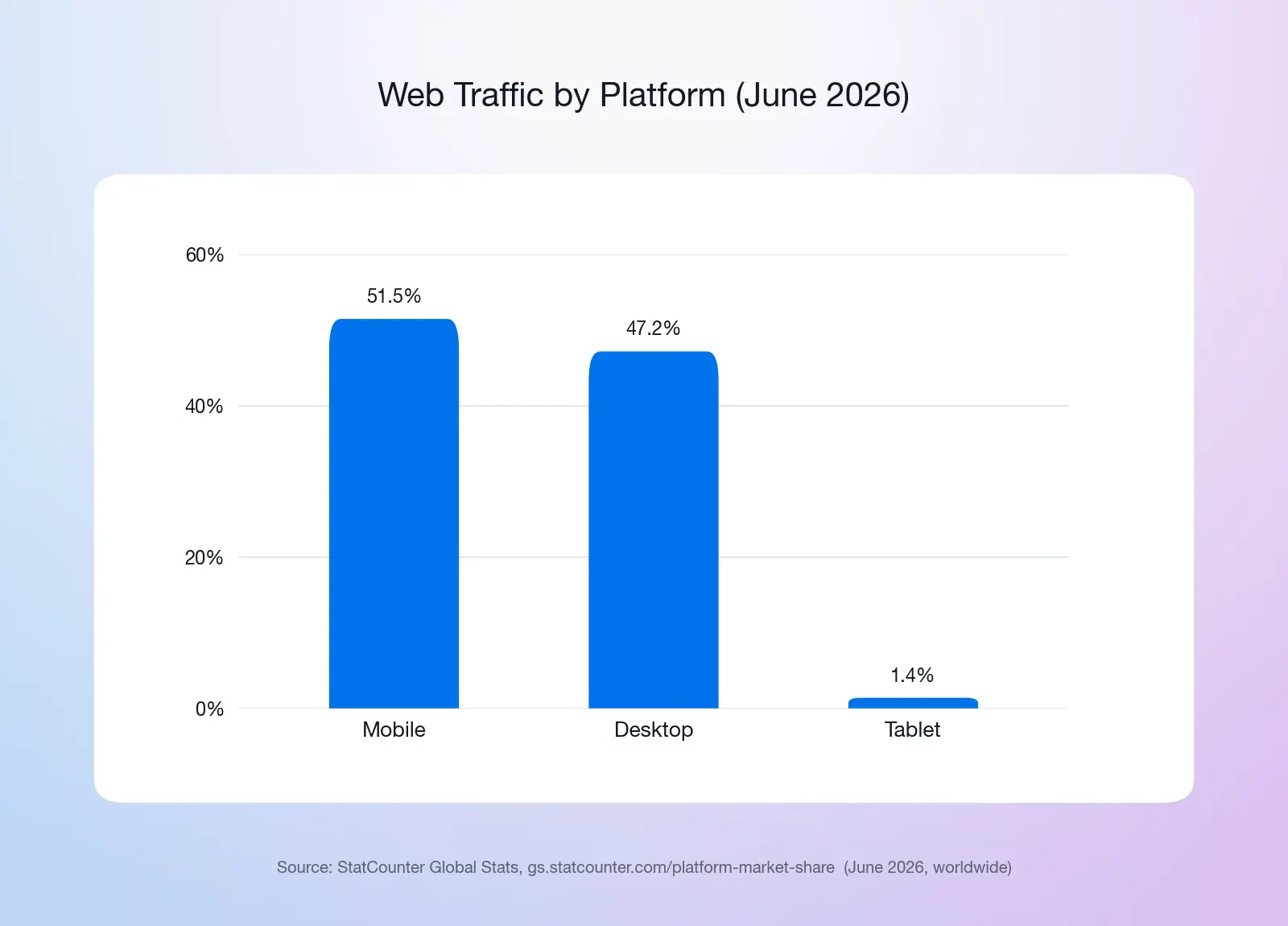
Elementor’s responsive design tools make it easy to optimize your website for mobile devices. For instance, you can hide less essential sections on mobile to keep your homepage focused and fast-loading for users on mobile devices.
6. SEO Integration
Your website’s design shouldn’t come at the cost of search engine visibility.
With Elementor’s compatibility with search engine optimization (SEO) plugins like Yoast SEO, you can optimize your pages while designing them.
SEO
Search Engine Optimization (SEO) is the practice of improving a site’s ranking in search results. Search results are aggregated based on a number of factors, including a site’s relevance and quality. Optimizing your site for these factors can help boost your rankings.
Read More
Add keywords to your content, optimize image alt text, and structure your site for better rankings — all within the same workflow.
7. Beginner-Friendly Learning Tools
If you’re new to website building, Elementor offers built-in tutorials and documentation to guide you.
From setting up your first page to mastering advanced features like popups, these resources ensure you’re never stuck.
You’ll feel confident managing your website, creating landing pages, and making updates as your business grows.
A Quick Overview of Elementor Free vs. Pro
| Feature | Free Version | Pro Version |
| Widgets | 40+ free widgets | 57 more on the entry tier; 85 more on Advanced plans and up |
| Templates | Limited selection | Full template library |
| Theme Builder (headers, footers, templates) | ❌ | ✅ |
| Form Builder | ❌ | ✅ (submissions storage on Advanced plans and up) |
| Popup Builder | ❌ | Advanced plans and up |
| WooCommerce widgets | ❌ | Advanced plans and up |
| Custom CSS & code | ❌ | Advanced plans and up |
| Support | Community | Included (AI chatbot; priority human support on One plans) |
Price: Elementor Free costs nothing. Pro is sold as several annual tiers (Essential, Advanced Solo, Advanced, and Expert), and the feature set grows with the tier — check Elementor’s current pricing for what each includes.
As with any freemium tool or service, the paid version offers more features and tools. That said, the free Elementor plugin is a robust tool with various elements and features to enhance your site.
The main difference between Elementor Free and Pro is that Pro adds the Theme Builder (headers, footers, templates), the Form Builder, dozens more widgets, the full template library, and official support — with popups, custom code, and WooCommerce widgets arriving on the Advanced plans and up.
This may not be an issue even if you’re a freelancer, small business owner, or startup. For example, you may prefer the free version because the options will be less overwhelming. Plus, you won’t have to worry about the paid license hurting your budget.
That said, let’s take a closer look at each.
In the following sections, we’ll explore Elementor Free’s features, including its pros and cons, and then do the same for Elementor Pro.
Elementor Free: Features, Pros, and Cons
Elementor is a leading website-building platform in the WordPress community. It can be used by everyone, from beginners to professional developers. It boasts an intuitive visual builder that lets you control every aspect of your pages.
The best part is that you can add, customize, and modify elements without touching a single line of code. Let’s explore some of the specific features that you can use.
Feature: Over 40 Free Widgets
Elementor provides more than 40 free widgets (per its WordPress.org listing) that you can use to build your professional website.
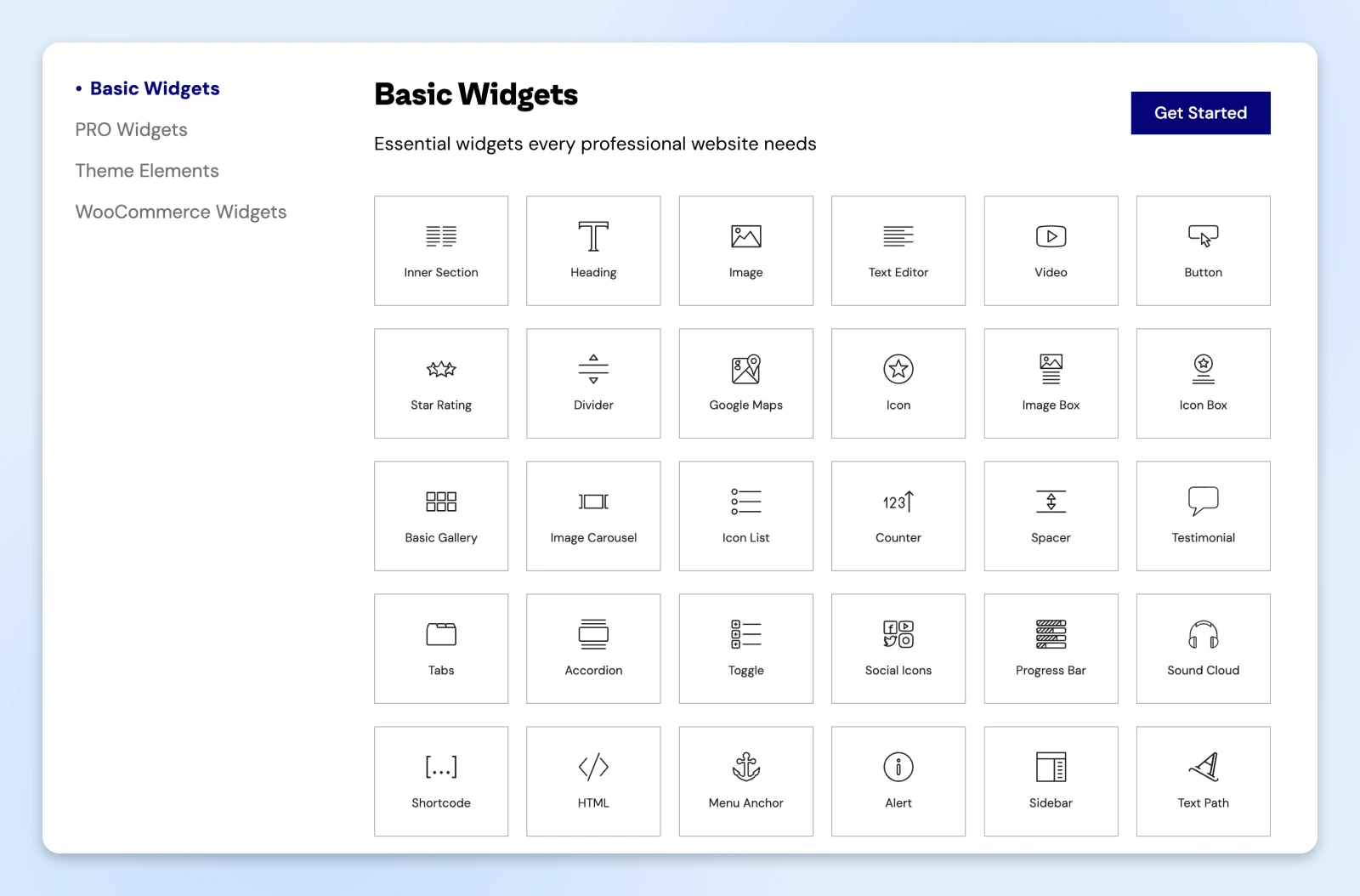
Some of the most popular Elementor Widgets include:
- Heading
- Image
- Video
- Button
- Image Box
- Icon
- Image Gallery and Carousel
- Progress Bar
- Tabs
- Accordion
This is just the beginning. All the elements you would need for building basic pages on your site are included with the free plugin.
Plus, you can easily insert them using the intuitive drag-and-drop editor.
Feature: Live Drag-and-Drop Editor
One of the best features of the Elementor page builder is the live drag-and-drop theme editor. The intelligent interface lets you seamlessly add, customize, and move elements and modules on your pages.
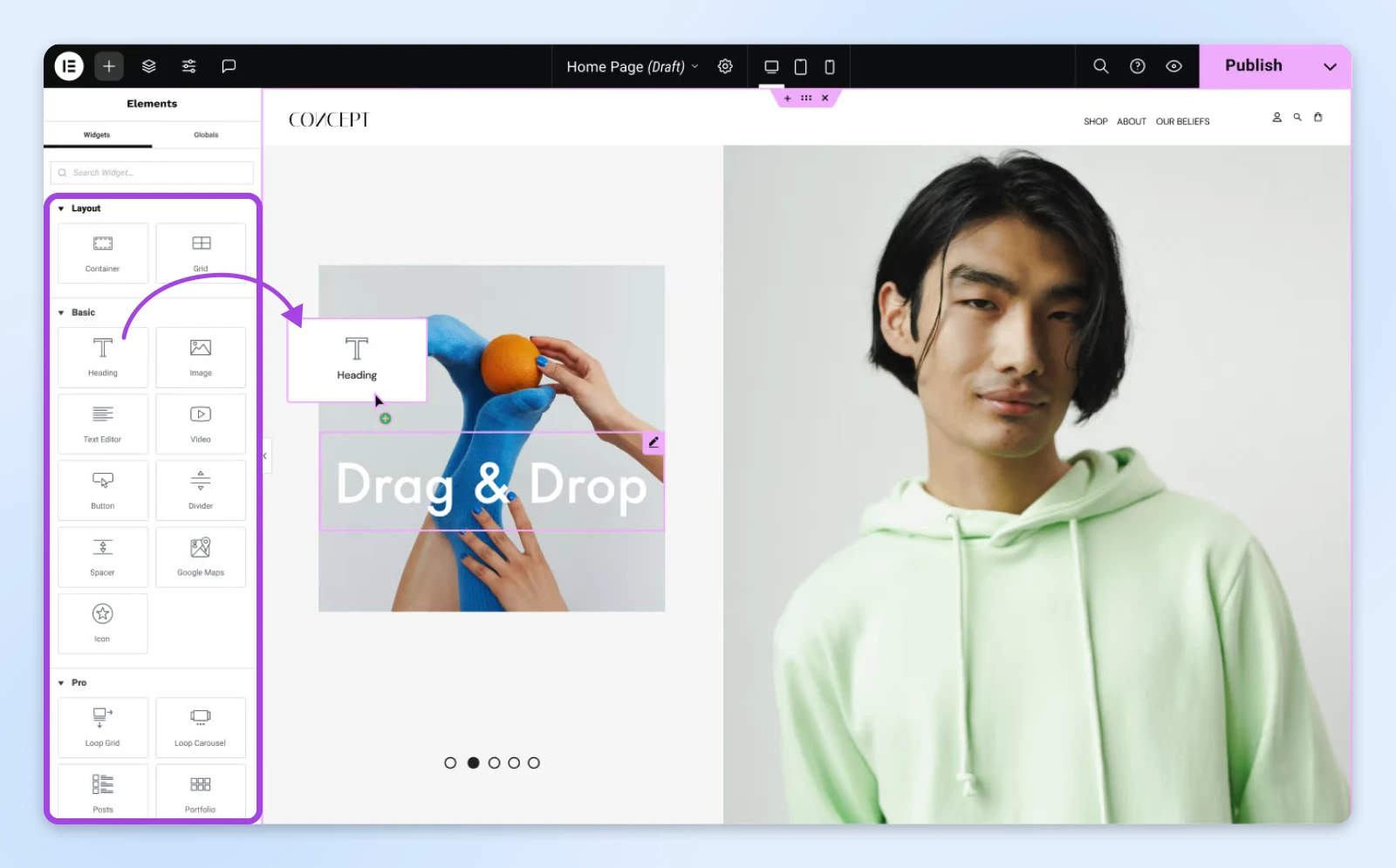
You can create various layouts, and then insert any of the free widgets available from the Widget Library. Within the Elementor editor, you can easily edit and customize the settings of each widget by simply clicking on it.
Then a panel will open that lets you configure the various controls as well as change the typography, colors, spacing, etc.
Being able to see the changes you’re making in real time can enhance the site-building experience. You won’t have to waste time “previewing” your changes on the front end of your site like you would if you were only using the WordPress editor.
The drag-and-drop editor lets you create distinct pages with varying layouts that fit the intent of that particular page.
It’s incredibly easy to use, which makes it a great option for people who are new to website design.
The editor also includes a Structure panel (formerly called the Navigator) that helps you move between the sections of your page designs. The panel displays all elements and widgets on the page so you can arrange them with ease.
Feature: Reusable Templates
Elementor offers an expansive template library. These pre-built layouts provide you with the foundation needed to create your pages with ease. The free version includes a limited selection of them; the full library is reserved for paid plans.
This includes options for popular pages, such as your homepage, contact, and “About Us” pages. Elementor allows you to create custom layouts and designs, giving you more flexibility than many other options. Another handy feature is that it lets you create reusable templates.
This saves you time by eliminating the need to start from scratch every time you want to design a page that is similar to one you already have. You can use the reusable templates on any page.
This is really helpful if you want to create a consistent look and feel for your website or if you need to create multiple pages that have the same layout. Then, choose from the library of widgets to add additional functionality to your pages, such as contact forms, social media icons, and maps.
Feature: Website Kits
Another element that sets Elementor apart from other page builder tools is its website kits — full sets of matching templates for every part of a site. The free version includes a small starter selection.
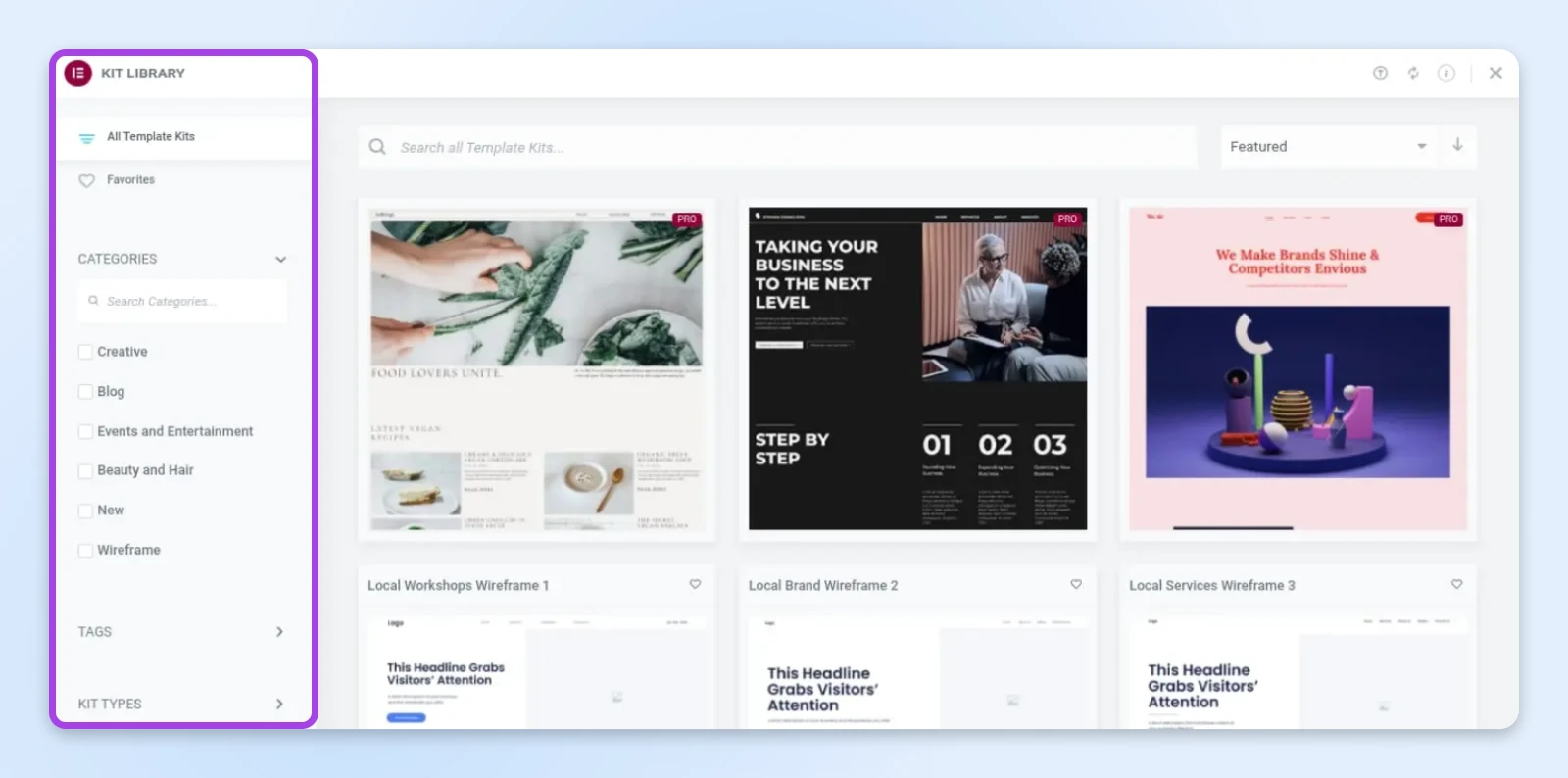
These website kits help you design every aspect of your site.
Similar to starter sites, the templates can be used on any page and make it easy to customize the essential pages of your website, including the homepage, blog posts, and 404 pages.
Elementor Free: Pros and Cons
One of the main advantages of Elementor is that you can download and use it for free. You get access to all of the features we just discussed without having to spend a dime.
It is also incredibly easy to install and use. Once activated, you can access the “Edit With Elementor” button on any page or post within WordPress.
But the downside is that you don’t get as many features as you would with the Pro version. For example, you won’t be able to use all of the templates from the Elementor library, nor will you get premium support.
The good news is that if you start using the plugin and find that you would benefit from these extra add-ons, you always have the option to upgrade directly from your WordPress dashboard.
Elementor Pro: Features, Pros, and Cons
The free Elementor plugin is not lacking in features. The Pro version, however, offers some additional features not included in the free version.
With a paid license, you get unlimited access to the template library. This is a bonus for large websites that are constantly adding new pages with unique requirements.
The drag-and-drop builder also lets you edit all areas of your site, including the header and footer. You can also design archive and single post pages. You can build custom post type templates and add dynamic content from custom fields from plugins such as Advanced Custom Fields.
Feature: Popup Builder
Another feature worth knowing about is the “Popup Builder,” which is included on the Advanced plans and up. This tool lets you create a wide variety of popups, including lead capture and subscription forms, exit intents, ad banners, and more:
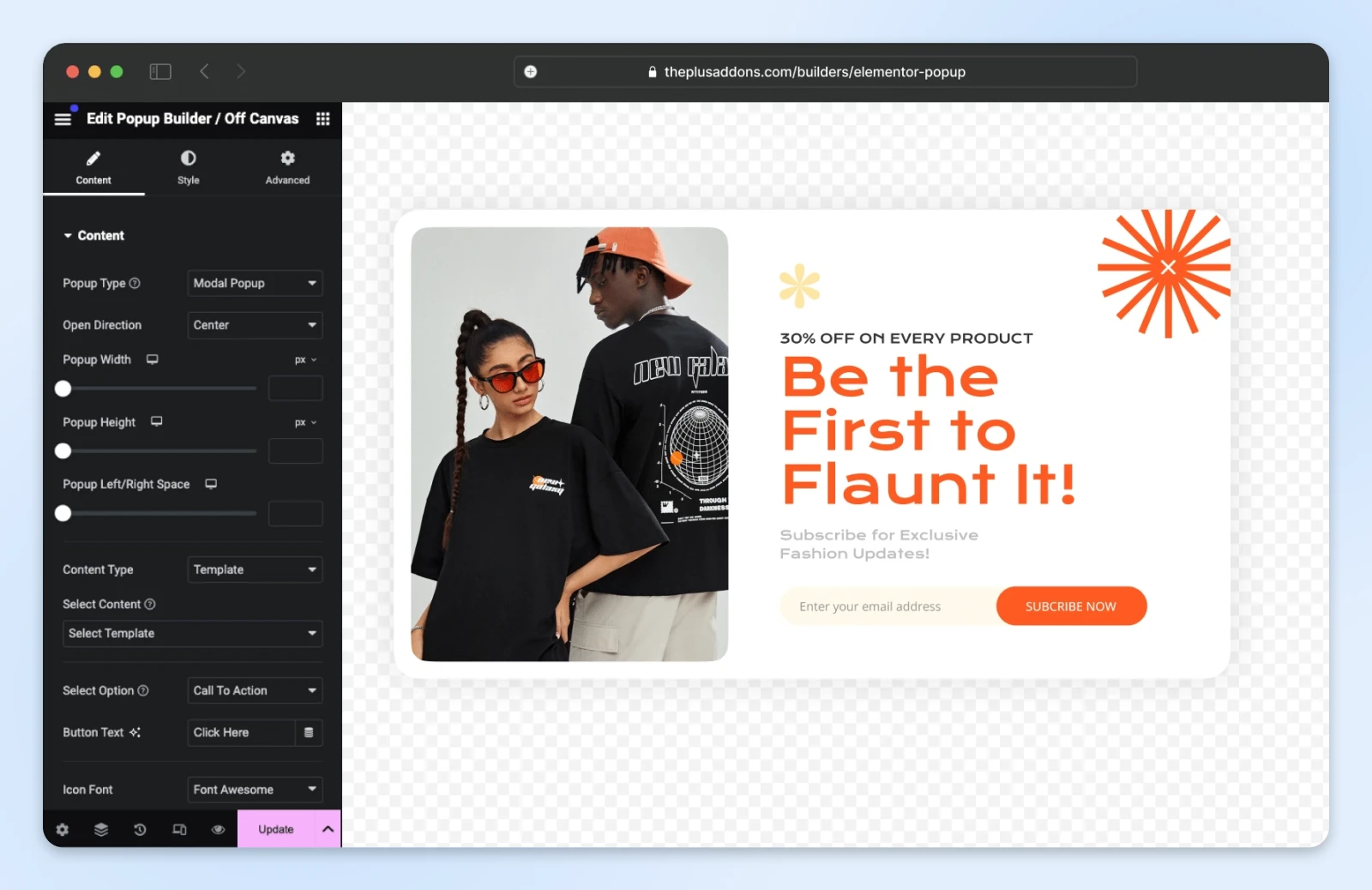
The Popup Builder lets you display the element on specific pages using certain predefined parameters and triggers. You can also configure it to appear based on visitors’ actions, such as clicking on a button. It also lets you adjust how it displays, such as in fullscreen mode, a slide-in effect, or positioned at the bottom of the screen.
Feature: WooCommerce Store Builder
Elementor Pro can also help you design an online store. Its WooCommerce-specific widgets simplify designing and personalizing your storefront — just note they’re included on the Advanced plans and up, not the entry Pro tier:
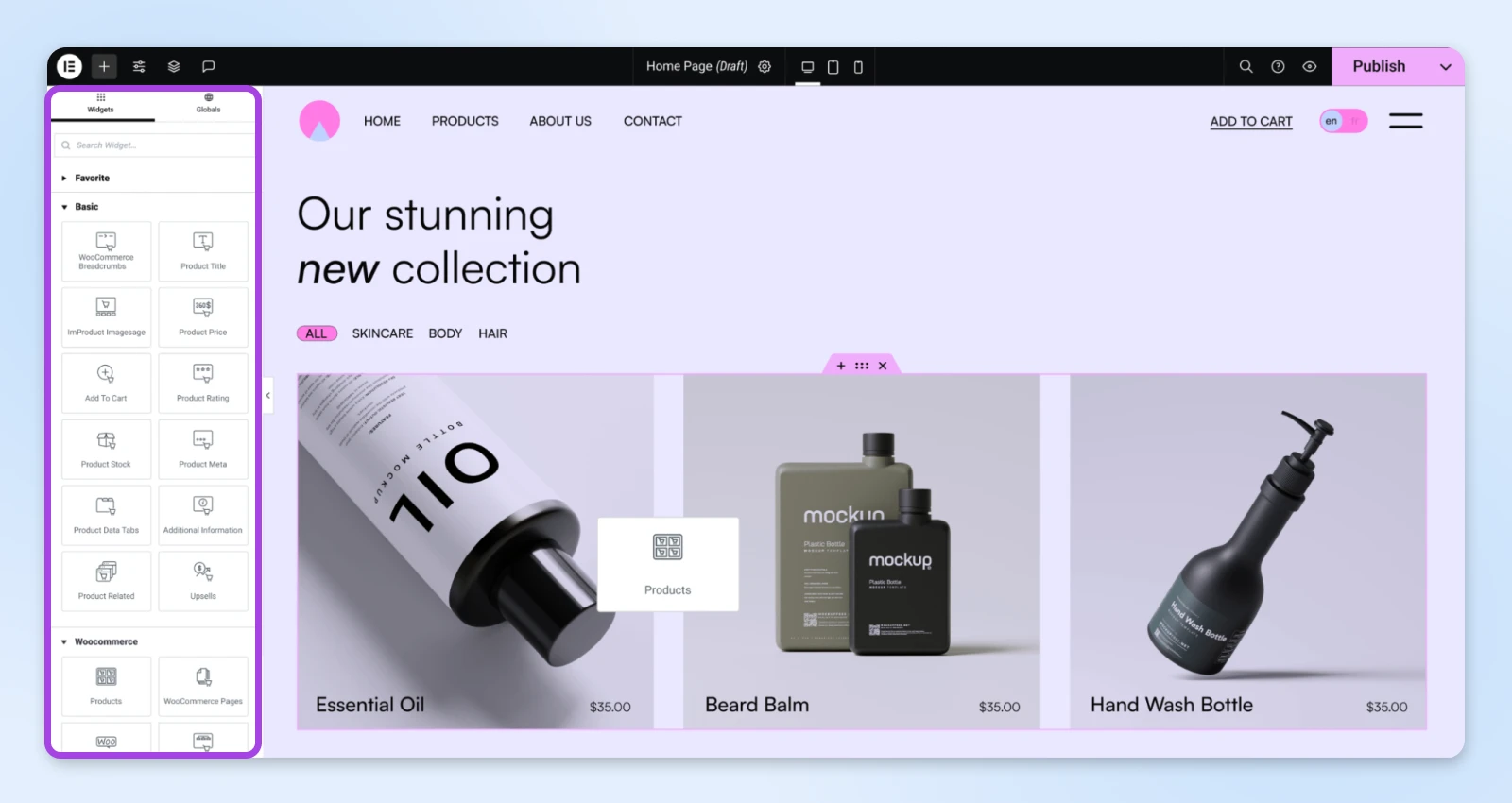
This includes widgets for:
- Add To Cart Button
- Product Price
- Product Title & Description
- Product Rating
- Breadcrumbs
- Upsells
- Product Stock
This feature makes it easy to build and customize every part of your online shop. You can use the visual editor to build your single product page, archive product page, and other store elements.
As with the widgets included with the free plugin, you can easily drag and drop the elements anywhere on the page. Then you can use the editor panel to the left to configure the settings. Note that these widgets are only available when you have WooCommerce installed and activated on your website.
Feature: Form Builder and Dynamic Content
Pro also adds a visual Form Builder, so you can design lead-capture and contact forms, like a call to action (CTA) with a signup form, right in the editor. Note that storing form submissions inside WordPress is a feature of the Advanced plans and up.
Pro widgets can also pull titles, fields, and images from your content automatically — dynamic content is how you build listing pages and custom post layouts that update themselves.
Elementor Pro Features:
In addition, Elementor Pro features include:
- Exclusive Pro Kits
- Advanced motion effects
- Theme Builder
- Dynamic content
- Marketing automation and Customer Relationship Management (CRM) integrations
- Dozens more Pro widgets (57 more on the entry tier, 85 more on Advanced plans and up)
- Custom CSS and custom code
- Official support (AI chatbot; priority human support on One plans)
The downside to Elementor Pro is that you need to pay for an annual license, and the price depends on which tier you pick — see Elementor’s pricing page for the current lineup. Every Pro tier includes the Theme Builder, Form Builder, official support (an AI chatbot, with priority human support on the One plans), and more website kits; popups, custom code, and WooCommerce widgets arrive on the Advanced plans and up.
Also, keep in mind that you may not need all the features that come with Elementor Pro. If most of the settings and extras appear unnecessary, a paid license might not be a worthwhile investment.
What About Elementor AI?
Elementor also has a native AI assistant that can generate text, images, custom code, and even whole sections from a prompt. Here’s what matters for the Free vs. Pro decision: Elementor AI is a separate credit-based subscription. It works inside the free plugin (with trial credits to start), and it isn’t bundled with the classic Pro plans either — so don’t upgrade to Pro just for the AI features.
Elementor Free vs. Pro: Frequently Asked Questions
It’s probably fair to say that by now you know the difference between Elementor Free and Pro. But to make sure we’ve covered all essential aspects, let’s wrap up with some frequently asked questions.
Is Elementor free?
Yes. The core Elementor plugin is free on WordPress.org, with 40+ widgets and the full drag-and-drop editor. Pro is a paid annual upgrade that adds the Theme Builder, Form Builder, and more widgets and templates, depending on the tier.
Can you get Elementor Pro for free?
Not legitimately. “Nulled” copies of Pro circulating on the web are pirated, receive no updates, and are a common source of malware and hacked sites. If the Pro budget isn’t there yet, stick with the official free plugin. It’s the safe version of “free.”
What is the main difference between Elementor Free and Elementor Pro?
The main difference is that Pro adds the Theme Builder, the Form Builder, dozens more widgets, and the full template library. There are plenty of features available with the free plugin. However, if you’re looking for a more expansive set, you might want to opt for Elementor Pro.
Can you use the Theme Builder with both versions?
No — the Theme Builder is a Pro feature. It lets you design your theme’s headers, footers, and single-post and archive templates visually. With the free plugin, you edit page and post content within the layout your active WordPress theme provides.
Is support included with the free Elementor plugin?
Official support is only included with Elementor Pro — an AI support chatbot on the standard tiers, with priority human support on the One plans. Even so, the free version has numerous resources, tutorials, and documentation to help you.
Does Elementor work with all WordPress themes?
Yes, Elementor works with any WordPress theme that follows WordPress coding standards. And if you have Pro, the Theme Builder can replace your theme’s headers, footers, and templates with your own designs.
Can I use Elementor to create my own theme?
With Pro’s Theme Builder, effectively yes: you can design every theme part (headers, footers, single posts, archives) and export or import them as template kits. The free plugin doesn’t build theme parts; it works within your existing theme.
Is it necessary to have both Elementor Free and Pro?
You can certainly use Elementor Free as a standalone plugin. If you opt to upgrade to Elementor Pro, you’ll first need to install the basic version.
Is Elementor Pro worth it?
For most beginners, no — start free. Pro becomes worth it when you need the Theme Builder, the Form Builder, or (on the Advanced plans and up) WooCommerce widgets and popups. The free plugin comes with everything you need to build a beautiful website and increase your conversion rate.
For those looking for more advanced features and functionality, the paid version may be well worth the money. Elementor Pro can be particularly helpful if you run an online store — just pick the Advanced plan or higher, since that’s where the WooCommerce widgets live.
Remember that you don’t need to start with Elementor Pro, especially if you’ve never used the plugin before. You can always start with the free version to see whether it’s something you’d like to commit to. If you enjoy using it and think it would be worth upgrading to unlock the Pro features you need, switching to the premium version is quick and easy!
Elementor Free vs. Pro: Which One Is Better for You?
Elementor is a powerful tool. Regardless of which version you choose, you’ll be able to leverage it to simplify and streamline building and designing your website pages.
Choose Elementor Free if:
- You’re a freelancer or a small business with basic needs, like a blog, portfolio, or informational site. For example, if you’re a photographer showcasing your work or a yoga instructor sharing schedules and updates, Free provides all the essentials.
- Budget is your top priority, and you’re okay with fewer customization options.
- Advanced features like dynamic content or WooCommerce-specific widgets aren’t critical to your goals.
Go for Elementor Pro if:
- You’re running an online store or a growing business with a need for advanced tools. For instance, Pro is perfect for e-commerce sites requiring WooCommerce widgets, like adding product galleries or custom checkout pages.
- You want full creative control, such as designing unique headers, footers, or landing pages tailored to specific campaigns or promotions.
- Your business heavily relies on lead generation or interactive elements. Features like the Form Builder, Popup Builder, and custom CSS (on the Advanced plans and up) can make your site stand out while saving time and effort.
We recommend starting with the free version to try it. Plus, if you do decide to upgrade, Elementor offers a 30-day money-back guarantee on annual plans, so you can try Pro for a month before deciding whether to continue.
Spin Up a Testing Environment and Try Elementor Yourself
When you’re new to website design, you’re likely looking for a user-friendly solution that’s affordable and helps you create your pages quickly. Fortunately, a website builder plugin such as Elementor can help.
As we discussed in this post, Elementor is a powerful WordPress tool that lets you easily build and customize pages for your website without touching a line of code.
While Elementor Pro adds the Theme Builder, the Form Builder, and more with each tier, the free version is more than enough to provide you with a better experience for building and designing your site!
At DreamHost, our mission is to make your site management as simple and seamless as possible. That’s why we offer WordPress hosting designed specifically for WordPress users. Check out our DreamPress-managed WordPress hosting plans to learn more!

WordPress Hosting
Unbeatable WordPress Hosting
Reliable, lightning-fast hosting solutions specifically optimized for WordPress.
See More
This page contains affiliate links. This means we may earn a commission if you purchase services through our link without any extra cost to you.
Did you enjoy this article?