The 6 Best Autonomous AI CRM Tools in 2026
We independently review every app we recommend in our best apps lists. When you click some of the links on this page, we may earn a commission. Learn more.
My very first CRM was a DOS-based system I was forced to use in 2009. Which, just to be clear, was well after the invention of the iPhone, streaming services, and functioning graphical user interfaces. It didn’t integrate with anything, it didn’t suggest or automate a single thing, and if it had any “intelligence,” it was the kind that treated the tab key as a threat to its authority.
I’ve seen the CRM evolution—from command lines and black screens to the sleek, AI-infused platforms of today that promise to predict your sales pipeline, manage your follow-ups, and automate complex workflows. If you’re looking to upgrade your customer relationship management strategy today, AI is no longer optional.
I spent weeks poking, prodding, and occasionally screaming into dozens of AI-driven CRMs, and I’ve put together a shortlist for you to try out. Here’s the best AI CRM software.
The best AI CRM tools
What is an AI-powered CRM?
An AI-powered CRM goes beyond traditional customer relationship management by using artificial intelligence to automate tasks, analyze data, and provide actionable insights. While your grandfather’s CRM stores customer information and tracks interactions, an AI CRM actively helps you make better decisions about how to engage with customers.
Here’s what makes CRMs with AI special, in that “this thing is going to replace me, isn’t it?” kind of way:
-
Automation of routine tasks: AI can handle data entry and follow-up reminders and even draft emails or responses based on context.
-
Smart data analysis: Instead of your team staring blankly at spreadsheets, trying to divine meaning like ancient mystics reading goat entrails, AI CRMs analyze patterns across thousands of customer interactions to spot trends humans might miss.
-
Predictive capabilities: The AI can forecast which deals are likely to close, identify at-risk customers, and suggest optimal times to reach out.
-
Personalization at scale: Remember when you wrote “Hi [First Name]” and called it personalized? That’s cute. AI CRMs tailor messages to individual customers without requiring manual customization for each interaction.
-
Continuous learning: The more data it processes, the better it gets at helping you look good. Which is really the goal, right?
What makes the best AI CRM?
How we evaluate and test apps
Our best apps roundups are written by humans who’ve spent much of their careers using, testing, and writing about software. Unless explicitly stated, we spend dozens of hours researching and testing apps, using each app as it’s intended to be used and evaluating it against the criteria we set for the category. We’re never paid for placement in our articles from any app or for links to any site—we value the trust readers put in us to offer authentic evaluations of the categories and apps we review. For more details on our process, read the full rundown of how we select apps to feature on the Zapier blog.
I started with a list of over 20 popular CRM platforms that claim AI capabilities. From there, I focused on four functions: AI customization, unified customer view, predictive analytics, and ease of adoption. I also considered factors like pricing, integration capabilities, and customer support.
To gather comprehensive data, I tested each platform myself, spoke with current users, analyzed customer reviews, and constructed an elaborate Google Sheet that would make even the most dedicated project manager weep with joy. The goal was to identify tools that not only have impressive AI features on paper but can deliver results in real-world business settings.
After wading through enough marketing BS to fertilize the entire state of Nebraska, I narrowed down the field based on four key criteria:
-
AI customization: The best AI CRMs let you tailor the artificial intelligence to your specific business needs. You should be able to train the system with your data, customize workflows, and adjust how the AI makes predictions.
-
Unified customer view: Contrary to popular belief, AI isn’t magic—it’s basically a glorified calculator with access to lots of customer data. I only considered CRMs that pull data from every possible corner—sales, marketing, support, maybe even your dreams—to give AI a comprehensive, 360-degree view of each customer. Only then can it pretend to “know” them well enough to recommend anything besides a restraining order.
-
Predictive analytics: Predictive analytics uses historical data to forecast future outcomes. When done right, it can help you make smarter decisions. When done wrong, it’s just an expensive way to be confidently incorrect.
-
Easy adoption: Even the most advanced AI is useless if your team won’t use it. I prioritized systems that balance sophisticated AI capabilities with user-friendly interfaces.
With these criteria in mind, let’s explore the best AI CRM tools, each excelling in different areas to meet various business needs.
The best CRMs with AI at a glance
|
Best for |
Standout features |
Pricing |
Website |
|
|---|---|---|---|---|
|
Enterprise-level customization |
Unparalleled customization and AI capabilities |
From $25/user/month |
||
|
Aligning marketing and sales |
Intuitive user experience and smoothly integrated AI |
Free plan available; paid plans from $9/user/month |
||
|
Visual pipeline management |
Clear drag-and-drop pipeline visualization |
From $14/seat/month |
||
|
Customer support |
Combines powerful AI with an intuitive agent experience |
From $55/user/month |
||
|
Mid-market teams |
The Zia Agent Studio agent builder |
Free plan available for up to 3 users; paid plans from $14/user/month |
||
|
Customization |
AI attributes that insert AI into every action |
Free plan available; paid plans from $29/user/month |
||
|
AI orchestration |
Integrates 9,000+ apps with built-in AI |
Free plan available; from $19.99/month |
Visit Zapier |
Best AI CRM for enterprise-level customization
Salesforce Agentforce Sales (Web, iOS, Android)

Salesforce Agentforce Sales pros:
-
Industry-leading AI capabilities
-
Extensive customization options
-
Huge ecosystem of apps and support
Salesforce Agentforce Sales cons:
Salesforce has been around since the dawn of time (or 1999, same diff), and it’s still the heavyweight in the CRM space. Its Agentforce platform offers a mix of pre-built features and deep customization. That balance makes it a popular choice for massive companies that need a massive platform to manage their massive customer databases.
Agentforce handles predictive lead scoring, deal prioritization, and pipeline forecasts right out of the box. The generative AI features are strong, too. It can draft personalized emails, summarize calls with key takeaways (even catching the customer’s sentiment), and suggest next steps tailored to specific deals.
I tested Agentforce’s Opportunity Insights feature extensively. It flagged deals at risk with surprising accuracy, often identifying issues I hadn’t noticed in my test scenarios. The AI considers factors like communication frequency, stakeholder engagement, and historical deal patterns to calculate risk scores. Luke Chapman, senior SEO strategist at BigChange, told me that Opportunity Insights has cut his team’s sales cycle time by about 10%.
Salesforce allows significant AI customization through tools like the no-code Einstein Prediction Builder (Einstein was the original name of Agentforce, which they haven’t yet changed in this context) to create your own AI models and Agentforce agents, and to design and deploy custom AI chatbots and autonomous workflows. And if you have developers, you can use Salesforce’s APIs to extend or embed AI. The platform’s flexibility means businesses can tailor models (for example, predicting a custom KPI). You can also bring in your own large language models and plug them into Agentforce’s Model Builder.
That said, tapping into this customization often requires Salesforce consultants or data scientists, as it’s complex. Out of the box, many Agentforce features work automatically, but full customization (like adding new data signals or building unique predictions) may involve additional licensing or technical setup.
Salesforce is the kind of platform that has inspired an entire ecosystem of consultants, certification programs, and support groups for traumatized administrators (probably). But if you’re an enterprise with complex needs and multiple departments, Salesforce is the gold standard for a reason. It can handle anything you throw at it, scale infinitely, and the AI capabilities are genuinely impressive when properly implemented.
To do even more with it, connect Salesforce to Zapier and start orchestrating AI across your entire sales workflow. Instead of just automating simple tasks, you can layer AI into your processes to make Salesforce smarter and more proactive, turning Salesforce into a central hub where AI, automation, and your sales data work together in real time. Learn more about automating Salesforce.
Salesforce Agentforce Sales pricing: From $25/user/month (billed annually); Agentforce capabilities start at $175/user/month
Best AI CRM for aligning marketing and sales
HubSpot CRM (Web, iOS, Android)

HubSpot CRM pros:
HubSpot CRM cons:
Once a humble marketing automation tool, HubSpot has morphed into a full-blown CRM powerhouse that gets your entire RevOps team working together on one approachable and surprisingly powerful platform.
The thing that makes HubSpot stand out is how gosh darn easy it is to use. Honestly, I haven’t seen many other solutions that make advanced AI feel so accessible to everyday users. HubSpot’s shiny, AI-enhanced toolkit (called Breeze AI) is smoothly integrated into the workflows you already use, making adoption significantly less painful than a CRM like Salesforce.
Breeze AI is really a collection of different tools:
-
Breeze assistant: An in-app assistant that helps build workflows, summarize records, write content, and support outreach.
-
Breeze agents: AI-powered specialists designed to automate workflows and extend team capabilities. HubSpot has expanded its agent lineup significantly, with 20+ available across marketing, sales, and service. Some of them include:
-
Social Media Agent writes social posts in your tone.
-
Content Agent helps with blog posts, landing pages, podcasts, and more.
-
Prospecting Agent researches and automates outreach.
-
Customer Agent resolves support inquiries, qualifies leads, and books meetings. It kind of acts as an always-on front-office concierge across chat, email, WhatsApp, and wherever your customers live.
-
What I love-slash-hate-slash-love-again about Breeze AI is how sneaky it is. It doesn’t feel like some extra feature you have to go looking for. For instance, when you’re putting together an email campaign, the AI is right there in the editor, ready to suggest a catchy subject line, clean up your copy, or even predict who’s most likely to open it, all without feeling like a separate tool.
HubSpot allows configuration of its AI features—for example, you can tweak lead scoring models by specifying which behaviors or contact properties to weigh more heavily. But it doesn’t offer fully custom AI model building to the end user. Also, many advanced AI functions (like conversation intelligence or advanced scoring) are available only on higher-tier plans.
You can connect HubSpot to all the other apps you use with Zapier’s HubSpot integrations. For example, Zapier can instantly log new Google Ads leads into the platform, then alert your sales team in Slack, all without manual entry. Or access and act on all your HubSpot data straight from your AI chat window. Read more about how to automate HubSpot.
HubSpot CRM pricing: Free plan available; paid plans from $9/user/month
Best AI CRM for visual pipeline management
Pipedrive (Web, iOS, Android)

Pipedrive pros:
-
Intuitive visual interface
-
Strong automation and analytics
-
AI features available on lowest-tier plan
Pipedrive cons:
Pipedrive keeps things simple in the best way. It’s a Kanban-based CRM that helps sales teams stay focused, and its AI features are built to support that, not distract from it.
Instead of layering in flashy features no one uses, Pipedrive’s AI stays close to the sales process. The AI Sales Assistant analyzes your deals, contacts, and emails to predict win probabilities and suggest next steps based on your sales process.
The email writer helps you write outreach emails, proposals, and follow-ups using custom prompts. You pick the tone, length, and type of email, and the AI builds it, saving you from staring at the screen wondering how many exclamation points are too many when following up for the fifth time. The email summarizer condenses long email threads into brief summaries so you don’t waste time digging for context.
The AI features don’t take much effort to set up. You won’t get deep customization of the underlying models, but you can design your own automated workflows and create multiple pipelines for different products or sales processes. The AI learns from these customizations, improving its predictions and recommendations over time.
While Pipedrive doesn’t offer the same comprehensive unified view across marketing, sales, and service as some all-in-one CRMs, it excels at unifying sales-related data. Every interaction, email, call, and activity is tracked on a clear timeline, giving you a complete picture of the sales process.
The Pipedrive Marketplace offers integrations with over 500 apps. You can do even more by connecting Pipedrive with Zapier, allowing you to connect it to thousands of other apps to orchestrate AI across your entire sales process. For example, when a high-value deal is created in Pipedrive, Zapier can analyze the historical data, generate an executive-ready summary, and send it to Slack for leadership visibility, all while logging the deal in any other app in your sales tech stack. Learn more about how to automate Pipedrive.
Pipedrive pricing: From $14/seat/month
Best AI CRM for customer support
Zendesk (Web, iOS, Android)
Zendesk pros:
Zendesk cons:
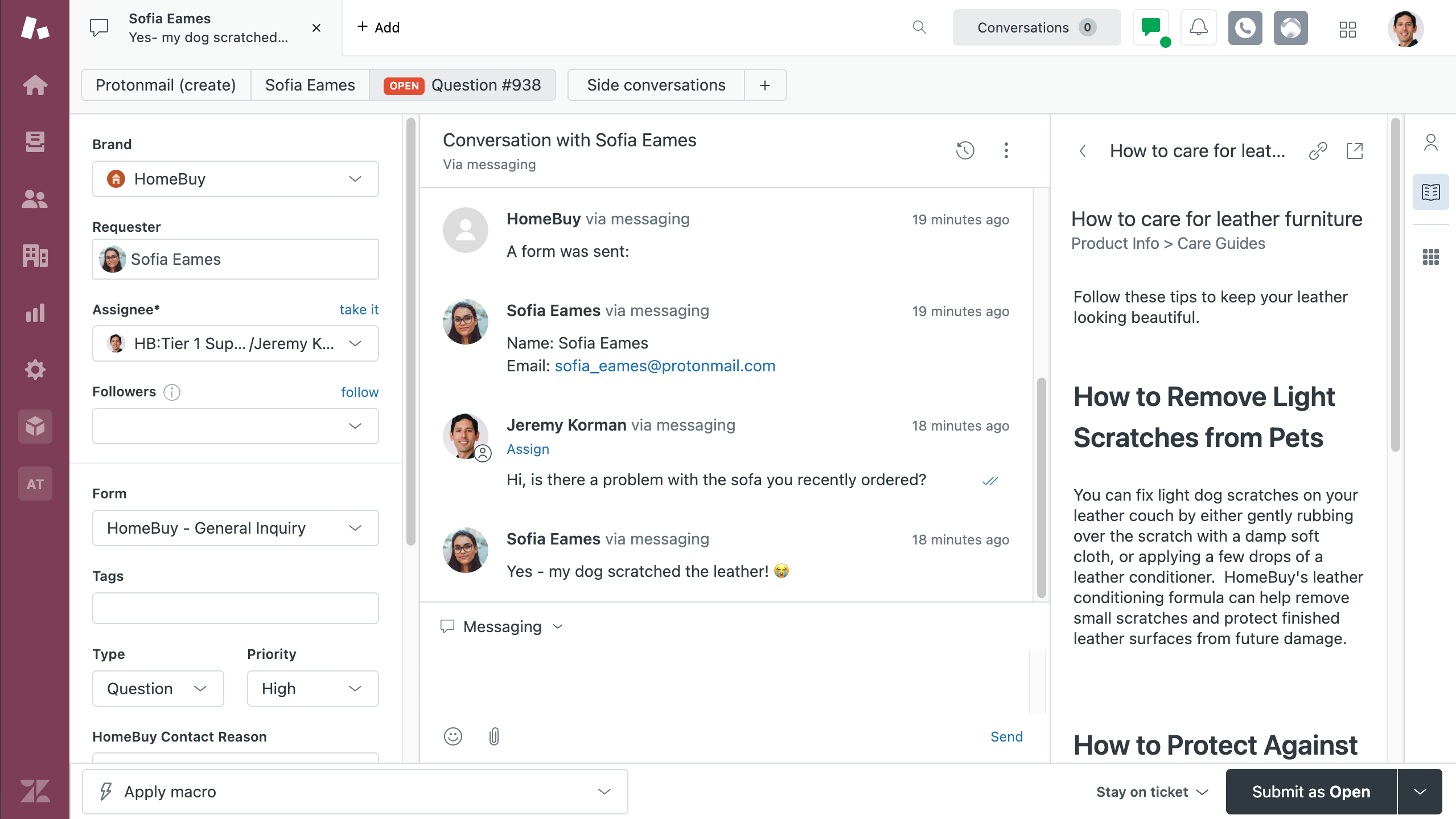
Zendesk for customer service is the kind of CRM that transforms customer support from a necessary evil into a competitive advantage. Most CRMs are built for sales first, with support tacked on later. Zendesk did the opposite—it started with support and built everything around that, which is a welcome change when most CRM vendors seem to think “customer relationship” exclusively means “sales opportunity.”
Zendesk’s goal is to let you talk to customers wherever they are. Unlike other CRMs I tested, Zendesk truly offers every imaginable channel, including email, web and mobile messaging, social messaging, help center, voice, SMS, and live chat. It pulls all of these different conversations into a single unified view called Agent Workspace.
For me, a standout feature is the AI’s ability to intelligently triage tickets and conversations. It automatically categorizes incoming requests by intent, language, and sentiment, then routes them to the appropriate team or agent based on skills, availability, and workload. For example, a question about billing goes to finance, a question in Spanish goes to a Spanish-speaking agent, and an angry message from a customer threatening to leave gets flagged and sent straight to a retention specialist.
The customization options for the knowledge base are equally impressive. It’s basically like having your own support website builder, complete with pre-built themes and editing options that make it feel more like creating a lifestyle blog than a boring help center. You can make it match your brand perfectly, which means customers won’t get that jarring “wait, am I still on the same company’s site?” feeling that happens with so many generic support portals.
Zendesk AI can also assist in creating and maintaining knowledge base content. For companies without a help center, AI can help generate hundreds of articles from basic bullet points. It can also flag articles that are underperforming or outdated and highlight top-viewed ones to ensure they remain current.
As for downsides, the biggest one is price. Zendesk can get expensive fast, particularly for advanced features like skills-based routing and customer self-service portals, which require a premium plan. Getting your data out of the platform can also be a headache if you want to analyze it with your own tools.
In addition to the 1,800+ integrations in its app marketplace, Zendesk also integrates with Zapier so you can expand its customer support automation functionality without writing a single line of code. For example, you can route high-priority Zendesk tickets into PagerDuty for urgent alerts, while also logging ticket details in a Google Sheet for reporting. And you can kick off workflows across your entire tech stack directly from your AI assistant. Learn how to automate Zendesk.
Zendesk Service pricing: AI plans from $55/user/month (billed annually)
Best AI CRM for mid-market teams
Zoho CRM (Web, iOS, Android)

Zoho pros:
-
Zia AI runs on Zoho’s own infrastructure, with no separate AI add-on licensing fees
-
Native integration with 55+ Zoho apps
-
The standard plan is surprisingly useful
Zoho cons:
Zoho is the generic grocery store brand of Salesforce—it’s cheaper, but not quite as powerful. It’s like when you really want the Fage Greek Yogurt, but reach for the Kirkland brand instead.
Zoho CRM exists within the massive Zoho app universe, which supports 55+ platforms across analytics and marketing, all running on the same underlying data model. Most importantly, it makes perfect sense for middle-of-the-road companies that want a powerful AI CRM at the Costco price point.
Zia is pretty much the star of the show here: it’s Zoho’s in-house engine that runs on its own infrastructure, rather than third-party LLMs. It can handle tasks like predictive lead scoring, deal-outcome predictions, workflow automation suggestions, sentiment analysis of customer emails, and roughly 100 other things I’ll spare you from to avoid going over my word count.
In my opinion, Zia Agent Studio is the super star of the show (if that’s a thing?). It’s an agent builder that takes in your instructions in plain English and builds and deploys exactly what you need with access to 700+ predefined actions across the Zoho suite. Zoho also has a marketplace of 25+ pre-built agents if you’d rather just tweak something to fit your needs. This generative AI tomfoolery is also useful when setting up your general CRM, too, as Zia can build modules or workflows directly from your instructions.
The main drawback for me is that the most impressive Zia features don’t exist until the Enterprise plan ($40/user/month). So, you’d probably want to do the math to see if you’d rather just grab the Fage after all. If you’d like to keep the lower price point and still turbocharge your capabilities, you can integrate Zoho CRM with Zapier to do more than what you could in the app alone. Learn more about automating Zoho.
Zoho pricing: Free plan available for up to 3 users; paid plans start at $14/user/month.
Best AI CRM for customization
Attio (Web)

Attio pros:
Attio cons:
Attio has been on a heater lately. In August 2024, it raised $33 million in funding, and just about a year later, it secured another $52 million. Around the same time, the co-founder went on Reddit and called out the “clunky CRMs that came before it.” So, the tool has the bank account and the confident tech founder—but should it have your attention, too?
One of the biggest differentiators of Attio is that it was built ground up for the AI era (not retrofitted for it), which means it’s pretty much the foundation of everything it does. The clearest example of that is AI Attributes. Some platforms offer AI in a sidebar or an automated copilot that you have to summon separately while reciting a strange hymn; with AI attributes, you can attach AI directly into lists, views, and record pages in your CRM via a perennial dropdown field. So if you want to have AI compile research on a client or company, classify records, summarize records, or answer specific questions about your data, all you have to do is create a custom attribute and click the button.
Ask Attio is a miniature “Ask Jeeves” that you can use to search through your records and live data—so if you have a very specific question like “which open enterprise deals haven’t had a touch point in 30 days?”, you can get the answer in seconds rather than manually slogging through your data. For teams that want to take that even further, Attio natively connects to Claude and ChatGPT via MCP, which means you can query your CRM and complete tasks from inside your chosen LLM interface.
A few of my major concerns with Attio are that it’s not a full GTM stack, and the integration library is pretty thin compared to other options on my list. That said, you could mitigate both drawbacks by integrating Attio with Zapier and connecting every tool across your tech stack, automatically or straight from your AI chat window.
Attio pricing: Free plan available; paid plans start at $29/user/month.
Best AI CRM for AI orchestration
Zapier (Web, iOS, Android)

Zapier pros:
-
Deep customization with built-in AI
-
Integrates with 9,000+ apps
-
Build traditional automations or use AI natively—meets you where you work
Zapier cons:
Yes, I’m going meta, but hear me out, because Zapier’s approach to CRM is genuinely useful if you’ve been trying to jam your square-peg business into the round hole of standardized CRM systems.
Zapier isn’t a traditional CRM like the other software on this list. It’s a flexible, no-code AI orchestration platform that lets you build your own system from scratch. If your team needs something tailored to your exact process—and you want it to work with the tools you already use—Zapier gives you that freedom.
Build your CRM from the ground up with Forms (for capturing lead and contact data), Tables (for storing and organizing everything in one place), and Zap workflows (for automating what happens next).
From there, you can connect your entire stack—Zapier works with more than 9,000 apps—and choose how much AI you want in the mix:
-
Set up AI-powered workflows to generate content, score leads, or route deals based on specific triggers.
-
Use Zapier MCP to query your pipeline data or take sales actions straight from Claude, ChatGPT, or whatever AI chat window your team already lives in.
Is Zapier perfect? Nothing is, except maybe the fourth season of “Dexter” and my dog (obviously). Building a custom CRM requires more upfront thought than just subscribing to a pre-built solution. You need to really understand your sales process and customer journey before you can effectively design a system to support it.
Learn more about how to automate your entire workflow using Zapier.
Zapier pricing: Free plan available; paid plans from $19.99/month (billed annually)
What is the best AI customer relationship management platform?
After poking around inside an obscene amount of AI-powered CRMs, I can’t crown a single one as The Best™. Sorry. I know you wanted a clear winner, but they all do different things well depending on what problems you’re trying to solve.
Nearly all of them have free trials or demos. I recommend taking two or three contenders for a spin. Plug in some of your actual data to see which one’s AI actually helps your team, rather than just looking cool.
Once you’ve decided on an AI CRM that provides the most value for your business model, get your people on board, set it up right, and connect it to Zapier to unlock even more CRM automation possibilities. You can trigger actions across thousands of apps based on CRM events—or directly from your AI assistant—creating intelligent workflows that extend far beyond traditional customer relationship management.
Related reading:
This article was originally published in September 2025. The most recent update was in July 2026.